
APIs (Application Programming Interfaces) power nearly every modern digital experience, from mobile apps and online payments to AI-driven services and real-time data processing. As software systems increasingly rely on microservices and distributed architectures, the number of API interactions continues to grow, making reliability and performance more critical than ever.
In 2026, automated API testing has become essential for maintaining API quality at scale. Manual testing is often too slow and error-prone for modern release cycles, while automation enables faster feedback, consistent validation, and continuous testing across frequent API changes. This guide introduces the fundamentals of API automation testing and outlines practical approaches for building reliable API test suites.
What Is API Automation Testing ?
API automation testing is an automated technique that verifies the behavior of an API using scripts or other tools. Automation also enables developers to run hundreds or even thousands of tests at once and repeatedly – instead of checking the response for each request individually, automation allows for running the same tests again and again (this is important because it will ensure that your API performs correctly regardless of the circumstances under which the API was deployed or how many requests it received). API automation will confirm that all API functionality is valid and reliable when the API was first developed.
The key components of performing an API automated test are:
-
To test that the API provides valid responses when the API receives requests with correct parameters.
-
To test that the API provides informative error messages when the API receives requests with invalid parameters.
-
To test that the API consistently provides response messages when a user has successfully authenticated or authorized.
-
To test that all responses conform to the response schema.
-
To test that response times and performance levels are stable over time.
-
To test that dependent micro-service communicate successfully.
Automating the testing process for APIs is critical to the overall software quality process. Automated API tests provide an additional safety net to protect against:
Regression problems
Products that are no longer functioning correctly
Unpredictable behaviors occurring with APIs that are deployed to production. Automated API tests are a critical component of modern Continuous Integration/Continuous Deployment (CI/CD) processes as they ensure that there are no regressions, broken functionality or unpredictable behavior before an API is deployed to production.
Using automated tests provides consistent testing, this will eliminate the potential for human error when performing tests. Although manual testing can be useful for exploratory purposes and debugging, manual testing cannot provide the same level of consistency that an automated testing process offers. By using automation, every critical scenario will be tested continuously, with no dependence on human effort.
Why API Automation Testing Matters in 2026
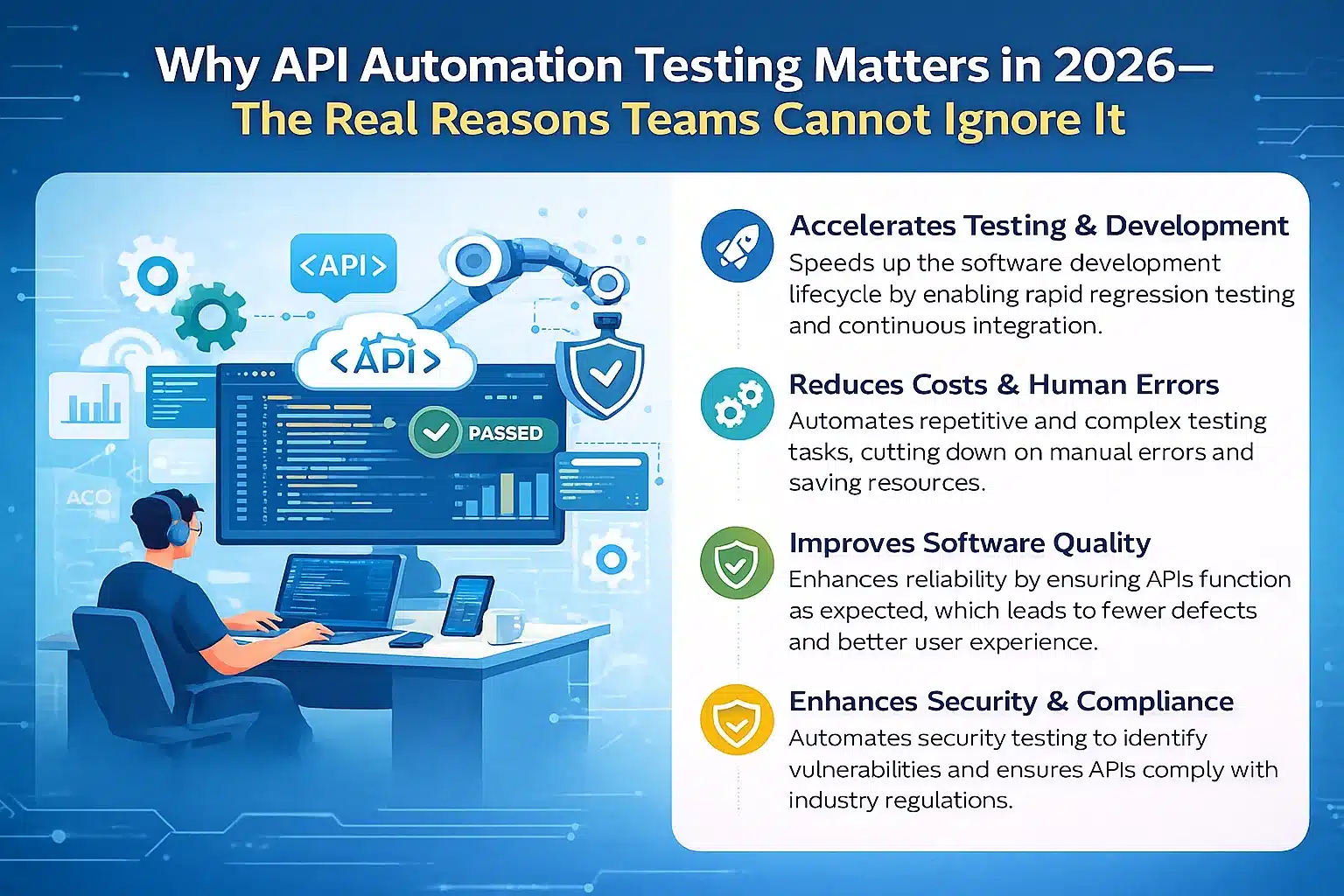
API’s are the key to modern software systems. A change in the request, backend logic or the way it integrates could cause a critical function to stop working in another place that depends on it, even if it’s only a small change. For those companies using microservices, when a company does a deployment, it could impact several applications that are connected together. If there is not an automated API test, a company will not know of the issues until a customer encounters them and most likely that will be a revenue loss, bad user experience and/or the loss of their brand reputation.
API Automation Testing will be vital for the following reasons in 2026:
1. Modern Applications Have Hundreds of API Dependencies
Today, a common application (web or mobile) would include a number of API calls made during the same user session. As the number of users grows, the number of requests sent to APIs may increase to thousands per hour and millions per day, making it impossible for testers to carry out manual testing on this type of scale; automated solutions also allow for all of the different ways users can interact with your application to be validated at the same time.
2. Faster Release Cycles Demand Continuous Validation
The rapid release cadence of many companies means that they will frequently release new software features (for example: weekly, daily, or multiple times in a single day). Automation increases the testing speed of the QA teams, allowing them to validate all new features added to the application immediately upon code change.
3. Automation Detects Issues Earlier in the Development Cycle
Bugs that are discovered early in the development lifecycle are much cheaper to fix (compared to fixing bugs late), therefore API automation gives developers the ability to try to create fixes based on all of the API testing that has been done simultaneously by automating the tests that they have submitted for review.
4. Improved Accuracy and Reduced Human Error
Manual testing can be performed by many people with varying levels of experience, and errors can be created by human testers. Automated API testing, however, runs tests the same way consistently. The result is test precision, reliability, and repeatability.
5. Better Test Coverage Across Complex Scenarios
Automation enables teams to create and run an exponentially greater number of combinations and conditions than what could otherwise be accomplished via manual testing alone. Due to automation, boundary condition testing, large payload testing, invalid input testing, and multi-step workflow testing have all become easier to access.
6. Supports Microservices and Distributed Architecture
Microservices communicate via API. Automated API Tests automatically assure the continuity of the communication between microservices, making it easier for teams to deploy microservices across multiple environments independently.
7. Helps Build More Reliable and Stable Products
End-users expect fast and seamless interactions. By eliminating testing failures prior to reaching the end user, Automated API Testing allows companies to produce products consistently that meet their high-quality requirements.
Types of API Automation Tests — The Complete Breakdown for Beginners and Professionals
Test automation of APIs encompasses multiple test types, with each type focused on a specific API function. An effective automation strategy will incorporate a combination of each type of test to ensure that your automatic testing covers everything.
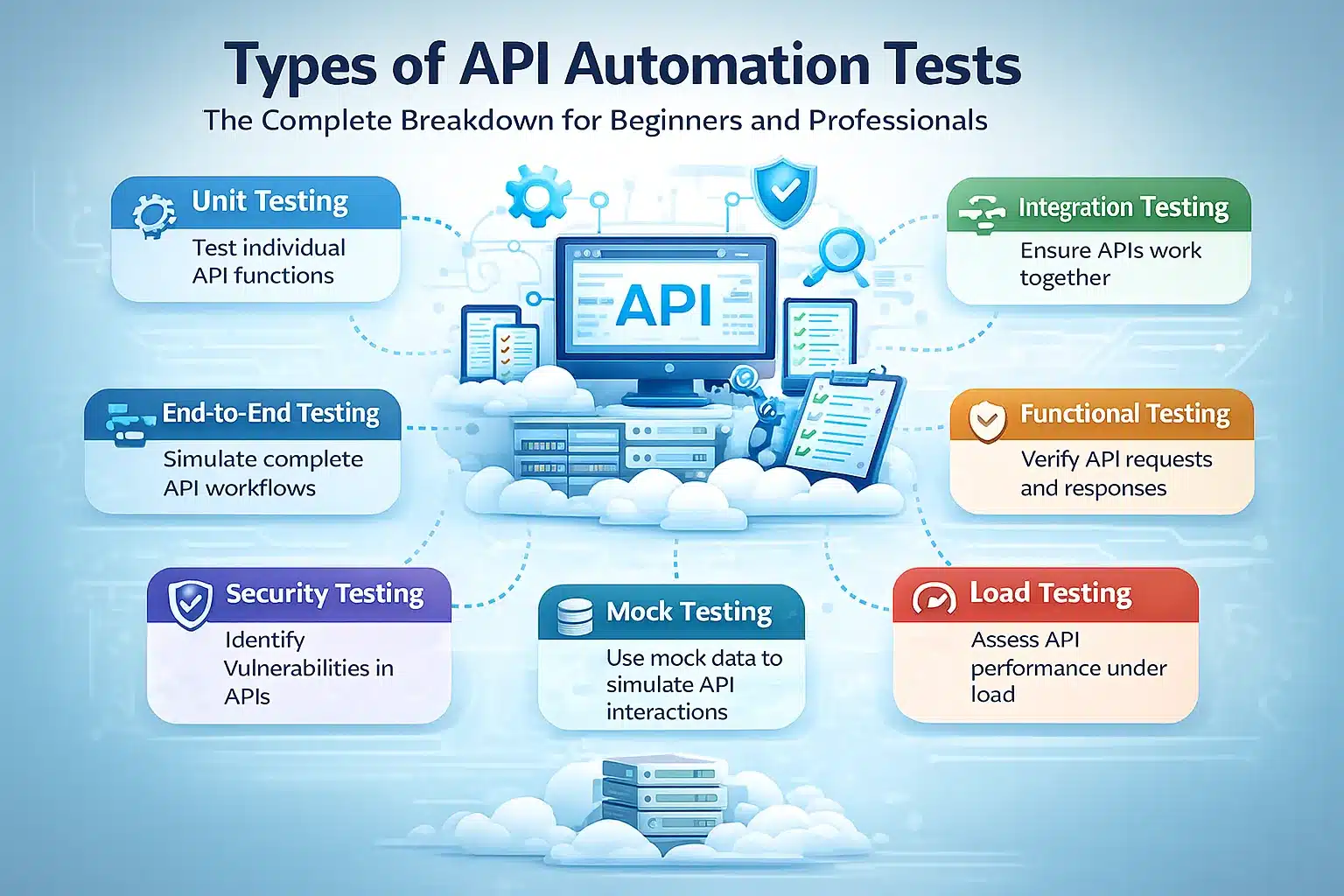
1. Functional Tests of the API
Functional tests allow you to determine if your API is functioning as it is expected to based on the functional specifications. These tests are used to validate that the API returns the appropriate output when given "correct" input and that the API is following the expected business rules.
Examples of functional tests include the following:
-
Verifying that the /login call returns a token when provided with the correct credentials.
-
Verifying that the /products call returns a valid complete list of the company’s product offering.
-
Validating that the /orders/create action creates a new order.
Functional tests form the foundation for API automation.
2. Integration Tests of the API
Integration testing verifies that the API functions correctly with other services, external systems or databases. Since most APIs do not function in isolation, integration tests provide validation that workflows between APIs and other services function as intended.
For example:
-
When an order is created, the inventory API should reduce the stock for that item.
-
Responses from the payment gateway should trigger an email notification to the customer.
-
Updating a user’s profile using the API should reflect in the company’s CRM.
Integration testing will help ensure the different microservices function without causing problems for one another.
3. Regression Tests of the API
When changes are made to the code, other parts of the functionality that worked before may stop working. Therefore, regression tests have the purpose of ensuring that all functionality that previously worked continues to work after every code change. Automated testing enables regression testing to happen very quickly, allowing for continuous quality assurance.
4. Load Testing / Performance Testing
Performance Testing is designed to gain insight into how an API behaves when it is subject to various traffic and stress levels. Performance Testing identifies areas of poor performance such as bottlenecks, timeouts and response times, as well as the maximum capacity of the API.
The following examples could constitute performance tests:
-
Sending thousands of requests to a /search endpoint in a 1 second timeframe.
-
Simulating a Black Friday like traffic load to a Checkout API.
-
Measuring performance of long running or archival APIs under a heavy load.
Performance Testing verifies an API’s ability to scale.
5. Security Testing of APIs
Security Testing is conducted to validate that proper security measures are in place to protect the data and prevent unauthorized access to an API. Cyberattacks are becoming more common and in order to combat that, security automation is necessary.
Security Testing of APIs would include:
-
Token expiry testing.
-
Testing for SQL/JSON Injection vulnerabilities.
-
Access Control Validation.
-
Vulnerability Scanning.
-
Authorization Flow Testing.
All of these tests help protect against the loss of vital data.
6. Negative Testing of APIs
Negative Testing is performed to verify how an API will respond to, incorrectly formatted/input/invalid/missing or malicious inputs. By conducting Negative Testing it is possible to ensure that there is sufficient robustness and predictable performance from an API.
Some examples of Negative Testing include:
-
Missing Authorization Headers.
-
Sending Wrong HTTP Method to an API endpoint.
-
Sending Invalid JSON to the API.
-
Requesting a Resource that does not exist.
Negative Testing also exposes weaknesses in error handling, ultimately increasing the resilience of APIs.
How API Automation Testing Works — A Step-by-Step Beginner-to-Advanced Workflow?
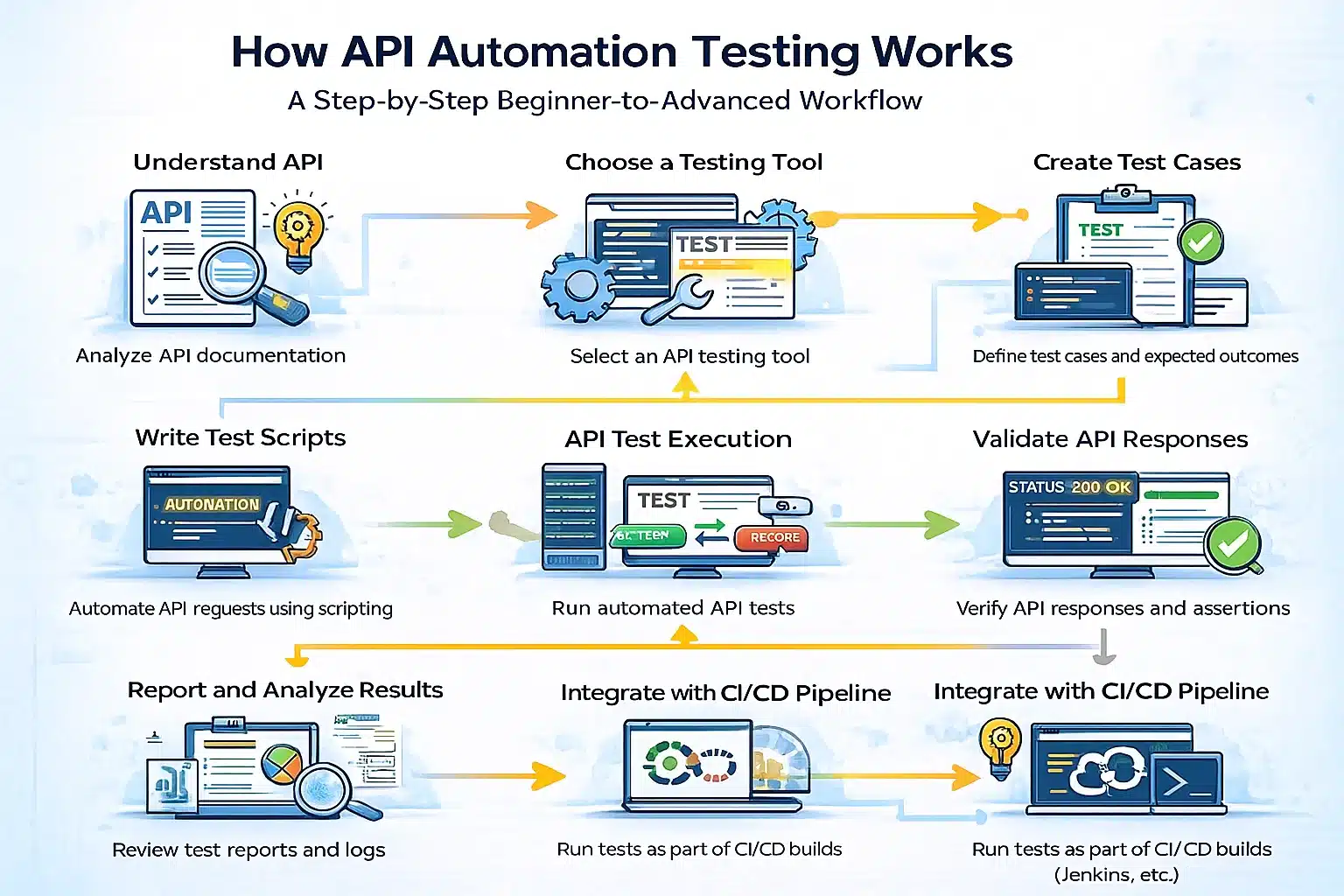
Automation suite building is simplified by having the knowledge of how automation operates. Below is a breakdown of the complete process through detailed steps.
Step 1: Review API Docs Completely
Before creating any automated tests, testers must have knowledge of:
-
Endpoints of an API
-
Query Parameters of an API
-
Format(s) of Request Body(s) of an API
-
Response Schema(s) of an API
-
Authentication Methods used in an API
-
Expected Errors from an API
-
API Rate Limit(s)
Understanding the API’s capabilities will lead to a good Automation Suite Design.
Step 2: Choose an Automation Tool Suitable for Your Skill Level
Here are the tools ranked with Keploy first, as requested:
1. Keploy
Keploy is an AI-powered tool that helps both beginners and skilled developers create and use APIs in new ways. By recording actual API calls, Keploy is able to produce a suite of automation tools based on the actual information collected from the call:
-
Test cases
-
Assertions
-
Data stubs
-
Mock-ups
-
Deterministic replays
With Keploy, teams have access to tools that allow them to build their own Automation Suites that are representative of the actual end-user traffic. Keploy also reduces the chance of tests being flaky by automatically generating stable mock-ups of dependent services.
Keploy is best suited for:
-
Teams with very little experience with Automation
-
Rapidly growing Engineering Teams
-
Microservices Environments CI/CD Pipelines
-
Companies that maintain large test suites.
Keploy has drastically reduced the time needed for creating an API automated testing environment.
2. Postman
Postman has gained popularity as a tool for both manual and automated testing. Users can create JavaScript segments to complete the process of validating an API through Postman. Using Postman collections in CI/CD pipelines makes it easy for a new user to begin automating their testing processes.
3. Rest Assured
The Rest Assured framework is a Java Domain-Specific Language (DSL) that provides developers with fine-grained control over their test automation processes and offers the ability to perform advanced validations of their APIs. Rest Assured is designed specifically for backend developers and automation engineers familiar with the Java programming language.
4. Karate Framework
The Karate Framework combines API testing, user interface (UI) testing, and performance testing into a single test automation platform. It has an easy-to-use scripting language that allows less-experienced testers to learn how to use the framework.
5. Cypress
Cypress has been used as a popular UI automation tool, but it also provides the ability to perform API testing. It is well suited to development teams that use JavaScript as a primary programming language, and who want a single solution to automate both frontend and backend processes.
6. SoapUI / ReadyAPI
SoapUI is an enterprise-level solution designed primarily for SOAP-based services. ReadyAPI is a more robust version of SoapUI that also supports REST APIs. SoapUI provides advanced analytical capabilities and a rich automation capability at the business level.
Step 3: Design Your Test Cases Carefully
When designing API test cases, it is important to adhere to standard practices employed throughout the testing industry. A good API Test Case covers the following:
-
Valid Inputs
-
Invalid Inputs
-
Edge Cases
-
Boundary Conditions
-
Authentication
-
Format of the Response
-
Consistent Error Messages
Some tools (e.g., Keploy) can capture a data set of completed transactions and/or customer interactions with an API and use that information to create automatic Test Cases.
Step 4: Implement Assertion Logic
Assertions confirm a response to ascertain if it meets the requirements. Assertions verify:
-
Status Code
-
Response Body Values
-
Schema Structure
-
Response Time
-
Headers
-
Business Logic Rules
By having a complete set of assertions, your test will be more reliable and predictably accurate.
Step 5: Run Tests Locally
Running tests automated locally allows developers to discover and correct errors prior to the code being merged into a common Code. Variants triage faster and lessen the Debug cycle on the initial run.
Step 6: Integrate Tests into CI/CD Pipelines
This is where the power of automation opens up. When connected to your CI/CD, your script will automatically run each time there is a commit/pull request.
The Full-functioning CI Theory Connects:
-
Protects against broken APIs in the production environment
-
Increases speed on the Development Cycle
-
Provides rapid feedback for the development team
Incorporates Keploy into your CI/CD without needing complicated configurations.
Step 7: Analyze Test Reports and Logs
Automated reporting allows teams to identify patterns of failure, record the rate of passed tests and identify the performance differences. Improves both the debugging process and the long-term quality strategy of your application.
Best Practices for API Automation Testing — Detailed, Practical, and Actionable
Here are the top best practice recommendations used by leading engineering teams to create a comprehensive and dependable automation suite. They include the following:
1. Start With The Most Important Scenarios First
When developing your automation suite, you should begin by automating the Critical User Journeys such as Logins, Payments, Data Retrieval, etc. The greatest returns will be experienced when Automating APIs that have the biggest impact on the Business.
2. Create Both Positive And Negative Test Cases
Only testing Positive flows leaves many hidden bugs in your application. Testing Negative flows increases the reliability of your APIs by ensuring proper error-handling is implemented in your application.
3. Use Realistic Test Data
Using Real-life Data will provide an increased likelihood of finding any issues with your application that may not have otherwise been discovered. Use Realistic Test Data in lieu of using Dummy Placeholders when possible.
4. Mock External Dependencies
APIs that depend on one another are inherently unstable. Using Keploy-generated Mock APIs helps ensure a consistent experience with your application.
5. Keep Your Tests Light and Fast
Slow Tests will hinder CI Pipeline. Maintaining efficient Test Data and removing any unnecessary delays may result in significantly increased CI Pipeline speed.
6. Document Each Test Suite
Accurate documentation will assure ongoing maintainability of your Test Suites, especially for larger teams who may have not been initially involved in writing those Test Suites.
7. Version Control Your Tests
As your APIs evolve, so should your Tests. Maintain a separate version of your Tests as needed to accommodate any changes to your API or Test Suite.
Common Challenges in API Automation Testing and How to Solve Them
Automating APIs has a lot of advantages, but it can also bring some problems. Here are five major challenges associated with API automation and how to solve them:
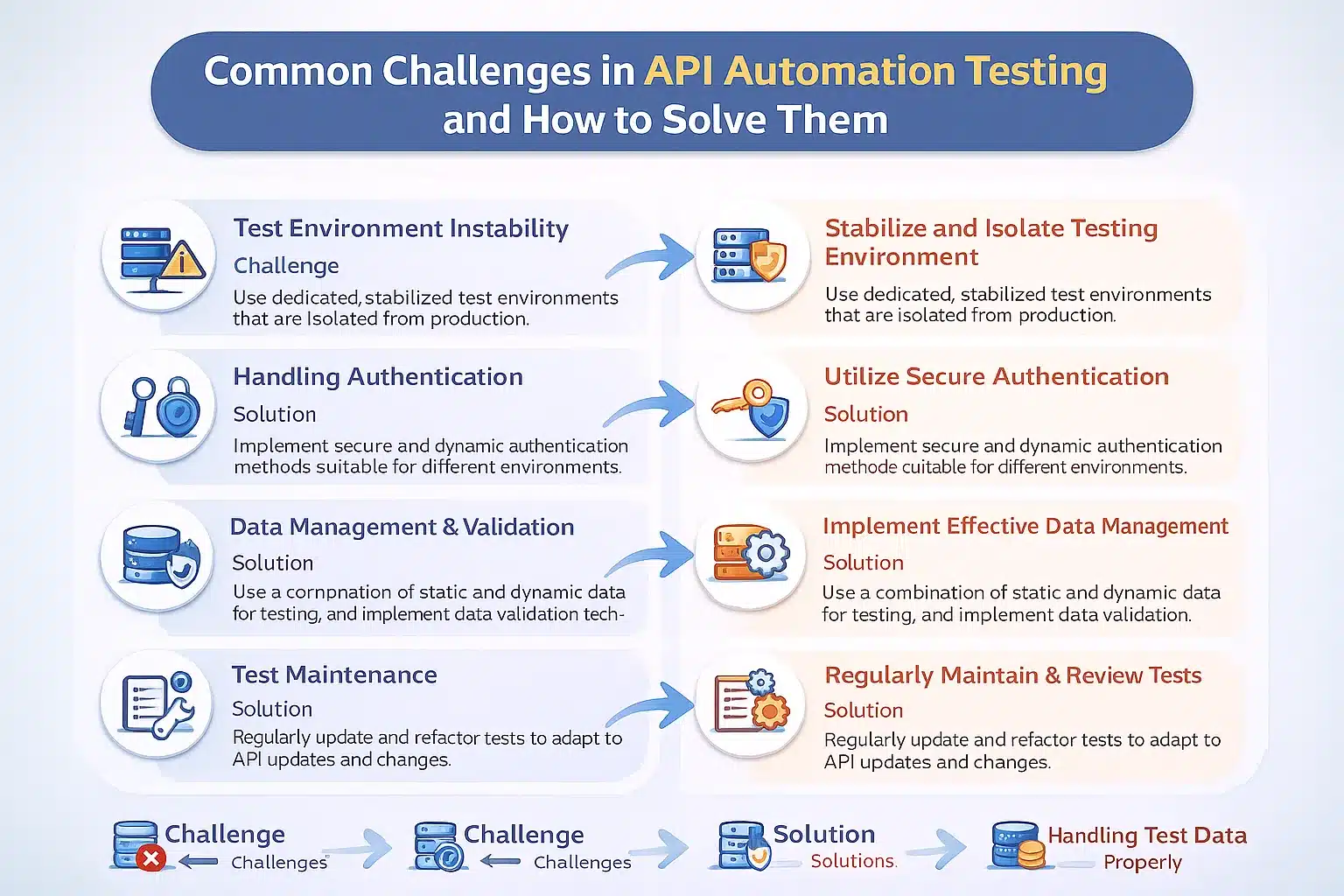
1. External Dependency-Failure Flakiness in Tests
External APIs that are unstable can result in intermittent test failure.
The solution is to mock, implement retry logic, and stabilize your network. Keploy does a great job in this area.
2. Authentication and Token Issues
Tokens (particularly in relation to API) can be expired/changed on a regular basis.
The solution is to automate login flows and dynamically refresh tokens.
3. Maintaining Large Test Suites
As test case suites get larger, it becomes more difficult to maintain the test cases effectively as a group.
The solution is to create test cases using AI and to implement stable mocks on those tests.
4. Test Breakage Due to Changing API Contracts
API contracts can change rapidly and can result in broken tests/emails that return false messages of failure.
The solution is to use contract testing and proactively monitor any schema changes.
5. Environment Configuration Differences
Each environment (Dev, Staging, Production) may act quite differently from the other.
The solution is to standardize your configuration settings across all of your environments and utilize stable mocks in all of your environments.
The Future of API Automation Testing — Trends Shaping 2026–2030

The transformations in API automation that are occurring today, AI-generated automation suites, automated self-healing tests, autonomous testing pipelines, deep observability as a driver for testing, and use of AI to validate the quality of API predictions, will continue to happen in the future.
1. Automating Testing Suite Generation with AI
AI will generate automated testing suites from captured user traffic to eliminate manually creating a script for every event.
2. Self-Healing Automated Tests
Automated test scripts will automatically update when the API behavior changes so that maintenance will be minimized.
3. Autonomous Testing Pipeline Production
Tests will be run dynamically based on the API’s most critical risk areas.
4. Testing Based on Deep Observability and Logs, Traces, Metrics
Whenever an abnormality occurs, it will automatically trigger the next level of testing based on the recorded logs, traces, and metrics.
5. AI as Validation for AI Models Created with an API
As AI Models continue to grow and expand, expect the use of Automated Validation to determine whether their predictions are of high enough quality, whether they are just or discriminatory, and what level of performance is needed for their deployment through an API.
6. Fully Automated End-to-End Testing of Microservices
To effectively monitor microservices, we will see the need for AI-powered testing and monitoring-driven end-to-end automated testing solutions.
Conclusion
In modern software engineering, API Automation Testing is one of the key skills required in today’s mobile and web applications development. As applications continue to expand into new areas of complexity and become more widespread while also increasing the overall expectations from users for continued API reliability, Automated API Tests have become critical in ensuring that an API will perform reliably by constantly validating the API’s functionality, performance, security and integration behavior.
Using tools such as Keploy, Postman, Rest Assured, and many more to assist with creating and running an Automated API test suite allows teams to easily automate their API Tests, and as a result, always maintain a stable application performance. Teams will deliver applications faster with fewer defects and higher quality because of employing strong test design, following best practice guidelines and implementing modern automation workflows.
Thus, API Automated Testing is not a temporary trend; rather, it is the foundation for creating reliable digital products through the year 2026 and beyond.
FAQs
1. How is API automation testing different from API monitoring?
API automation testing ensures that an API behaves as expected at the time of development and subsequently when a new version of that API is released while API monitoring works by providing a way for you to keep track of how well your API is doing in terms of its ability to provide reliable service out to users in a production environment.
2. Can API automation testing be integrated into CI/CD pipelines?
Yes, it is very common for technology companies to include API automation testing in their CI/CD pipelines so that they can integrate API automated tests to automatically verify that the APIs continue to function properly after each code update, allowing teams to find out right away when something goes wrong and keep producing reliable software.
3. Why is API Automation Testing?
Using API Automation Testing allows teams to release quicker than they normally would, to improve stability and catch issues early and maintain quality on many projects and across complex situations.
4. What basic skills should testers know before attempting to do API automation testing?
Testers need to have basic knowledge of HTTP and APIs (e.g., how they communicate), JSON (data format), testing concepts, and be familiar with tools like Keploy or Postman.
5. Can API Automation Testing be included as part of a Continuous Integration/Deployment (CI/CD)?
Yes. Automated API tests should run every time code is committed to source control (e.g., Git). This prevents the possibility of a bug making it into production.

Leave a Reply