If you’ve been using Rest Assured for API testing, you know how powerful it is. The syntax looks simple and easier to understand, but things get interesting when you have to write test cases and mocks for a microservices application that has more than 2 services.
Key Takeaway: Keploy replaces REST Assured’s manual Java test scripting with automatic API test generation from real traffic. Using eBPF for zero-code capture, Keploy auto-generates mocks for databases and services, handles non-deterministic data via time-freezing, and integrates natively with CI/CD — cutting test creation effort by up to 80%. See the full Keploy vs REST Assured comparison.
In this blog, I am exactly sharing my pain of writing Rest Assured test cases for a microservices application and why I switched to Keploy not because I am working here, but to show you the real pain points Keploy solves.
To give more context for someone who is hearing about Rest Assured for the first time:
What is Rest Assured?
Rest Assured is a Java library and framework for automating tests for RESTful APIs, simplifying the process with a domain-specific language (DSL) that makes tests readable and efficient. It allows users to easily send HTTP requests (like GET, POST, PUT, DELETE) and validate responses, including status codes, headers, and body content in both JSON and XML formats.
Let’s see a sample test case:
plaintext
import static io.restassured.RestAssured.*;
import static org.hamcrest.Matchers.*;

public class CreateUserTest {

    @Test
    public void testCreateUser() {
        given()
            .baseUri("https://reqres.in")
            .header("Content-Type", "application/json")
            .body("{ "name": "Alien", "job": "Roaming around the world" }")
        .when()
            .post("/api/users")
        .then()
            .statusCode(201)
            .body("name", equalTo("Alien"))
            .body("job", equalTo("Roaming around the world"));
    }
}
The above one seems simple, right? Even I also thought the same. The code really makes it clean and understandable. But I was wrong. Let me share my pain with you folks.
My Struggle with Creating Rest Assured Test Cases for Microservices
After reading the Rest Assured docs and seeing references from ChatGPT, I was so curious to create test cases for the microservices using Rest Assured. This is the microservices application I am talking about you can see the references for it. https://github.com/keploy/ecommerce_sample_app
You can see the number of services and the application source code.
Basically, the microservices are written in Python, but I wanted to create the test cases using Rest Assured. Mostly people use Rest Assured if their application is written in Java, but I was so curious to try it for a Python application also. At the end of the day, everything is an API, so it should not make any issue to write test cases in Java for a Python application.
Let me come to the real pain. Basically, microservices applications are different from normal monolithic applications because in microservices, we are talking to multiple services, not only one. In my e-commerce application, there are 3 services. My use case is: I want to create Rest Assured test cases for the order service. If I want to create the test cases for the order service, first login should be done, user details have to be added, then a product should be purchased only then the create order API will pass, otherwise the test case will fail, right? Basically, the order service is dependent on other services. I needed a token, product ID, and other details to pass the order API.
At first, I didn’t know anything about this. Blindly, I was testing the order service. I followed everyone’s approach first I gave the Postman collections and OpenAPI schema to ChatGPT to create Rest Assured test cases for me. But still, it couldn’t create it. I gave it to Gemini, then Claude, then Grok, and then I thought I needed to do something.
Basically, for testing microservices, we have Postman collections. We can simply send requests to an application using Postman collections. Then I thought, let me create a flow to understand the API requests, and I took the curl commands. After spending 4 to 5 hours, I understood the flows. Then I gave the AI the details to create Rest Assured test cases even then it failed. And after manual fixing, finally it worked.
What about the Mocks?
After spending time writing Rest Assured tests, the next challenge was mocking dependent services. In my case, the Order Service depended on the User Service and Product Service, so both had to be mocked to make the tests run reliably.
I used WireMock to mock these services and configured the application so that all API calls to the User Service and Product Service were routed to WireMock instead of the actual services.
Although this worked, it required creating and maintaining multiple mock files, carefully matching request patterns, and constantly updating mocks whenever APIs changed. This additional effort is what eventually made me look for a better approach.
This is my Rest Assured test case, which took 4 to 5 hours to create test cases for 6 APIs.
java
package com.example.tests;

import io.restassured.RestAssured;
import io.restassured.response.Response;
import org.junit.jupiter.api.*;

import java.util.UUID;

import static io.restassured.RestAssured.*;
import static org.hamcrest.Matchers.*;

@TestMethodOrder(MethodOrderer.OrderAnnotation.class)
public class EcommerceTest {

    private static final String BASE_URL_USER = "http://user_service:8082/api/v1";
    private static final String BASE_URL_PRODUCT = "http://product_service:8081/api/v1";
    private static final String BASE_URL_ORDER = "http://order_service:8080/api/v1";

    private static String token;
    private static String userId;
    private static String addressId;
    private static String orderId;

    @BeforeAll
    public static void setup() {
        RestAssured.enableLoggingOfRequestAndResponseIfValidationFails();
        System.out.println("User Service: " + BASE_URL_USER);
        System.out.println("Product Service: " + BASE_URL_PRODUCT);
        System.out.println("Order Service: " + BASE_URL_ORDER);
    }

    @Test
    @Order(1)
    public void loginTest() {
        Response res = given()
            .contentType("application/json")
            .body("{"username": "admin", "password": "admin123"}")
        .when()
            .post(BASE_URL_USER + "/login")
        .then()
            .statusCode(200)
            .body("username", equalTo("admin"))
            .body("email", equalTo("admin@example.com"))
            .extract().response();

        token = res.path("token");
        Assertions.assertNotNull(token, "Token should not be null");
        System.out.println("Login successful. Token acquired.");
    }

    @Test
    @Order(2)
    public void createUserTest() {

        String uniqueUsername = "user_" + UUID.randomUUID().toString().substring(0, 8);
        String uniqueEmail = uniqueUsername + "@example.com";

        String body = String.format("""
            {
              "username": "%s",
              "email": "%s",
              "password": "p@ssw0rd"
            }
            """, uniqueUsername, uniqueEmail);

        Response res = given()
            .contentType("application/json")
            .header("Authorization", "Bearer " + token)
            .body(body)
        .when()
            .post(BASE_URL_USER + "/users")
        .then()
            .statusCode(anyOf(is(200), is(201)))
            .body("username", equalTo(uniqueUsername))
            .extract().response();

        userId = res.path("id");
        Assertions.assertNotNull(userId, "User ID should not be null");
        System.out.println("Created new user: " + uniqueUsername + " | userId = " + userId);
    }

    @Test
    @Order(3)
    public void addAddressTest() {
        String addressPayload = """
            {
              "line1": "1 Main St",
              "city": "NYC",
              "state": "NY",
              "postal_code": "10001",
              "country": "US",
              "phone": "+1-555-0000",
              "is_default": true
            }
            """;

        Response res = given()
            .contentType("application/json")
            .header("Authorization", "Bearer " + token)
            .body(addressPayload)
        .when()
            .post(BASE_URL_USER + "/users/" + userId + "/addresses")
        .then()
            .statusCode(anyOf(is(200), is(201)))
            .body("id", notNullValue())
            .extract().response();

        addressId = res.path("id");
        Assertions.assertNotNull(addressId, "Address ID should not be null");
        System.out.println("Address added for userId = " + userId + " | addressId = " + addressId);
    }

    @Test
    @Order(4)
    public void getProductsTest() {
        given()
            .header("Authorization", "Bearer " + token)
        .when()
            .get(BASE_URL_PRODUCT + "/products")
        .then()
            .statusCode(200)
            .body("size()", greaterThan(0))
            .body("[0].name", notNullValue());

        System.out.println("Product list fetched successfully.");
    }

    @Test
    @Order(5)
    public void createOrderWithStockTest() {
        Response res = given()
            .contentType("application/json")
            .header("Authorization", "Bearer " + token)
            .header("Idempotency-Key", UUID.randomUUID().toString())
            .body("{"userId": "" + userId + "", " +
                  ""items": [{"productId": "22222222-2222-4222-8222-222222222222", "quantity": 1}], " +
                  ""shippingAddressId": "" + addressId + ""}")
        .when()
            .post(BASE_URL_ORDER + "/orders")
        .then()
            .statusCode(anyOf(is(200), is(201)))
            .body("status", anyOf(equalTo("PENDING"), equalTo("CREATED")))
            .extract().response();

        orderId = res.path("id");
        Assertions.assertNotNull(orderId, "Order ID should not be null");
        System.out.println("Created order with stock | orderId = " + orderId);
    }

    @Test
    @Order(6)
    public void payOrderTest() {
        given()
            .header("Authorization", "Bearer " + token)
        .when()
            .post(BASE_URL_ORDER + "/orders/" + orderId + "/pay")
        .then()
            .statusCode(200)
            .body("status", equalTo("PAID"));

        System.out.println("Order paid successfully | orderId = " + orderId);
    }

    @Test
@Order(7)
public void cancelPaidOrderTest() {
    given()
        .header("Authorization", "Bearer " + token)
    .when()
        .post(BASE_URL_ORDER + "/orders/" + orderId + "/cancel")
    .then()
        .statusCode(409)
        .body("error", equalTo("Cannot cancel a paid order"));

    System.out.println("Correctly received 409 when trying to cancel a paid order.");
}

}
Do you know how I felt? I am not even shipping anything I am just creating test cases to test my APIs. Let’s think for a second: what if we have more than 10+ microservices? I can’t even imagine in my dreams how hard it would be, right?
I was so happy when I saw all my Rest Assured test cases passing.

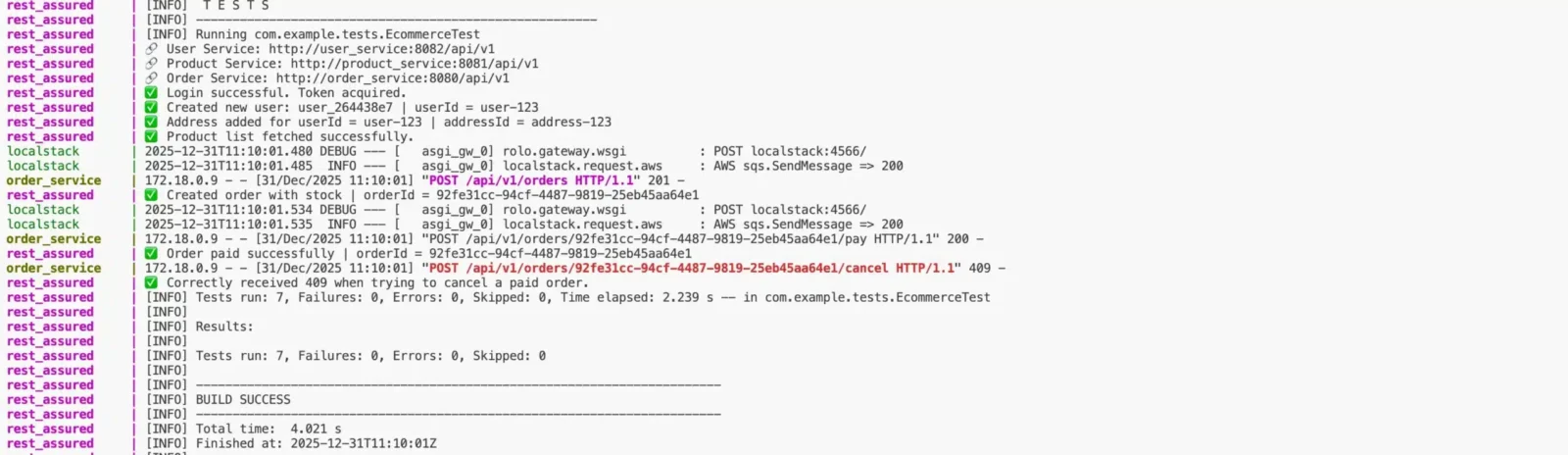
Then finally I understood how hard it is to create test cases even in the age of AI. This is my real story which happened. Now let’s see how to test the same application with Keploy in just 5 minutes, even without writing any code or using AI.
What is Keploy?

Keploy is an open-source testing platform designed specifically for backend, microservices, and API-based applications. It helps developers automatically create test cases and mocks directly from real API calls, without writing any test code manually.
Basically, Keploy captures all your network calls in the record mode, creates test cases as YAML files, and then you can replay them afterward.
Migrate from REST Assured to Keploy
Let’s stop talking we have spoken a lot. Let’s see a demo.
First and foremost, install the Keploy CLI, which helps to record and replay your applications.
Use this command to install Keploy:
plaintext
curl --silent -O -L https://keploy.io/install.sh && source install.sh
Once it is installed, we are ready to go. If you want to follow along with me, you can use this e-commerce application.
Link to the ecommerce application: https://github.com/keploy/ecommerce_sample_app
Step 1: First, run your application. In the microservices, there is a Docker Compose file it will spin up all the 3 services. Ensure that every service is running.
Step 2: Start Keploy in record mode using this command:
plaintext
keploy record -c "docker compose up" --container-name="order_service" --build-delay 40 --path="./order_service" --config-path="./order_service"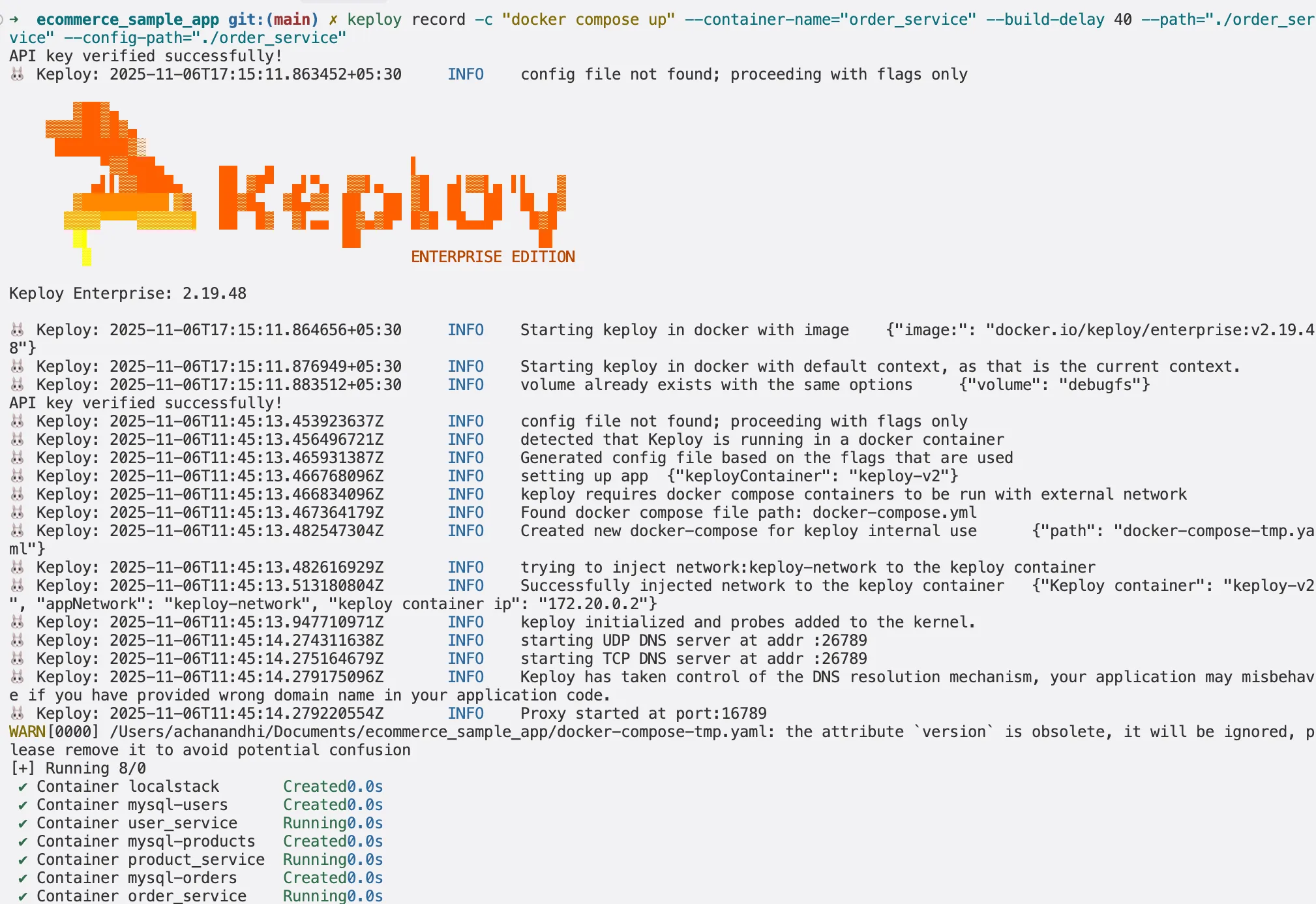
Now the question arises how to make an API call? We’ve made it simple! You can just import the Postman collection and try sending an API call. You can download the Postman collection from this URL and import it into Postman:
plaintext
https://github.com/keploy/ecommerce_sample_app/tree/main/postman
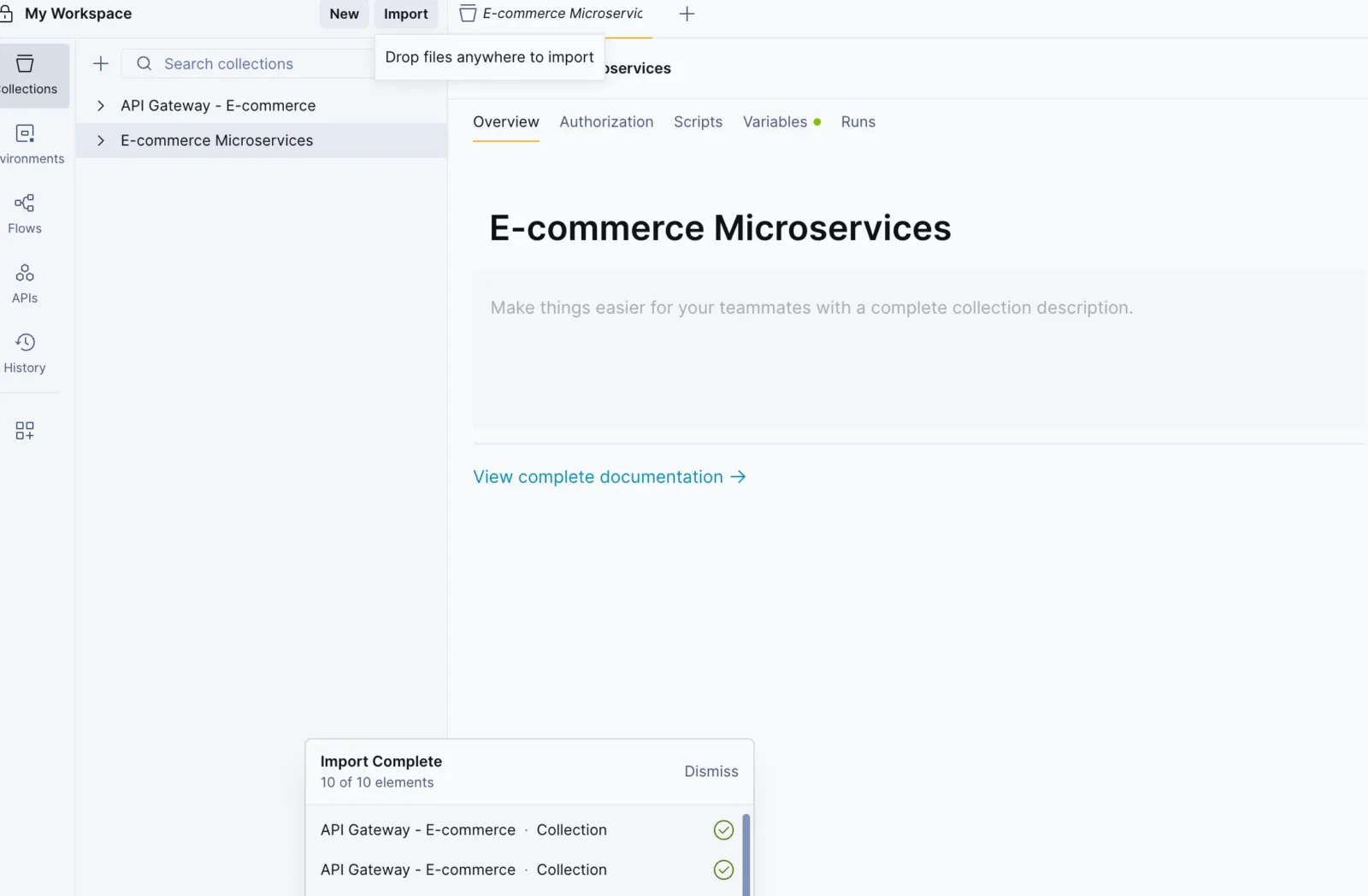
Step 3: If you’ve already downloaded the collection, upload it.
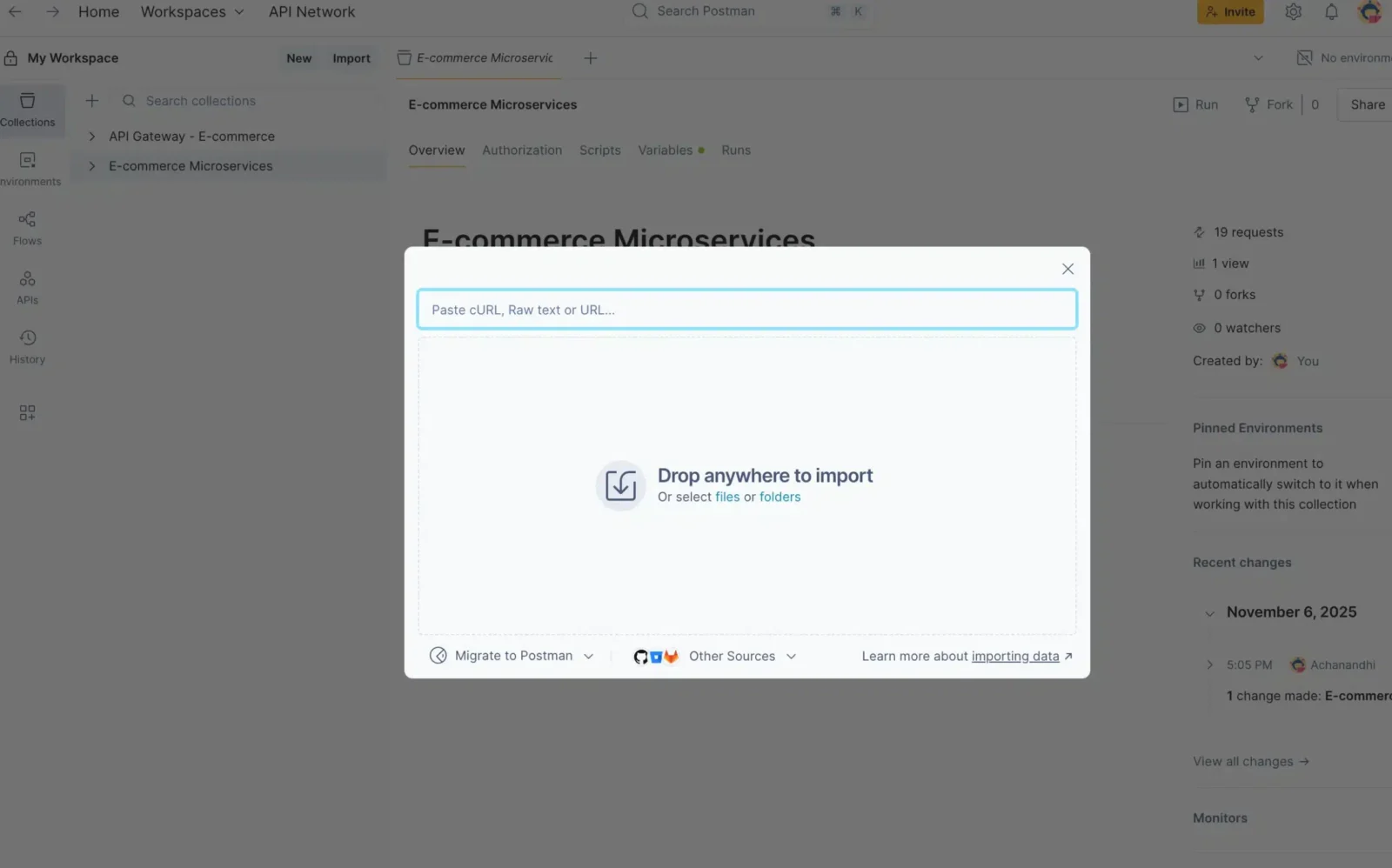
Step 4: Once it is uploaded, you will see the Ecommerce microservices in the left tab.
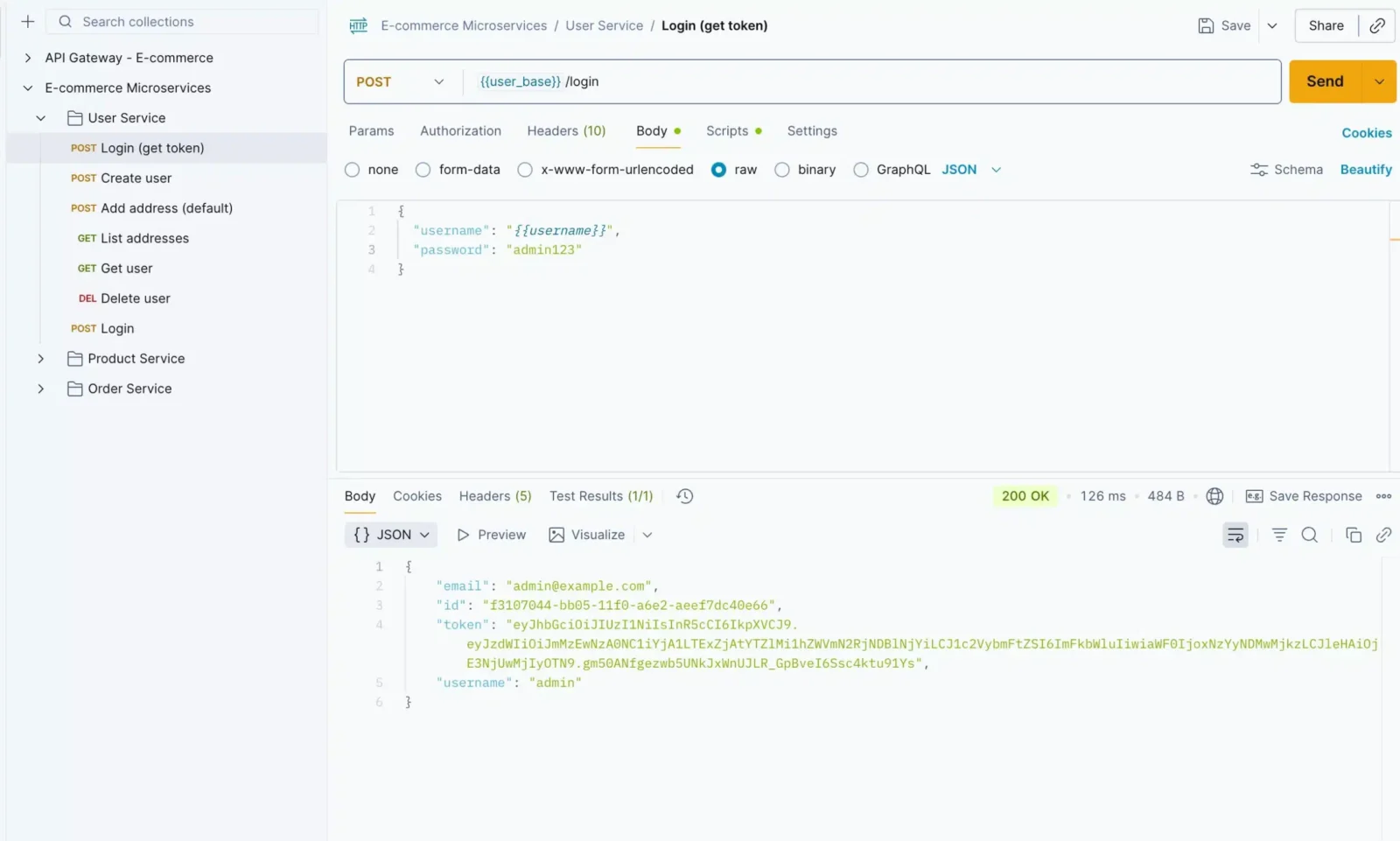
Step 5: Click the User Service and hit the login URL to get the token.
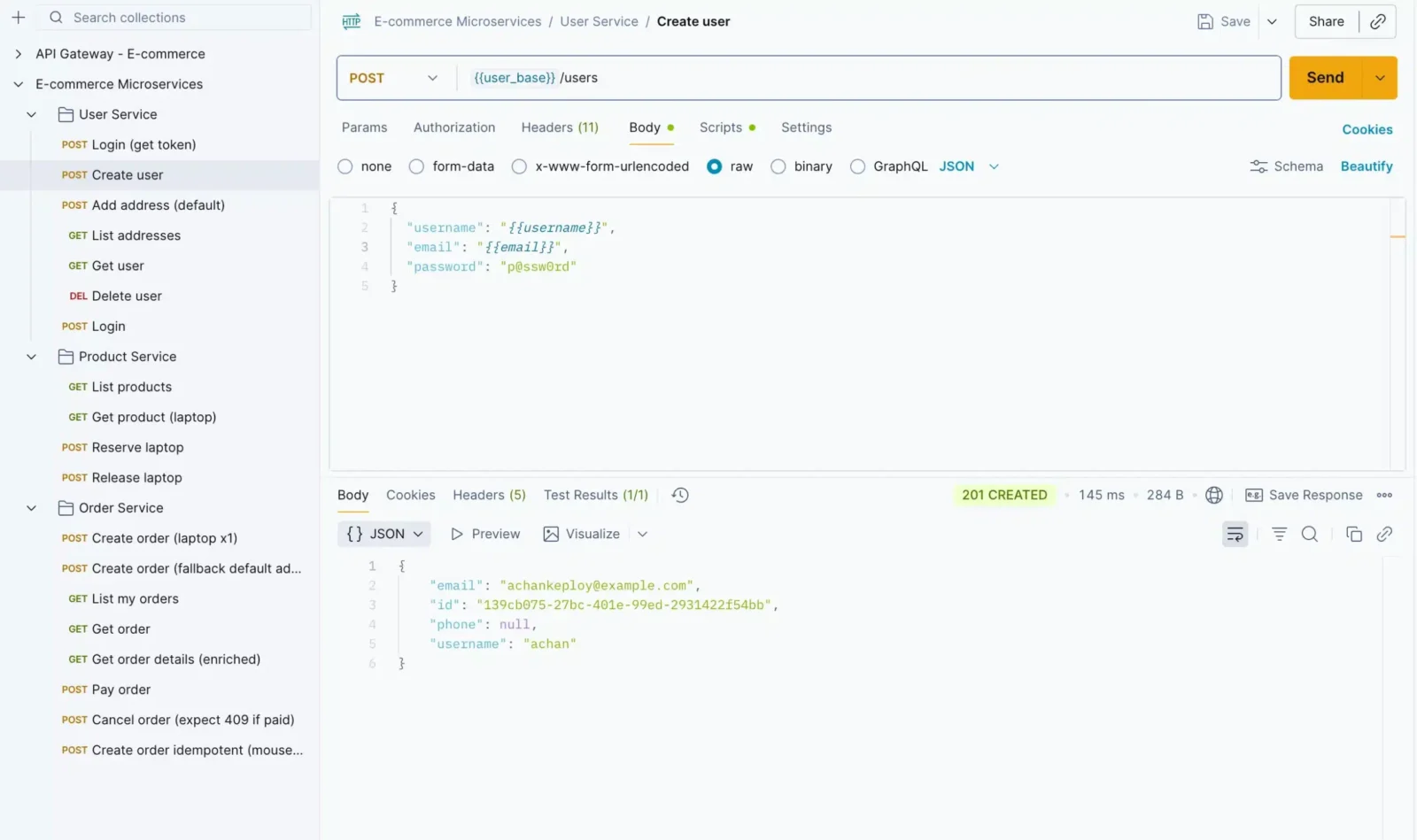
Step 6: We need to create a user before placing an order. So, create a user using the Create User API.
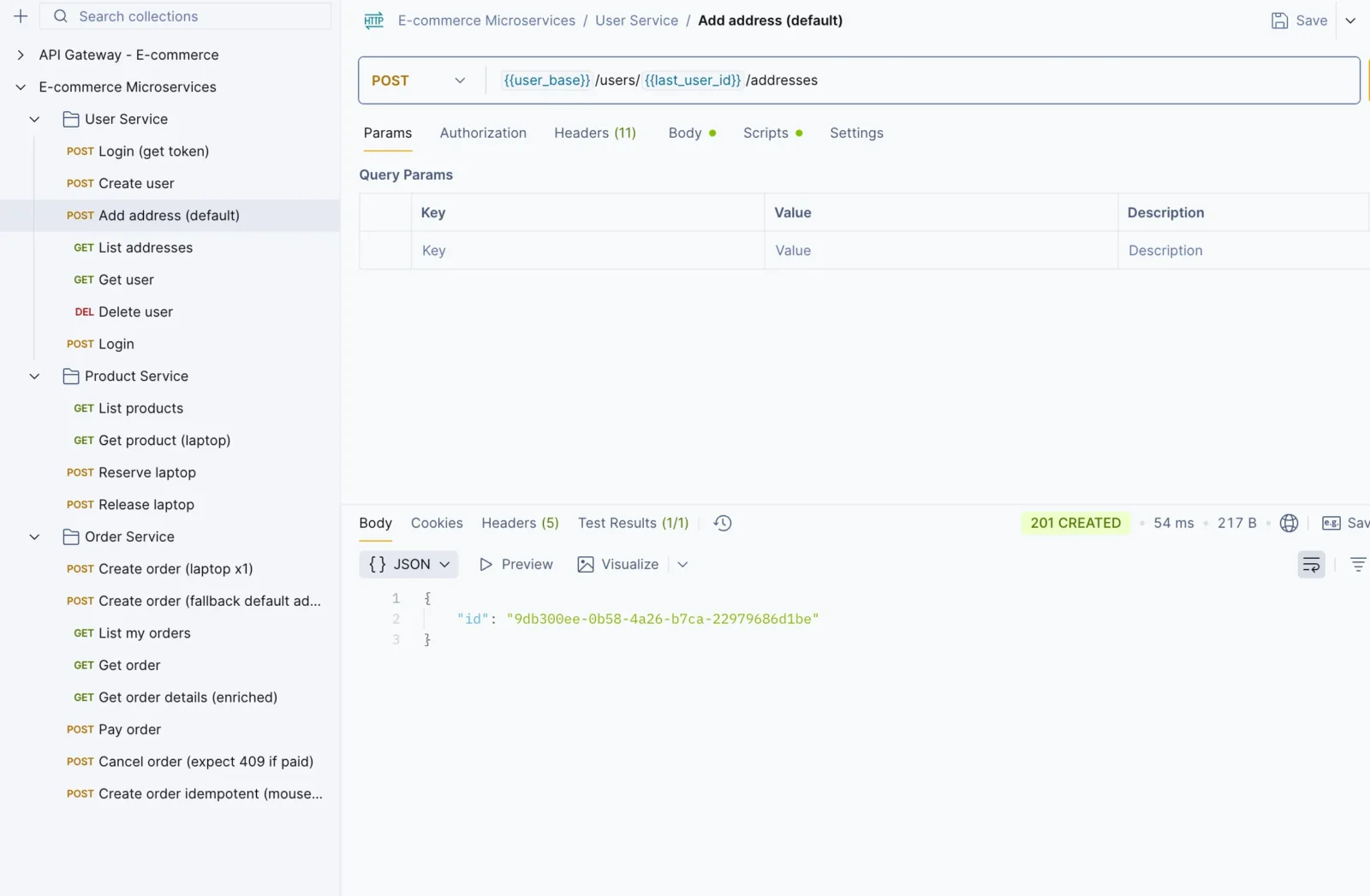
Step 7: Then, create an address for the user.
Step 8: Once you’re done creating the user details, let’s fetch the product details. This will be helpful when placing an order.
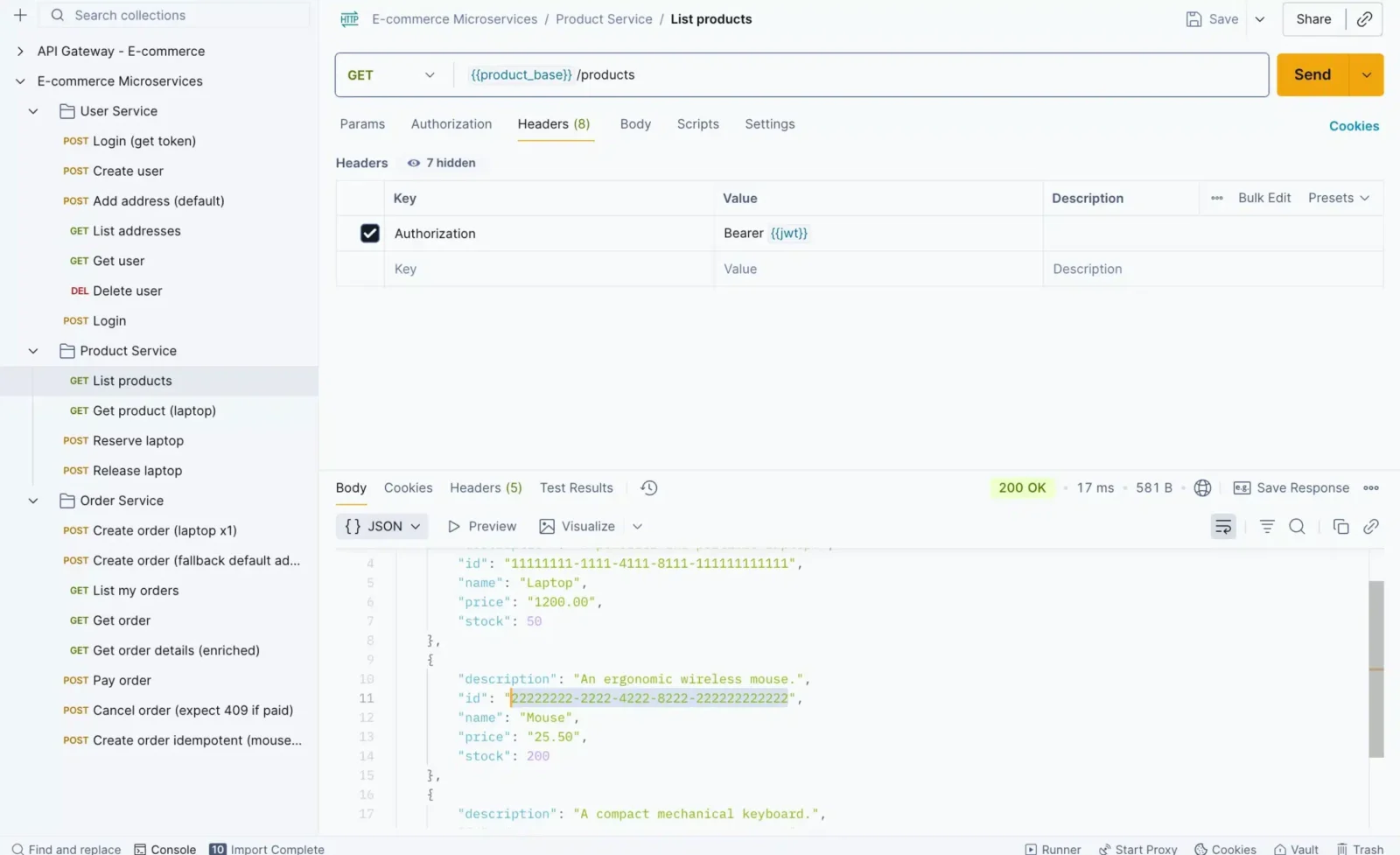
Step 9: Create an order, but before that, copy the mouse_id to place the order.
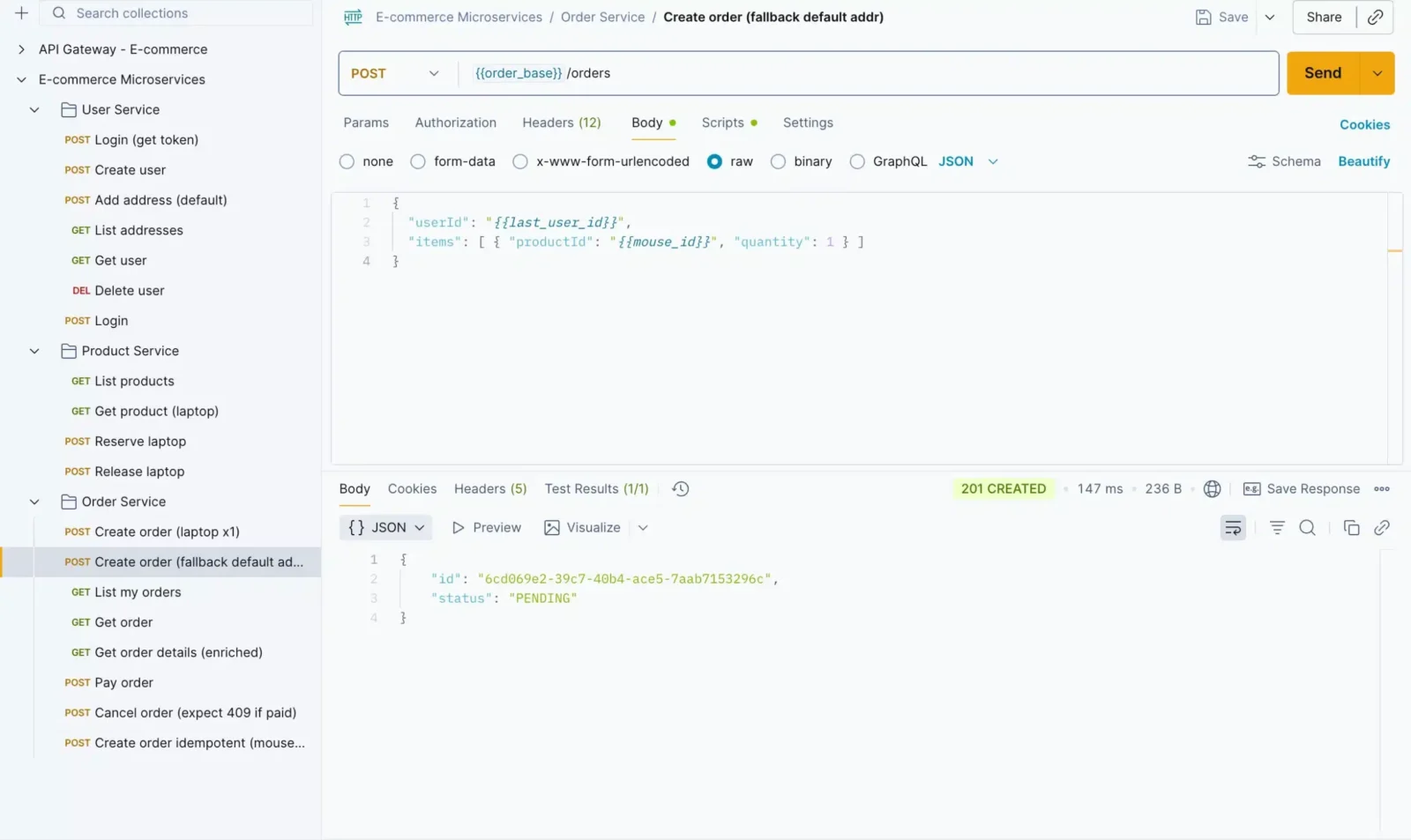
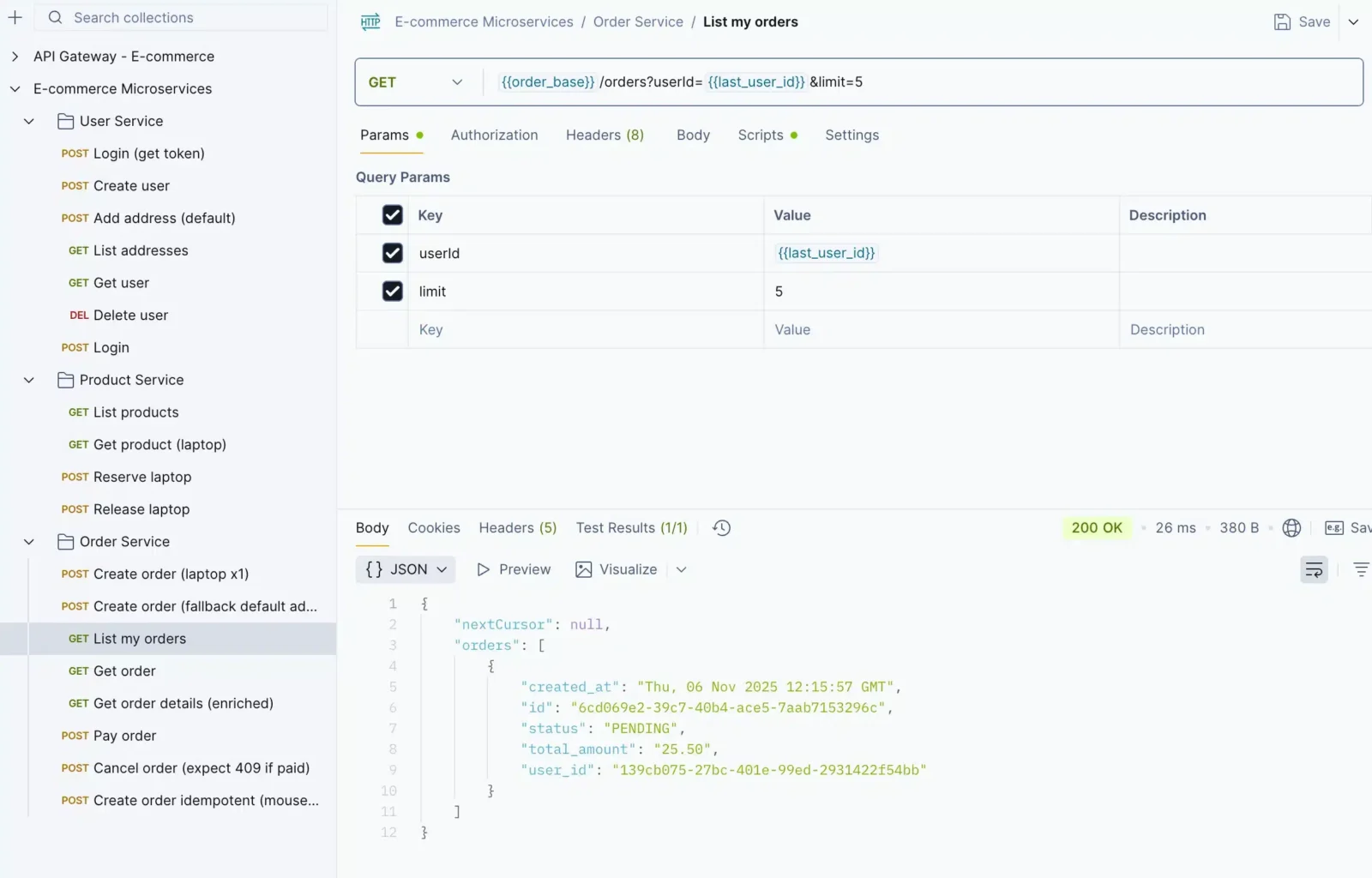
Step 10 : You can verify it using the List Order API.
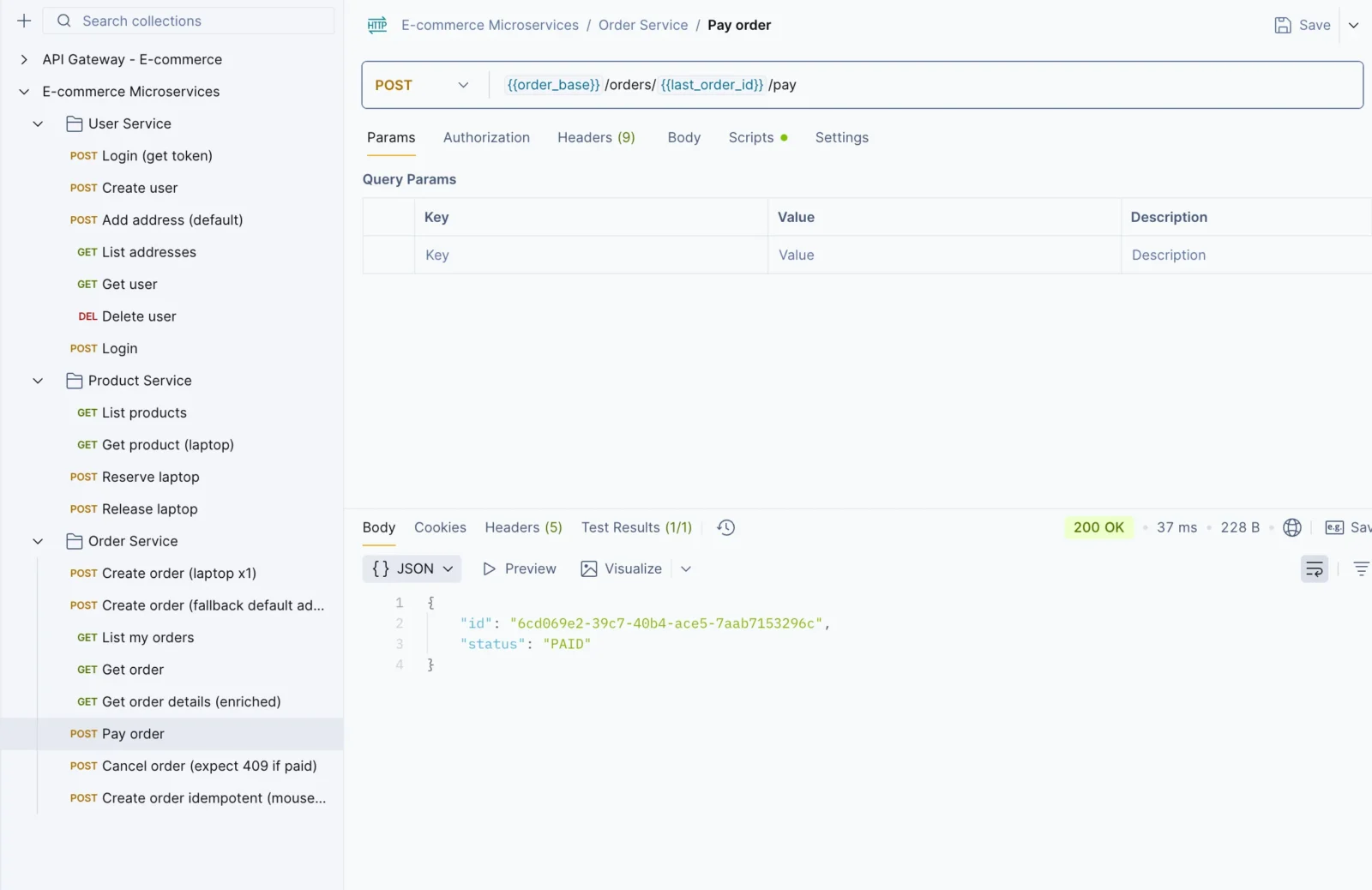
Step 11: Once you’ve created an order, use the Payment API to pay for the order.
Step 12: You can use the Get Order API to check the status of your order.
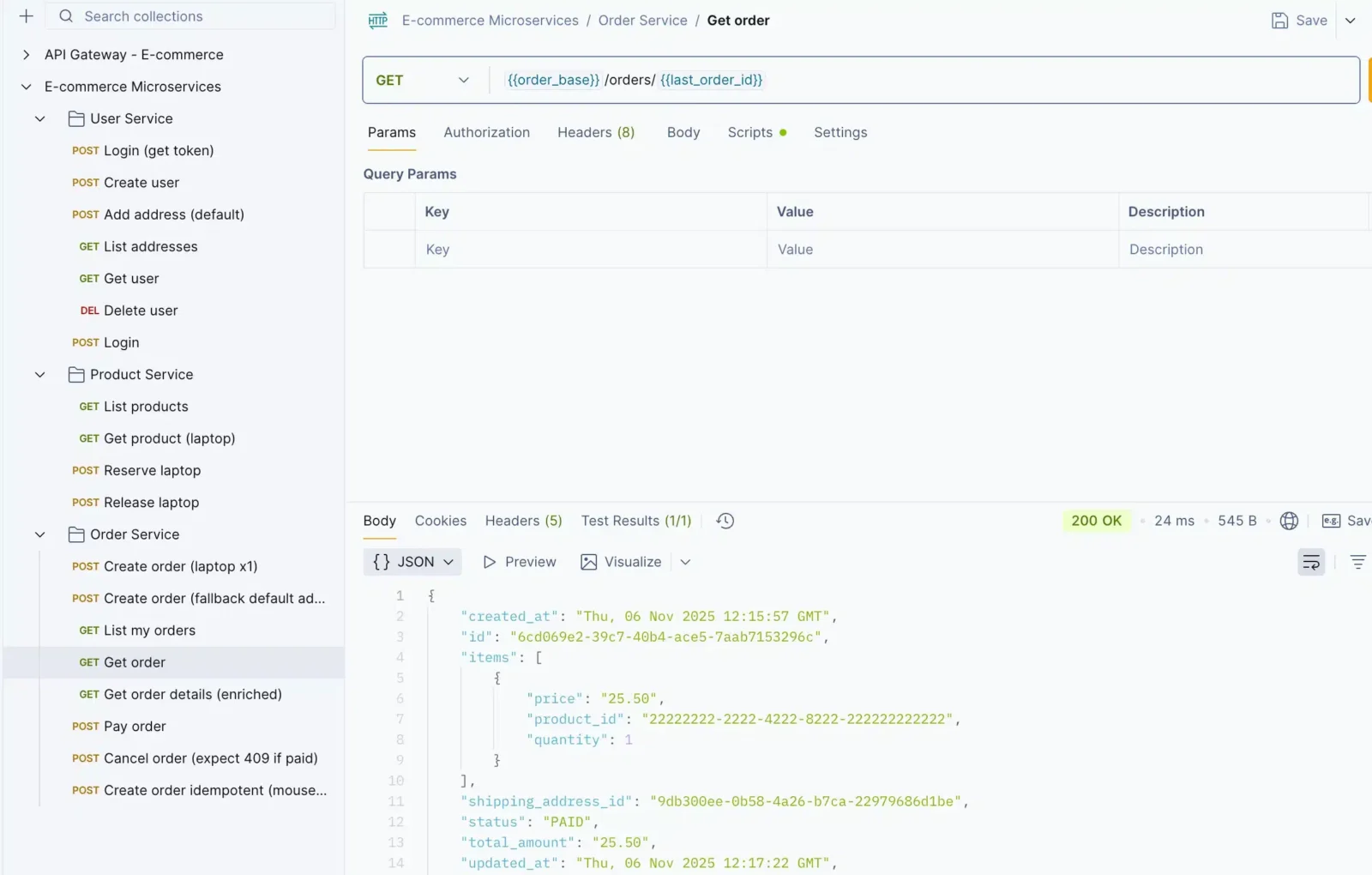
Note: You can see that Keploy only captures the network calls related to the order service. It can’t capture other network calls because we are recording only for the order service.
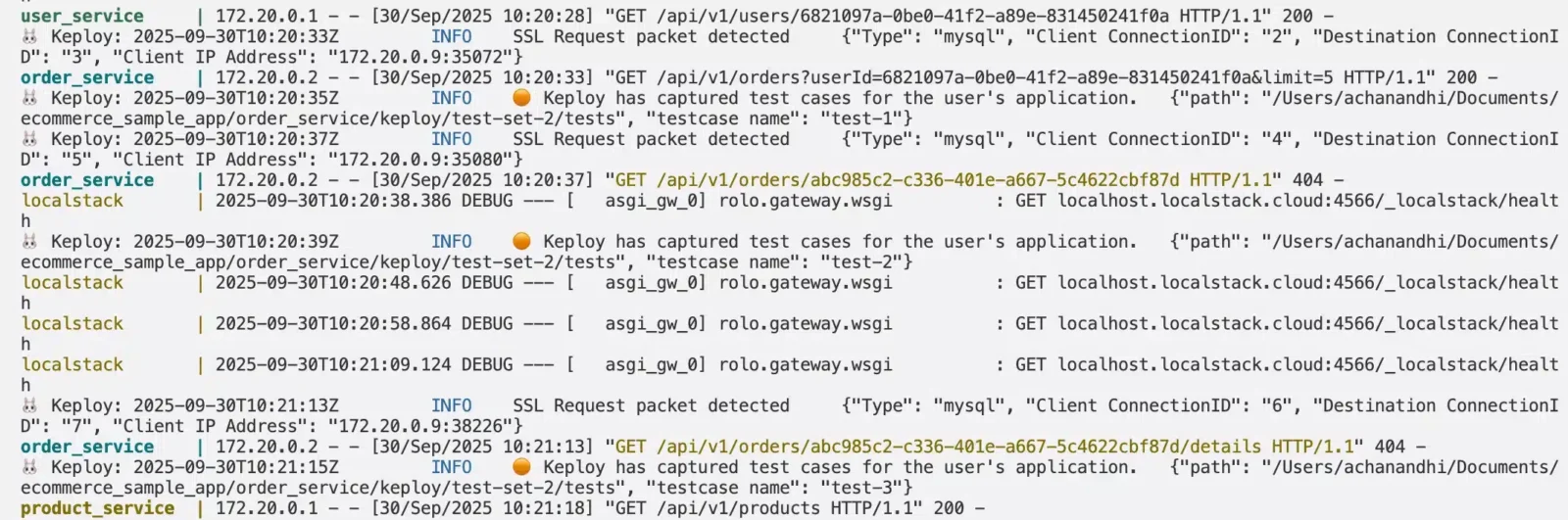
You can see Keploy captured the network calls, and it created the test cases also. No code we didn’t do anything, and it also created a mocks file.
What about the Mocks??
Check the mocks.yaml file in the Keploy directory. Open the Keploy directory and you will see the test cases have been created in the YAML format.
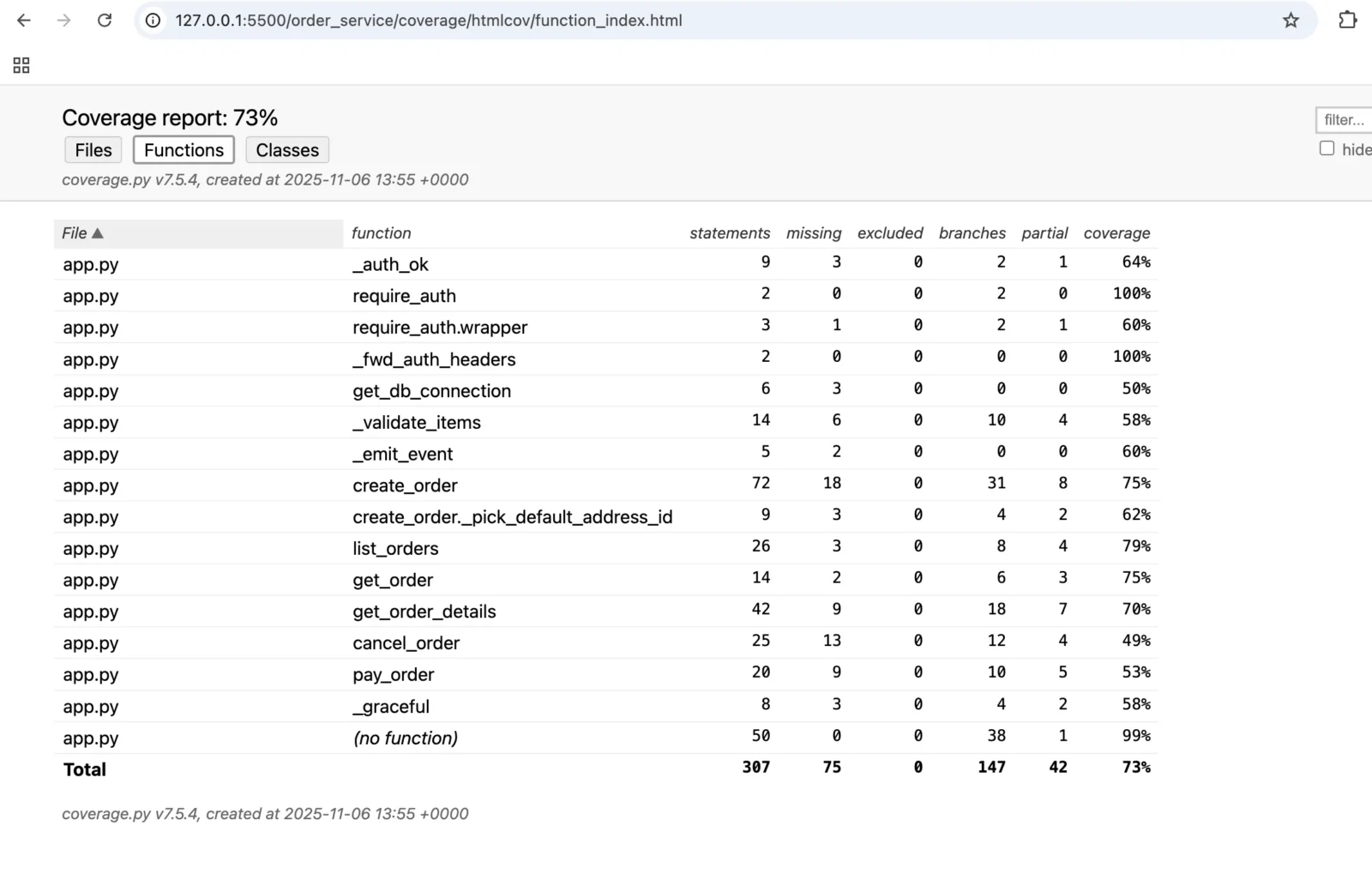
What about the coverage??
Every tool is great, but how do you know the coverage, right? Let’s see the coverage.
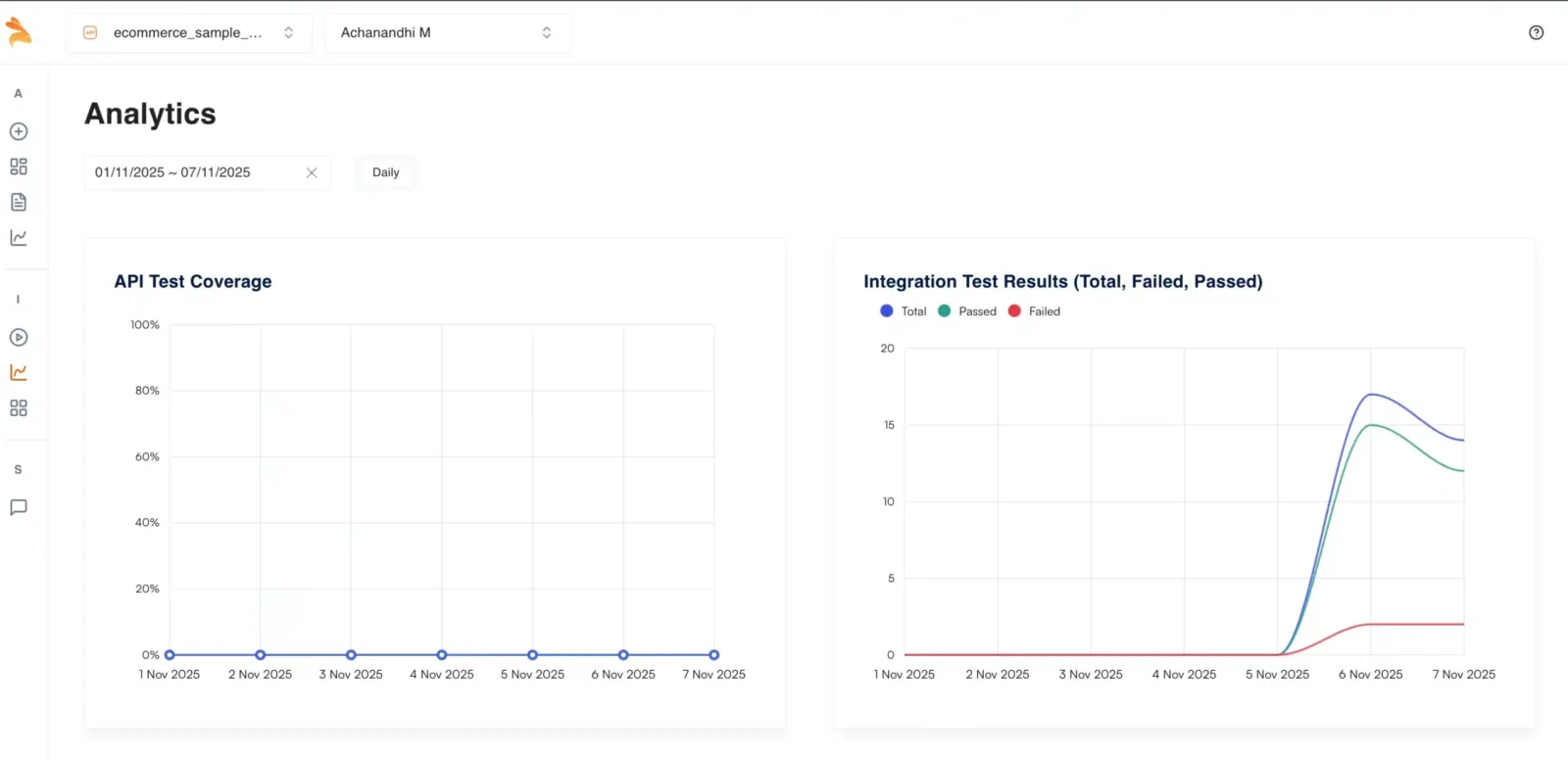
If you are looking for more features like Dashboard, time freezing, and deduplication, you can try out Keploy Enterprise. This is how the Dashboard in the Enterprise will look like.
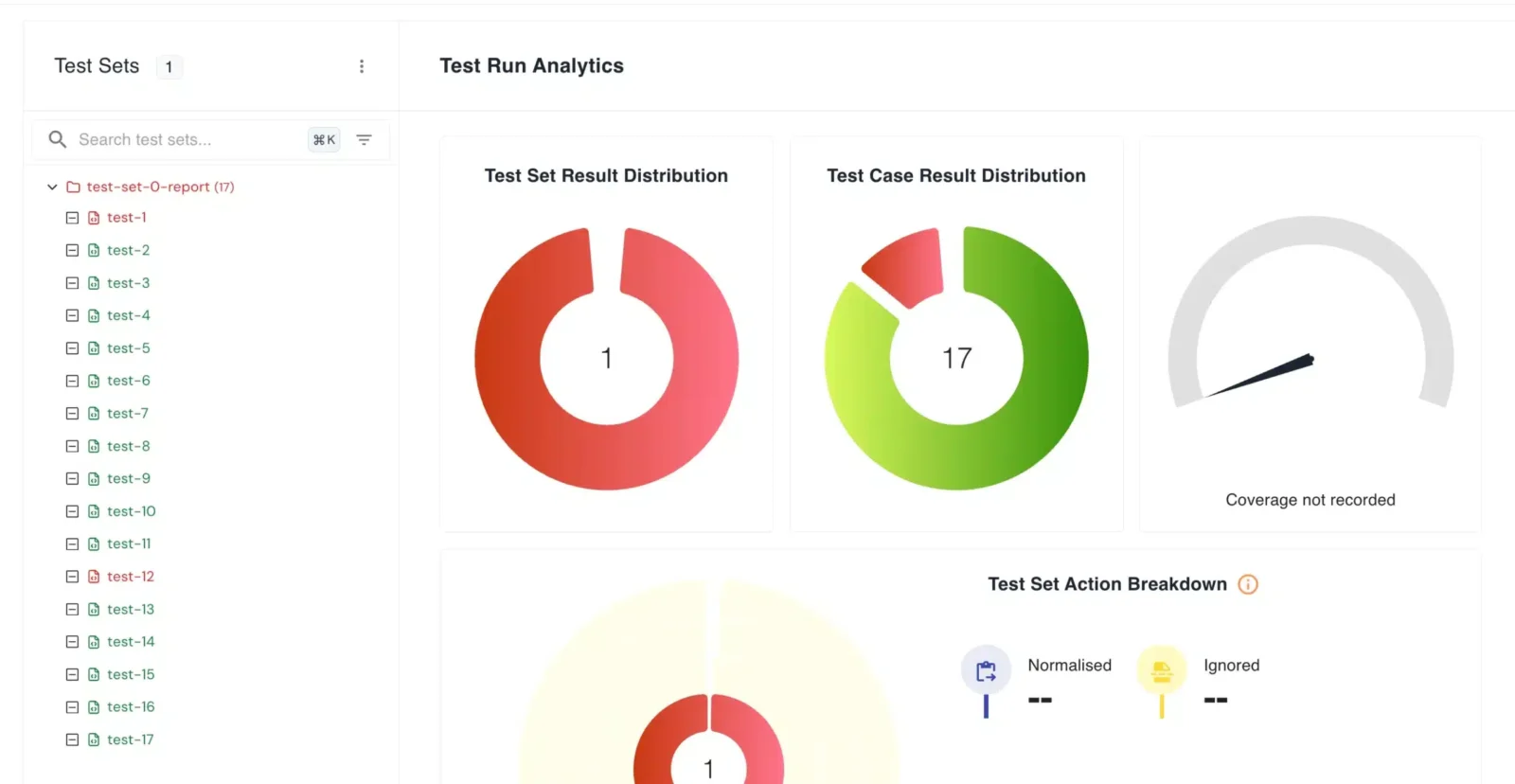
Now let’s see the comparison table between Rest Assured and Keploy.
REST Assured vs Keploy: Comparison Card
| Feature/Aspect | With REST Assured | With Keploy |
|---|---|---|
| What does it do? | API testing framework for RESTful services in Java. | End-to-end backend testing platform records real user traffic and auto-generates API, DB, and dependency mocks. |
| What will it not do? | Cannot record traffic or auto-generate tests; limited to HTTP-based APIs only. | Not for UI testing or front-end automation. |
| Who are its users? | Primarily Developers, SDETs, and QA Engineers. | SDETs, QA Engineers, Developers especially backend and DevOps engineers. |
| Implementation | ||
| How does it work? | Manually write test cases in Java using REST Assured library to send HTTP requests and assert responses. | Record and Replay: Captures real API traffic from your app and auto-generates test cases and mocks. 100% autonomous. |
| Where are the tests run? | Runs locally or in CI/CD pipelines as part of Java test suites (JUnit, TestNG). | Can be run locally or integrated into CI/CD without separate environments uses real captured data. |
| How does one start? | Add REST Assured dependency in your Java project and manually code test cases for each API. | Install Keploy → record traffic → replay the recorded test cases. You can record test cases using either the CLI or a CI pipeline. |
| Key Differences | ||
| Scope | Focused only on REST API request/response testing. | Broader: Tests APIs, DB calls, and external service integrations using real data. |
| Maintenance | Manual. Requires frequent updates when API schema or endpoints change. | Zero maintenance. Automatically updates tests and mocks when APIs or dependencies change. |
| Quality of Tests | Depends on manually written assertions prone to human error. | High-quality, auto-generated assertions from real production data consistent and reliable. |
| Test Data Management | Needs manual setup or custom code to manage test data. | Automatically uses data from recorded traffic, reuses it intelligently for replay tests. |
| Test Databases? | No, cannot directly test DB layer. | Yes, captures and replays DB calls automatically. |
| Test Message Queues? | No, supports only HTTP APIs. | Yes, Supports queues like Kafka, RabbitMQ, etc. |
| Test Coverage | Limited visibility cannot measure backend or code-level coverage. | Provides measurable code coverage identifies which lines of code are actually tested. |
| Test Execution Speed | Moderate depends on network latency and test framework setup. | Very fast runs like unit tests using mocks, without real network calls. |
| Other Features | ||
| CI/CD Integration | Works with Jenkins, GitHub Actions, etc., but setup is manual. | Built-in CI/CD integrations, with simple CLI-based automation. |
| Community and Support | Mature ecosystem, widely adopted with strong documentation and community support. | Rapidly growing open-source community, focused support for developers integrating backend testing. |
| User Interface | No UI works purely via Java code and CLI. | Simple dashboard and CLI tools for test management and report visualization. |
| Cost | Free and open-source. | Free and open-source (enterprise support available). |
| Language Support | Java only | Language agnostic – works with any tech stack (Go, Python, Node.js, Java, Rust etc.) |
| Learning Curve | Moderate. Requires Java knowledge and understanding of REST Assured DSL syntax | Low. Minimal code changes required. Tests generated automatically from traffic |
Conclusion:
Rest Assured is good, and most people still use it, but if you have a complex application, then writing Rest Assured tests would be really hard. From the above comparison, you could have seen the real differences and how Keploy makes testing easy.
FAQs:
1. How does REST Assured differ from Keploy in the way they create test cases?
REST Assured requires developers or QA engineers to manually write test scripts in Java, sending HTTP requests and asserting responses.
Keploy automatically records real user traffic from your backend and generates test cases and mocks without writing any code, making testing autonomous and faster.
2. Can REST Assured test databases and message queues like Kafka or RabbitMQ?
No. REST Assured is limited to HTTP REST API testing only and cannot interact with databases or message queues.
Keploy, however, can capture and replay database interactions and dependency calls, including Kafka, RabbitMQ, and other external services making it suitable for full backend testing.
3. is REST Assured requires more maintenance when APIs change?
Yes. REST Assured tests require manual updates whenever the API contracts or payloads change, increasing maintenance effort. Keploy however, provides zero-maintenance testing, automatically updating tests and mocks when API behavior or dependencies change, as they are based on real traffic.
4. Can Keploy integrate with CI/CD pipelines?
Yes. Keploy can be integrated into CI/CD pipelines.
5. Which tool Keploy or REST Assured provides better visibility into test coverage and backend quality?
REST Assured provides limited coverage insights, mainly validating HTTP responses.
Keploy offers detailed backend coverage, showing which parts of the code are tested and improving confidence by relying on real production-like data
Related Reading
- Keploy vs REST Assured — Detailed Feature Comparison
- Migration Guide: REST Assured to Keploy
- 20 Powerful REST Assured Alternatives
- Compare Keploy with All Testing Tools

Leave a Reply