Software testing strategies define how teams plan, organize, and execute testing activities throughout the software development lifecycle. A well-structured testing strategy helps teams detect defects earlier, maintain product reliability, and release software faster without compromising quality.
Modern development environments rely heavily on Agile workflows, microservices architectures, APIs, and CI/CD pipelines. Without a defined testing strategy, teams often struggle with late defect detection, unstable automation, and unpredictable release cycles.
In this guide, we’ll explore software testing strategies, their types, real-world examples, best practices, and modern approaches used by development teams today.
Understanding these strategies helps teams design reliable testing workflows and maintain software quality across fast-moving development cycles.
What Are Software Testing Strategies?
A software testing strategy is a high-level plan that defines how testing activities are designed, executed, and managed during the software development lifecycle. It outlines the testing approach, tools, environments, risk areas, and quality goals required to ensure reliable software delivery.
Unlike individual test cases or scripts, a testing strategy focuses on the overall framework for maintaining software quality across multiple releases.
A strong testing strategy typically answers questions such as:
-
What types of testing should be performed?
-
Which tools and frameworks will be used?
-
When should testing occur in the development lifecycle?
-
How will testing results be measured and reported?
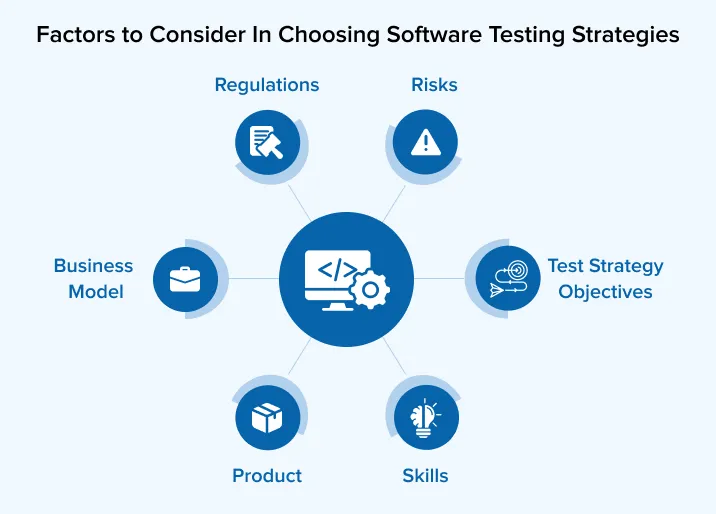
By defining these aspects early, teams can create predictable and scalable testing workflows.
Why Software Testing Strategies Are Important
Whenever I’ve worked on projects without a clear strategy, the same problems show up:
-
Defects reaching production
-
Critical issues discovered late
-
Flaky automation and wasted effort
-
Unpredictable release cycles
With a defined strategy in place, I’ve seen clear improvements:
-
Risks identified earlier
-
Effort focused where it matters
-
Automation delivering real value
-
Releases becoming stable and repeatable
In fast-moving environments, a well-defined strategy helps balance speed, quality, and cost without slowing delivery.
Key Components of a Software Testing Strategy
A comprehensive software testing strategy includes several core components that guide how testing activities are planned, executed, and evaluated throughout the software development lifecycle.
1. Testing Objectives
Testing objectives define the overall goals of the testing process. They help teams understand what quality standards must be achieved and what risks need to be minimized before software is released.
2. Testing Scope
The testing scope identifies which parts of the system will be tested and which areas may be excluded. It ensures that critical modules, integrations, and features receive proper validation during the testing process.
3. Types of Testing
This component specifies the different testing approaches that will be used, such as functional testing, performance testing, security testing, and regression testing. Selecting the right testing types ensures comprehensive validation of the application.
4. Testing Tools and Frameworks
Testing tools and frameworks support the execution and automation of test cases. Teams often use tools for UI testing, API testing, performance testing, and continuous integration to improve efficiency and reduce manual effort.
5. Test Environments
Test environments represent the infrastructure where testing activities take place. These environments should closely resemble the production environment to ensure accurate and reliable testing results.
6. Automation Strategy
An automation strategy defines which test cases should be automated and how automation fits into the development pipeline. Automation is typically used for repetitive tasks such as regression testing and CI/CD validation.
7. Entry and Exit Criteria
Entry and exit criteria establish the conditions required to begin and complete testing phases. These criteria help teams maintain consistency and ensure that testing is performed only when builds are stable.
8. Metrics and Reporting
Metrics and reporting help teams evaluate testing effectiveness by tracking indicators such as test coverage, defect density, and automation success rates. These insights allow teams to continuously improve their testing processes.
Who Owns the Software Testing Strategy?
From what I’ve seen, ownership depends on team size and maturity:
-
QA Manager or Test Lead in most teams
-
Engineering Manager in smaller setups
-
QA Architect in enterprise environments
-
Shared ownership across QA, Dev, and Product in Agile teams
Even when one person owns the document, the strategy works best when it’s collaborative and evolves with the product.
Test Strategy vs Test Plan in Software Testing
I often see teams mix these two up, so I keep the distinction simple.
|
Aspect |
Test Strategy |
Test Plan |
|
Level |
High-level |
Detailed |
|
Scope |
Project or organization |
Specific release |
|
Focus |
Testing approach |
Execution details |
|
Stability |
Long-term |
Short-term |
|
Created by |
QA leadership |
QA team |
A test strategy defines the overall approach and remains stable over time.
A test plan focuses on execution details for a specific release and changes more frequently.
Both are necessary, but they serve different purposes at different levels. In my experience, teams that struggle to differentiate between these two often need to revisit core software testing basics before defining higher-level strategy decisions.
Types of Software Testing Strategies
Common levels of testing used when defining a software testing strategy.
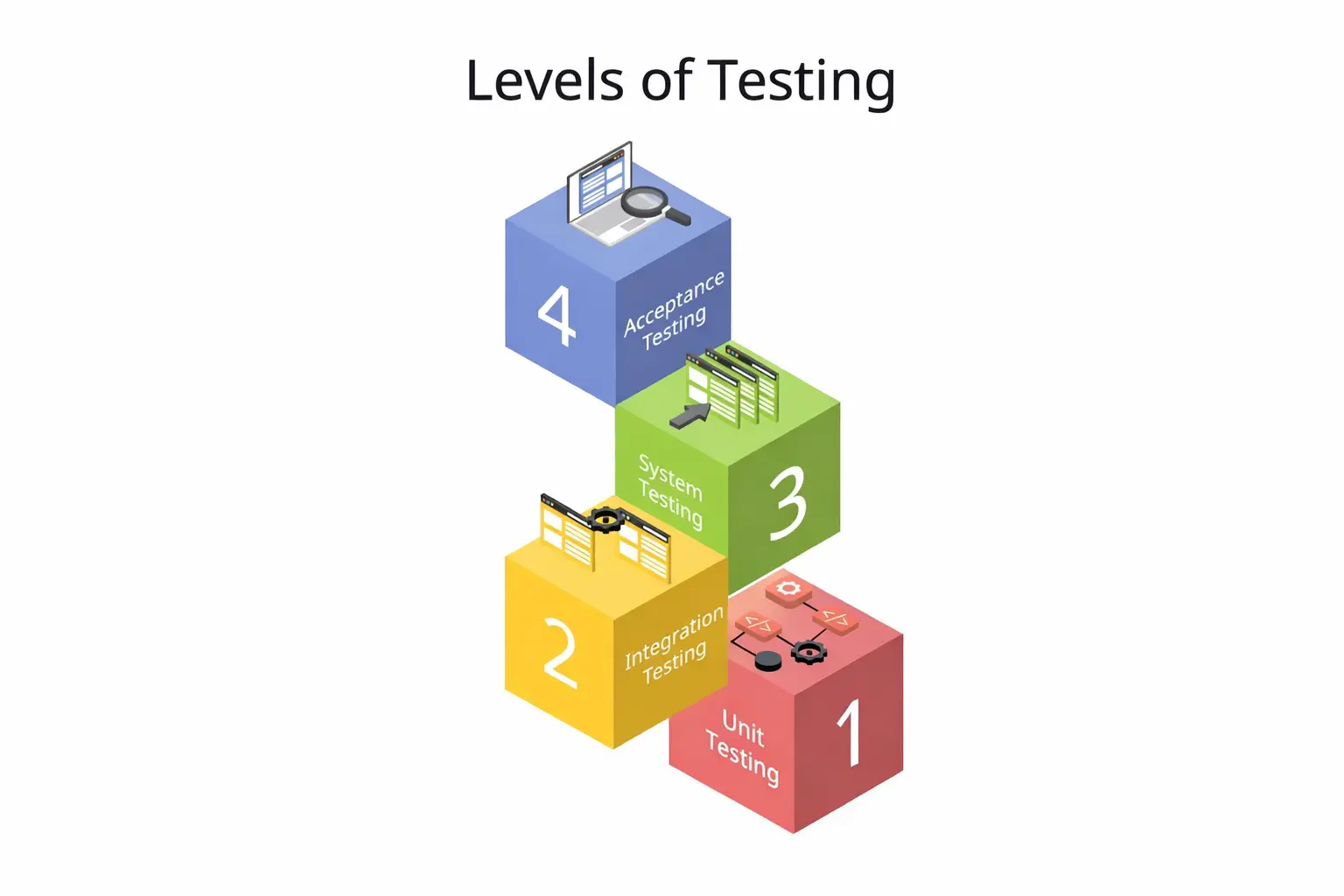
In real-world projects, I rarely rely on a single testing approach. Most teams combine multiple testing strategies depending on risk, system complexity, and development speed.
Manual Testing Strategy
I rely on manual testing mainly to:
-
Explore real user flows
-
Validate edge cases
-
Debug issues during development
Even during manual validation, tools matter. I often use Postman for API exploration, BrowserStack for cross-browser checks, and Keploy to capture real API interactions triggered manually. Those captured flows later become reusable test cases.
Automation Testing Strategy
Automation delivers the most value for:
-
Regression and smoke coverage
-
CI/CD pipelines
-
Repetitive and stable workflows
Here, I usually combine UI tools like Selenium or Playwright with API-level coverage. Keploy reduces manual scripting by converting real traffic into automated regression checks that run in pipelines.
API Testing Strategy
I prefer API testing at the service level when:
-
Business logic lives at the service layer
-
UI checks become slow or flaky
-
Systems are built around microservices
API checks run faster, break less often, and scale better. I use Postman during early validation and rely on Keploy to capture real API traffic and replay it later during regression runs.
Regression Testing Strategy
Regression coverage helps ensure new changes don’t break existing functionality.
-
Mix of automated and targeted manual checks
-
Critical before every release
Keploy plays an important role here by replaying previously captured API flows, which makes regression more realistic and less brittle.
Performance and Security Testing Strategy
This strategy focuses on:
-
Load and stress behavior
-
Scalability limits
-
Security vulnerabilities
I usually run these at defined milestones using tools like JMeter or k6 instead of on every build.
Testing Strategy by Project Type
Startup or MVP Projects
In startups, I focus on:
-
Risk-based validation
-
Lightweight documentation
-
Core user journeys
-
Early API and exploratory checks
Capturing real usage early using Keploy helps avoid heavy test design while still building future automation.
Enterprise Software Projects
In enterprise environments, the strategy usually includes:
-
Formal documentation
-
Compliance and security coverage
-
Multiple test environments
-
Metrics-driven decisions
Automation, API regression, and CI/CD integration become mandatory at this scale.
Agile vs Waterfall
Agile teams follow adaptive strategies with automation-first thinking and frequent updates.
Waterfall teams rely on fixed strategies, phase-based validation, and heavier upfront planning.
Best Practices for Software Testing Strategies
To create an effective testing strategy, teams should follow several best practices.
-
Adopt shift-left testing to detect defects earlier
-
Automate stable and repetitive workflows
-
Prioritize API-level validation for faster feedback
-
Integrate testing into CI/CD pipelines
-
Continuously monitor testing metrics
-
Update strategies as the system architecture evolves
These practices help maintain consistent software quality across releases.
How I Create an Effective Software Testing Strategy
1. Understand Product Scope and Risks
I start by identifying:
-
Business-critical features
-
High-risk integrations
-
Performance or compliance constraints
2. Define Test Levels and Test Types
I clearly define:
-
Unit, integration, system, and acceptance levels
-
Functional and non-functional coverage
3. Choose Tools and Test Environments
At this stage, I choose tools that support the strategy instead of slowing it down. UI tools stay limited, performance tools handle benchmarks, and Keploy supports API-level validation and regression coverage.
4. Define Entry and Exit Criteria
Typical examples:
-
Entry: stable build available
-
Exit: no critical issues open
5. Plan Automation and CI/CD Integration
Here I focus on:
-
What should be automated
-
When checks should run (PR, nightly, pre-release)
-
How failures are reported
API flows captured by Keploy integrate smoothly into CI/CD pipelines and keep feedback fast.
6. Define Metrics and Reporting
I make sure metrics reflect quality impact rather than activity volume.
Test Strategy Metrics and KPIs
The metrics I track most often include:
-
Test coverage
-
Defect leakage
-
Defect density
-
Automation pass rate
-
Flaky check percentage
-
Mean time to detect issues
These metrics help improve the strategy over time instead of assigning blame.
Software Test Strategy Document
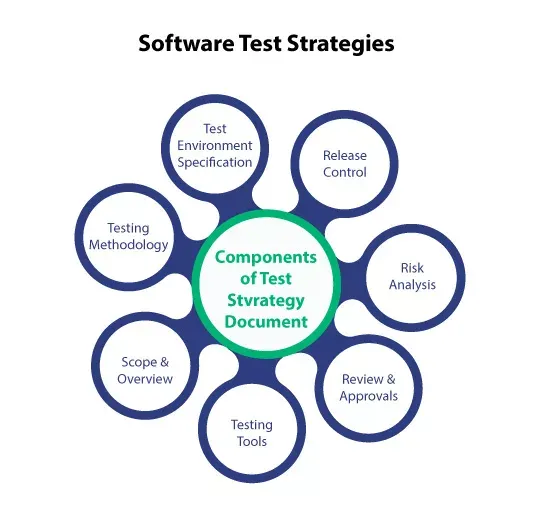
I treat the test strategy document as a single source of truth for quality expectations.
It usually includes:
-
Scope and objectives
-
Approach and coverage types
-
Tools and environments
-
Roles and responsibilities
-
Risk assessment
-
Metrics and reporting
Software Test Strategy Example (Real-World)
For a typical SaaS web application, I’ve followed an approach where:
-
Core workflows are covered with API-first validation
-
UI automation is limited to smoke checks
-
Manual exploration is used for new features
In execution:
-
API flows are captured using Keploy during development
-
Regression suites run before releases
-
Exploratory checks happen during sprint reviews
This approach keeps releases fast, stable, and predictable.
Modern Software Testing Strategies (2026-Ready)
Shift-Left Testing
I follow a shift-left testing approach by pushing quality checks earlier into design and development workflows.
CI/CD-Driven Testing
In CI/CD-driven setups, automated checks run directly from pipelines and keep feedback loops short.
AI-Assisted and API-First Strategies
As systems grow around APIs and microservices, traditional script-heavy approaches struggle to scale.
With an API-first approach:
-
Business logic is validated at the service layer
-
Validation runs faster and fails less often
-
Issues surface earlier in development
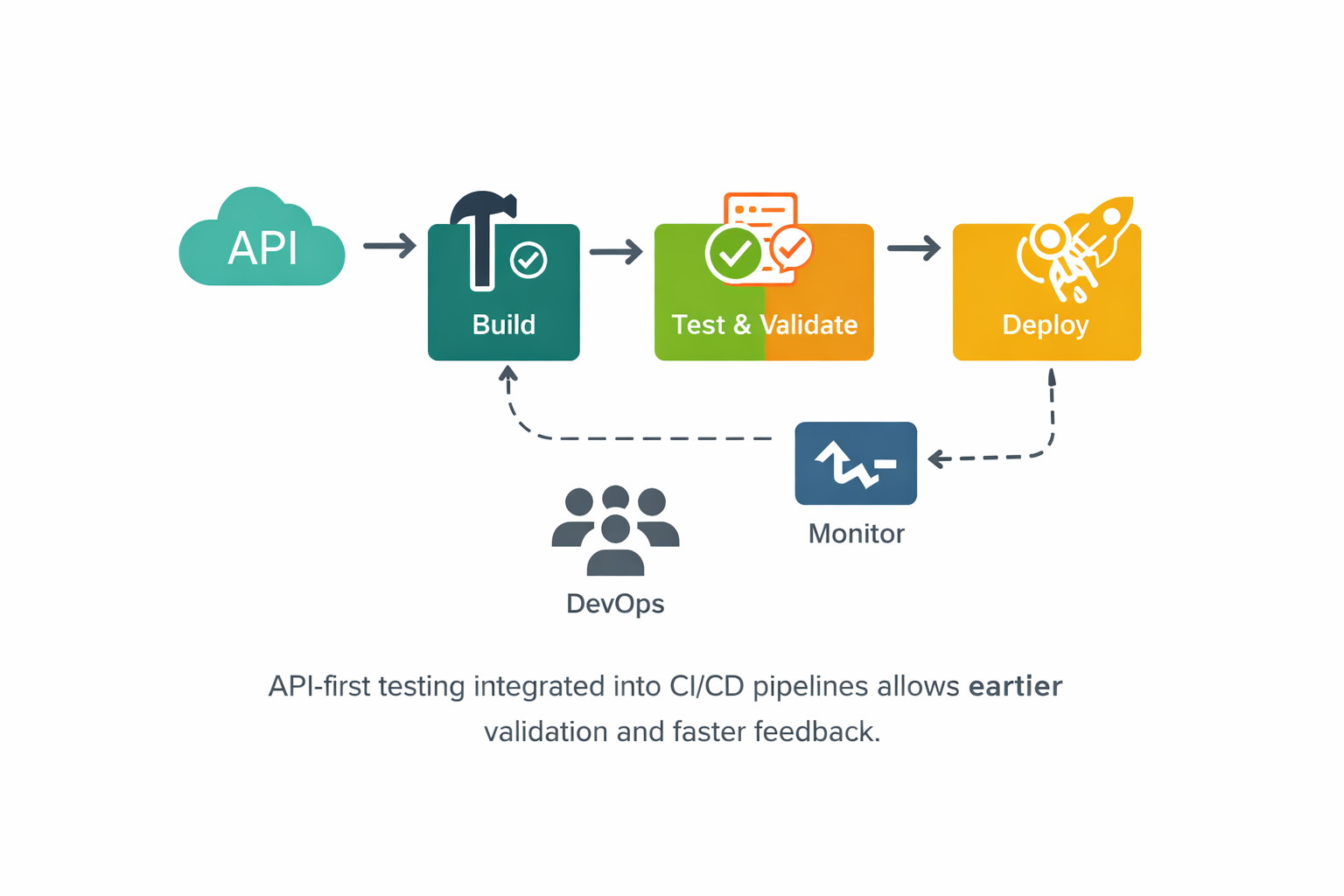
AI-assisted approaches add another layer by generating checks from real traffic, reducing maintenance, and improving coverage. Keploy fits well here by capturing real API behavior, replaying it during builds, and detecting regressions early whether flows were triggered manually or automatically.
When Should You Update a Software Testing Strategy?
I update the strategy whenever:
-
Architecture changes
-
New integrations are added
-
Teams scale
-
CI/CD pipelines evolve
-
Quality goals change
A strategy should evolve with the product.
Common Mistakes in Software Testing Strategies
Mistakes I see often include:
-
Treating the strategy as a formality
-
Over-automating unstable features
-
Ignoring non-functional coverage
-
Not revisiting the strategy regularly
-
Confusing strategy with execution
Future of Software Testing Strategies
Software testing strategies are evolving alongside modern development practices.
Key trends include:
-
AI-assisted testing
-
traffic-based test generation
-
continuous testing in CI/CD pipelines
-
intelligent regression detection
Tools like Keploy represent a new generation of testing solutions that automatically generate tests from real application traffic.
These approaches help teams reduce manual effort while improving test coverage and reliability.
Benefits of Software Testing Strategies
- Detect defects earlier in the development lifecycle
- Automate regression testing in CI/CD pipelines
- Reduce production risks and system failures
- Improve collaboration between developers and QA engineers
- Maintain consistent software quality across releases
Software Testing Strategy Template
A typical software testing strategy document includes the following sections:
- Introduction
Defines the purpose of the testing strategy and the overall testing objectives.
- Scope of Testing
Describes which modules, systems, and integrations will be tested and which areas are out of scope.
- Testing Approach
Explains the testing methodologies used, including manual testing, automation testing, API testing, and performance testing.
- Test Environments
Defines the environments where testing will take place, such as development, staging, and pre-production.
- Testing Tools
Lists the tools used for test execution, automation, monitoring, and CI/CD integration.
- Roles and Responsibilities
Identifies the teams and individuals responsible for testing activities.
- Entry and Exit Criteria
Defines the conditions required to begin testing and the criteria for completing testing cycles.
- Metrics and Reporting
Specifies how testing results will be measured and reported.
Many teams document their software testing strategy using structured templates to ensure consistency across development cycles.
Conclusion
A clear testing strategy doesn’t slow teams down—it helps them move faster with confidence. By aligning risk, tools, and validation early, teams can ship reliable software without last-minute surprises or unstable releases.
FAQs
What is a software testing strategy?
A software testing strategy is a high-level plan that defines how testing activities are designed, executed, and managed throughout the software development lifecycle. It outlines testing approaches, tools, environments, and quality goals.
Who prepares the test strategy?
Usually a QA lead or test manager, with input from development and product teams.
Is a test strategy mandatory in Agile projects?
It’s not mandatory, but I strongly recommend it for consistency and quality.
How often should a test strategy be updated?
Anytime there are major changes in architecture, tools, teams, or release processes.

Leave a Reply