
Effective API testing requires more than running a few requests and checking status codes. The api testing best practices that separate high-performing teams from struggling ones cover everything from how tests are structured and maintained to how they integrate into CI/CD pipelines and catch security vulnerabilities before deployment.
This guide covers the api testing and automation best practices that matter most in 2026, with tool recommendations for each.
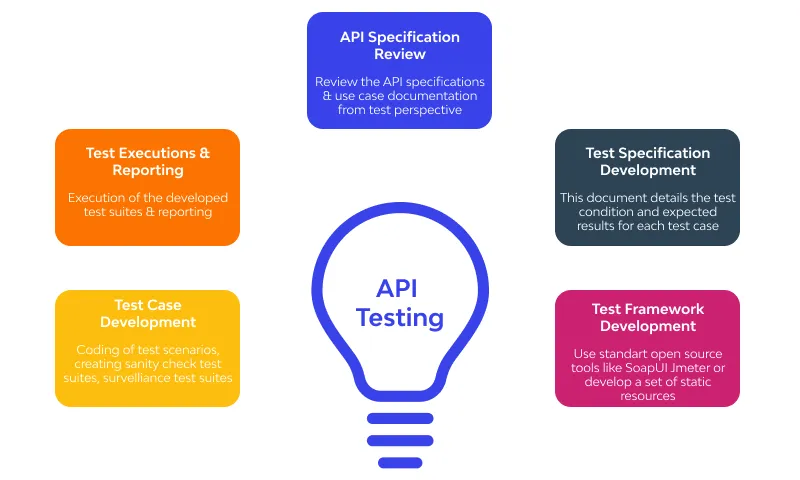
API Test Automation allows you to:
- Save Time: Automated tests can be run quickly and repeatedly, freeing up valuable time for developers and testers to focus on more creative and critical tasks.
- Increase Test Coverage: Automated tests can cover a wide range of scenarios, from basic functionality to edge cases, ensuring thorough testing.
- Catch Bugs Early: Automated tests can be integrated into the development process, catching issues as soon as they are introduced, which is more cost-effective than fixing them later in the development cycle.
- Facilitate Continuous Integration (CI): Automated API tests can be seamlessly integrated into your CI/CD pipeline, providing instant feedback on code changes.
Now that we’ve established the need for automation let’s explore some best practices and tools for mastering API test automation.
What Are the Advantages and Challenges of API Test Automation?
Automating API tests brings a lot of benefits, but it also comes with some challenges that every team should be aware of. Let’s break it down.
Advantages
One of the biggest benefits of API test automation is scalability. Once your tests are automated, you can run hundreds or even thousands of test cases in minutes, something that would take days if done manually. This makes it easy to test complex applications with multiple endpoints and ensures that nothing is left unchecked.
Automation also improves reliability. Because the tests run the same way every time, you don’t have to worry about human errors creeping in, which is common with manual testing.
Another key advantage is faster delivery. Automated tests integrate seamlessly into agile and DevOps workflows, allowing teams to release features more quickly without compromising on quality.
Finally, automation enhances test coverage. It allows you to validate not only the common, expected scenarios but also edge cases that might be difficult or tedious to check manually. This reduces the risk of bugs slipping into production.
Challenges
Of course, API test automation isn’t without its hurdles. The initial setup can require significant effort, including choosing the right framework, designing test strategies, and ensuring your team has the right skills.
Once the tests are in place, there’s the maintenance overhead. APIs evolve over time, and your test scripts need to keep up with changes. Otherwise, you risk false failures or outdated tests that don’t reflect the current system.
Handling dependencies can also be tricky. Many APIs rely on external services or databases, and if these dependencies aren’t properly managed, your tests can become flaky and unreliable.
Finally, managing test data at scale can be a challenge. Large test suites often require varied input data and expected outputs, and keeping this organized while maintaining flexibility requires thoughtful planning.
How to Solve These Challenges
Fortunately, there are practical ways to address these challenges. A good starting point is to start small: focus on automating the most critical endpoints first, and expand gradually as confidence in your suite grows.
Using mocks or stubs is another effective approach. These tools simulate external services, ensuring that your tests remain stable even when dependencies change or are unavailable.
Version control for test scripts is essential, just like for your application code. It allows you to track changes, collaborate with your team, and roll back updates if something goes wrong.
You can also parameterize your tests, meaning you can reuse the same test logic with different input data. This reduces duplication and makes your tests more flexible.
Finally, make it a habit to review and maintain your test suite regularly. Remove outdated tests, update scripts to reflect API changes, and clean up any redundant or flaky cases to keep your suite reliable and maintainable.
API Testing Best Practices
1. Start with a Solid Test Strategy
Before diving into automation, create a clear test strategy. Understand the API’s functionality, expected outcomes, and potential edge cases. Document your test scenarios and expected results. This will serve as the foundation for your automated tests.
2. Use a Testing Framework
Select a testing framework that suits your needs. For API testing, popular choices include:
- Postman: Known for its user-friendly interface and the ability to create collections of API requests.
- Keploy: An Open Source E2E Testing Platform to auto-generate test cases and Data Mocks/Stubs.
- RestAssured: A Java library for REST API testing.
- Requests-HTML: A Python library for testing and scraping HTML and JSON.
Choose a framework that aligns with your team’s skills and the programming languages you use in your project.
3. Separate Test Data from Test Scripts
Keep your test data separate from your test scripts. Storing test data in external files or databases allows for easy updates without modifying the test scripts. This separation also promotes reusability.
4. Implement Test Version Control
Just as you version control your code, version control your test scripts. This ensures that you can track changes, collaborate effectively, and revert to previous versions if necessary.
5. Parameterize Tests
Parameterization allows you to run the same test with different input data. This is especially useful for testing various scenarios without duplicating test cases. Most testing frameworks support parameterization.
6. Handle Dependencies and State
APIs often depend on external services or databases. Ensure that your tests can handle these dependencies or use mocking to simulate them. Also, be mindful of test order and any potential side effects between tests.
7. Continuous Integration (CI) Integration
Integrate your automated API tests into your CI/CD pipeline. This ensures that tests are run automatically with each code change, providing rapid feedback to developers.This includes regression testing – running your full API test suite on every commit to catch any breaking changes before they reach staging or production.
8. Regular Maintenance
APIs evolve, and so do your tests. Keep your test suite up-to-date with the latest API changes. Regularly review and update your test scripts to prevent false negatives.
9. Implement Contract Testing
In microservices architectures, a breaking change in one service’s API response – a removed field, a changed status code, a modified schema – can cascade across all dependent services. Contract testing catches these breaks in CI before deployment rather than in production.
The consumer defines what it expects from the provider API. The provider runs these consumer contracts as part of its test suite. When a change breaks the contract, the build fails immediately.
Pact is the standard tool for consumer-driven contract testing. Keploy takes a complementary approach, by replaying captured real traffic against new deployments, it verifies that behavioral contracts hold without requiring manually written contract definitions.
10. Automate Security Testing
The OWASP API Security Top 10 defines the most critical API vulnerabilities. In 2026, the top three that automation catches most effectively are:
- Broken Object Level Authorization (BOLA): Test whether authenticated users can access objects belonging to other users by substituting resource IDs in requests.
- Broken Authentication: Verify that endpoints reject expired tokens, malformed tokens, and missing Authorization headers with the correct 401 or 403 responses.
- Unrestricted Resource Consumption: Test rate limiting by sending requests above the documented threshold and confirming the API returns 429 responses.
11. Validate Response Structure, Not Just Status Codes
A common mistake in API testing is checking only whether an endpoint returns a 200 status code and treating that as a passing test. Status codes confirm that the server responded – they say nothing about whether the response contains the correct data.
Effective API testing validates the complete response:
- Status code – confirms the correct HTTP response category
- Response body structure – validates that required fields are present and correctly named
- Data types – confirms that fields return the expected type (string, integer, boolean, array)
- Response headers – validates content-type, authentication headers, and cache directives
- Response time – confirms the endpoint meets performance thresholds under normal conditions
A test that only checks the status code will pass when an API silently drops a required field, renames a key, or changes a data type. These are the breaking changes that cause downstream failures in consuming services.
12. Test Authentication and Authorization Explicitly
Authentication and authorization failures are among the most critical API vulnerabilities and the most commonly missed in automated test suites. Testing these explicitly means verifying not just that authenticated requests succeed but that unauthenticated and unauthorized requests fail correctly.
For each protected endpoint, test:
- Missing token – the endpoint should return 401, not 200 or 500
- Expired token – the endpoint should return 401 with a clear error message
- Token with insufficient permissions – the endpoint should return 403, not 401 or 200
- Token belonging to a different user – the endpoint should not return data belonging to that user
These tests are cheap to write and catch entire classes of security vulnerabilities that functional tests miss entirely.
13. Cover Negative Scenarios and Error Paths
Most API test suites cover the happy path thoroughly and neglect error paths. Production incidents happen at the edge cases – malformed inputs, missing required fields, boundary values, concurrent requests, and dependency failures.
Negative testing for APIs means covering:
- Invalid input – send malformed JSON, unexpected data types, and values that exceed field limits
- Missing required fields – confirm the API returns a descriptive 400 error rather than a 500 or silent failure
- Boundary values – test the exact limits of numeric fields, string lengths, and date ranges
- Dependency failure simulation – use mocks to simulate what happens when a downstream service is unavailable or returns an error
The ratio that works in practice: for every positive scenario in the suite, at least two negative scenarios covering invalid input and dependency failure. The ratio sounds high but the tests are fast to write once the framework is in place.
Which Tools Can Help Automate API Testing?
Now that we’ve covered some best practices, let’s explore a few popular tools that can help you automate API testing:
1. Postman
Postman is a user-friendly tool that allows you to create and organize API requests into collections. It offers features like environment variables, pre-request scripts, and a test runner. Postman is an excellent choice for manual and automated API testing. It supports various authentication methods and can be easily integrated into your CI/CD pipeline.
2. Keploy
Keploy is an open source API testing platform that captures real traffic using eBPF-based tracing and automatically generates test cases and mocks from actual application behavior. Unlike scripted tools, Keploy generates regression coverage from production traffic – meaning tests reflect how the API actually behaves, not how it was assumed to behave.
3. RestAssured
RestAssured is a Java library specifically designed for REST API testing. It provides a simple and expressive syntax for writing tests. RestAssured is popular among Java developers and can be easily integrated into Java-based test automation frameworks.
4. Requests-HTML (Python)
Requests-HTML is a Python library that not only allows you to send HTTP requests but also parse HTML and JSON responses. It’s a versatile tool for testing web APIs and web scraping. Python developers often prefer it for its simplicity and readability.
Limitations: Requests-HTML is more tailored to simple tests and may not offer the same depth of functionality as some other tools when it comes to complex API testing scenarios.
5. k6
k6 is a developer-friendly performance testing tool where tests are written in JavaScript. Unlike legacy load testing tools, k6 integrates natively into CI/CD pipelines and supports threshold-based quality gates – if the 95th percentile response time exceeds 500ms, the build fails. It is the standard tool for API performance testing in 2026 among teams that want code-based, version-controlled load tests.
6. Pact
Pact is the standard tool for consumer-driven contract testing. It generates pact files from consumer tests and verifies provider compliance before deployment. Teams using microservices architectures use Pact to prevent breaking changes from reaching production. The Pact Broker stores contracts and provides visibility into which consumer-provider pairs are verified across the entire system.
How to Create Robust and Maintainable API Test Suites?
- Modularize Your Tests: Break tests into smaller, reusable components. This makes it easier to maintain and scale your test suite.
- Implement Assertions Carefully: Validate status codes, response body structure, data types, and headers. A test without proper assertions cannot catch real failures.
- Keep Test Data Separate: Store test data in external files, databases, or configuration files. This separation makes it easier to update data without modifying test scripts.
- Handle Errors Gracefully: Catch exceptions and errors in your tests to prevent unexpected failures and produce clear error messages for debugging.
- Document Your Tests: Clear documentation helps new team members understand the test suite and its objectives.
- Review Regularly: Periodically refactor your test suite. Remove redundant or obsolete tests, update test data, and address any flakiness.
Keploy implements these best practices automatically, by generating test cases from real traffic, creating mocks for external dependencies, and integrating into CI/CD without manual configuration.
Start for free or book a demo to see how Keploy fits your API testing workflow.
Conclusion
In conclusion, mastering API test automation is essential for efficient and reliable software development. By following best practices, choosing the right tools, and implementing strategies for creating maintainable test suites, you can ensure that your APIs are thoroughly tested and robust, saving time and preventing issues down the line. Happy testing!
Frequently Asked Questions
What is API testing and why is it important?
API testing ensures that the different endpoints of your application communicate properly and return the correct data. It is essential because APIs form the backbone of modern web and mobile applications, and failures in communication can lead to critical bugs.
Why should I automate my API tests instead of doing them manually?
Automating API tests saves time, increases test coverage, and catches bugs earlier in the development cycle. It also integrates seamlessly into CI/CD pipelines, enabling continuous feedback and reducing manual effort.
How do I get started with API test automation?
Begin by creating a clear test strategy, understanding your API’s functionality, and selecting an appropriate testing framework. Afterward, start automating basic functionality tests and gradually add more complex scenarios as you build out your test suite.
What tools are best for automating API testing?
Some of the most popular tools for API testing include Postman, Keploy, RestAssured, and Requests-HTML. The choice of tool depends on your team’s preferred programming language, test requirements, and integrations needed for your project.
How often should I run my API test suite?
Ideally, you can run tests on every code change (via CI/CD). Additionally, schedule daily or weekly runs to catch environment or dependency-related issues.
Can I use automated API tests in my CI/CD pipeline?
Yes, automated API tests can be easily integrated into your CI/CD pipeline. By doing this, you get rapid feedback on every code change, ensuring that any issues are caught early before they make it to production.
How do I ensure that my API tests are maintainable?
To create maintainable tests, modularize them into smaller, reusable components, keep test data separate from the scripts, and continuously review and refactor your test suites to avoid redundancy and flakiness.
What are the challenges of API test automation?
Challenges include setup effort, test maintenance, flaky dependencies, and test data management. These can be solved with mocks, parameterization, and regular review.
How do I keep API tests maintainable long-term?
Modularize your tests, separate data from scripts, document thoroughly, and review test suites regularly to avoid redundancy.

Leave a Reply