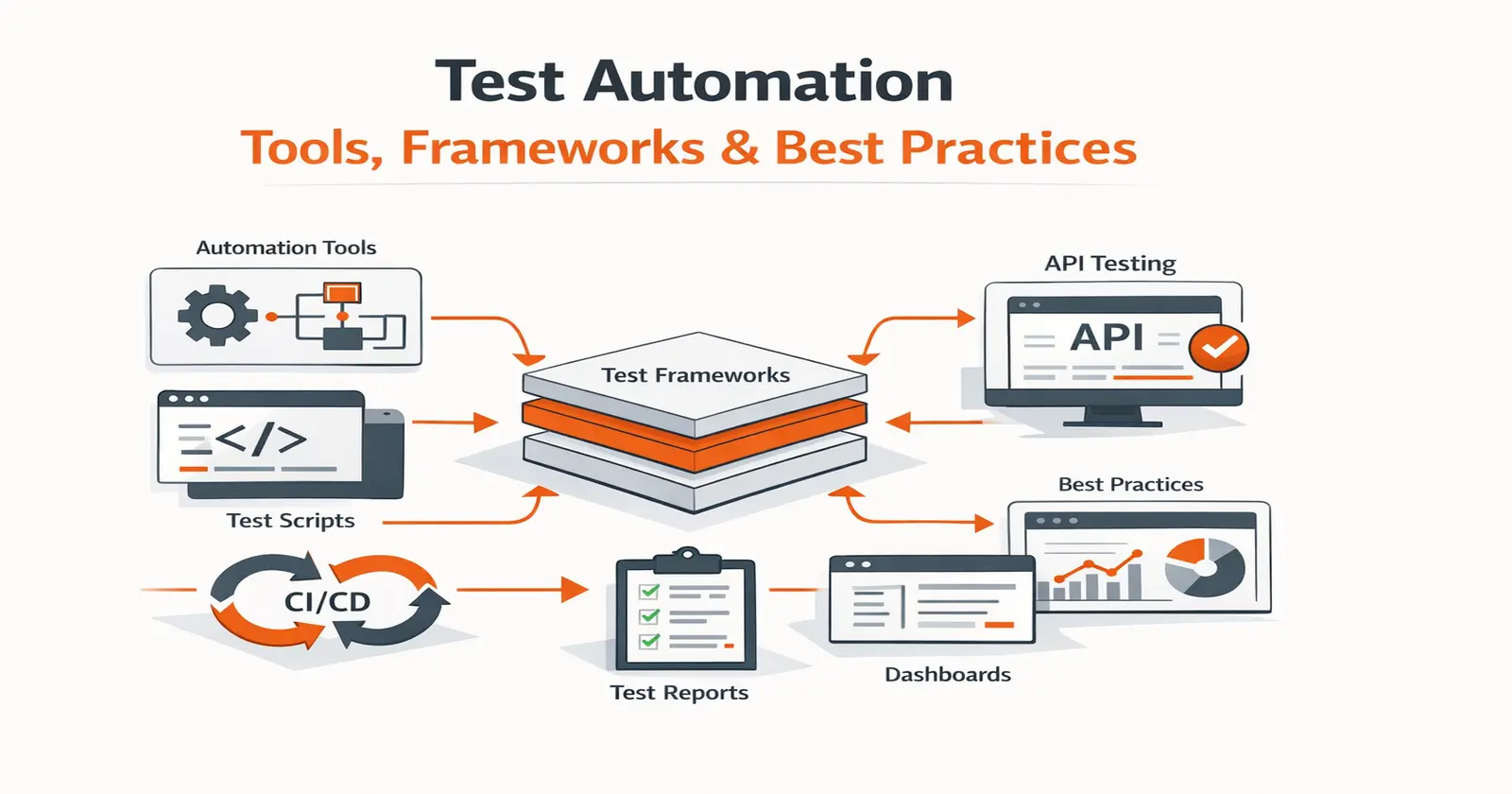
Test automation is the use of tools and scripts to run tests, validate outcomes, and report results without manual effort on every build. The goal isn’t to automate everything – it’s repeatable validation of the right layers. Most teams get the most signal from API and integration tests in CI, where tools like Keploy generate tests from real traffic rather than hand-written scripts.
If your CI pipeline feels unpredictable, it’s rarely because you’re testing too little – it’s because testing isn’t repeatable.
Test automation brings consistency by validating every build the same way, every time. Done poorly, though, it creates slow suites and unreliable failures. Let’s get it right with a practical guide to what test automation is, when to use it, which frameworks and tools matter in 2026, and how to implement it without a maintenance nightmare.
What is Test Automation in Software Testing?
Test automation is the use of tools and scripts to automatically run tests, validate expected outcomes, and report results with minimal manual effort. It improves testing speed, consistency, and coverage – especially for regression, API, and integration checks – while requiring strategy, maintenance, and reliable test data.
The goal is not to “automate everything.” The goal is:
-
faster feedback
-
higher confidence
-
repeatable validation
-
less manual repetition
When it’s done right, test automation becomes the safety net that allows teams to ship frequently without fear.
What is the Difference Between Test Automation and Automated Testing?
The terms test automation and automated testing are interchangeable – both refer to the same practice of using tools and scripts to execute tests automatically without manual intervention. You will see both used throughout the industry, often on the same page, and they mean the same thing.
The term that is genuinely different is automation testing. Automation testing refers to testing an automated process itself – for example, validating that an RPA (robotic process automation) workflow runs correctly. It is a specific type of test, not a synonym for test automation.
In short:
- Test automation = automated testing – automating the act of running software tests
- Automation testing – testing whether an automation (like an RPA bot) works as intended
Why Test Automation Matters in 2026?
Most teams don’t struggle because they “don’t test.” They struggle because the way software is built and shipped today has fundamentally changed. With AI-assisted development, teams are shipping 10x code in the same amount of time. Applications are increasingly microservice-based, integrations are deeper, and system behavior now spans multiple services, databases, and third-party APIs. As architecture complexity grows, testing individual changes in isolation – or validating everything end-to-end – becomes harder and slower.
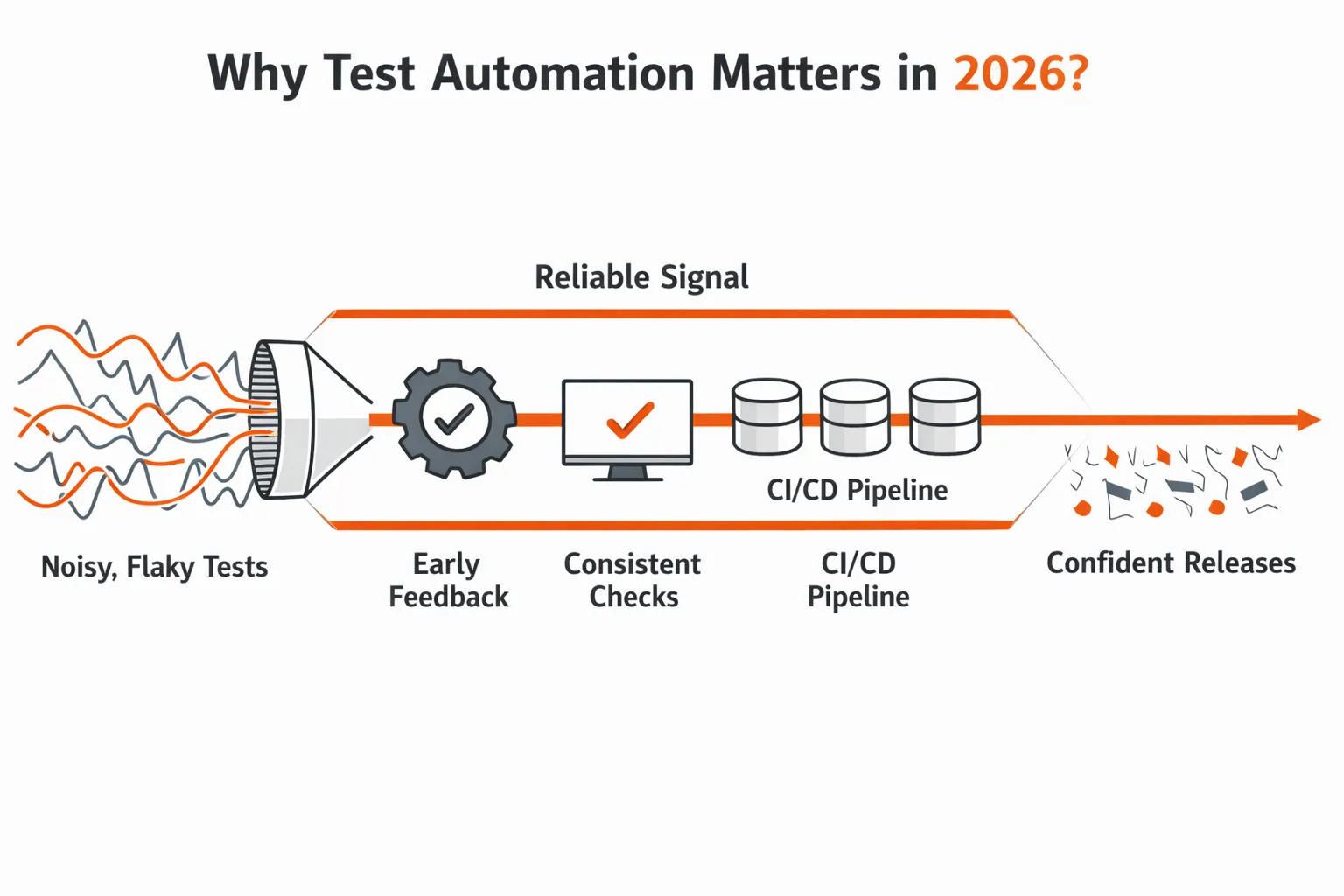
In fast release cycles like these, you need a stable test result signal – a reliable pass/fail indicator – on every change. When testing isn’t repeatable, or feedback arrives too late, teams lose confidence in what they’re shipping.
When automation is healthy and trusted, teams experience the following:
Why CI pipelines need repeatable test signals
Pull requests fail quickly for the right reasons
When defects are discovered that cause a failure (such as broken contracts, invalid responses, missing edge cases), they are discovered while the developer still has an accurate memory of their work, rather than weeks after the pull request is submitted (in staging or production).
How automation prevents regression escapes across services
There are no regression bugs leaking into unrelated releases
Automation around APIs, permissions, and core workflows is stable enough that changes to one service will not cause changes to another service weeks later (thus removing hidden defects).
Why API behavior must be validated on every build
API and integration behavior are predictable
Because the same requests are validated with every build, teams can reason about changes with confidence, even as services, data, and dependencies change and evolve.
Where automation coverage creates the most risk reduction
Coverage is increased where the risk really exists
Automation focuses on APIs, integrations, and service boundaries instead of brittle UI flows (this is where most of the problems with modern production systems occur). This is the principle behind shift-left testing.
What is shift-left testing?
Shift-left testing means moving testing earlier in the development cycle – closer to where code is written rather than after it is built. Instead of validating changes in staging or before release, teams test at the pull request stage, catching issues while the developer still has full context on the change. In practice this means running unit tests, API checks, and integration tests on every commit rather than saving validation for a later pipeline stage. The result is faster feedback, lower fix cost, and fewer surprises at release time.
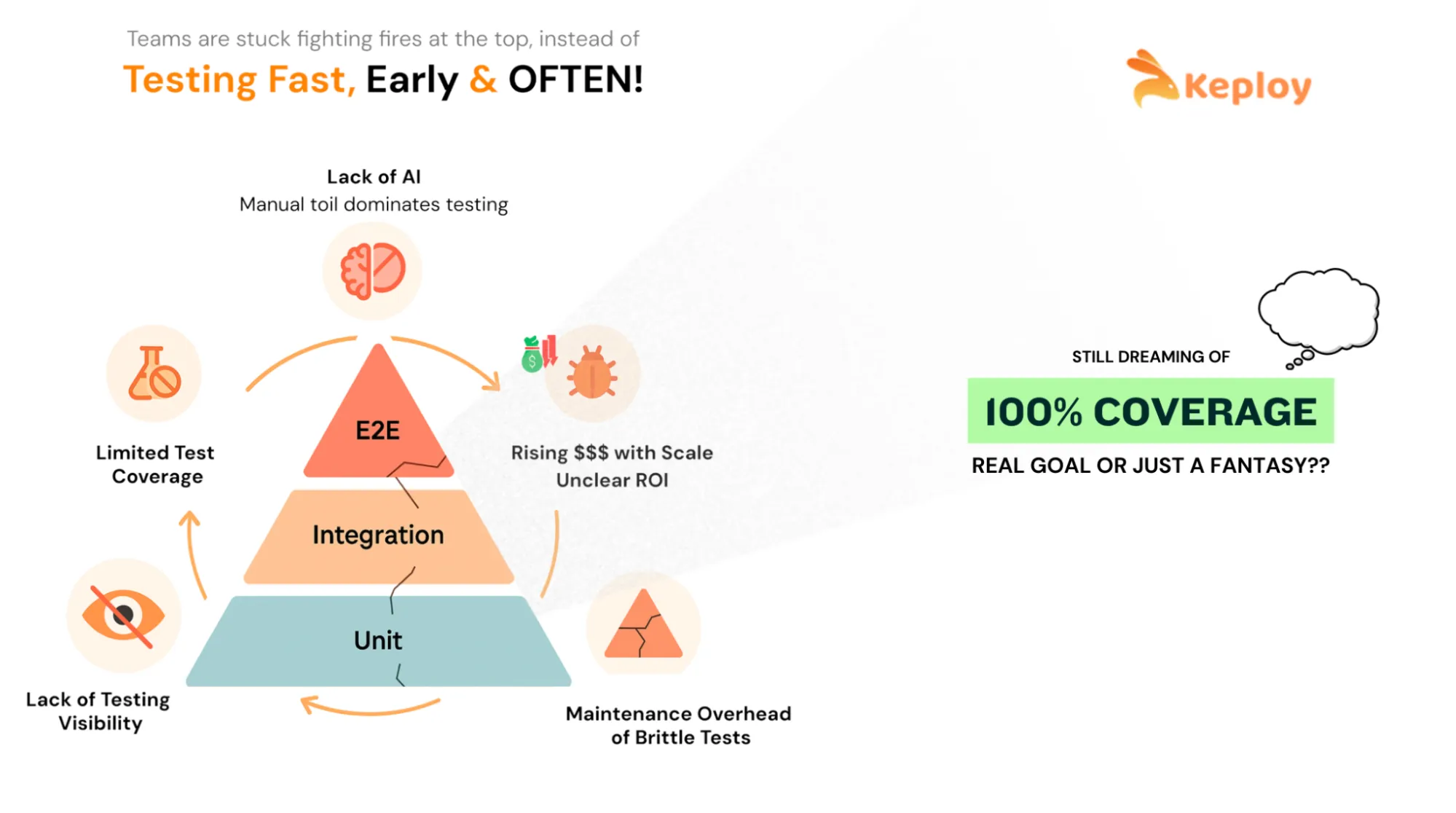
Now the honest part: automation can also become a mess. If the suite is flaky, slow, or hard to debug, teams stop trusting it. That’s why the goal isn’t “more tests.” The goal is reliable signal that teams can act on.
For a detailed breakdown of measurable returns, see our guide on benefits of test automation.
How AI is Changing Test Automation in 2026?
-
AI has not replaced test automation. It has changed which parts require human effort. The problems teams spent the most time on – writing scripts from scratch, fixing broken selectors after UI changes, maintaining mocks as dependencies drift – are exactly what AI tooling now targets.
-
AI test generation analyzes application behavior or real traffic and generates test cases automatically, skipping the manual scripting step. The limitation is accuracy: AI-generated tests reflect observed behavior, not necessarily intended behavior. Human review is still required.
-
Self-healing tests detect when UI elements change – a renamed button, a shifted selector – and update the test automatically instead of failing it. This reduces false failures from cosmetic changes and cuts selector maintenance time.
What AI does not change: the judgment required to decide what to test, why a failure matters, and whether a passing suite actually reflects real system quality. AI handles the mechanical layer. Humans remain responsible for test strategy and coverage decisions.
The practical implication: AI is accelerating how fast code gets written and shipped. Test automation needs to keep pace with that speed – not be replaced by it.
What to Automate and What to Not?
Manual testing relies on human judgment – it catches usability issues, exploratory edge cases, and anything that requires intuition. Test automation replaces repetition – the same checks, run the same way, on every build.
The question is never "automate everything" or "manual is better."
It is knowing where each approach creates the most value.
A lot of automation fails because teams start in the wrong place. They automate the most visible layer (UI) first, then spend months fighting flakiness.
A more effective way to test software is by focusing on tests that provide the highest return. These types of tests will be run frequently, identify major issues, and not be broken with every sprint. Understanding the fundamentals of software testing is a prerequisite before making this decision.
Before deciding what category of tests to automate, it helps to apply a simple criteria check. A test is a strong candidate for automation if it meets one or more of the following:
- Repetition- the test needs to run on every build or deployment
- Volume- the test covers multiple data sets, roles, or configurations that would take hours to validate manually
- Precision- the test involves calculations, data comparisons, or sequencing where human error is likely
- Stability- the underlying behavior being tested is unlikely to change every sprint
- Breadth– the test needs to run across multiple environments, browsers, or platforms
- Business criticality– a failure in this area would have a direct impact on users or revenue
If a test does not meet any of these criteria, it is almost always a better use of time to validate it manually. The sections below apply these criteria to the specific test categories that deliver the highest return.
Automate These First (High ROI)
-
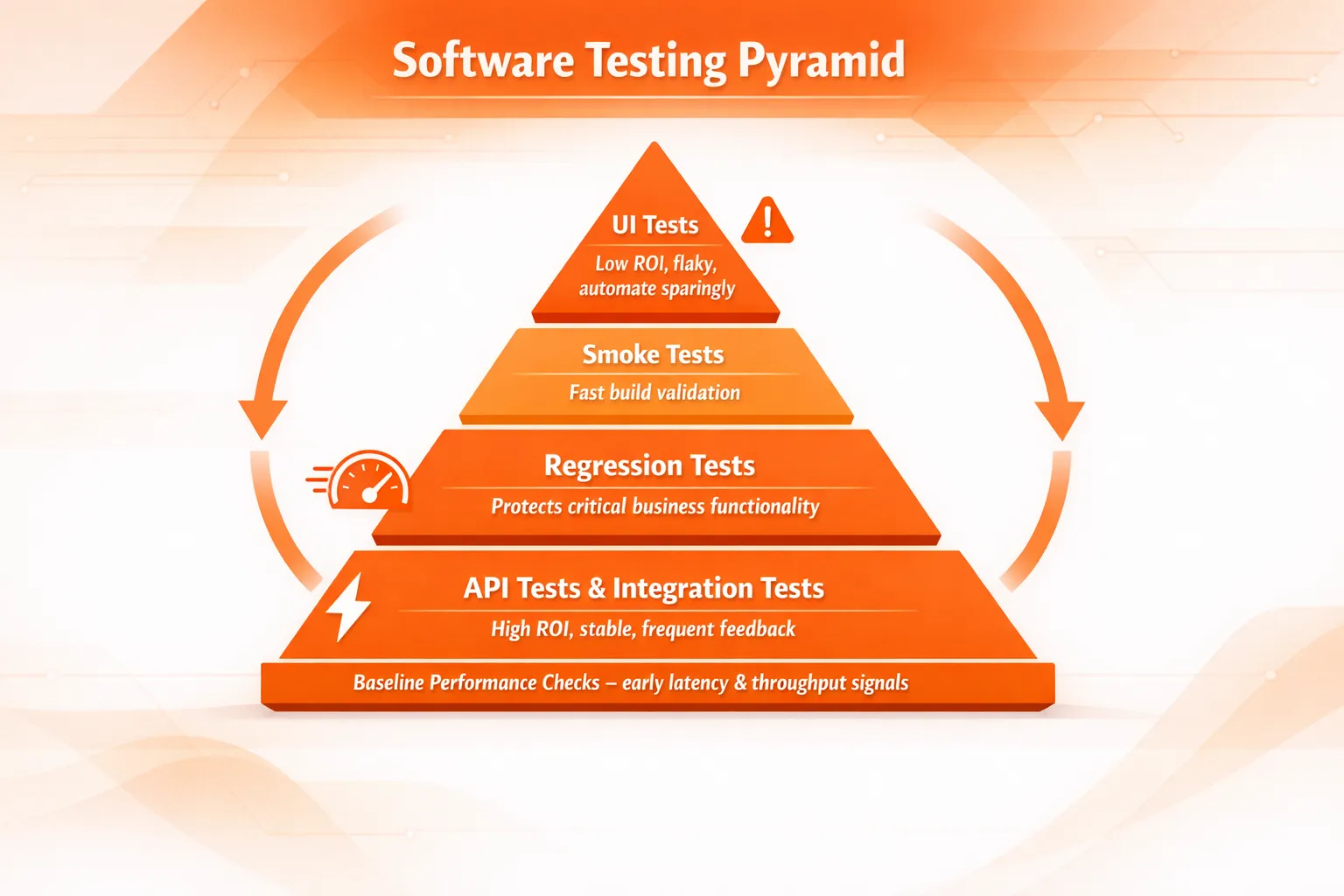
Regression tests
Regression tests should be created for stability-based functional areas that are important to the business and should not fail from release to release. These tests yield immediate return since they identify unintentional side effects of work performed by the team across multiple systems using the same method. -
API tests
API tests are applied to ensure that all the standard artifacts used as part of an API’s request and response in the system are working correctly. Automated API testing provides immediate and reliable feedback on the quality of APIs and often yields the highest return in newer models of architectures where services communicate constantly with each other. -
Integration tests
Integration tests should be created for service to database, service to a message queue, and service to service interactions. Many of the actual production failures occurred at these boundaries where the actual configuration, data or behavior of dependencies differs from what was expected. -
Smoke tests
Run smoke test for a small number of quick validation tests to answer the question “Is this particular build okay to deploy?” The tests should execute in less than 5 minutes or thereabouts and should prevent broken builds from getting further into the build-and-deploy pipeline. -
Baseline performance checks
Monitor lightweight latency and throughput of critical system endpoints as a performance baseline measurement for the system as a whole. Not perform a complete load test of the system every time that there is an application idle, but rather catch possible latency issues before they are noticed by users.
Skip These Early (High Maintenance / Low Value)
-
Exploratory testing
Exploratory testing relies on human intuition, observation, and curiosity. While automation can support setup and data creation, the core value here comes from skilled testers interacting with the system in unpredictable ways. -
UI/UX “feel” checks
Automation can validate functional behavior, but it cannot reliably judge usability, visual polish, or user satisfaction. These checks are better handled through design reviews, usability testing, and human feedback loops. -
Rapidly changing features
When UI flows, selectors, or business rules change every sprint, automation quickly becomes a maintenance burden. In high-churn areas, it’s usually better to wait until the feature stabilizes before automating. -
One-off or rarely repeated scenarios
If a scenario is unlikely to recur, the cost of building and maintaining automation often outweighs the benefit. Automation pays off through repetition – without it, manual validation is usually sufficient.
A practical decision rule most teams follow:
Automate tests that are frequent, business-critical, stable, and repeatable.
If a feature is still evolving rapidly, delay automation until the behavior settles.
This single rule prevents most early automation pain.
Common Challenges of Test Automation (and How to Address Them)
Test automation delivers real value – but only when it is built and maintained deliberately. Teams that treat automation as a one-time setup often hit the same three problems.
1) Maintenance burden grows with every sprint
Every time production code changes, tests that depend on that code can break – even if the underlying behavior hasn’t changed. UI selectors shift, API contracts evolve, and test data goes stale. In fast-moving codebases, this creates a compounding maintenance cost where engineers spend more time fixing broken tests than writing new ones.
-
The fix: treat test code with the same discipline as production code. Review it, refactor it, and delete tests that no longer reflect real system behavior. A smaller, accurate suite beats a large, half-broken one every time.
2) Slow test suites get bypassed entirely
Automation only creates value when it runs. Suites that take 45 minutes or more on every PR start getting skipped – developers push changes without waiting for results, and the suite becomes theater rather than a safety net. -
The fix: split suites by purpose. Keep the PR suite under 10 minutes by running only unit tests, smoke tests, and critical API checks. Move longer regression and integration runs to a nightly pipeline. Speed and coverage are not mutually exclusive — they just belong at different stages.
3) Flaky tests destroy confidence in the entire suite
A flaky test fails intermittently for reasons unrelated to the code being tested – timing issues, shared state, unstable dependencies, or environment drift. Even a small number of flaky tests is destructive: once engineers learn to ignore failures, they ignore all failures, including real ones. -
The fix: treat flakiness as a critical defect, not a minor inconvenience. When a test fails inconsistently, quarantine it immediately – remove it from the PR gate – and fix or delete it within the same sprint. A test that cannot be trusted should not be running.
Where Test Automation Fits: The Test Pyramid?
Once teams start automating, the next issue is balance. If everything becomes UI automation, CI slows down, and failures become noisy.
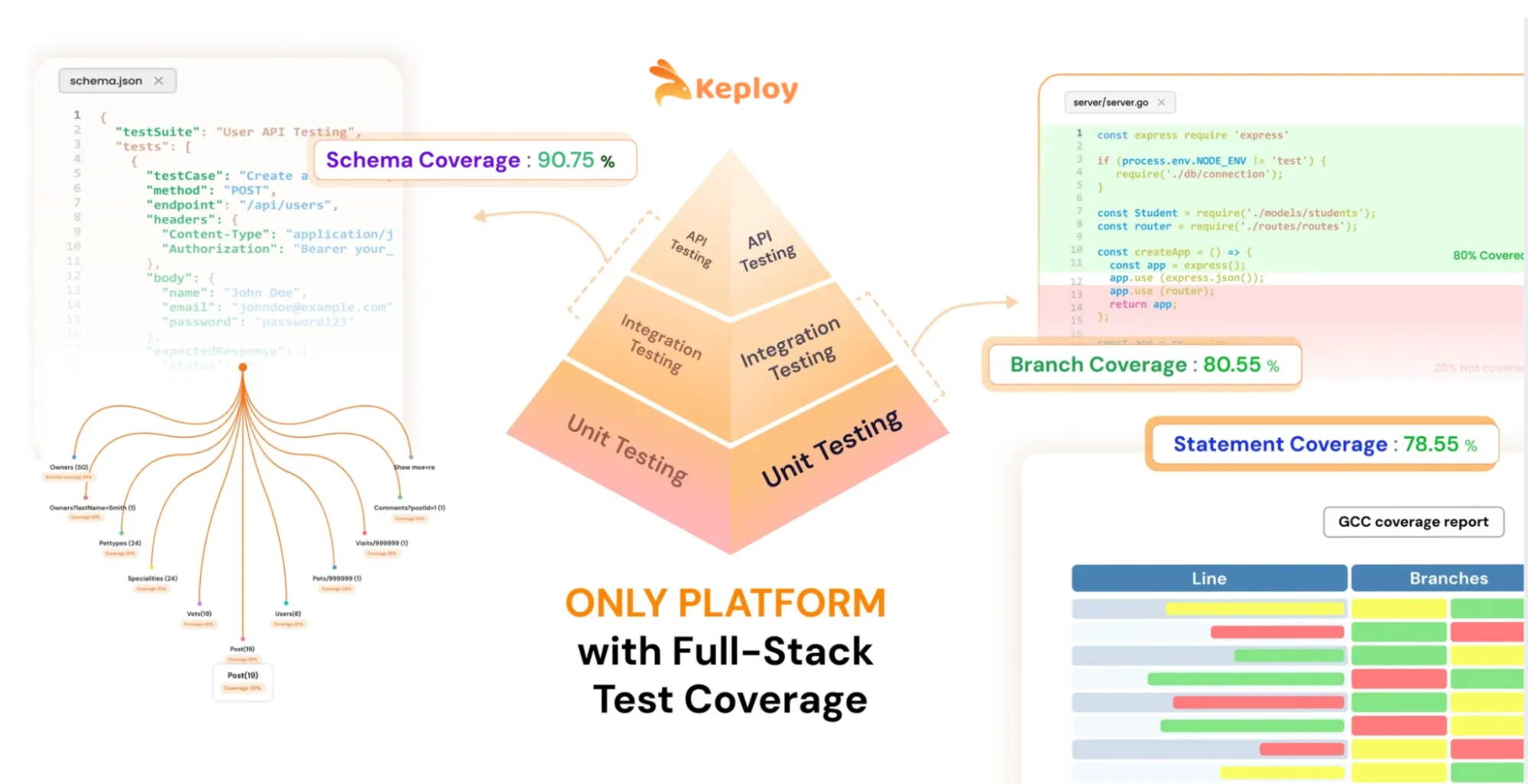
That’s why many teams follow the test pyramid strategy:
-
Unit tests (largest layer): fast, cheap, stable
-
Integration + API tests (middle layer): strong signal, realistic coverage
-
UI/E2E tests (smallest layer): valuable, but slower and easier to break
What has changed in recent years is how teams rely on each layer?
-
With AI-assisted development, unit tests are increasingly generated and modified automatically alongside production code. While this improves speed, it also means unit tests often change with every PR, making them less reliable as a long-term quality signal. As a result, many teams are shifting focus away from treating unit tests as the primary safety net.
-
.Instead, they are focusing more heavily on the middle layer of the testing pyramid – API and integration tests. This layer provides the answer to a critical question about whether or not a change has broken the system, in isolation, before we verify the entire, end-to-end flow of the application.
-
Furthermore, API and integration tests can give a better indication of quality than unit tests because unit tests typically change every PR, while API and integration tests provide a more stable, consistent, and reliable quality signal without the expense and flakiness of using UI Automation.
-
Tools like Postman and Keploy fit naturally into this layer. They provide teams with a consistent way to validate the behavior of their API’s, validate their contracts, and validate their integrations with other systems during the build cycle, regardless of whether or not services, data, or downstream dependencies change.
-
In addition to this shift in focus, teams have also begun tracking more meaningful metrics regarding their test coverage. Historically, teams have relied primarily on code coverage; however, code coverage by itself is no longer sufficient. As teams begin to rely more heavily on API and integration testing, they will also begin to track additional coverage metrics such as API schema coverage, contract coverage, and endpoint behavior coverage to accurately understand which parts of the system are ultimately being protected by automation
The test pyramid still matters – but in practice, modern automation strategies are becoming mid-layer heavy, with unit tests providing fast feedback and UI tests reserved for a small number of critical journeys.
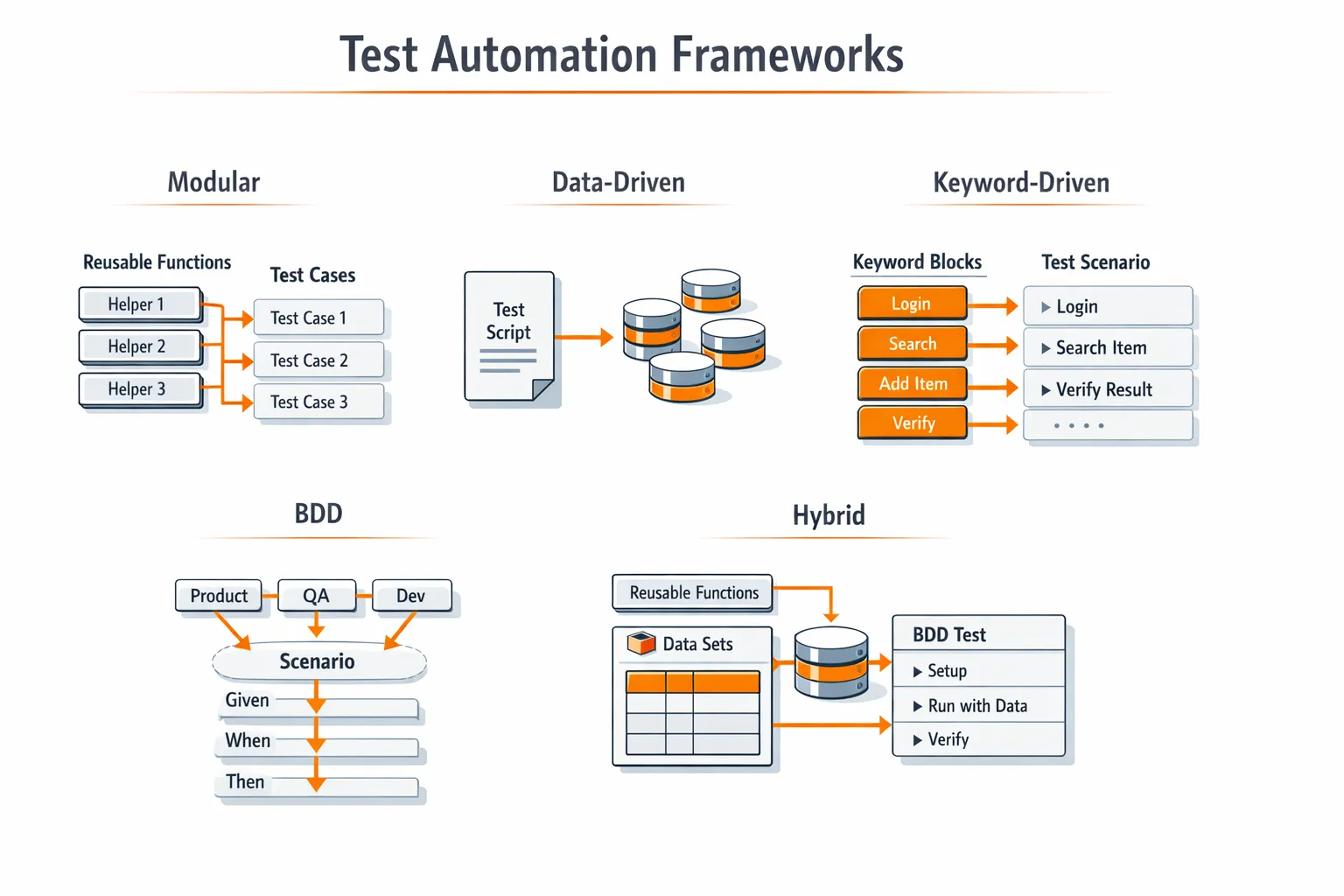
Test Automation Frameworks Teams Use to Scale
A test automation framework doesn’t just mean the tool. It also means the structure around it: how tests are written, organized, run in CI, and reported. As teams scale, another part of the “framework” often becomes painful: how the test environment is controlled. Tests may pass locally but fail in CI because downstream services, shared databases, or third-party APIs behave differently across runs. Hand-written mocks drift out of sync, and maintaining them becomes a project of its own.
This is where modern frameworks increasingly include repeatable environment behavior as a first-class concern. Instead of manually mocking every dependency, some teams record real API and integration traffic once and replay it deterministically in CI.
Tools like Keploy address this problem by generating repeatable API, integration tests, and mocks directly from real traffic. This allows teams to scale automation without constantly chasing broken mocks or environment-specific failures – and keeps CI failures focused on real regressions, not infrastructure noise.
Here are the patterns teams use most often.
Modular Framework (The Default for Most Teams)
Teams build reusable helpers like login(), createUser(), or createOrder() so individual tests focus on what is being validated, not setup mechanics. This keeps tests short, readable, and easier to debug when something fails.
In practice, most companies adopt modular automation after their first few months of scaling tests. Early suites often start with copy-pasted flows; over time, maintenance cost rises as the same change needs to be fixed in dozens of places. Modularization is usually the turning point where automation stops slowing teams down.
A common pattern looks like this:
-
shared setup utilities for authentication and test data creation
-
service or API clients that wrap raw requests
-
environment-agnostic helpers that work the same locally and in CI
Mature teams also treat these helpers as production code: reviewed, versioned, and owned. This allows new tests to be added quickly without increasing fragility – and is one of the main reasons modular frameworks scale across teams and repositories.
Data-Driven Framework (Great for Broad Coverage)
Same test logic, multiple datasets. It’s useful for roles, plans, permissions, regions, and error cases.
The key is discipline: keep test data separate from test logic, or the suite becomes hard to read.
Keyword-Driven Framework (Good When Non-Coders Contribute)
Tests are assembled from reusable “keywords” like LOGIN, CLICK, VERIFY_TEXT. It can help adoption, but overuse can create a rigid system that’s hard to extend.
BDD (Helpful, and Increasingly Practical)
The BDD vs TDD debate has been part of software testing for years. In theory, TDD promises cleaner design and fewer bugs- but in practice, many teams struggled to sustain it consistently at scale. Tests often lagged behind delivery pressure, and the discipline required was hard to maintain across growing teams.
In recent years, BDD has gained renewed momentum – largely because it aligns better with AI-assisted development. As AI helps generate code and tests, teams are focusing less on strict test-first discipline and more on clearly defined behavior and acceptance criteria that everyone can agree on.
BDD works best when it stays lean. Used selectively for high-impact workflows, it helps product, QA, and engineering teams validate that the right behavior exists, even as implementation details change underneath. When every minor case turns into a long scenario file, maintenance grows quickly, and the signal degrades.
In practice, teams that succeed with BDD treat it as a communication and alignment tool, not a replacement for unit or integration testing.
Hybrid (What Most Mature Teams End Up With)
Most teams combine modular + data-driven, and use BDD only where it helps coordination.
A good framework is one that stays readable even after months of changes.
Types of Tests You Can Automate
Different test types solve different problems. The trick is not to automate everything equally, but to build a portfolio that gives a fast signal and realistic coverage.
|
Test Type |
What It Validates |
Preferred Tools (2026) |
Pros |
Cons |
Key Metrics to Track |
|
Unit Testing |
Individual functions or modules |
JUnit, TestNG, pytest, Jest |
Very fast feedback, easy to run on every PR |
Tests change with implementation; weaker long-term signal with AI-generated code |
Execution time, PR failure rate, code coverage (use cautiously) |
|
Integration Testing |
Service ↔ DB, queue, and service interactions |
Keploy, Testcontainers |
Catches real production-like failures; strong quality signal |
Higher setup cost; unstable if environments aren’t controlled |
Integration failure rate, dependency coverage, flakiness rate |
|
API Testing |
Endpoints, authentication, contracts, and errors |
Keploy, Postman, Rest Assured, Karate |
High ROI; fast and stable feedback; ideal for PR gating |
Mock drift if dependencies change |
Endpoint coverage, schema/contract coverage, error-path coverage |
|
Functional Testing |
Business workflows and rules |
Keploy, Postman, limited Playwright |
Validates real user behavior; less brittle when API-first |
Slows down if UI-heavy |
Workflow coverage, regression escape rate, time to root cause |
|
Smoke Testing |
Build deployability |
Keploy, Postman, lightweight Playwright |
Extremely fast; blocks broken builds early |
Shallow by design |
Smoke suite duration, deployment block rate, false positives |
|
Regression Testing |
Known breakpoints across releases |
Keploy, Postman, selective UI tests |
Prevents repeat incidents; builds confidence over time |
Grows fast without pruning |
Regression trend, flaky test %, prod vs pre-prod defects |
|
Security Testing |
Common vulnerabilities and risks |
OWASP ZAP, Snyk |
Early risk detection; useful release gate |
High false positives; not exhaustive |
Critical vulnerabilities, time-to-fix, noise ratio |
|
Performance Testing |
Latency and throughput trends |
k6, JMeter |
Detects slowdowns early; easy baselining |
Needs stable environments |
P95/P99 latency, throughput baselines |
Key takeaway: Modern automation strategies are API- and integration-heavy, measurable, and selective about UI. If a test type doesn’t produce a clear metric or actionable signal, it usually needs to be re-scoped – or removed.
How to Implement Test Automation in a Real Project?
Most teams succeed when they roll automation out in small, high-confidence steps.
Step 1: Define Scope and Priorities
Start with stable, critical flows:
-
login/signup
-
permissions/roles
-
payments/checkout
-
core APIs that can’t break
If you can’t explain why a test matters, it probably won’t be maintained.
Step 2: Choose Tools Based on Your Product and Team Skills
Tool choice is highly dependent on your product, workflow, and team skills – there’s no single “best” tool for everyone.
Before evaluating specific tools, assess your stack against these criteria:
-
Integration fit- does the tool connect cleanly with your existing CI/CD system (GitHub Actions, GitLab CI, Jenkins, CircleCI)?
-
Language and framework compatibility- does it support the languages your team already writes in?
-
Scalability- can it handle your test volume as the suite grows, without significant rearchitecting?
-
Learning curve- how quickly can a new team member become productive with it? Low-code options lower this barrier significantly.
-
Maintenance overhead- how much ongoing work does it create when the application changes? Self-healing or traffic-based approaches reduce this.
-
Reporting and CI visibility- does it produce output your pipeline can act on – pass/fail gates, JUnit XML, HTML reports, trace artifacts?
-
Cost and pricing model- does the tool fit your team’s budget, and does pricing scale reasonably as test volume grows? See our test automation pricing comparison for a breakdown of what leading tools charge at different tiers.
Pick the tool that fits the most criteria for your specific context. A tool that scores well in isolation but poorly on integration fit will create more problems than it solves.
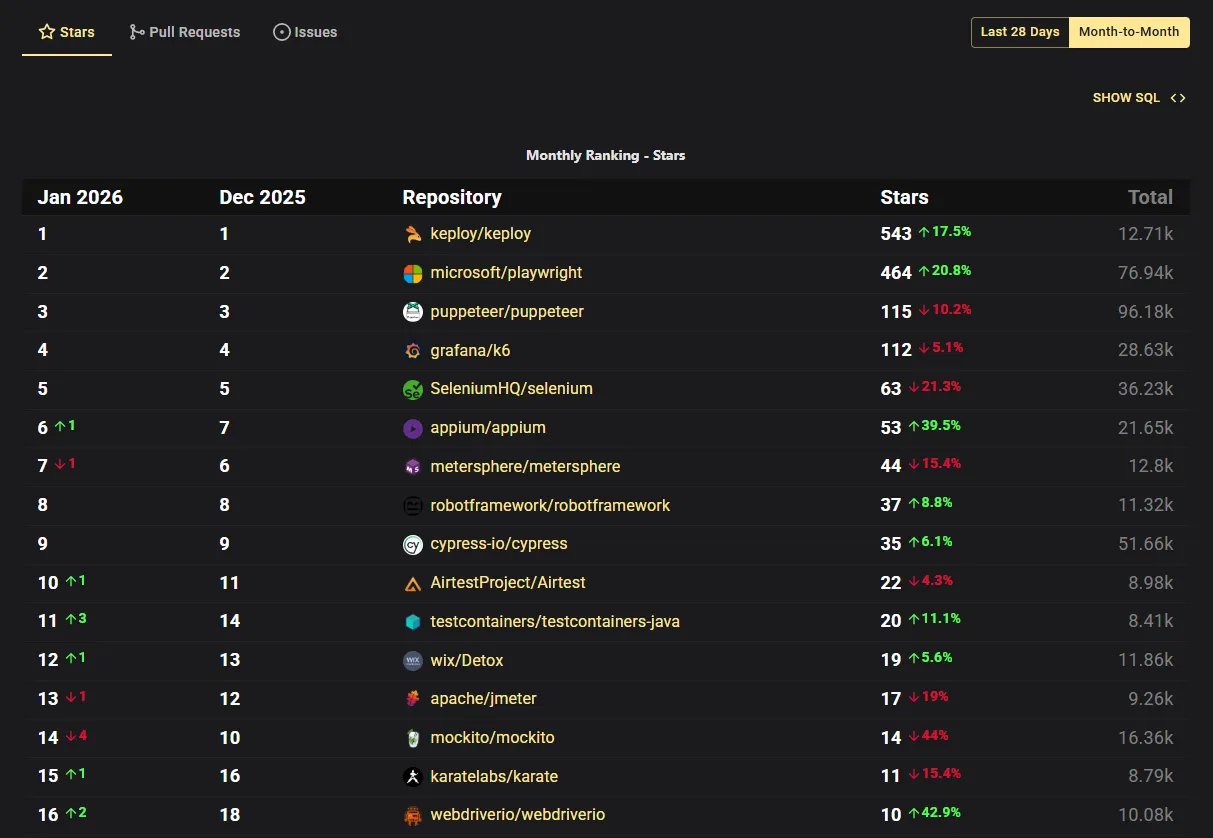
That said, from my perspective and based on industry trends (see OSS Insight screenshot below showing top trending automation tools), the following tools are widely adopted in modern automation stacks.
A practical way to choose is to map tools to your biggest risk area:
-
Web UI (critical user journeys) → Playwright / Cypress / Selenium
Use UI automation for the few flows that must always work. Keep this layer small to avoid slow, brittle suites. -
Mobile → Appium
Best when you need cross-platform mobile automation across iOS and Android. -
API (fast regression signal) → Postman / Rest Assured / Karate
Great for validating contracts, auth, error behavior, and response shape – especially as part of PR checks. -
API + Integration repeatability (when CI fails due to dependency drift) → Keploy
Many teams get stuck here: tests fail not because your code is wrong, but because downstream services, data, or third-party APIs behave differently across runs. Keploy helps generate repeatable API/integration tests and mocks from real traffic, so CI failures reflect real regressions – not environment noise. -
Integration with real dependencies → Testcontainers + service-level tests
Useful when “works locally, fails in CI” is caused by shared environments or inconsistent dependency setup. -
Performance → k6 / JMeter
Start with baselines and regression thresholds on critical endpoints. -
Security → OWASP ZAP
Useful for automated scanning gates, especially when security checks are part of release requirements.
Pick a small stack and stick with it. Tool sprawl is a real cost – it usually shows up later as maintenance time and slower CI. Most teams build their core stack around open source automation tools that integrate across CI layers without licensing overhead
Step 3: Build a Framework Designed for Maintenance
Before writing 200 tests, teams usually standardize:
-
folder structure + naming rules
-
reusable helpers (auth, setup, teardown)
-
test data strategy
-
reporting (JUnit XML, HTML reports, traces/screenshots)
This prevents chaos later.
Step 4: Integrate With CI/CD Early
Automation creates leverage only when it runs consistently:
-
PR suite (fast checks)
-
nightly suite (broader regression)
-
pre-release suite (full confidence)
This keeps PR feedback fast and still gives deep coverage over time.
Step 5: Add Realistic Quality Gates
Start with 1- 2 rules that are enforceable:
-
PR must pass smoke + critical API checks
-
The release suite cannot include known flaky tests
-
Performance regressions beyond a threshold block release
A few strict gates beat a long list that nobody follows.
Close this rollout with one practical truth: if automation doesn’t run cleanly in CI, it doesn’t exist.
How to Keep Automated Tests Reliable?
Flaky tests are the fastest way to kill confidence.
Most flakiness comes from a few predictable causes:
-
shared test state
-
unstable test data
-
time-based sleeps
-
environment drift (local vs CI)
-
dependencies that behave differently across runs
What Teams Do That Actually Works
1) Make tests independent
Every test should be able to run alone, in any order, on any machine.
2) Stabilize waits (especially in UI tests)
Avoid fixed sleeps. Use framework waits and retryable assertions instead.
3) Treat test data like a first-class system
Decide how data is created, isolated, and cleaned. If test data is random, results will be random too.
4) Control unstable dependencies
A lot of “random CI failures” aren’t code bugs. They’re dependency issues: third-party downtime, rate limits, changing responses, or shared test environments.
Teams usually solve this in one of these three ways:
-
run real dependencies in a sandbox testing environment – isolated, ephemeral, and reset per CI run
-
run real dependencies in isolated environments (often container-based), or
-
make dependencies repeatable through mocking or controlled replay
This is a common spot where teams adopt approaches like Keploy for API/integration workflows, because generating repeatable tests and mocks from real traffic reduces the “we have to hand-write and maintain every mock” burden.
The outcome you want is simple: failures are actionable, not mysterious.
CI/CD Setup That Doesn’t Slow Teams Down
A strong automation system doesn’t run everything on every PR. It runs the right tests at the right time.
How to Structure Test Suites by Pipeline Stage
PR Suite (Fast and Strict)
Goal: block bad merges quickly.
-
unit tests
-
lint/type checks
-
smoke tests
-
a small set of critical API/integration checks
Keep it short enough that engineers don’t start working around it.
Nightly Suite (Broad and Deep)
Goal: widen coverage without slowing PRs.
-
full regression runs
-
cross-browser UI checks
-
longer integration tests
-
heavier performance baselines
Nightly is where you catch the “slow bugs.”
Pre-release Suite (High Confidence)
Goal: reduce production risk.
-
full regression
-
critical E2E journeys
-
performance and security gates (where needed)
When teams structure suites this way, CI becomes calmer and easier to trust.
How Test Automation Changes the Role of QA
Test automation does not eliminate QA – it changes what QA professionals spend their time on, and raises the value of the role significantly.
In traditional development cycles, QA teams operated separately from engineering – writing test cases, running manual tests, filing bug reports, and repeating the cycle for every release. Testing was a gate at the end of the pipeline, not a continuous part of it. This worked when releases happened monthly. It breaks down when teams ship multiple times per day.
With test automation embedded across the CI/CD pipeline, the execution layer – running the same checks repeatedly – is handled by tools. This frees QA professionals to focus on work that tools cannot do:
- Test strategy- deciding what to automate, what to leave manual, and where coverage gaps exist
- Quality coaching- helping developers write testable code and understand coverage trade-offs
- Exploratory testing- investigating system behavior in ways that scripted tests miss
- Coverage analysis- tracking which API endpoints, user flows, and integration boundaries are actually protected by automation
- Failure triage- distinguishing real regressions from environment noise and flakiness
The role is becoming more technical, not less. Teams that succeed with automation treat QA engineers as quality architects – responsible for the system of testing, not just the execution of tests. Modern low-code automation tools have also made it easier for manual testers to build and maintain automated checks, widening access to the role without eliminating the need for deep expertise at the strategy level.
Popular Test Automation Tools in 2026
Once teams align on what to automate and how to measure it, selecting tools becomes straightforward. Modern automation stacks typically focus on one primary tool per layer, minimizing overlap and keeping CI predictable.
The table below highlights the commonly used tools and their primary roles. Tool choice ultimately depends on your product, workflow, and team skills, which we’ll cover in the next section.
|
Category |
Tools |
Primary Role |
|
API & Integration Automation |
Keploy |
Repeatable API/integration tests; reduces dependency drift (when downstream services, databases, or third-party APIs respond differently across runs) in CI |
|
Web UI Automation |
Playwright, Cypress, Selenium |
End-to-end UI testing for critical user journeys |
|
Mobile Automation |
Appium |
Cross-platform mobile functional testing |
|
API Automation |
Postman |
API regression and contract tests |
|
Unit Testing |
JUnit / TestNG |
Fast PR/unit checks |
|
Integration Testing |
Testcontainers |
Dependency-backed integration tests in disposable environments |
|
Performance Testing |
k6 / JMeter |
Load and performance testing with CI-friendly metrics |
|
Security Testing |
OWASP ZAP |
Automated security scanning for release gates |
|
Acceptance / Keyword-driven |
Robot Framework |
Keyword-based acceptance testing and RPA workflows |
Tip: Most teams keep their stack minimal – fast unit checks, strong API/integration coverage, and a thin layer of UI automation for the most critical flows. This approach ensures fast feedback, maintainability, and actionable CI results.
Example: A Simple Automated Test + CI Workflow
To make this concrete, here’s a small setup teams commonly start with: one UI test and a CI workflow that runs on pull requests. This pattern scales well because it’s clear, fast, and easy to debug.
Playwright Test (TypeScript)
import { test, expect } from '@playwright/test';

test('user can log in with valid credentials', async ({ page }) => {
  await page.goto('https://your-app.com/login');
  await page.fill('[data-testid="email"]', 'test@example.com');
  await page.fill('[data-testid="password"]', 'validpassword');
  await page.click('[data-testid="login-button"]');
  await expect(page).toHaveURL('https://your-app.com/dashboard');
  await expect(page.locator('[data-testid="welcome-message"]')).toBeVisible();
});
GitHub Actions Workflow
yaml
name: e2e-tests
on:
  pull_request:

jobs:
  test:
    runs-on: ubuntu-latest
    steps:
      - uses: actions/checkout@v4

      - uses: actions/setup-node@v4
        with:
          node-version: "20"

      - name: Install dependencies
        run: npm ci

      - name: Install Playwright browsers
        run: npx playwright install --with-deps

      - name: Run tests
        run: npx playwright test

      - name: Upload report
        if: always()
        uses: actions/upload-artifact@v4
        with:
          name: playwright-report
          path: playwright-report
This is intentionally simple. Teams usually expand from here by splitting suites (PR vs nightly), stabilizing test data, and improving reporting.
Keploy Example: An API Regression Test Generated From Real Traffic
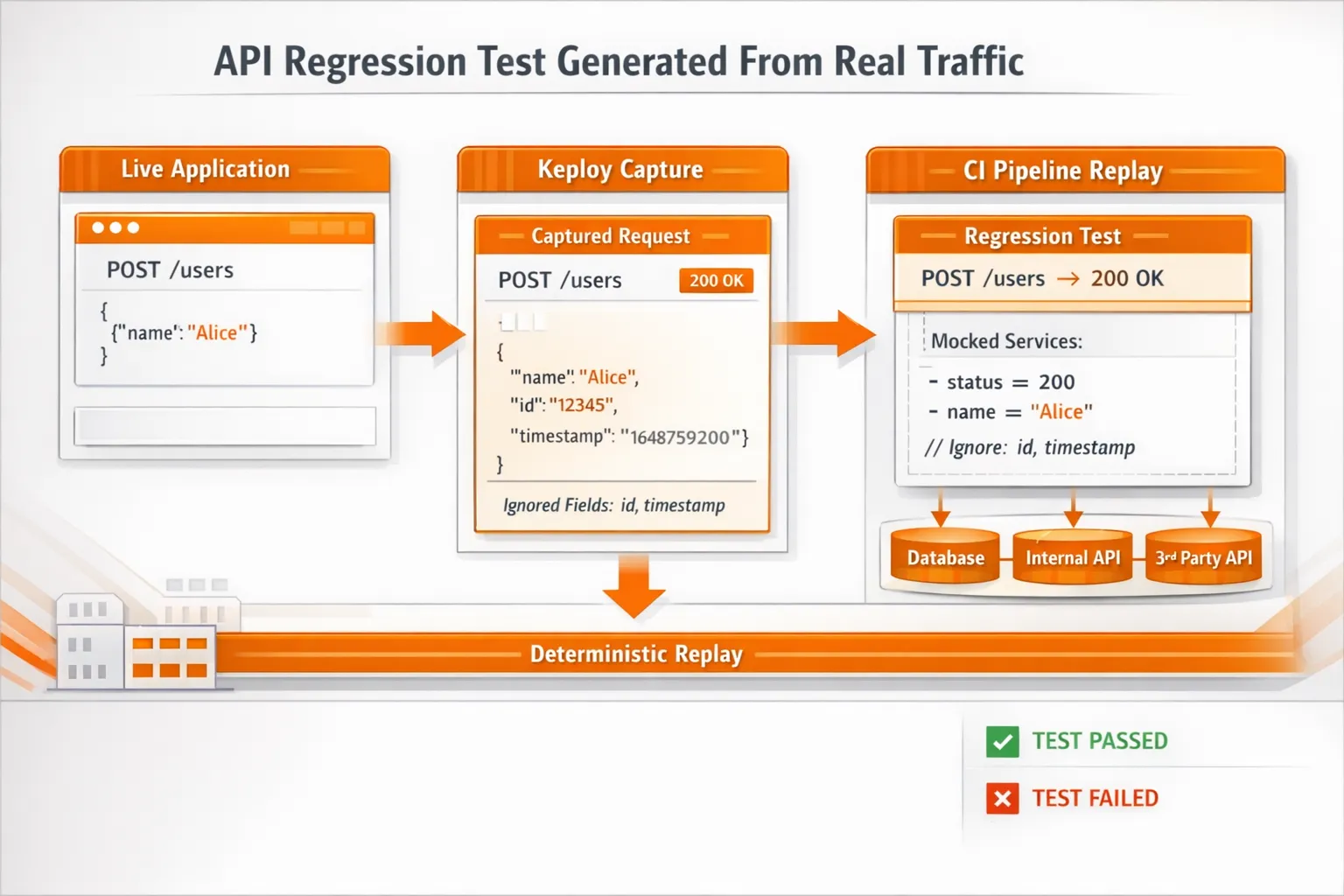
UI tests are useful, but a lot of real CI pain shows up in the middle layer: API + integration behavior becomes unpredictable because dependencies respond differently across runs.
Keploy fits here by recording a real API call once, then replaying it as a repeatable test in CI. This keeps failures focused on real regressions, not dependency drift.
Example Keploy HTTP Test Case
yaml
# Example Keploy HTTP test case (simplified)
name: create-user
request:
  method: POST
  url: http://localhost:3000/users
  headers:
    Content-Type: application/json
  body: |
    {"email":"a@demo.com","password":"123456789","displayName":"A"}

expectedResponse:
  status: 200
  bodyContains:
    - "Successfully created a user"

# Fields that change every run can be ignored to reduce flakiness
ignore:
  - expectedResponse.headers.Date
  - expectedResponse.body.user.id
This pattern is especially useful when the same endpoint depends on databases, other services, or third-party APIs – and teams don’t want to hand-maintain mocks for every case.
How to Measure ROI and Success of Test Automation?
Automation should change outcomes you can measure. If nothing improves, the suite needs tuning.
Engineering Metrics
-
time-to-signal (PR → reliable result)
-
PR suite duration- target under 10 minutes; suites exceeding 20 minutes consistently get bypassed by developers.
-
flaky failure rate- aim to keep this below 2%; above 5% signals the suite needs immediate attention.
-
defect leakage (bugs found in prod vs earlier)
Business Metrics
-
release frequency
-
incident rate after release
-
manual regression hours saved
-
cost of defects avoided
Of the business metrics above, defect cost avoidance typically drives the largest real return – not because of any single number, but because the cost of a defect compounds as it moves through the pipeline.
A defect caught in CI has a fixed, predictable remediation cost. The same defect in production adds incident response, customer communication, rollback effort, and in revenue-critical systems, direct financial loss.
Teams that reduce defect leakage consistently see improvement across DORA metrics, particularly Change Failure Rate and Lead Time for Changes – two of the five metrics used to measure software delivery performance.
Test automation ROI doesn’t require a specific multiplier. It requires tracking where your defects are currently escaping, and what each one costs when it does.
A healthy automation suite reduces uncertainty. If it increases noise, the fix is usually: follow the best practices, simplify scope, improve reliability, and split suites by purpose.
Conclusion
Test automation isn’t about replacing manual testing. It’s about replacing repetitive work with repeatable validation.
Teams that win with automation don’t just pick tools. They build a system:
-
Automate the right layers (pyramid shape)
-
Keep PR checks fast and strict
-
Control flakiness and dependency instability
-
Treat the suite like a living product with ownership and metrics
Do that, and test automation becomes an accelerator – not a maintenance nightmare.
Key Takeaways
- Automate regression, API, and integration tests first – these give the highest ROI and most stable signal
- Follow the test pyramid: unit tests for fast feedback, API and integration tests for real coverage, UI tests for critical journeys only
- Keep PR suites under 10 minutes – split longer regression runs to nightly pipelines
- Treat flaky tests as critical defects – quarantine and fix within the same sprint, target below 2% flake rate
- Control dependency instability – mocks, containerized environments, or traffic replay prevent "works locally, fails in CI"
- Measure what changes: PR suite duration, flake rate, defect leakage, and release frequency
FAQs
1) What is the difference between manual testing and test automation?
Manual testing relies on a human executing steps and making judgment calls – it catches usability issues, exploratory edge cases, and anything requiring intuition. Test automation replaces repetition – the same checks, run identically, on every build. Neither replaces the other. The goal is knowing which approach creates more value for a given test type.
2)What is the difference between test automation and automated testing?
They mean the same thing. Both terms describe using tools and scripts to run tests automatically without manual execution. The only distinct term is "automation testing" – which refers to testing an automated process like an RPA workflow, not software testing itself.
3) How long does it take to implement test automation?
A small suite of 10 critical, stable test cases can be running in CI within two to three weeks. A full regression suite covering API, integration, and smoke tests typically takes three to six months to reach a state where it carries meaningful coverage. Teams that try to automate everything in the first month almost always have to restart. Start small, prove reliability, then scale.
4) What is the best test automation framework?
There is no single best framework. The right choice depends on your product, team, and biggest risk area. For web UI, Playwright is the fastest-growing choice for new projects. For API and integration testing, Keploy is a strong fit – particularly when CI failures are caused by dependency drift and teams want to generate repeatable tests from real traffic rather than hand-writing mocks. For mobile, Appium remains the standard. The more important decision is keeping your stack minimal – one primary tool per layer avoids the maintenance overhead that comes with tool sprawl.
5) Does test automation replace manual testing?
No. Test automation replaces repetitive, predictable validation – regression checks, API contracts, smoke tests. Manual testing remains essential for exploratory testing, usability evaluation, and validating new or rapidly changing features before they stabilize. The teams that succeed with automation treat both approaches as complementary, not competing.
6) What is self-healing test automation?
Self-healing test automation uses AI to detect when UI elements change – a renamed button, a shifted selector – and updates the test automatically instead of failing it. Instead of relying on a single static locator, the tool captures multiple attributes for each element and uses them as fallbacks. The practical benefit is fewer false failures from cosmetic changes and significantly less time spent on selector maintenance.
7) What are the biggest challenges of test automation?
Three problems come up consistently: maintenance burden (tests break when code changes), slow suite growth (suites that take too long to run get skipped entirely), and flaky tests (intermittent failures that cause engineers to stop trusting results). All three are solvable with deliberate suite management – but they require ongoing effort, not a one-time fix.
8) How does test automation work in a CI/CD pipeline?
When a developer raises a pull request, the CI/CD system automatically triggers a test suite against that change. Unit tests, smoke tests, and critical API checks run first. If any fail, the pipeline blocks the merge and flags the failure. If all pass, the change moves to the next stage. This repeats on every commit, giving continuous validation without manual effort.
9) How do we know when to delete tests?
If the test case is unreliable, has little value, and requires excessive maintenance it should be considered for removal/redesign. A small, reliable testing suite is superior to a large suite of tests that don’t give any confidence to the users.
10) How do we handle API changes without breaking half the automation suite?
The best way to handle issues caused by API changes is to treat an API similar to a legal contract, by: creating new versioned endpoints where appropriate, maintaining backward compatible changes whenever possible, and making sure to validate the functionality of the APIs through automated testing as part of the pull request process
For integration-heavy systems, keeping mocks aligned with real traffic is often the hard part – this is where approaches like recorded request/response replay (for example, using Keploy in CI) can reduce drift and keep failures meaningful.
11) Can AI replace test automation?
No. AI accelerates parts of the process – generating test cases, fixing broken selectors, identifying coverage gaps – but it cannot replace the judgment required to decide what to test and whether a passing suite reflects real system quality. AI handles the mechanical layer. Test strategy remains a human responsibility.

Leave a Reply