The Software Testing Life Cycle (STLC) is a structured sequence of six phases – requirement analysis, test planning, test case development, environment setup, test execution, and test closure that QA teams follow to systematically validate software quality. Unlike the SDLC which governs how software is built, STLC governs how it’s verified. Each phase has defined entry criteria, exit criteria, and deliverables to keep testing organised and traceable across every release.
Modern software teams ship faster than ever. Releases are frequent, systems are increasingly distributed, and testing environments can be unstable. At the same time, maintaining large sets of manual and automated tests becomes difficult as applications grow.
Without a structured approach, testing quickly becomes reactive instead of strategic.
This is where the Software Testing Life Cycle (STLC) plays a critical role. It provides a clear framework for planning, designing, executing, and managing software testing activities throughout development.
In this guide, we’ll explore the phases of STLC, its deliverables, entry and exit criteria, best practices, challenges, and how it fits into modern Agile and DevOps environments.
What is Software Testing Life Cycle
Software Testing Life Cycle is a sequence of specific activities carried out during the testing process to ensure software quality. Each phase in STLC has defined objectives, deliverables, and exit criteria.
In modern development environments with frequent releases and complex systems, STLC provides the structure needed to keep testing organized and reliable.
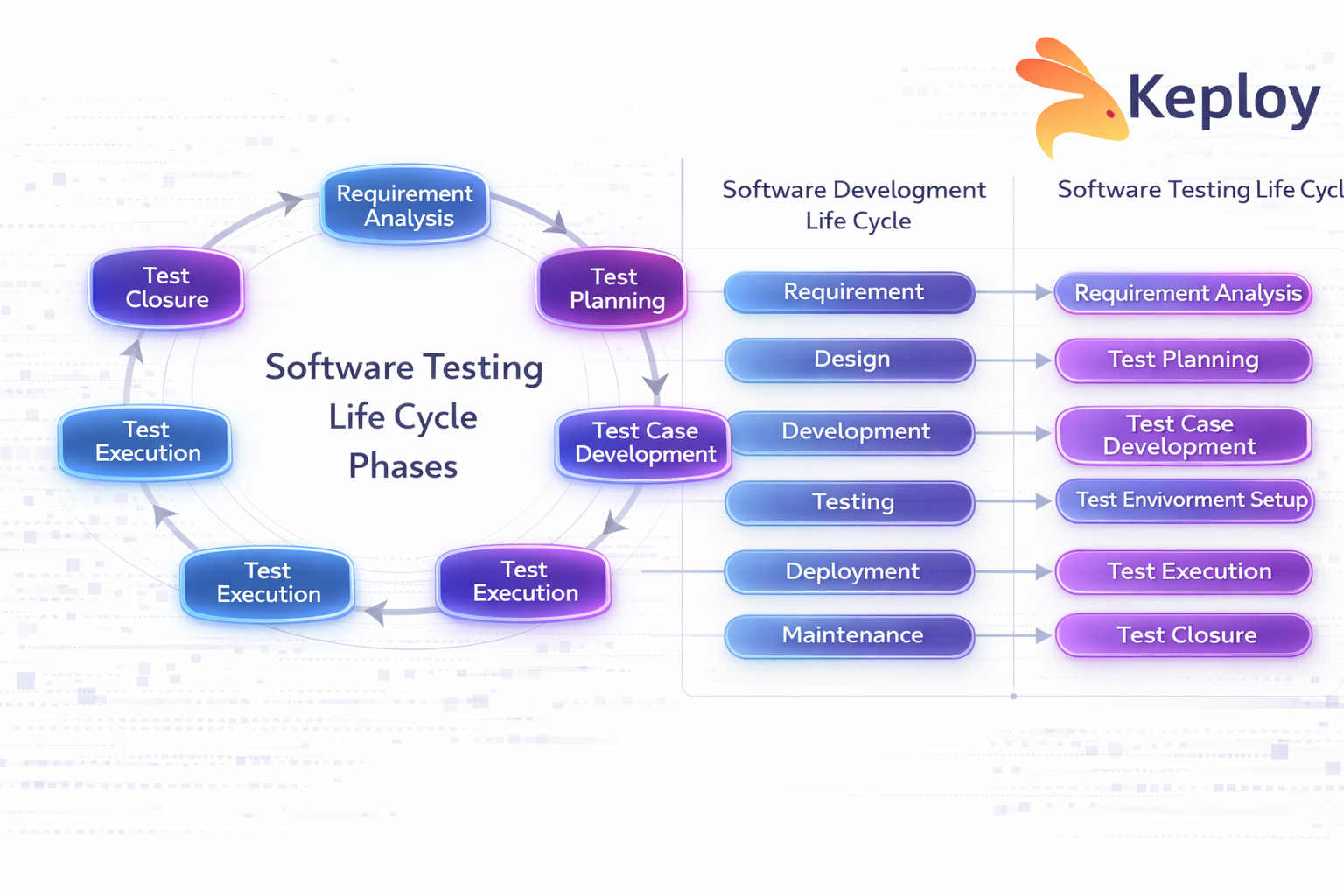
While the Software Development Life Cycle focuses on building the product, STLC focuses on verifying and validating it. Testing is not a single phase at the end but a structured lifecycle that runs alongside development.
Why STLC is Important
Without a structured testing process, teams often deal with unclear requirements, missed defects, and inconsistent test coverage, especially as systems grow more complex.
A defined testing lifecycle helps teams:
-
Improve requirement clarity
-
Detect defects early
-
Reduce the cost of fixing issues
-
Maintain traceability
-
Ensure better test coverage
-
Improve release confidence
Without a structured lifecycle, testing becomes reactive instead of strategic.
Phases of Software Testing Life Cycle
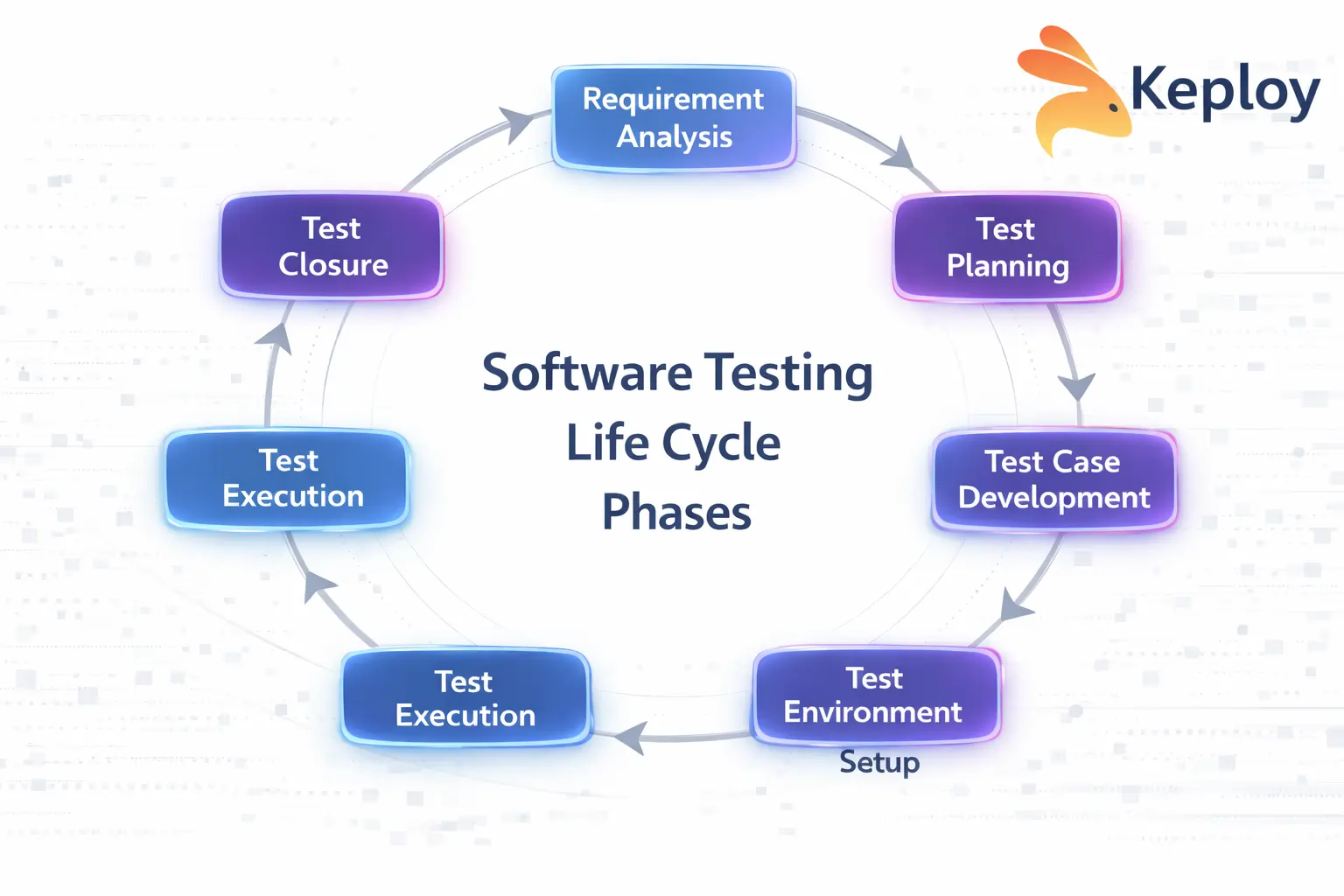
The Software Testing Life Cycle typically consists of six major phases. Each phase has defined inputs, outputs, and activities, but in real engineering environments these phases also help teams identify risks, environment gaps, and coverage issues early in development.
Rather than treating STLC as a rigid process, modern teams use these phases as a framework for organizing testing work, reducing risk, and improving release confidence.
1. Requirement Analysis
Requirement Analysis is the first phase of STLC. In this stage, the QA team studies business and technical requirements from a testing perspective to understand how the system should behave and how it can be validated.
Beyond reviewing requirement documents, testers perform testability analysis, map system dependencies, and identify potential integration risks early in the development cycle.
Objectives
-
Identify testable requirements
-
Clarify ambiguities in specifications
-
Perform testability analysis
-
Map dependencies between services or components
-
Identify integration risks early
-
Understand real user journeys, not just requirement documents
Modern applications often rely heavily on APIs, microservices, and external integrations, so testers must understand API contracts, expected data flows, and service dependencies.
Analyzing real user behavior and traffic patterns can also reveal scenarios that requirement documents often miss. Production-like flows may expose edge cases such as unusual request sequences, concurrency issues, or partial service failures.
Tools like Keploy can capture real API traffic and help teams analyze realistic interaction patterns, enabling testers to identify meaningful edge cases much earlier in the lifecycle.
Key Deliverables
-
List of testable requirements
-
Identified requirement gaps or clarifications
Entry Criteria
-
Approved requirement documents
-
Functional and non-functional specifications
Exit Criteria
-
Requirements reviewed from a testing perspective
-
Test feasibility confirmed
-
Integration risks identified
-
Open questions resolved
Unclear requirements, hidden dependencies, or poorly defined APIs often lead to incomplete testing and production defects, which makes this phase critical.
2. Test Planning
Test Planning defines how testing will be executed within the project. Instead of focusing only on documentation, modern teams use this phase to establish testing scope, risk priorities, and automation strategy.
The goal is to decide what needs deeper validation, what can be automated, and where system risks are highest.
Objectives
-
Define testing scope and priorities
-
Identify high-risk components and integrations
-
Decide automation boundaries
-
Align testing with CI/CD pipelines
-
Define ownership across QA, development, and DevOps teams
In fast-moving teams, planning is less about creating large documents and more about aligning the execution strategy.
For example, critical systems such as authentication, payments, or data pipelines may receive deeper testing coverage compared to lower-risk features.
Key Deliverables
-
Test strategy outline
-
Risk-based testing priorities
-
Effort estimation
-
Automation and tooling plan
Entry Criteria
-
Approved requirements
-
Defined project scope
Exit Criteria
-
Testing priorities finalized
-
Automation strategy defined
-
CI/CD testing expectations aligned
A common mistake in this phase is treating the test plan as a static document. In modern environments, testing strategy often evolves as system complexity, integrations, and risks change.
3. Test Case Development
In this phase, teams design test scenarios and build the assets needed to validate application behavior.
Traditionally, this meant writing detailed manual test cases and later converting them into automated tests. However, modern teams generate test scenarios from multiple sources beyond requirement documents.
Activities
-
Identify critical user journeys and API flows
-
Create test scenarios from requirements and real usage patterns
-
Prepare and manage test data
-
Identify automation opportunities early
-
Build reusable test assets for regression testing
Test scenarios may originate from:
-
User workflows
-
API specifications and contracts
-
Production incidents and bug reports
-
Traffic recordings and real system behavior
Example
For a payment API, testing scenarios might include:
-
Successful payment flow
-
Payment failure due to invalid credentials
-
Partial service failures
-
Concurrent checkout requests
Key Deliverables
-
Test scenarios and test cases
-
Automation scripts or reusable test assets
-
Test data
-
Updated traceability matrix
Entry Criteria
-
Approved test plan
-
Stable requirements
Exit Criteria
-
Test scenarios reviewed
-
Test data prepared
-
Automation coverage identified
One major challenge in this phase is test maintenance cost. Large test suites often become fragile as applications evolve.
Tools like Keploy help address this by capturing real API interactions and converting them into executable test cases, allowing teams to build regression suites directly from real system behavior.
4. Test Environment Setup
Test Environment Setup ensures the infrastructure required for testing is ready. Ideally, the environment should replicate production conditions as closely as possible.
In practice, this phase is often one of the biggest sources of testing delays.
Testing frequently fails not because of application defects, but because environments are unstable or dependencies are unavailable.
Common Challenges
-
Downstream services not being available
-
Unstable staging environments
-
External API rate limits or sandbox restrictions
-
Missing or inconsistent test data
-
Configuration mismatches between environments
Modern systems rely on multiple microservices, APIs, and third-party integrations, so even a small dependency issue can block testing.
Activities
-
Configure hardware and software
-
Deploy the application build
-
Set up databases and seed test data
-
Configure service dependencies and integrations
-
Validate environment readiness through smoke tests
Key Deliverables
-
Environment readiness report
-
Deployment confirmation
Entry Criteria
-
Test cases prepared
-
Required infrastructure available
Exit Criteria
-
Environment validated
-
Smoke tests successful
To reduce dependency issues, many teams adopt service virtualization or API mocking.
Tools like Keploy help stabilize test environments by capturing real API interactions and replaying them during testing, allowing teams to simulate dependencies even when certain services are unavailable.
5. Test Execution
Test Execution is where the application is actually validated. Testers execute planned scenarios, record results, and identify defects that must be fixed before release.
In distributed systems, executing reliable regression tests can be challenging because applications rely on multiple APIs, services, and external integrations.
Activities
-
Execute manual and automated tests
-
Log and track defects
-
Retest fixed defects
-
Perform regression testing
Key Deliverables
-
Test execution report
-
Defect reports
-
Updated traceability matrix
Entry Criteria
-
Stable test environment
-
Approved build
Exit Criteria
-
All planned tests executed
-
Critical defects resolved
-
Required test coverage achieved
One major challenge in this phase is maintaining reliable regression coverage as systems evolve.
Modern approaches focus on generating tests from real application behavior. Capturing API traffic and replaying those interactions during testing allows teams to validate realistic scenarios without manually recreating every test case.
Tools like Keploy support this approach by recording real API interactions and converting them into executable regression tests. These tests can be replayed across builds to validate production-like behavior and improve release confidence.
6. Test Closure
Test Closure marks the completion of the testing cycle and focuses on evaluating results and capturing improvements for future releases.
Instead of simply preparing reports, modern teams use this phase to understand how effective the testing process was and where improvements are needed.
Activities
-
Analyze defect trends across the testing cycle
-
Identify flaky or unreliable tests
-
Evaluate gaps in test coverage
-
Review environment stability and failures
-
Document test debt for future iterations
Key Deliverables
-
Test summary report
-
Defect trend analysis
-
Coverage gap analysis
-
Testing improvement recommendations
Test Closure Checklist
| Area | Key Questions to Review |
|---|---|
| Defect Trends | Did defect frequency increase or decrease during the cycle? |
| Flaky Tests | Which tests failed inconsistently and require stabilization? |
| Coverage Gaps | Were important user flows discovered late or left untested? |
| Environment Issues | Did environment instability affect testing reliability? |
| Test Debt | Which tests or automation tasks should be prioritized in the next sprint? |
By reviewing these areas, teams ensure that the testing cycle produces actionable insights rather than just documentation, enabling continuous improvement in future releases.
Entry and Exit Criteria in STLC
Entry and exit criteria define when a phase can begin and when it is considered complete.
Entry Criteria
These are prerequisites required before starting a phase. For example, requirement documents must be approved before beginning requirement analysis.
Exit Criteria
These are conditions that must be satisfied before moving to the next phase. For example, all critical defects must be fixed before closing test execution.
Clearly defined criteria prevent premature transitions and ensure process discipline.
Best Practices for Software Testing Life Cycle
To maximize the effectiveness of STLC, modern engineering teams focus on practices that improve real-world coverage, reduce operational friction, and ensure testing remains scalable as systems evolve.
Prioritize Business-Critical Flows
Not all features carry the same risk. Testing should focus first on business-critical workflows such as authentication, payments, checkout processes, or core APIs. Prioritizing these flows ensures that the most impactful failures are caught early.
Validate Against Real System Behavior
Tests written only from requirement documents often miss edge cases. Incorporating real traffic patterns, production incidents, and user behavior helps teams build more realistic test scenarios.
Tools like Keploy enable teams to capture actual API interactions and convert them into test cases, allowing validation of real-world system behavior rather than relying only on assumed test paths.
Reduce Dependency on Fragile Environments
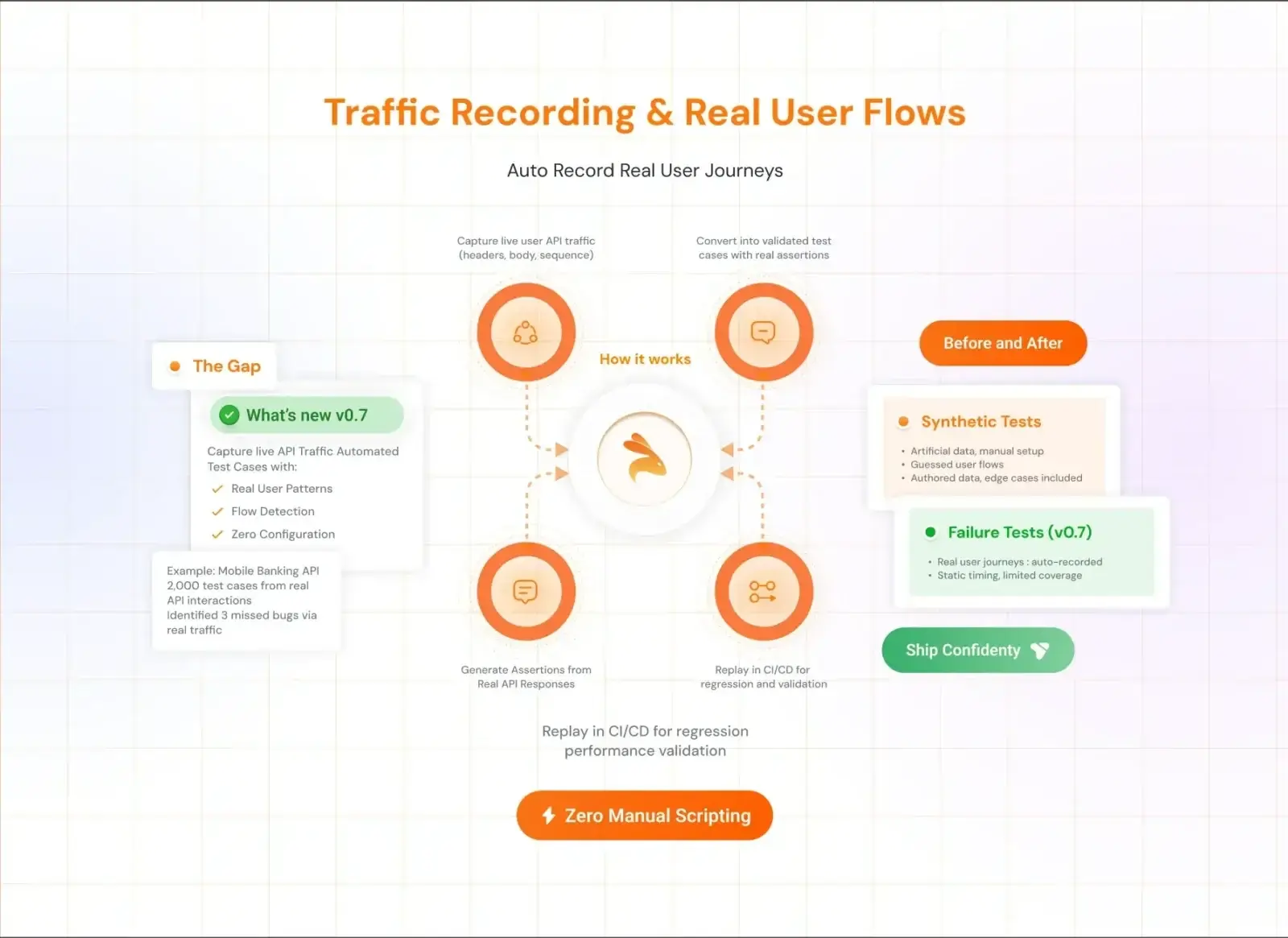
Testing pipelines often fail because dependent services, external APIs, or staging environments are unstable. Teams should minimize these risks by using service virtualization, traffic replay, or API simulation techniques to stabilize test execution.
Track Business Coverage, Not Just Code Coverage
Code coverage alone does not guarantee quality. Teams should measure whether important user journeys and critical business flows are properly validated during testing.
For example, ensuring full coverage of payment flows may be more valuable than increasing overall code coverage by a few percentage points.
Keep Test Assets Version Controlled
Test scenarios, automation scripts, and test data should be treated as version-controlled assets, just like application code. This ensures tests remain reviewable, traceable, and easier to maintain as the system evolves.
Version control also helps teams track how testing strategies change over time and prevents important tests from being lost during rapid development cycles.
Common Challenges in STLC
Even with a structured testing lifecycle, modern engineering teams face several challenges as systems become more distributed and release cycles accelerate.
Incomplete or Evolving Requirements
Requirements often change during development, especially in Agile environments. When requirements are unclear or constantly evolving, test scenarios may miss important edge cases or system behaviors.
Environment Instability
Testing environments frequently become unstable due to unavailable dependencies, configuration issues, or shared staging environments. When services or integrations fail, test execution can become unreliable or blocked entirely.
Mock Drift
Many teams rely on mocks or simulated services during testing. Over time, these mocks can drift away from real system behavior, leading to tests that pass in staging but fail in production.
Flaky Tests
Automated tests that fail intermittently without real defects can significantly reduce trust in the test suite. Flaky tests increase debugging time and often lead teams to ignore failures altogether.
Poor Regression Confidence
As applications grow, maintaining large regression test suites becomes difficult. Fragile automation scripts and outdated test cases can reduce confidence in test results.
Modern approaches such as capturing and replaying real API traffic help improve regression reliability by validating realistic system interactions.
Lack of Production-Like Test Coverage
Tests written only from documentation often miss scenarios that occur in real user behavior. Without production-like coverage, important edge cases remain undiscovered until after release.
Overdependence on Staging Environments
Many teams rely heavily on staging environments for testing, but these environments rarely match production conditions perfectly. This gap can lead to unexpected failures after deployment.
High Maintenance Cost of Automated Tests
Automation is essential for modern development cycles, but poorly designed automation frameworks can become difficult to maintain. Test updates, dependency changes, and fragile scripts often consume significant engineering time.
Addressing these challenges requires modern testing strategies such as traffic-based testing, improved environment simulation, better automation practices, and continuous collaboration between development and QA teams.
STLC in Agile and DevOps
Traditional STLC was designed for waterfall models. However, modern teams work in Agile and DevOps environments where releases are frequent.
In Agile
-
Testing is iterative
-
Test cases evolve every sprint
-
Continuous feedback is essential
In DevOps
-
Testing integrates into CI pipelines
-
Automation plays a major role
-
Continuous monitoring supports quality
Modern testing tools such as Keploy align well with Agile and DevOps practices by enabling automated test generation and seamless integration with CI workflows.
Tools That Support STLC
Different phases of the Software Testing Life Cycle can be strengthened with specialized tools that help teams manage tests, automate validation, and maintain visibility into system behavior.
Test Management Tools
Test management platforms help teams organize testing activities, track requirements, and maintain traceability between requirements, test cases, and defects.
API Testing and Automation Tools
Modern applications rely heavily on APIs and distributed services, making API testing tools essential for validating system behavior.
Platforms like Keploy extend this approach by capturing real API traffic and automatically generating test cases from it.
Service Virtualization and Dependency Simulation
Service virtualization tools simulate dependent services so that testing can continue even when real systems are not accessible.
Continuous Integration and CI/CD Tools
Continuous integration platforms integrate testing directly into the development pipeline.
Defect Tracking Systems
Defect tracking tools allow teams to log, prioritize, and manage issues discovered during testing.
Observability and Coverage Tools
Observability platforms analyze system logs, traces, and metrics to validate whether tests cover real production scenarios.
Measuring Success in STLC
Testing success should be measurable, but modern teams go beyond traditional metrics like simple test counts or execution speed.
Business Flow Coverage
Instead of measuring only code coverage, teams evaluate whether critical user journeys and business workflows are properly validated.
Schema and API Contract Coverage
For API-driven systems, validating request and response schemas is essential.
Regression Confidence
Teams evaluate whether their test suites reliably validate previously working functionality without producing false failures.
Traffic-based testing approaches, such as capturing real API interactions and replaying them during regression cycles, can significantly improve regression reliability.
Flaky Test Rate
Tracking flaky test rates helps teams identify fragile tests that require stabilization or redesign.
Dependency and Mock Accuracy
When tests rely on simulated services, teams should measure how closely mocks reflect real system behavior.
Escaped Production Incidents
One of the most important indicators of testing effectiveness is whether production incidents occur due to untested scenarios or missing coverage.
Conclusion
The Software Testing Life Cycle provides a structured approach to maintaining software quality, guiding teams from requirement analysis through execution and closure. Each phase helps identify risks early, validate system behavior, and improve confidence in releases.
In modern development environments, however, testing must go beyond traditional documentation and manual processes. Teams increasingly focus on validating real user flows, maintaining reliable regression coverage, and adapting testing practices to distributed systems.
Modern tools like Keploy support this shift by capturing real API interactions and turning them into reusable tests, helping teams validate realistic system behavior while keeping testing scalable as applications grow.
Frequently Asked Questions (FAQs)
1. What is the Software Testing Life Cycle (STLC)?
The Software Testing Life Cycle (STLC) is a structured process that defines the sequence of testing activities performed during software development to ensure product quality. It includes phases such as requirement analysis, test planning, test case development, environment setup, test execution, and test closure.
2. What are the phases of the Software Testing Life Cycle?
The Software Testing Life Cycle typically consists of six phases:
-
Requirement Analysis
-
Test Planning
-
Test Case Development
-
Test Environment Setup
-
Test Execution
-
Test Closure
Each phase has specific objectives, deliverables, and entry and exit criteria to ensure systematic testing.
3. What is the difference between STLC and SDLC?
SDLC (Software Development Life Cycle) focuses on building the software, including stages such as design, development, and deployment. STLC, on the other hand, focuses specifically on validating and verifying the software to ensure it meets quality standards and functional requirements.
4. Why is the Software Testing Life Cycle important?
STLC is important because it provides a structured approach to testing. It helps teams detect defects early, improve test coverage, maintain traceability between requirements and tests, and ensure higher confidence in software releases.
5. How does STLC work in Agile and DevOps environments?
In Agile and DevOps environments, STLC becomes more iterative and integrated with development workflows. Testing activities occur continuously within CI/CD pipelines, and automated tests help teams validate application behavior quickly during frequent releases.

Leave a Reply