
Modern teams push code multiple times a day. But how do you verify that the changes made are free from bugs? And how do you integrate testing as part of your pipelines? In this blog, let’s explore how to integrate Keploy into your CI/CD pipelines. We’ll be using GitHub Actions for the examples.
What is Keploy?

Keploy is an API and integration testing tool that:
-
Records real API calls along with DB and queue interactions from your application
-
Generates test cases and mocks from that traffic
-
Replays them as deterministic tests during CI/CD
You don’t need to change your application code or add SDKs – Keploy hooks into network traffic (via eBPF) and captures it.
So the basic idea is very simple:
-
Record traffic in dev or staging once
-
Commit Keploy test cases to your repository
-
Replay them on every PR or push in the CI pipeline
Note: Now that we understand what Keploy is, let’s integrate it into our pipeline. But before that, you need to have recorded test cases for the application you plan to run in the CI pipeline.
For this blog, I’ll be using a FastAPI–Postgres application.
You can view the source code of the application here: Github
How to record test cases using the Keploy CLI?
Let’s record a few test cases using the Keploy CLI.
Use the following command to install the Keploy CLI:
curl --silent -O -L https://keploy.io/install.sh && source install.sh
Once you have installed the Keploy CLI, let’s start recording not a movie, but your application’s network calls. To do this, you need to run your application along with Keploy.
Now, let’s capture the test cases:
keploy record -c "uvicorn application.main:app --reload"Use the following cURL commands to send requests to the application:
bash
curl --location 'http://127.0.0.1:8000/students/' \
--header 'Content-Type: application/json' \
--data-raw '{
    "name": "Eva White",
    "email": "evawhite@example.com",
    "password": "evawhite111"
    }'
bash
curl --location 'http://127.0.0.1:8000/students/'curl --location --request PUT 'http://127.0.0.1:8000/students/1' \
--header 'Content-Type: application/json' \
--data-raw ' {
"name": "John Dow",
"email": "doe.john@example.com",
"password": "johndoe123",
"stream": "Arts"
}'bash
curl --location 'http://127.0.0.1:8000/students/1'bash
curl --location --request DELETE 'http://127.0.0.1:8000/students/1'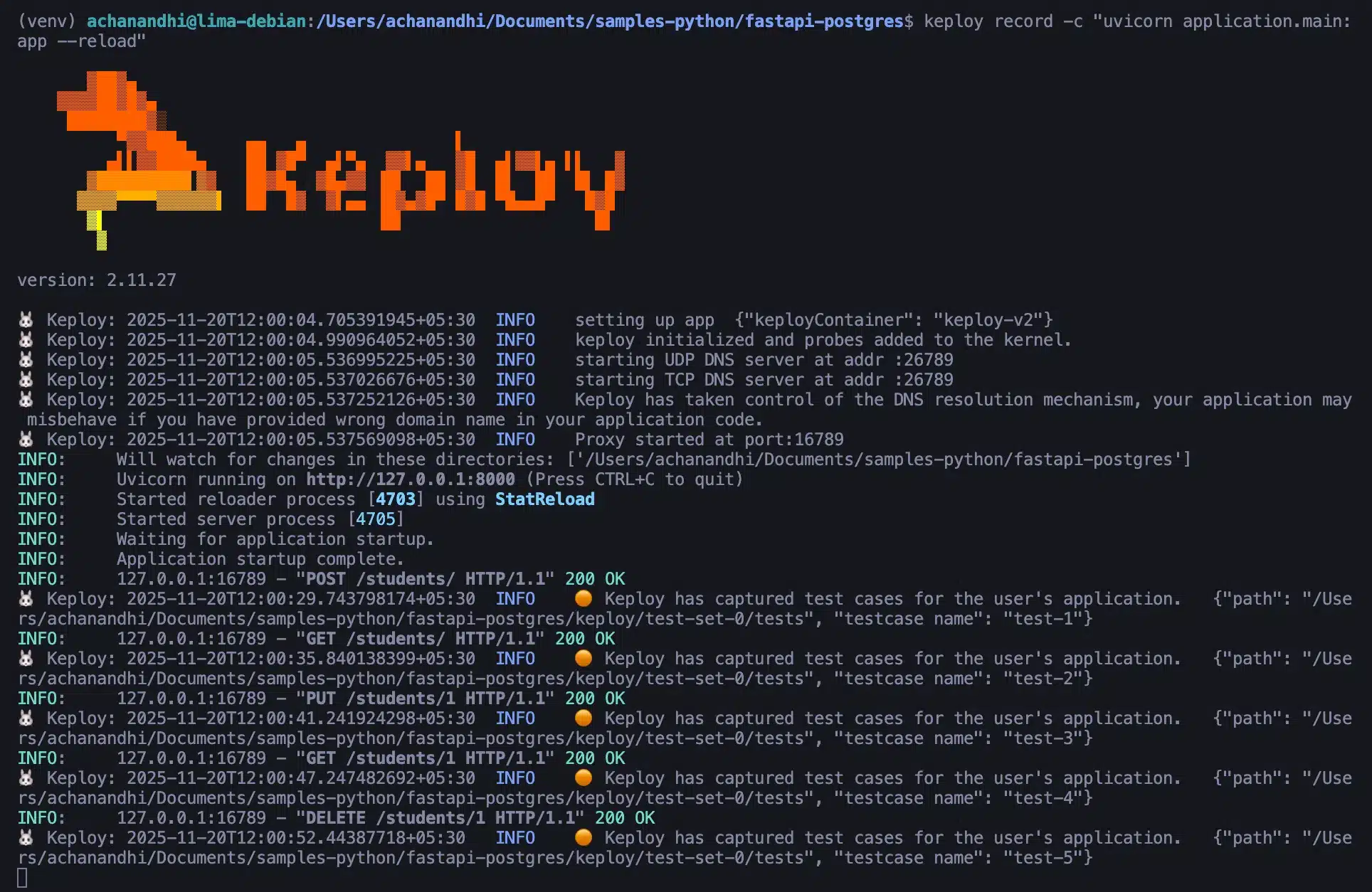
You can see that Keploy has successfully captured all the test cases. Now, let’s move to the main topic of this blog: how to integrate Keploy into GitHub Actions.
How to Integrate Keploy in GitHub Actions
Since we’ve already recorded the test cases using Keploy, the next step is to create a pipeline and integrate Keploy into it.
Below is the complete GitHub Actions workflow file:
bash
name: CI
on: [push]
jobs:
build:
runs-on: ubuntu-latest
steps:
- name: Checkout code
uses: actions/checkout@v5
- name: Set up Python
uses: actions/setup-python@v6
with:
python-version: '3.10'
- name: Install dependencies
run: |
python -m pip install --upgrade pip
python -m pip install -r requirements.txt
echo "PYTHON_BIN=$(which python)" >> $GITHUB_ENV
- name: Keploy Tests
run: |
curl --silent -O -L https://keploy.io/install.sh && source install.sh
sudo -E keploy test -c "$PYTHON_BIN -m uvicorn application.main:app" --delay 10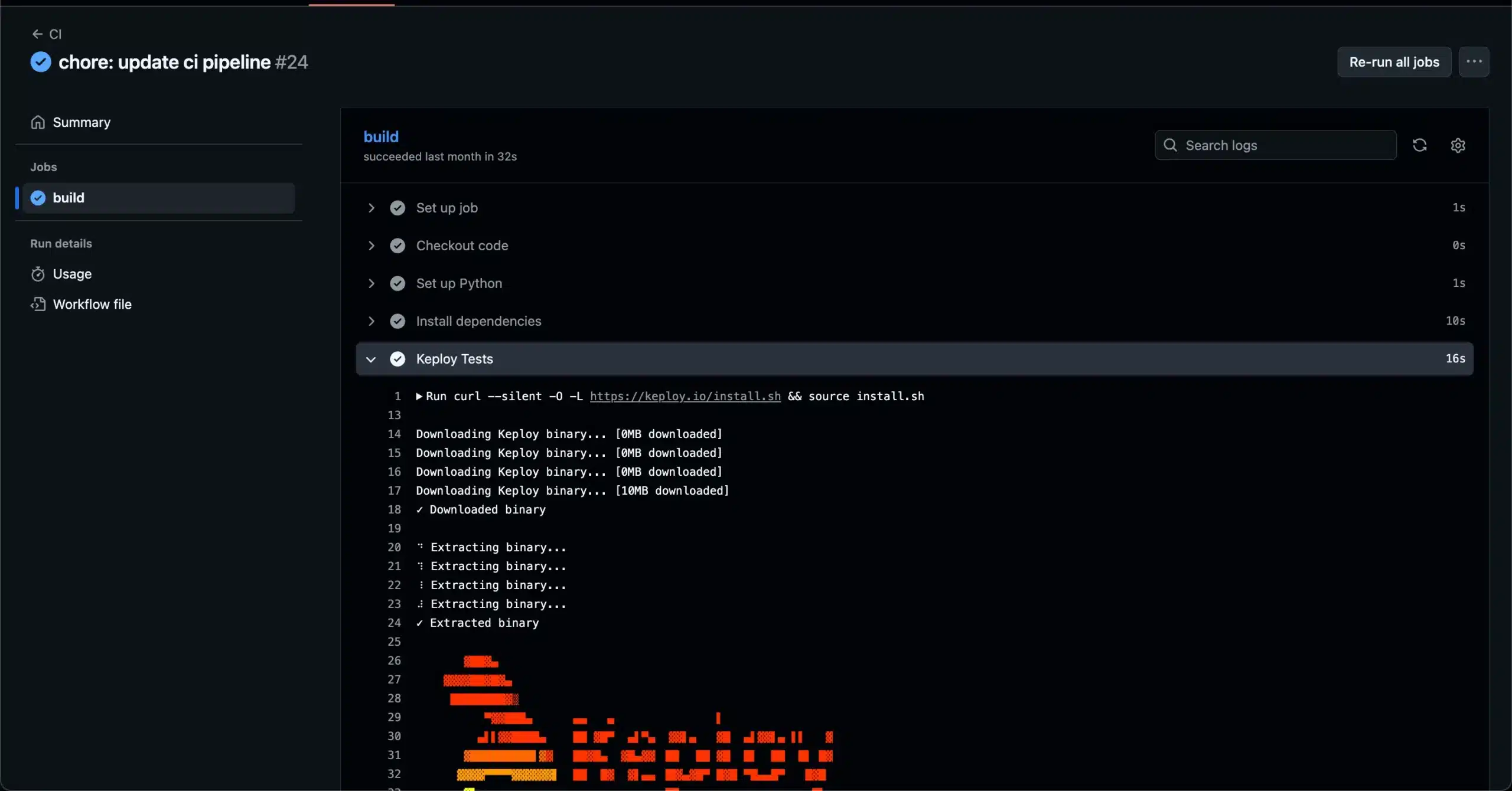
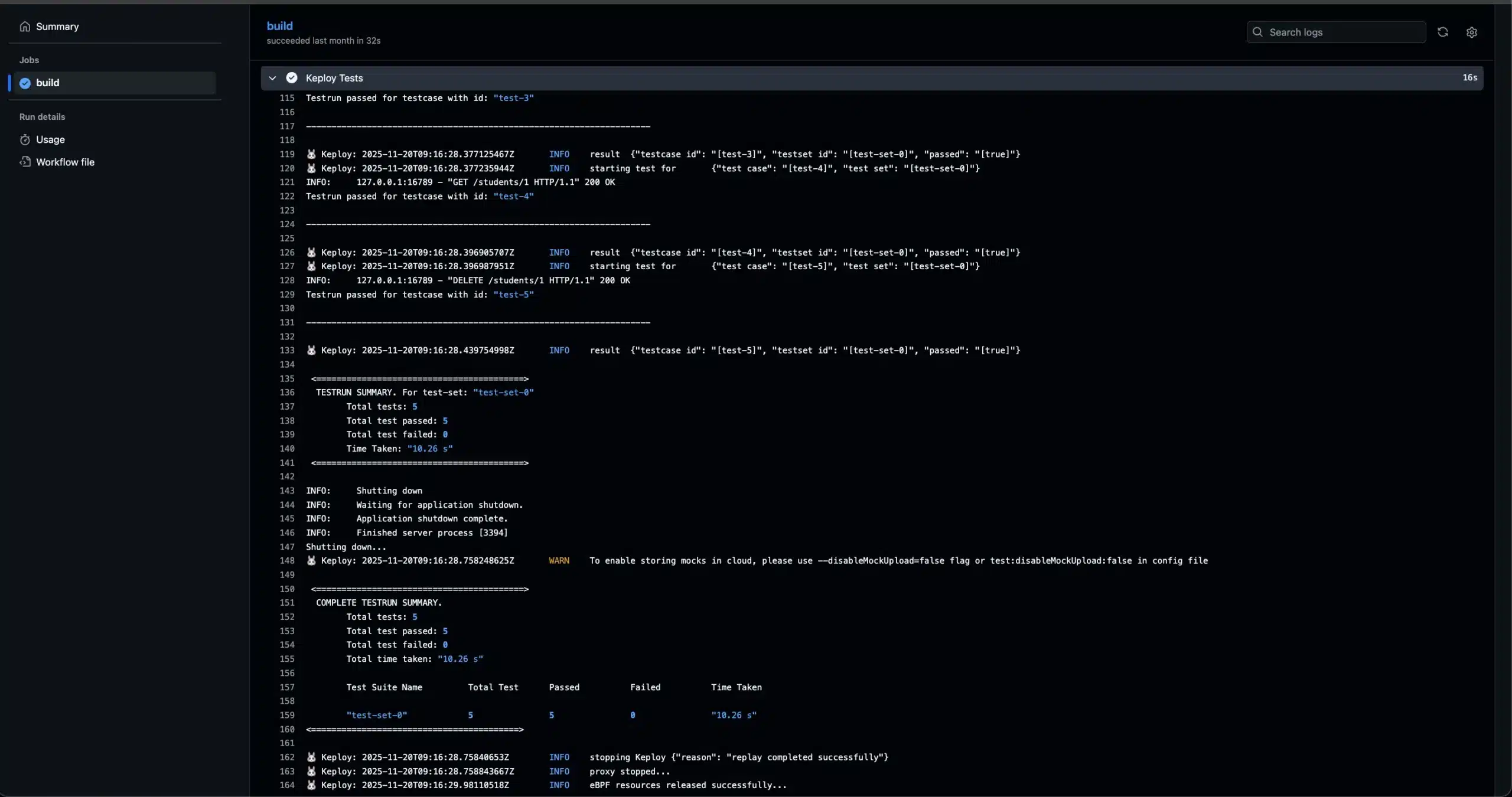
You can also view the exact output in the GitHub Actions logs: Github Actions logs
How to Record and Replay Test Cases in CI/CD Using Keploy
In the first section, we integrated the already recorded test cases and then replayed them in the CI/CD pipeline. But if you want to record and replay test cases directly within your CI/CD pipeline, you can use the code below as a reference.
The script below includes both steps recording and replaying along with the GitHub Actions workflow file.
bash
name: Keploy FastAPI Tests
on:
push:
branches: [ "main" ]
pull_request:
branches: [ "main" ]
jobs:
keploy-tests:
runs-on: ubuntu-latest
steps:
- name: Checkout repository
uses: actions/checkout@v4
- name: Set up Python
uses: actions/setup-python@v5
with:
python-version: "3.10"
- name: Install Keploy CLI
run: |
curl -L https://keploy.io/install.sh | sudo bash
which keploy
keploy version || true
- name: Create keploy docker network
run: |
sudo docker network create keploy-network || true
- name: Make CI script executable
run: |
chmod +x .github/workflows/python_script.sh
- name: Run Keploy + FastAPI tests
run: |
.github/workflows/python_script.shThe script file:
bash
#!/bin/bash
echo "root ALL=(ALL:ALL) ALL" | sudo tee -a /etc/sudoers
# Start the postgres database
sudo docker compose up -d postgres
echo "=== Docker ps ==="
sudo docker ps
echo "=== Postgres logs ==="
sudo docker logs postgres --tail 50 || true
# 🔹 Wait for Postgres on localhost:5432 to be ready
wait_for_postgres() {
echo "Waiting for Postgres on localhost:5432..."
for i in {1..30}; do
if nc -z localhost 5432 2>/dev/null; then
echo "Postgres is up!"
return 0
fi
echo "Postgres not ready yet... retry $i"
sleep 2
done
echo "Postgres did not become ready in time"
exit 1
}
wait_for_postgres
# Install dependencies
pip3 install -r requirements.txt
# Setup environment
export PYTHONPATH="$(pwd)"
# Configuration and cleanup
export RECORD_BIN=/usr/local/bin/keploy
export REPLAY_BIN=/usr/local/bin/keploy
sudo $RECORD_BIN config --generate
sudo rm -rf keploy/ # Clean old test data
config_file="./keploy.yml"
sed -i 's/global: {}/global: {"header": {"Allow":[],}}/' "$config_file"
sleep 5 # Allow time for configuration changes
send_request(){
sleep 10
app_started=false
while [ "$app_started" = false ]; do
if curl -X GET http://127.0.0.1:8000/; then
app_started=true
fi
sleep 3 # wait for 3 seconds before checking again.
done
echo "App started"
# Start making curl calls to record the testcases and mocks.
curl --location 'http://127.0.0.1:8000/students/' \
--header 'Content-Type: application/json' \
--data-raw '{
"name": "Eva White",
"email": "evawhite@example.com",
"password": "evawhite111"
}'
curl --location 'http://127.0.0.1:8000/students/'
curl --location --request PUT 'http://127.0.0.1:8000/students/1' \
--header 'Content-Type: application/json' \
--data-raw '    {
        "name": "John Dow",
        "email": "doe.john@example.com",
        "password": "johndoe123",
        "stream": "Arts"
    }'
curl --location 'http://127.0.0.1:8000/students/1'
curl --location --request DELETE 'http://127.0.0.1:8000/students/1'
# Wait for 10 seconds for keploy to record the tcs and mocks.
sleep 10
REC_PID="$(pgrep -n -f 'keploy record' || true)"
echo "$REC_PID Keploy PID"
echo "Killing keploy"
sudo kill -INT "$REC_PID" 2>/dev/null || true
}
# Record and Test cycles
for i in {1..2}; do
app_name="flaskApp_${i}"
send_request &
sudo -E env PATH="$PATH" $RECORD_BIN record -c "python -m uvicorn application.main:app" 2>&1 | tee "${app_name}.txt"
if grep "ERROR" "${app_name}.txt"; then
echo "Error found in pipeline..."
cat "${app_name}.txt"
exit 1
fi
if grep "WARNING: DATA RACE" "${app_name}.txt"; then
echo "Race condition detected in recording, stopping pipeline..."
cat "${app_name}.txt"
exit 1
fi
sleep 5
wait
echo "Recorded test case and mocks for iteration ${i}"
done
# Shutdown postgres before test mode - Keploy should use mocks for database interactions
echo "Shutting down postgres before test mode..."
sudo docker compose down
echo "Postgres stopped - Keploy should now use mocks for database interactions"
# Testing phase
sudo -E env PATH="$PATH" $REPLAY_BIN test -c "python -m uvicorn application.main:app" --delay 10 2>&1 test_logs.txt
if grep "ERROR" "test_logs.txt"; then
echo "Error found in pipeline..."
cat "test_logs.txt"
exit 1
fi
if grep "WARNING: DATA RACE" "test_logs.txt"; then
echo "Race condition detected in test, stopping pipeline..."
cat "test_logs.txt"
exit 1
fi
all_passed=true
for i in {0..1}
do
# Define the report file for each test set
report_file="./keploy/reports/test-run-0/test-set-$i-report.yaml"
# Extract the test status
test_status=$(grep 'status:' "$report_file" | head -n 1 | awk '{print $2}')
# Print the status for debugging
echo "Test status for test-set-$i: $test_status"
# Check if any test set did not pass
if [ "$test_status" != "PASSED" ]; then
all_passed=false
echo "Test-set-$i did not pass."
break # Exit the loop early as all tests need to pass
fi
done
# Check the overall test status and exit accordingly
if [ "$all_passed" = true ]; then
echo "All tests passed"
exit 0
else
cat "test_logs.txt"
exit 1
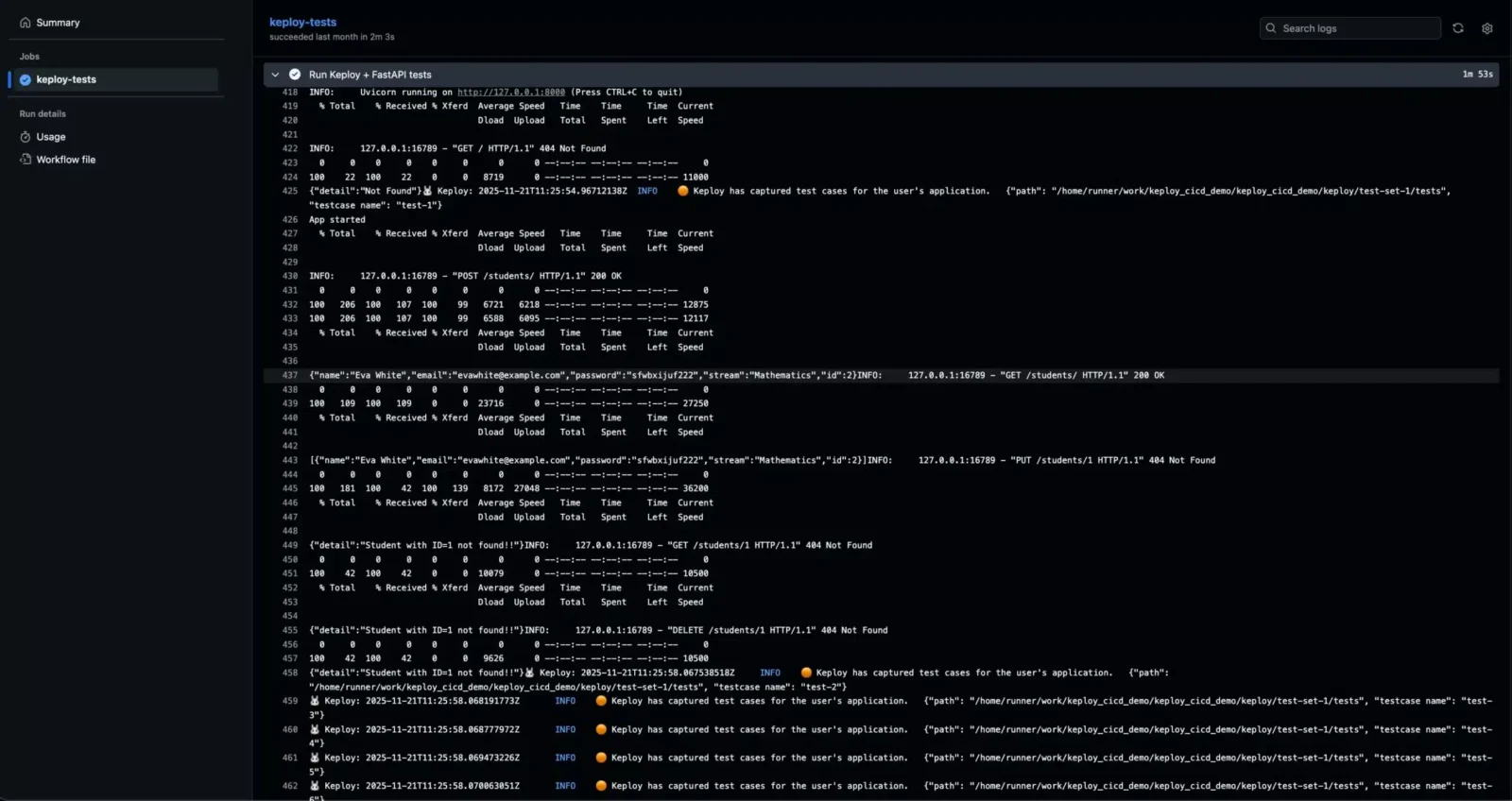
fiRecording the test cases using Keploy in the CI Pipeline:
Replaying the test cases using Keploy in the CI Pipeline:
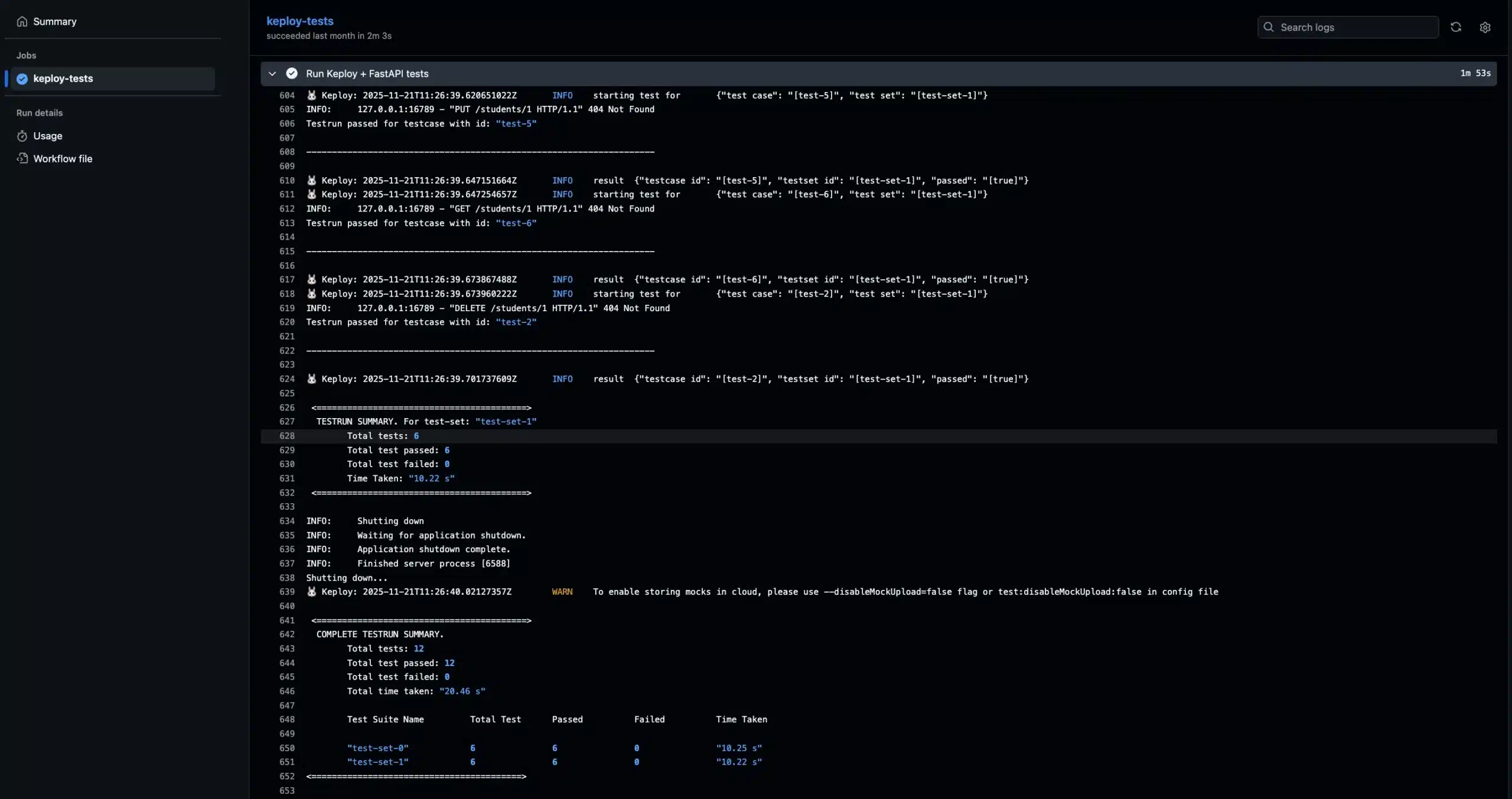
You can view the GitHub Actions logs at the provided URL. The workflow will perform both record and replay steps: Github Actions logs
Conclusion
In this blog, we explored how to integrate Keploy into a CI/CD pipeline. The example we used was based on GitHub Actions, but the same approach can be applied using shell scripts on any CI/CD platform.
We also learned how to record and replay test cases in CI/CD using Keploy. If you want to customize the workflow, you can easily modify the configuration for example, replace Postgres with any other database or update the cURL commands to match your application’s APIs.
Adding an automated testing phase to your CI/CD pipeline helps you catch bugs early and ensures that every change pushed to production is reliable.
FAQs:
-
Does Keploy work only with GitHub Actions?
No. Keploy is platform-agnostic. You can use the same scripts with GitLab CI, Jenkins, CircleCI, Bitbucket, or any platform that supports running shell commands.
-
Can I run both record and replay inside the same CI/CD workflow?
Yes. Your pipeline can first record fresh test cases and then replay them in the same workflow to validate the new build.
-
How does integrating Keploy improve DevOps productivity?
It reduces manual testing effort, increases confidence in deployments, speeds up delivery, and catches regressions early, making CI/CD pipelines more reliable.
-
Can I customize which test cases Keploy replays?
Yes. You can filter test cases, organize them into folders, or selectively run tests using flags in your CI/CD scripts.
5. Can Keploy be used for microservices-based applications?
Yes. Keploy works well with microservices because it captures interactions between services and mocks them during replay, ensuring isolated and consistent testing.

Leave a Reply