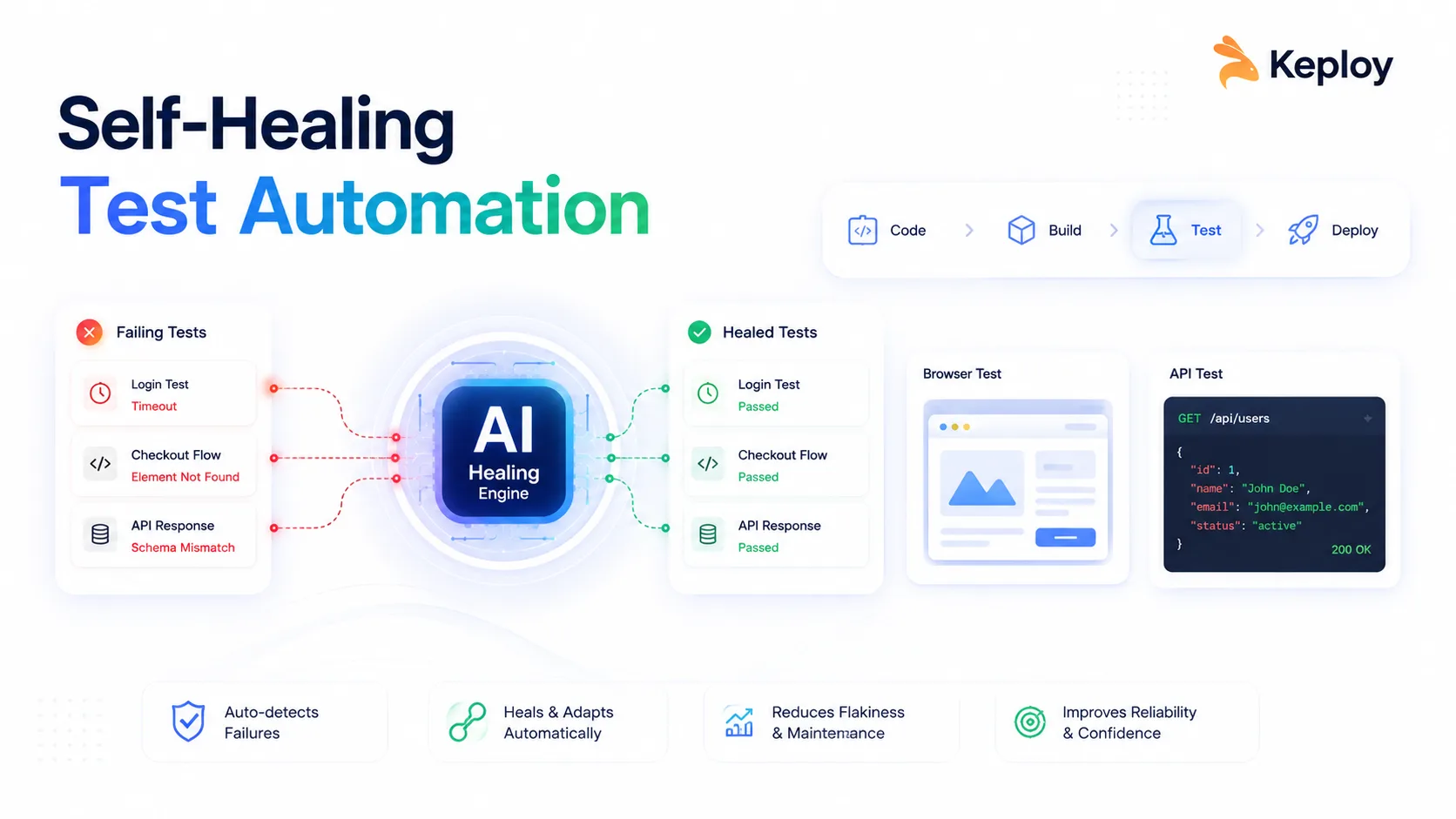
Self-healing test automation detects and recovers from application changes – broken locators, timing issues, schema drift – without manual intervention. Most tools focus only on UI selector healing, but selector failures are just ~28% of real test failures. The rest come from timing, data, runtime, and API schema issues. For schema drift specifically, Keploy detects when a service response changes and flags it automatically.
Your team ships a UI update on Monday. By Tuesday morning, 47 automated tests are failing and half of them are not real bugs. They broke because a button ID changed from confirmButton to confirm-purchase-btn. Your engineers spend hours figuring out what is an actual regression and what is just a broken locator.
Self healing test automation solves this by allowing tests to automatically recover from UI changes, locator failures, timing issues, and API schema updates without constant manual fixes. Instead of failing every time the application changes, these frameworks adapt dynamically and keep test suites reliable, stable, and easier to maintain.
What Is Self-Healing Test Automation?
Self-healing test automation is the ability of automated tests to detect, adapt, and recover from changes in an application — without manual intervention. When a locator breaks or a response schema shifts, the framework finds an alternative path and keeps the test running.
Think of it like a GPS that reroutes when a road closes, rather than stopping and asking you to update the map.
Traditional test scripts are brittle by design. They store a single identifier – an XPath, an element ID, a CSS selector – and fail the moment that identifier changes. Self-healing frameworks instead build a fingerprint of each target: ID, CSS selector, text content, ARIA label, DOM position, and visual context. When the primary locator fails, the system walks through the fingerprint to find the element another way.
It is worth clarifying one thing upfront: self-healing is not just selector healing. That misconception is why most teams only partially solve their flakiness problem. There are six categories of test failures, and selector changes account for only about 28% of them.
How Self-Healing Test Automation Works
Here is the step-by-step mechanism that runs inside a self-healing framework on every test execution.
Step 1 — Element fingerprinting
Before a test runs, the framework captures multiple attributes for each UI element it will interact with: id, name, XPath, CSS selector, text, ARIA label, position in the DOM tree, and sometimes a visual snapshot. This multi-attribute profile is what makes recovery possible later.
Step 2 — Primary locator attempt
The test executes normally, using the stored primary locator. If the element is found and the test passes, nothing else happens — the healing layer is invisible.
Step 3 — Failure detection
If the primary locator throws a NoSuchElementException (or its equivalent in your framework), the engine does not mark the test as failed and stop. Instead, it hands control to the healing layer.
Step 4 — Heuristic fallback
The healing layer works through the fingerprint. It tries secondary locators in order — CSS selector, then text match, then ARIA label, then relative DOM position. This heuristic pass resolves the majority of real-world locator breaks caused by minor UI refactors.
Step 5 — AI inference
If heuristics fail, a machine learning model trained on past executions evaluates element similarity across the current DOM snapshot. It scores candidate elements by how closely they match the stored fingerprint and picks the most likely match.
Step 6 — Script update and verification
Once a new locator is confirmed, the framework applies it, re-runs the test step, and logs the healing event. Most tools flag healed steps for human review in a separate report — which is exactly where they should go before being merged back as the canonical locator.
For API and backend tests, the equivalent mechanism works differently. Keploy records real traffic between services, stores expected request-response pairs, and detects when a service’s response schema drifts from the stored baseline. When drift is detected, it flags the change and can automatically update the expected output — making record-replay a form of self-healing at the API layer.
The 6 Types of Test Failures Self-Healing Fixes
This is where most content about self-healing falls short. Selector healing is the most talked-about capability, but it is the minority of actual test failures. Here are all six categories your self-healing strategy needs to cover.
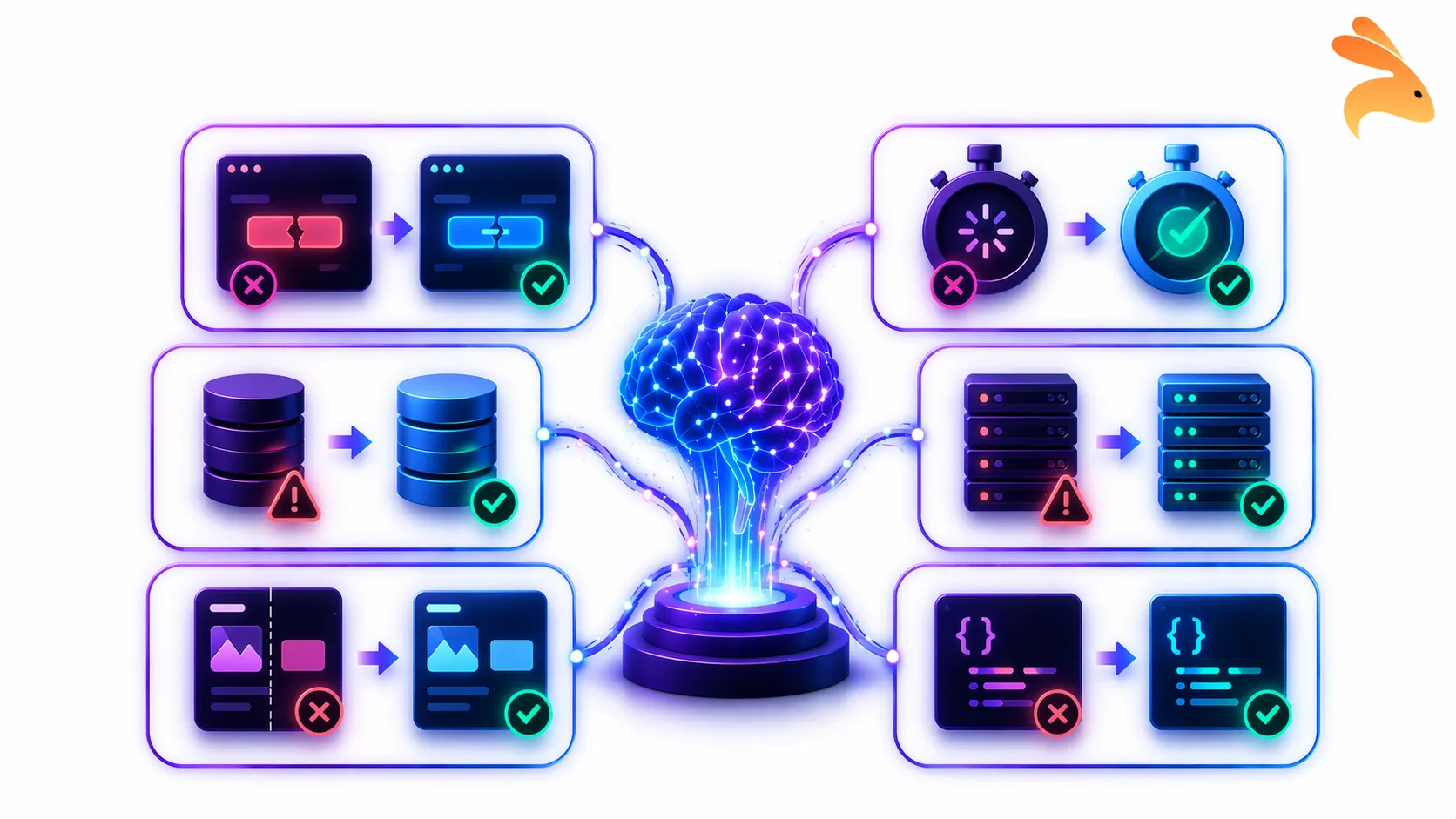
1. Selector / locator failures (~28% of failures)
The classic case. A button ID changes after a redesign. An XPath breaks when a parent div is removed. The framework uses its fingerprint to find the element via an alternative attribute and continues.
Example: A checkout test relies on #confirmButton. After a redesign, it becomes #confirm-purchase-btn. The framework finds it via its text content ("Confirm Purchase") and CSS class, runs the step, and logs the healed locator.
2. Timing failures
These happen when async operations — API responses, lazy-loaded components, animations — do not complete before the test looks for an element. The test fails not because anything broke, but because it looked too early.
Self-healing frameworks address this with adaptive waits: instead of a fixed sleep(3000), they poll for the element with intelligent retry logic and exponential backoff. This is one of the highest-impact changes a team can make to reduce flakiness.
3. Test data failures
Expired sessions, missing seed records, and invalid fixtures can cause tests to fail in ways that look like UI bugs. A test that expects to start with a valid auth token fails silently when that token has expired overnight.
Self-healing systems detect data-related failure patterns and automatically refresh sessions, re-seed fixtures, or generate replacement records before retrying the step. This is especially valuable in long-running regression suites.
4. Runtime and environment errors
Infrastructure flaps — a container restart, a transient 500 from a dependency, a network timeout — produce failures that have nothing to do with the application under test. Naive test runners mark these as failures and page someone.
Self-healing handles them with retry-with-backoff logic and by isolating the crashing component. The test continues through the main flow while the environment error is logged separately, so teams still see it without losing coverage on the feature being tested.
5. Visual assertion failures
When a UI redesign changes the layout, visual regression tests that compare pixel-by-pixel will fail — even if the functionality is completely unchanged. This creates a flood of false positives after every design update.
Modern self-healing frameworks use visual AI to compare semantic intent rather than pixel values. They evaluate whether the same interactive elements are present and accessible, not whether the button is 2px higher than it was last week.
6. API contract / schema failures
This category is almost entirely absent from competitor content, but it is the one most relevant to backend and microservices teams.
When a service is updated and its response shape changes — a field is renamed, a nested object is restructured, a new required field appears — tests that assert on the old schema fail. This happens constantly in teams running microservices with independent deployment cycles.
Keploy’s record-replay engine captures real API traffic, stores the expected schema, and detects drift on every test run. When a service updates its response, Keploy flags the schema change as a test failure with a clear diff — so teams can decide whether to accept the new shape or treat it as a regression. This is self-healing at the API layer, and it covers a failure category that UI-focused tools entirely miss.
Benefits of Self-Healing Test Automation
The case for self-healing is straightforward once you see the time breakdown. In most teams with large test suites, 30–50% of QA engineering time goes to test maintenance — updating locators, chasing flaky tests, investigating false positives.
Self-healing cuts that sharply. Teams report reductions of up to 70% in maintenance time after adopting a self-healing strategy, freeing engineers to write new tests for new features instead of fixing old ones.
The downstream effects compound. Fewer false positives mean more trust in the test suite. More trust means developers actually pay attention when a test fails, rather than dismissing it as "probably another flaky test." That trust is foundational to a healthy CI/CD pipeline.
A more reliable test suite can also improve the broader performance of your software delivery process. When teams spend less time fixing flaky tests and waiting for false failures to be investigated, they can reduce bottlenecks that affect deployment frequency and lead time for changes. These are two of the key indicators measured by DORA metrics, which provide a broader framework for evaluating software delivery speed and stability.
Other concrete benefits include faster feedback loops (the suite stays green, so CI completes without human intervention), better test coverage (time saved on maintenance goes to coverage expansion), and lower long-term cost per test run.
Limitations: When Self-Healing Can Hurt You
Almost no article on this topic covers limitations honestly. That’s a gap worth filling — especially for engineers who need to make a technical decision, not just get sold on a feature.
It can mask real bugs. If a button genuinely moved because of a product regression, a healed test might pass and hide the issue. Every healed step needs to appear in a visible audit log and require human sign-off before it becomes the new canonical test. Tools that heal silently — with no visibility into what changed — are dangerous.
It adds latency. The healing process, especially the AI inference step, takes time. For fast unit test suites, this overhead is unacceptable. Self-healing belongs in integration, E2E, and API test suites — not unit tests that need to run in under 30 seconds.
It creates false confidence. A suite that heals everything and always shows green can give a team the illusion of quality. Monitor your healing rate as a metric. A rising trend week over week is a signal that your test architecture or locator strategy needs a redesign, not just more healing.
It does not fix bad tests. Self-healing cannot rescue fundamentally poorly written tests — ones that assert on irrelevant details, chain too many steps without intermediate assertions, or rely on hardcoded production data. Fix test design first.
When to use it: rapidly evolving UIs, large test suites, Agile teams shipping multiple times per week, microservices environments where schemas evolve independently.
When to skip it: stable applications with infrequent UI changes, small test suites under 50 tests, regulated environments (HIPAA, PCI-DSS) that require immutable test assertions and full audit trails of every test step.
Self-Healing Test Automation Tools: A Practical Comparison
Rather than listing every tool by brand, here is a breakdown by the layer they operate on — because the right tool depends on where your failures are happening.
UI and end-to-end testing tools
Cypress with cy.prompt — Cypress’s AI-powered test step healing is notable for its transparency. Every healed step is visible in the Command Log with a clear explanation of what changed and why. Teams that want full visibility into AI decisions should start here.
Playwright + Momentic / Testim — Playwright provides the testing framework; Momentic and Testim add an AI layer on top that handles selector healing and adaptive waits. Works well for teams already invested in Playwright.
Healenium — An open-source self-healing library that wraps Selenium. It intercepts NoSuchElementException, searches for the element via alternative attributes, and updates the locator in a PostgreSQL database for future runs. The best option for teams that need self-healing without a SaaS dependency.
API and backend testing tools
Keploy — Records real application traffic, generates test cases automatically, and detects API schema drift on every run. The free tier includes 100 tests/month and 5 AI credits for bug detection and self-healing. For backend and microservices teams, this is the only tool in this list that natively addresses failure type 6 (schema failures).
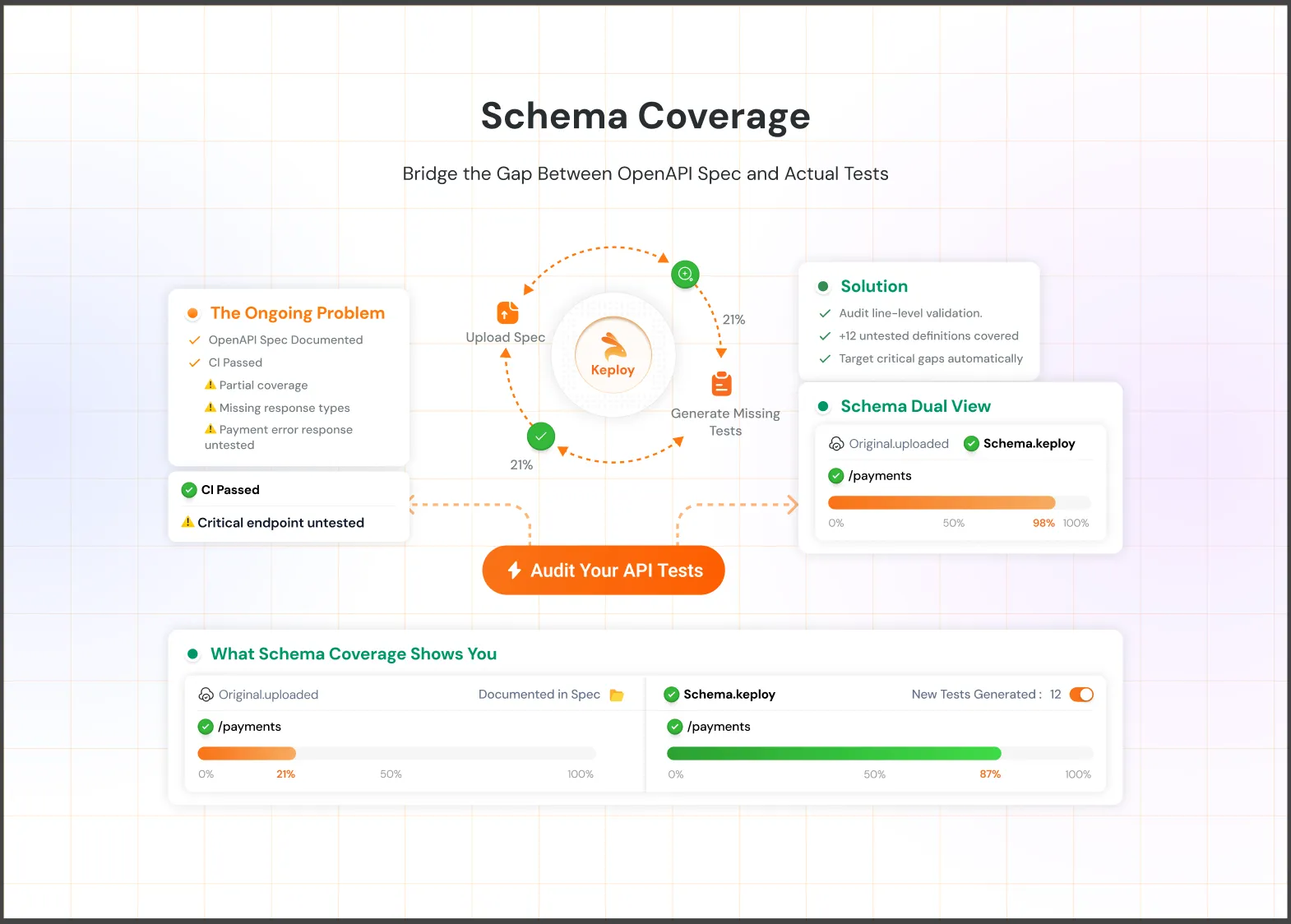
Rest Assured + custom healing logic — Teams with existing RestAssured suites can add schema-drift detection manually using JSON Schema validation libraries. More work upfront, but keeps the stack dependency-free.
Open Source and AI Testing Platforms
Browser Stack Self Healing Agent — Integrates with Browser Stack’s Low Code Automation platform. Good for teams already using the Browser Stack ecosystem and looking for automatic locator recovery without changing frameworks.
Healenium — An open source self healing library for Selenium that automatically restores broken locators using previous DOM information and alternative attributes. Best for teams that want self healing without relying on a SaaS platform.
Selenide — An open source Selenium wrapper with smart waits and stable element handling that reduces flaky failures caused by timing and locator issues. Useful for Java teams building reliable UI automation.
Tool Comparison
| Tool | Healing scope | Open source | Best for |
|---|---|---|---|
| Cypress | UI selectors, timing | No | Full visibility into healing |
| Healenium | UI selectors | Yes | Selenium teams, no SaaS |
| Keploy | API schema drift | Yes (core) | Backend, microservices |
| Selenide | Timing, element stability | Yes | Java Selenium automation |
| BrowserStack | UI selectors | No | BrowserStack users |
How to Implement Self-Healing in Your CI/CD Pipeline
Most guides explain what self-healing is. Very few show how to actually wire it in. Here is a five-step implementation playbook.

Step 1 — Audit your current failure types
Before adding any self-healing tooling, spend one sprint categorizing your existing flaky test failures by type: locator, timing, data, runtime, visual, or schema. A simple spreadsheet with 50–100 recent failures is enough to see the distribution.
This step tells you which healing category will have the biggest impact for your team — and it prevents you from buying a UI-focused tool when most of your failures are actually timing or data issues.
Step 2 — Choose the right layer
UI tests with selector failures → add Healenium (Selenium) or enable cy.prompt (Cypress). API tests with schema drift → add Keploy to record traffic and detect drift. Timing failures across the board → configure adaptive waits in your existing framework before reaching for a new tool.
Do not try to solve all six failure categories at once. Pick the top two and ship a working solution.
Step 3 — Set healing guardrails
Configure your healing tool to log every healed step to a dedicated report. Set up a PR gate: if healing occurred during a test run, the pipeline opens a PR with the proposed locator diff and requires a reviewer to approve it before the canonical test is updated.
This is non-negotiable. Silent healing that auto-merges changes is how teams end up with tests that pass for the wrong reasons.
Step 4 — Integrate with CI
Here is a minimal GitHub Actions configuration for a Keploy-enabled pipeline with schema drift detection:
yaml
name: Test with Keploy

on: [push, pull_request]

jobs:
  test:
    runs-on: ubuntu-latest
    steps:
      - uses: actions/checkout@v4

      - name: Install Keploy
        run: curl --silent -O -L https://keploy.io/install.sh && source install.sh

      - name: Run tests with Keploy
        run: keploy test -c "go run main.go" --delay 10

      - name: Upload Keploy report
        if: always()
        uses: actions/upload-artifact@v4
        with:
          name: keploy-test-report
          path: keploy/testReports/
When Keploy detects schema drift — a field renamed, a new required property, a changed status code — it marks the test as failed with a clear diff in the report artifact. The team reviews the diff and decides: accept the new schema (update the test baseline) or treat it as a regression.
Step 5 — Monitor your healing rate
Track "healed steps as a percentage of total test steps" as a weekly metric. A stable or declining healing rate means your test suite is healthy and the application is being built in a test-friendly way.
A rising healing rate is a warning signal. It usually means one of three things: the application is changing faster than the test strategy can keep up, developers are making UI changes without considering test impact, or the locator strategy itself needs a redesign (switch to data-testid attributes, which are change-resistant by convention).
Best Practices for Self-Healing Test Automation
A few practices make the difference between self-healing that saves time and self-healing that creates new problems.
Use data-testid attributes wherever possible. This is the single highest-leverage change a development team can make. Elements annotated with stable, semantic test attributes rarely need healing in the first place. It reduces the surface area of the problem before any AI is involved.
Treat healed tests as technical debt. Schedule a monthly review of healed locators. Accept them into the canonical test suite only after a human has verified that the healed version tests the right thing.
Combine UI healing with API contract testing. UI self-healing keeps your front-end tests green. Keploy’s schema drift detection keeps your backend integration tests honest. Both layers together give you genuine confidence in every deploy.
Do not use self-healing in performance test suites. The overhead of healing logic — especially AI inference — adds latency that will corrupt your performance baselines. Keep perf tests static and minimal.
Maintain a healing audit log. In any environment where compliance matters (SOC 2, HIPAA, PCI-DSS), every healing event must be logged with a timestamp, the original locator, the healed locator, and the approver. Build this into your pipeline from day one.
The Future: Agentic Self Healing
Today’s self healing automation reacts to failures after they happen, but the next generation will be proactive. Agentic testing systems can monitor production traffic, generate missing test cases automatically, and update tests when applications change.
Tools like Keploy are already moving in this direction with record replay, API schema drift detection, and AI powered test generation. As AI models improve, self healing will become more accurate across UI, API, and visual testing. But teams still need strong fundamentals like stable locators, audit logs, and clear review processes to make self healing reliable.
Conclusion
Self healing test automation helps teams reduce flaky failures and maintenance overhead as applications evolve. Instead of constantly fixing broken tests, teams can focus more on shipping features and improving coverage.
The key is using the right healing strategy for the right layer. UI tools handle locator and timing issues, while backend tools like Keploy help detect API schema drift and service level changes. With proper review processes and monitoring, self healing can make test automation faster, more stable, and easier to scale.
The free tier gets you started in minutes. Try Keploy →
Frequently Asked Questions
What is self-healing in test automation? Self-healing test automation is a technique where automated tests detect and recover from application changes — like a renamed button or a shifted DOM element — without requiring a developer to manually update the test script.
How does AI fix broken tests automatically? AI-powered testing frameworks build a multi-attribute fingerprint of each test element before execution. When the primary locator fails, the AI model evaluates the current DOM against the fingerprint and identifies the most likely new locator, applying the fix in real time.
What is the best self-healing test automation tool? It depends on the layer you are testing. For UI and E2E tests, Cypress (cy.prompt) and Healenium (open-source Selenium wrapper) are strong choices. For API and backend tests, Keploy’s record-replay and schema drift detection is the most purpose-built option available.
How do I reduce flaky tests without self-healing? Start with data-testid attributes to stabilize locators. Replace fixed sleep() calls with adaptive waits. Audit your test data setup to ensure clean state before every run. These three changes reduce flakiness significantly before you need an AI layer.
Does self-healing work for API testing? Yes, but most tools do not support it. Keploy handles API self-healing through schema drift detection — it compares each API response against a recorded baseline and flags changes automatically, so teams know immediately when a service update breaks a contract.
Can self-healing hide real bugs? Yes, this is the most important limitation to understand. If a UI element moved because of a genuine regression, a healed test might pass and conceal the bug. Always require human review of healed steps and maintain a visible audit log of every healing event.

Leave a Reply