Software testing has four levels, each answering a different question. Unit testing asks whether a single function works in isolation. Integration testing asks whether connected components communicate correctly – the layer where Keploy automates test generation from real API traffic. System testing validates the full application end-to-end, while acceptance testing asks whether real users consider it ready to ship.
A developer writes a function. That function gets wired into a module. The module joins the rest of the application. And at some point, someone outside engineering has to decide whether the whole thing is actually good enough to ship. Four different moments, four different kinds of testing, that’s the whole idea behind levels of software testing.
Most teams already do some version of this without naming it. The confusion usually shows up later: a bug slips past unit tests but gets caught in system testing, or a feature that worked fine in staging falls apart during UAT. Nine times out of ten, that gap traces back to a testing level that got rushed or skipped. Understand how the four levels actually work, where they overlap with the SDLC, and where teams are automating the parts that used to eat the most time.
What Are Levels of Software Testing?
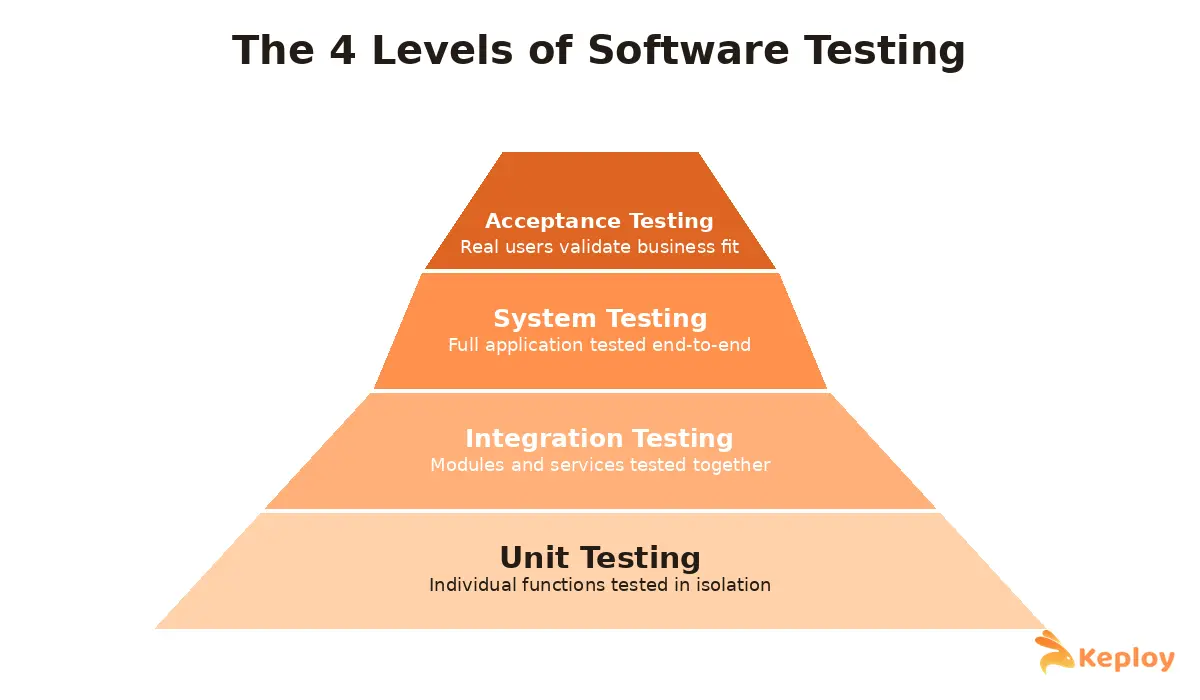
Levels of software testing are the stages at which software gets tested as it moves from a single unit of code to a fully working system. There are four of them: unit testing, integration testing, system testing, and acceptance testing.
Each one is answering a different question. Unit testing asks whether one function or component works on its own. Integration testing asks whether components behave once they’re connected. System testing asks whether the whole application actually meets the requirements. Acceptance testing asks whether real people, the ones who’ll actually use the thing, agree it’s ready.
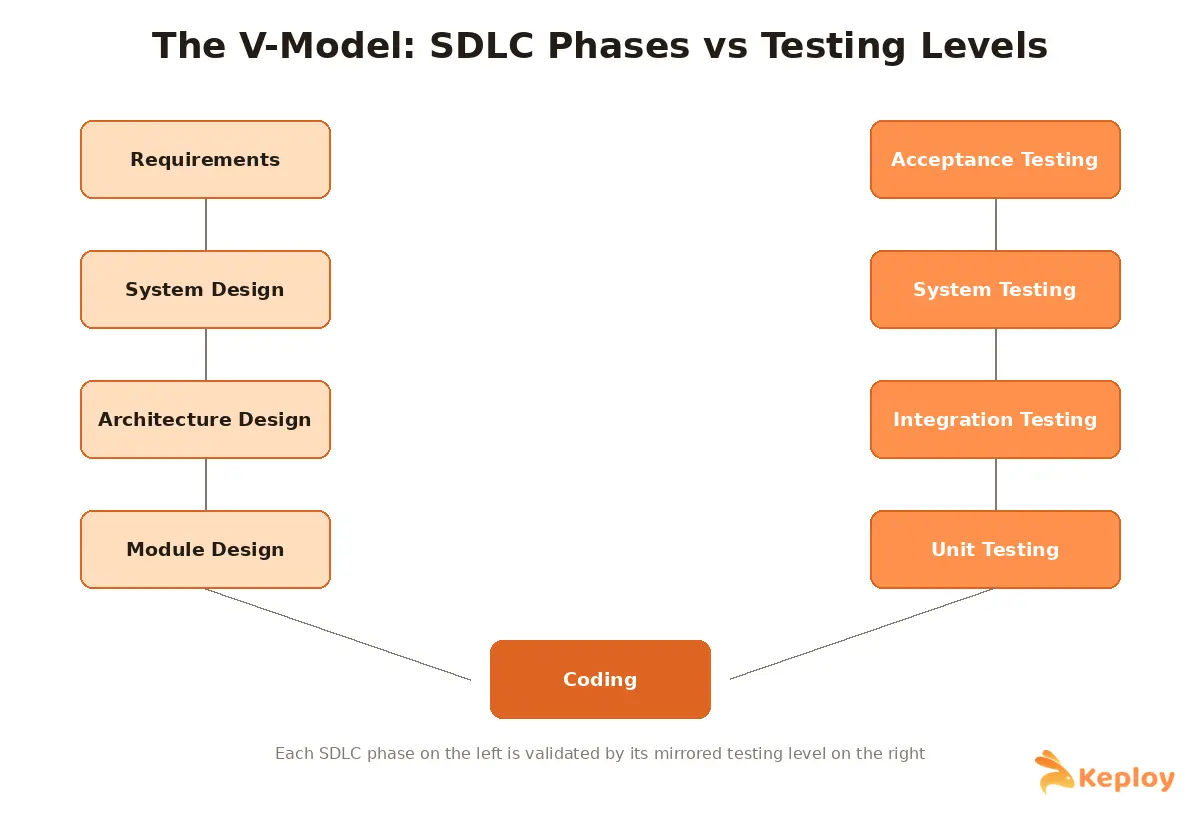
That order isn’t arbitrary. It’s often described as testing "in the small" before testing "in the large," and it maps almost exactly onto the SDLC, which is why you’ll sometimes see testing levels drawn against development phases in a V-shape (the aptly named V-model).
- Unit Testing – run during coding, on every commit; checks a single function or component in isolation
- Integration Testing – run once units pass; checks whether connected components exchange data and calls correctly
- System Testing – run on the fully integrated build; checks the whole application against functional and non-functional requirements
- Acceptance Testing – run just before release; checks whether real users or stakeholders consider it ready to ship
Why Bother Splitting Testing Into Levels at All
Here’s the practical reason this matters: skipping a level doesn’t make the software any more stable, it just delays when you find out it isn’t. A bug caught in unit testing costs a developer a few minutes. The same bug caught during acceptance testing, or after release, can mean a hotfix at 11pm and an unhappy customer.
Structuring software testing this way buys you a few things:
-
Defects get caught close to where they were introduced, which is the cheapest place to fix them.
-
Ownership stays clear: developers write unit tests, QA owns integration and system testing, and actual users or stakeholders handle acceptance. Each level works like a gate before code moves further down the pipeline, which matters a lot once you’re shipping through CI/CD (continuous integration/continuous delivery) pipelines multiple times a day.
-
And because functional bugs, integration mismatches, and performance problems rarely show up at the same layer, testing across all four levels covers a wider spread of risk than doubling down on just one.
The 4 Levels of Software Testing
1. Unit Testing
Unit testing is the first and smallest level, checking a single function, method, or class in complete isolation. No database, no network calls, no other services in the picture, just that one piece of logic doing what it’s supposed to.
Developers usually write these themselves, often in the same commit as the code they’re testing. Say you’ve got a calculateDiscount() function. A decent unit test suite checks it with a normal input, a negative number, a zero, and maybe a null, all without spinning up the rest of the checkout flow.
Good unit tests share a few habits: they test one behavior at a time, they mock out anything external, they run in milliseconds rather than seconds, and nobody’s obsessing over hitting 100% coverage just for the sake of the number. Coverage that’s actually meaningful matters more than coverage that’s complete.
2. Integration Testing
Once units pass on their own, the next question is whether they play nicely together. This is where things get interesting, because two perfectly working components can still fail the moment they talk to each other, mismatched data formats, a broken API contract, a race condition nobody predicted.
Teams generally pick one of a few approaches here. Top-down starts testing from the higher-level modules and fakes the lower ones that aren’t ready yet. Bottom-up flips that, starting low and simulating the calls from above. Big bang integration testing (combining all components at once, rather than incrementally) just throws everything together at once, which is quick to set up but painful when something breaks and you’re not sure where. Sandwich testing (combining top-down and bottom-up approaches) splits the difference for systems too large to do either cleanly.
A concrete example: checking that a payment service correctly receives an order total from checkout, processes it, and sends back a confirmation status the order module can actually read.
This is really where API testing earns its keep, since most applications today talk to each other over APIs rather than direct function calls. Getting the contracts right, request and response formats, status codes, how errors get handled, catches a huge share of integration bugs before they ever reach a real user.
3. System Testing
System testing looks at the fully integrated application as one piece, checked against everything it’s supposed to do, functionally and otherwise. It’s the first level where the software gets tested roughly the way a user would actually experience it.
There are two sides to this. Functional testing checks whether every feature does what the spec says it should, login works, search returns results, checkout completes, notifications go out. Non-functional testing asks the other questions: how it performs under load, how secure it is, whether it’s usable, whether it holds up across different browsers and devices.
Picture a full checkout flow, add to cart, pay, get a confirmation email, while also confirming the page loads fast enough under normal traffic. That’s a system test.
QA teams usually own this level, and it’s where most regression suites live and, frankly, where most of the maintenance pain shows up too. Every change to the app risks quietly breaking a dozen end-to-end scenarios somewhere. Tests generated from real traffic rather than written by hand tend to hold up better here, simply because they update alongside the application instead of drifting from it.
4. Acceptance Testing
Acceptance testing is the last stop before release, and it’s answering a different kind of question than the earlier three: not "does this work," but "is this actually acceptable to the people paying for it or using it." Fewer technical bugs get caught here, it’s more about fit.
This level shows up in a few flavors. User Acceptance Testing (UAT) has business stakeholders or end users run through real workflows and sign off. Alpha testing happens internally, close to release but before outsiders see it, we’ve written a full walkthrough of alpha testing if you want the step-by-step version. Beta testing hands the software to a limited group of real external users in their own environments, covered in more depth in our beta testing guide. Then there’s contract acceptance testing, which checks against terms in a SOW (statement of work), and regulatory acceptance testing, which matters a lot if you’re in healthcare, finance, or government software.
If you’re stuck deciding when alpha ends and beta should start, this alpha vs beta testing comparison lays out the sequencing with real examples.
One example that sticks: a hospital billing team running actual patient-billing scenarios through a new EHR (electronic health record) module before signing off. That’s UAT, and it’s exactly the kind of thing no automated test can substitute for.
Levels of Testing vs Types of Testing
People mix these up constantly, so it’s worth being precise. Levels of testing are about when and at what scope testing happens, unit, integration, system, acceptance. Types of testing are about what aspect you’re checking, functional, performance, security, usability, and a long list of others.
They’re not rivals, they overlap. Performance testing is a type that usually gets run during the system testing level. Regression testing can, and should, happen at nearly every level. For the fuller picture on how types break down, our guide to types of software testing covers where each one actually fits.
The 4 Levels at a Glance
| Level | Performed By | Scope | Primary Goal | Common Tools |
|---|---|---|---|---|
| Unit Testing | Developers | Single function or component | Verify smallest units work in isolation | JUnit, PyTest, Jest |
| Integration Testing | Developers / QA | Interaction between modules or services | Catch interface and data-flow issues | Keploy, Postman, REST Assured |
| System Testing | QA team | Fully integrated application | Validate functional and non-functional requirements end-to-end | Selenium, Keploy, Cypress |
| Acceptance Testing | End users / stakeholders | Business and user requirements | Confirm the software is ready for release | Manual UAT, TestRail, beta programs |
A Few Principles Worth Keeping in Mind
A handful of things hold true no matter which level you’re working at. Every test should trace back to an actual requirement, not just exist because someone thought of an edge case. Planning should happen before execution starts, not get invented on the fly. Exhaustive testing, every possible input combination, simply isn’t achievable, so the highest-risk paths deserve the attention. It’s also worth remembering the old observation that roughly 80% of defects tend to cluster in about 20% of modules; that’s usually where extra scrutiny pays off. Testing should move outward, small scope before large, unit before integration, integration before system. And an outside perspective, whether that’s a separate QA team or an automated tool, tends to catch what the original developer was too close to see.
How Keploy Fits Into The Levels of Software Testing
The honest problem with testing across four levels is that most of the manual work piles up at integration and system testing. Every new endpoint, every schema change, every extra microservice means more test scripts to write and more mocks to keep updated by hand.
Keploy approaches this differently. It uses eBPF (a Linux kernel technology for low-overhead traffic tracing) to capture real API traffic and turns that traffic directly into test cases and mocks, no scripting required. That helps at exactly the two levels that tend to hurt the most. For integration testing, it records actual calls between services and auto-generates mocks for dependencies like databases and third-party APIs, so you’re testing what really happens instead of guessing at scenarios. For system testing, because the suite is built from live traffic instead of hand-written scripts, it tends to stay in sync with the application on its own, which cuts a lot of the maintenance that normally builds up here.
If you’re weighing this against a more manual, collection-based approach, Keploy vs Postman breaks down how auto-generated tests compare with building everything by hand.
Frequently Asked Questions
How many levels of software testing are there?
Four: unit testing, integration testing, system testing, and acceptance testing. Regression testing is sometimes mentioned alongside these, but it’s really a practice repeated across all four rather than a level of its own.
What’s the difference between unit testing and integration testing?
Unit testing checks one component by itself. Integration testing checks what happens once components start talking to each other. One catches logic errors, the other catches communication and data-flow errors.
Who’s actually responsible for each level?
Developers own unit testing. QA engineers generally own integration and system testing. Acceptance testing belongs to end users or business stakeholders, not engineering.
What happens after system testing?
Acceptance testing. Once the integrated system passes its functional and non-functional checks, it moves to real users or stakeholders for sign-off.
Can any of the testing levels be automated?
Unit testing, almost always yes, frameworks like JUnit and PyTest handle that well. Integration and system testing are catching up fast too, with tools like Keploy generating both tests and mocks straight from real traffic instead of requiring someone to write them by hand.
When should you use unit testing versus system testing?
Use unit testing continuously, during development, on every commit, to catch logic errors close to the source. Use system testing after full integration, ahead of release, to confirm the application meets functional and non-functional requirements as a whole.
What level of testing comes right after integration testing?
System testing. Once integration testing confirms components communicate correctly, system testing evaluates the fully assembled application against the complete set of requirements.
What’s the difference between system testing and acceptance testing?
System testing is a technical check, run by QA, confirming the application meets specifications. Acceptance testing is a fit check, run by end users or stakeholders, confirming the application is actually acceptable for real-world use.
Final Thoughts
The four levels exist because bugs get cheaper to fix the earlier they’re caught, and different levels catch entirely different classes of problems. Jumping straight to system or acceptance testing without solid unit and integration coverage underneath almost always means finding the same issues later, at a worse time, for more money.
The upside is that the two levels costing teams the most manual effort right now, integration and system testing, are also the ones seeing the most automation. If your team is still hand-writing and hand-maintaining these, it’s worth checking how much of that can be generated from real traffic instead.

Leave a Reply