The bug life cycle (defect life cycle) is the sequence of states a defect moves through from discovery to closure. Typical stages are New, Assigned, Open, Fixed, Retest, and Closed, with additional paths for Reopened, Deferred, or Rejected bugs. It gives teams a shared, trackable workflow for managing defects to resolution.
Every bug that gets fixed in your product goes through the same journey. Someone finds it, someone confirms it, someone fixes it, and someone proves the fix actually works. That journey is the bug life cycle, and teams that manage it well ship faster than teams that treat bug tracking as an afterthought.
I have watched teams lose entire sprints to bugs that bounced between "fixed" and "reopened" three or four times, mostly because nobody agreed on what each state meant or who was responsible for moving a bug forward. This guide covers every stage of the bug life cycle, the ownership behind each transition, and the practical habits that keep defects from getting stuck.
What Is a Bug in Software Testing?
A bug in software testing is any behavior in an application that does not match what was expected or specified. If the requirement says a password reset email should arrive within a minute and it never arrives, that gap between expected and actual behavior is a bug.
You will hear a few related terms used around it, and the distinction matters when you write reports:
- Error: a mistake made by a developer while writing code, such as an off-by-one condition in a loop.
- Defect or bug: the flaw that the error introduces into the software. Most teams use "bug" and "defect" interchangeably in daily work.
- Failure: what the end user actually experiences when the defect executes in production, like a crashed checkout page.
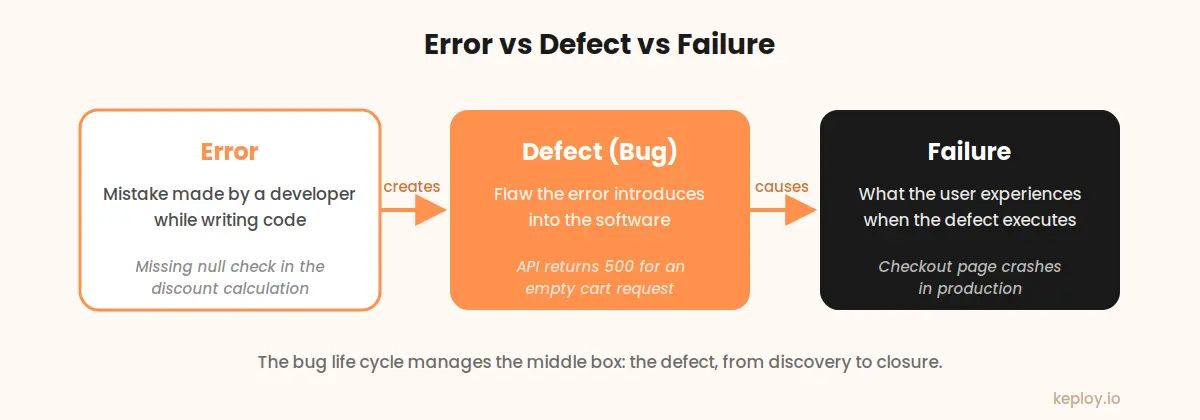
So an error creates a defect, and a defect can cause a failure. If you are still building your foundation on these concepts, our guide on software testing basics walks through the full vocabulary.
What Is the Bug Life Cycle?
The bug life cycle, also called the defect life cycle, is the sequence of states a bug moves through from the moment it is discovered until it is closed. Each state answers one question: what is the current status of this bug, and whose move is it?
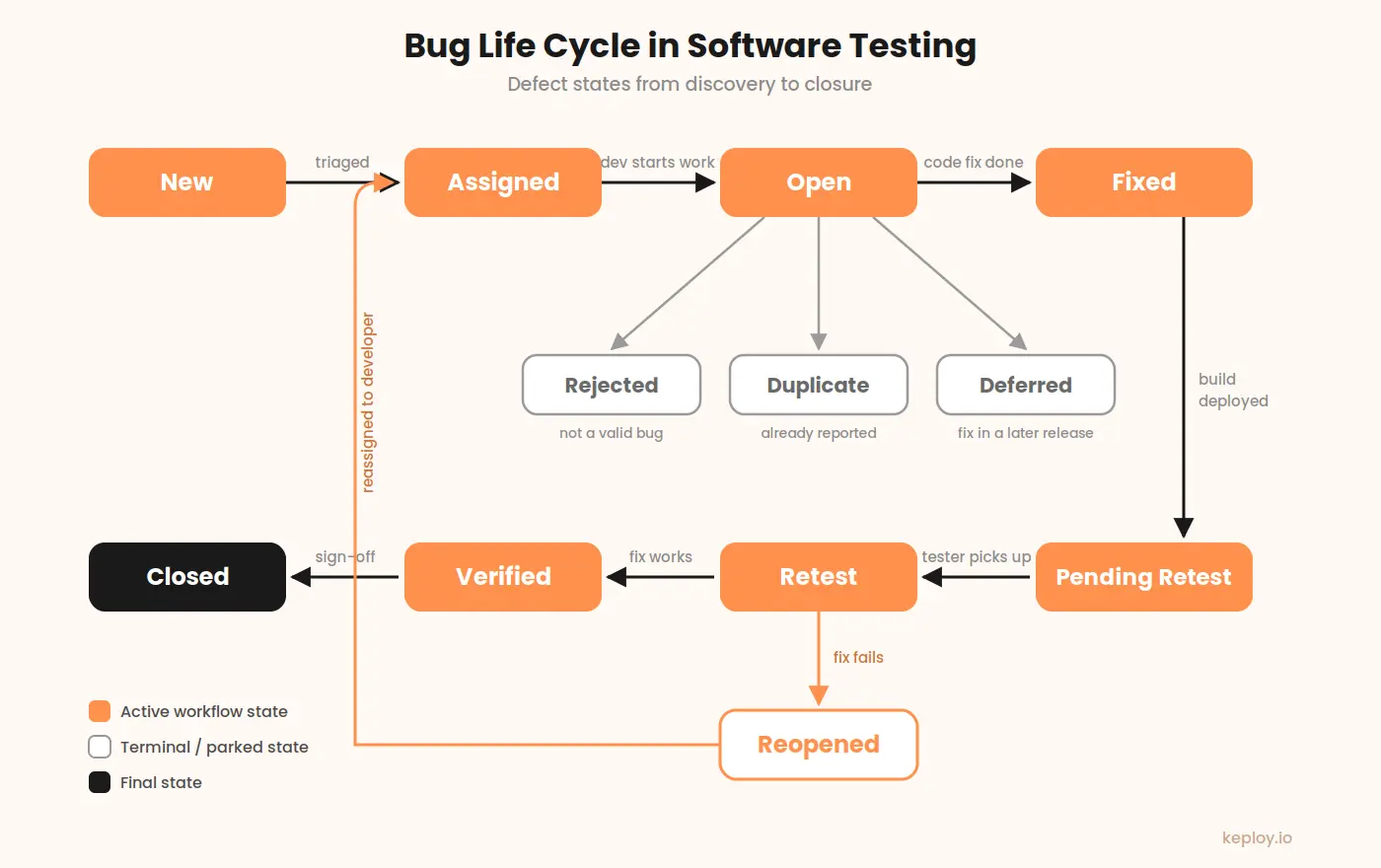
A typical software bug life cycle looks like this: a tester logs a new bug, a lead triages and assigns it, a developer fixes it, the tester retests it against a new build, and the bug is verified and closed. If the fix does not hold, the bug is reopened and the loop repeats.
The exact state names differ between tools. Jira, Bugzilla, and Azure DevOps each use slightly different labels, but the underlying workflow is nearly identical everywhere. Once you understand the canonical cycle, you can read any team’s board.
Stages of the Bug Life Cycle
Here is each state in the defect life cycle, what it means, and who owns the next move.
New
Everything starts when someone spots behavior that looks wrong and logs it. Usually that someone is a tester, but bugs also arrive from developers, support tickets, and angry tweets. At this point the bug is unverified. Nobody has confirmed it is real, reproducible, or unique, and a surprising number never make it past this state.
What separates a useful report from a useless one is boring stuff: exact reproduction steps, what you expected versus what happened, environment details, a screenshot or a log snippet. I keep coming back to this because weak reports are the single biggest source of delay in the entire cycle. A developer who cannot reproduce a bug cannot fix it, and every clarifying comment adds a day.
Assigned
Someone with triage authority, usually a test lead or project manager, looks at the new bug and makes a call. Legitimate? Assign it to a developer and set severity and priority. Vague, duplicate, or working as intended? Filter it out now, before it eats developer time. Teams that skip this checkpoint end up with engineers doing triage in the middle of feature work, which is expensive and annoys everyone.
Open
The assigned developer starts analyzing the bug. They reproduce it, trace the root cause, and begin working on a fix. The Open state is where a bug can also branch off the main path:
- Rejected: the developer determines the reported behavior is actually correct, often because the tester misread the requirement. Sometimes labeled "Not a Bug."
- Duplicate: the same defect has already been reported. The new entry is linked to the original and closed.
- Deferred: the bug is real but will not be fixed in the current release. Low severity issues, edge cases, and defects in soon-to-be-deprecated features often land here.
Each of these branches needs a written justification. A rejection without an explanation almost always turns into a reopened argument later.
Fixed
The developer finishes the change, gets it through review, and merges. The bug gets marked Fixed. Careful with this state, though. Nothing is proven yet. A fix that has not been retested is a claim, not a result, and treating Fixed as done is how bugs sneak back into release notes.
Pending Retest
The fix has reached a test build or staging environment and is waiting for a tester to pick it up. On a fast-moving team this state lasts an hour. On teams with long release trains, bugs sit here for days, and almost nobody measures it. If your cycle feels slow, check this state first. It is usually where the time goes.
Retest
The tester replays the original reproduction steps against the new build. The good ones do not stop there. Fixes have a habit of breaking whatever sits next to them, so poking at the surrounding functionality is worth the extra ten minutes. This is regression thinking, and it is covered in more depth in the 7 principles of software testing.
Verified
The defect no longer occurs. The tester records the evidence and the bug moves toward closure. Short state, but skipping the evidence part means arguments later when someone claims it was never really fixed.
Reopened
The retest failed, or the bug came back weeks later. Either way it goes back to the developer and the loop repeats. Watch your reopen rate closely. When more than a handful of fixes bounce, the cause is almost always upstream: rushed patches, reports that pointed at the wrong thing, or a test environment that does not match where the bug actually lives.
Closed
Fixed, verified, signed off, done. The better teams I have worked with require one more thing before closing: a comment recording the root cause. It feels like bureaucracy in the moment, and then six months later it turns your bug tracker into a searchable history of how your system actually fails.
Bug Life Cycle vs Defect Life Cycle: Is There a Difference?
In practice, no. "Bug life cycle," "defect life cycle," and "life cycle of a defect" all describe the same workflow. Formal testing literature, including ISTQB material, prefers the word "defect," while most engineering teams say "bug" in daily conversation. Your bug tracker does not care which word you use; the states and transitions are identical.
The only nuance worth knowing: some organizations reserve "defect" for issues found during testing and "failure" for issues found in production. If your company makes that distinction, follow it in your reports so metrics stay clean.
A Worked Example: One Bug, Start to Finish
Abstract state diagrams are easier to remember with a concrete run-through. Say a tester finds that an e-commerce API returns a 500 error when a discount code is applied to an empty cart.
- The tester logs it with the request payload, response, and environment details. Status: New.
- The QA lead confirms it reproduces, sets severity to High because it crashes a checkout path, and assigns it. Status: Assigned.
- The developer reproduces it locally and finds a null reference in the discount calculation when the cart array is empty. Status: Open.
- They add a guard clause, write a test for the empty-cart case, and merge. Status: Fixed, then Pending Retest once the build reaches staging.
- The tester replays the original request. The API now returns a proper 400 with a validation message. They also retest discount codes on valid carts to confirm nothing else broke. Status: Retest, then Verified.
- The lead signs off and records the root cause. Status: Closed.
Total elapsed time in a healthy team: a day or two. The same bug in a team with vague reports and slow triage can take two weeks, and most of that time is spent waiting, not fixing.
Severity and Priority in the Defect Life Cycle
Two fields drive how fast a bug moves through the cycle, and they measure different things.
Severity measures technical impact. A crash that corrupts data is Critical regardless of how rarely it happens. Severity is usually set by the tester who found the bug.
Priority measures business urgency. A typo in the company name on the homepage is technically trivial but might be a top priority to fix before a launch. Priority is usually set by a product owner or lead.
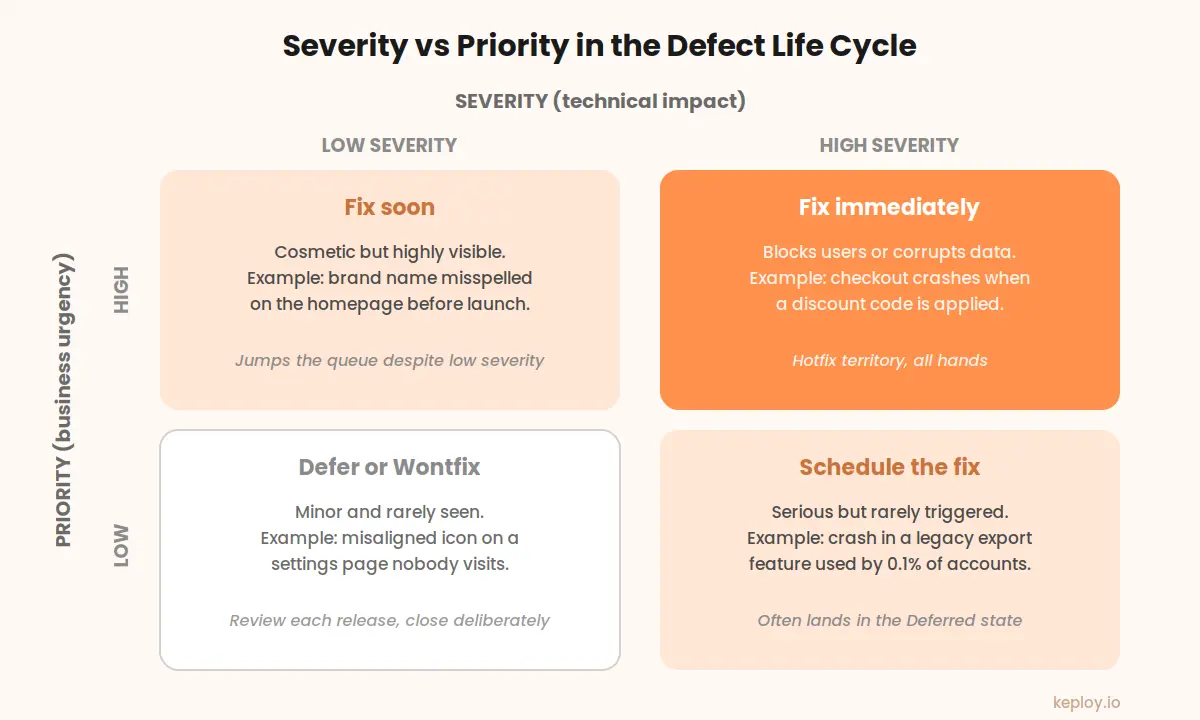
The combinations matter. A high severity, low priority bug (a crash in a feature almost nobody uses) may be deferred. A low severity, high priority bug (that homepage typo) may jump the queue. Teams that conflate the two fields end up arguing about labels instead of fixing defects.
Bug Life Cycle in Popular Tools
The canonical cycle maps onto every major tracker with minor renaming:
- Jira: Open, In Progress, Resolved, Reopened, Closed. Most teams customize this workflow heavily.
- Bugzilla: Unconfirmed, Confirmed, In Progress, Resolved, Verified, with resolutions like Fixed, Duplicate, and Wontfix.
- Azure DevOps: New, Active, Resolved, Closed.
- GitHub Issues: deliberately minimal with just Open and Closed, so teams recreate the intermediate states with labels.
The tool matters far less than the discipline. A team with a strict workflow in GitHub Issues will outperform a team with a beautiful Jira board and no ownership rules.
Device Defect Life Cycle
The same life cycle applies when the software runs on hardware, but with extra stages around environment and compliance. In a device defect life cycle, reproduction requires the exact hardware revision, firmware version, and often the physical conditions under which the bug appeared. A defect that only shows up on one board revision at low battery is still a defect, and the report has to capture all of that context.
Medical Device Defect Life Cycle
Medical device software adds a regulatory layer on top of the standard defect life cycle. Under standards like IEC 62304 and FDA design control requirements, every defect must be evaluated for patient safety impact, and the analysis, fix, verification, and closure must all be documented in an auditable trail. States cannot be skipped, closures require formal sign-off, and deferred defects need a documented risk assessment. The workflow is the same shape you saw in the diagram above; the difference is that every transition leaves a paper trail that a regulator can inspect years later.
Best Practices for Managing the Bug Life Cycle
Most of what separates smooth-flowing bug cycles from clogged ones comes down to a handful of habits, none of them glamorous.
Write reports a stranger could reproduce. Steps, expected result, actual result, environment, evidence. That’s it. Every missing detail becomes a comment thread, and every comment thread is a day of delay.
Give every state a named owner. A bug sitting in Pending Retest should belong to a specific tester, not "the QA team." Bugs without owners simply do not move, and no dashboard will fix that.
Triage on a schedule rather than on vibes. A short session every day or two keeps the New queue near zero and catches duplicates before two developers quietly fix the same thing in different branches. I have seen that exact collision happen, and the merge conflict conversation afterward was not fun for anyone.
Keep an eye on the reopen rate. Somewhere around one in ten fixed bugs coming back is the threshold where I start asking questions. Above that, something upstream is broken, usually rushed fixes or a staging environment that drifted from production.
And retire deferred bugs on purpose. Go through the deferred list every release. Anything deferred four releases running should either get scheduled or closed as Wontfix with a sentence explaining why. Carrying it forever is just noise with a status label.
One more that deserves its own mention: find bugs in groups. Structured group hunting sessions surface defects that solo testing misses, mostly because ten people bring ten different mental models of how the product should behave. Our guide to running a bug bash covers the format.
Shortening the Cycle: Catch Bugs Before They Enter It
The cheapest bug life cycle is the one that never starts. Every state transition above costs coordination time, so the highest-leverage improvement is catching defects before they reach a tracker at all.
That is where automated testing earns its keep. Unit tests catch logic errors at the function level before code review. Integration and API tests catch the contract-level defects that unit tests miss. And automated software testing tools keep those checks running on every commit so regressions surface within minutes of being introduced, when the fix is a one-line change instead of a triaged, assigned, and retested ticket.
This is the problem Keploy focuses on for APIs. Keploy records real traffic from your running application using eBPF and converts it into test cases and mocks automatically, so the empty-cart edge case from the example above gets caught in CI before a tester ever has to log it. If most of your bugs live at the API layer, see how Keploy handles API testing and how much of the defect life cycle you can skip entirely.
Conclusion
On paper the bug life cycle is almost trivial: New, Assigned, Open, Fixed, Retest, Verified, Closed, with a few branch states to handle rejections, duplicates, deferrals, and the occasional fix that did not stick. The hard part was never the diagram. It is making sure every state has an owner, every report stands on its own, and fewer defects enter the cycle in the first place because your automated checks caught them at commit time. Teams that manage those three things stop experiencing bug tracking as overhead. It becomes the fastest feedback loop they have.
Frequently Asked Questions
What is the bug life cycle in software testing?
It is the sequence of states a defect passes through between discovery and closure. The standard path runs New, Assigned, Open, Fixed, Pending Retest, Retest, Verified, and Closed, and branch states like Rejected, Duplicate, Deferred, and Reopened handle everything that falls off the happy path.
What is a bug in software testing?
Any gap between what the software actually does and what it was supposed to do. A developer’s error in the code creates the bug, and if the bug executes in front of a user, the result is a failure.
Is the defect life cycle different from the bug life cycle?
Same thing, two names. Formal standards like ISTQB material lean on "defect," while most engineers say "bug" in conversation. The states and transitions do not change based on which word your team prefers.
How many stages are in the bug life cycle?
Eight core states plus three or four branches is the usual count, so around eleven. In practice teams merge and rename states constantly, so the number on your Jira board will probably differ, and that is fine.
Who changes the status of a bug at each stage?
Testers own the discovery and verification ends: creating bugs, retesting, marking Verified, and reopening failed fixes. Developers own the middle: Open, Fixed, and the calls on Rejected, Duplicate, or Deferred. Leads sit at the gates, handling assignment and final closure.
Why do bugs get reopened?
Three causes account for most reopens. The fix was tested in an environment that differs from where the bug lives. The fix patched a symptom while the root cause stayed put. Or the original report was vague enough that the developer fixed the wrong thing entirely.

Leave a Reply