CI/CD testing runs automated tests inside your continuous integration and delivery pipelines so every change is validated before it ships. Unit, integration, and end-to-end tests fire on each commit or merge. Keploy fits naturally here, generating API tests and mocks from real traffic and running them CI/CD-native so pipelines gain coverage without extra scripting.
In this guide, you’ll learn how CI/CD testing works, the different testing stages in a CI/CD pipeline, the best tools and best practices, common challenges, and how automated API testing with Keploy helps build faster, more reliable software delivery pipelines.
What Is CI/CD Testing?
CI/CD testing means running automated tests at every stage of your continuous integration and continuous delivery pipeline, instead of testing manually after the code is already built and merged. Every commit gets validated by a structured set of checks before it moves to the next stage.
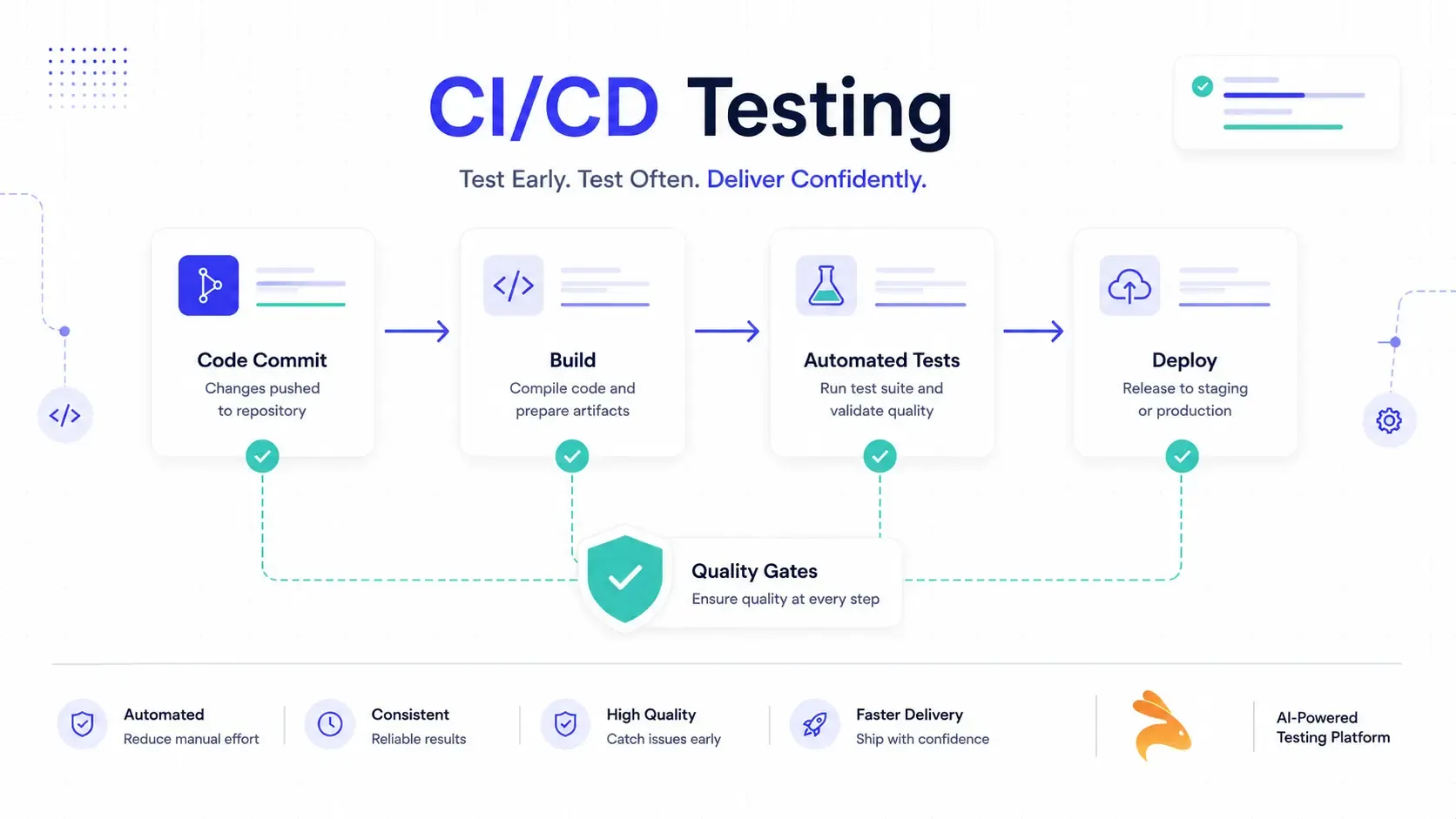
It sounds simple, but most teams get the terminology tangled. Here’s the breakdown:
-
CI testing: Tests run when code is merged into a shared repository — unit tests, static analysis, fast integration checks.
-
CD testing: Tests run before and after deployment to confirm the build is actually safe to release — end-to-end tests, smoke tests, performance checks.
-
Continuous testing: The umbrella term for testing at every single stage, not just CI or CD in isolation.
The goal across all three is the same: catch defects before they reach a user, without slowing the team down.
For a broader look at what happens after testing, see our guide to the software deployment process.
Why CI/CD Testing Isn’t Optional Anymore
Teams that ship multiple times a day can’t afford a QA team eyeballing every release. Netflix, Google, and most fast-moving SaaS companies rely on automated quality gates precisely because manual testing doesn’t scale to their release frequency.
Skip this step and you get one of two outcomes: either releases slow down because someone has to manually verify every change, or bugs slip into production because nobody caught them in time. Neither is acceptable once your team is moving fast.
The CI/CD Testing Pipeline, Stage by Stage
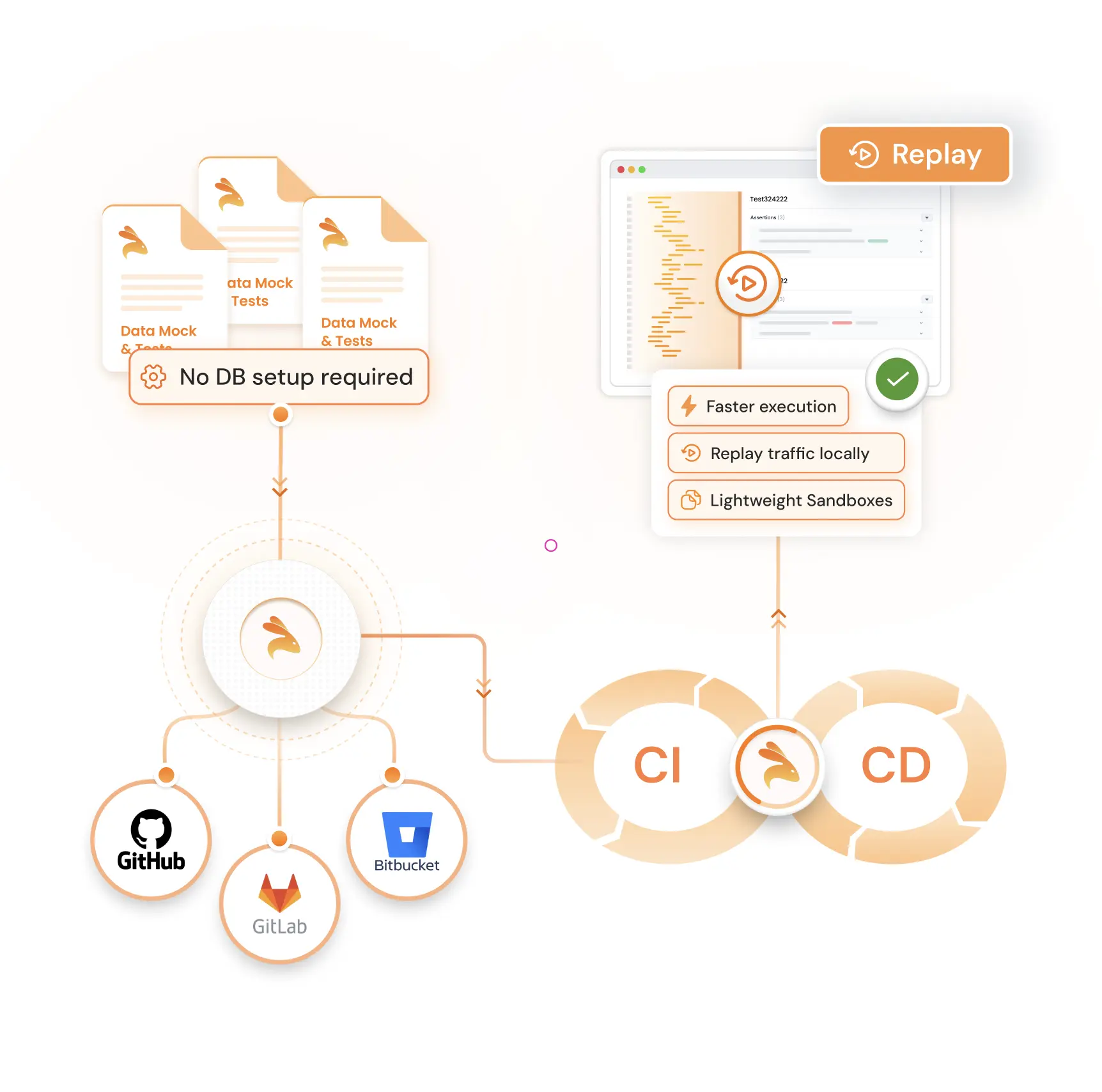
A CI/CD pipeline isn’t one big test — it’s a sequence of gates, each catching a different class of problem. Here’s how a well-structured pipeline maps tests to stages:
| Pipeline Stage | What Runs | Purpose |
|---|---|---|
| Build | Unit tests, static analysis, linting | Catch broken logic and style violations early |
| Post-build | Integration tests, contract tests, API tests | Verify services and modules work together |
| Staging | End-to-end tests, performance tests, security scans | Simulate real user flows before release |
| Post-deployment | Smoke tests, synthetic monitoring | Confirm production is healthy after release |
Build Stage: Unit Tests and Static Analysis
This is your fastest, cheapest feedback loop. Unit tests should run in under five minutes and catch broken functions before they go anywhere near a shared branch. Static analysis tools flag code smells and security issues before a human even opens the pull request.
Post-Build: Integration and API Testing
Once individual units pass, you need to know the pieces actually work together. This is where integration testing and contract testing come in — verifying that your services, APIs, and database calls behave as expected when combined. It’s also the stage where most teams start losing time, which I’ll get to in a minute.
Staging: End-to-End and Performance Testing
Here, you’re simulating what a real user would do — logging in, placing an order, hitting an API endpoint under load. End-to-end tests are slower and more brittle, so they shouldn’t run on every commit. Gate them behind the faster tests instead.
Post-Deployment: Smoke Tests and Monitoring
Testing doesn’t stop once code is live. Smoke tests confirm the deployment didn’t break anything obvious, and synthetic monitoring keeps checking production every few minutes so you catch outages before your users do.
Types of Tests You Should Automate
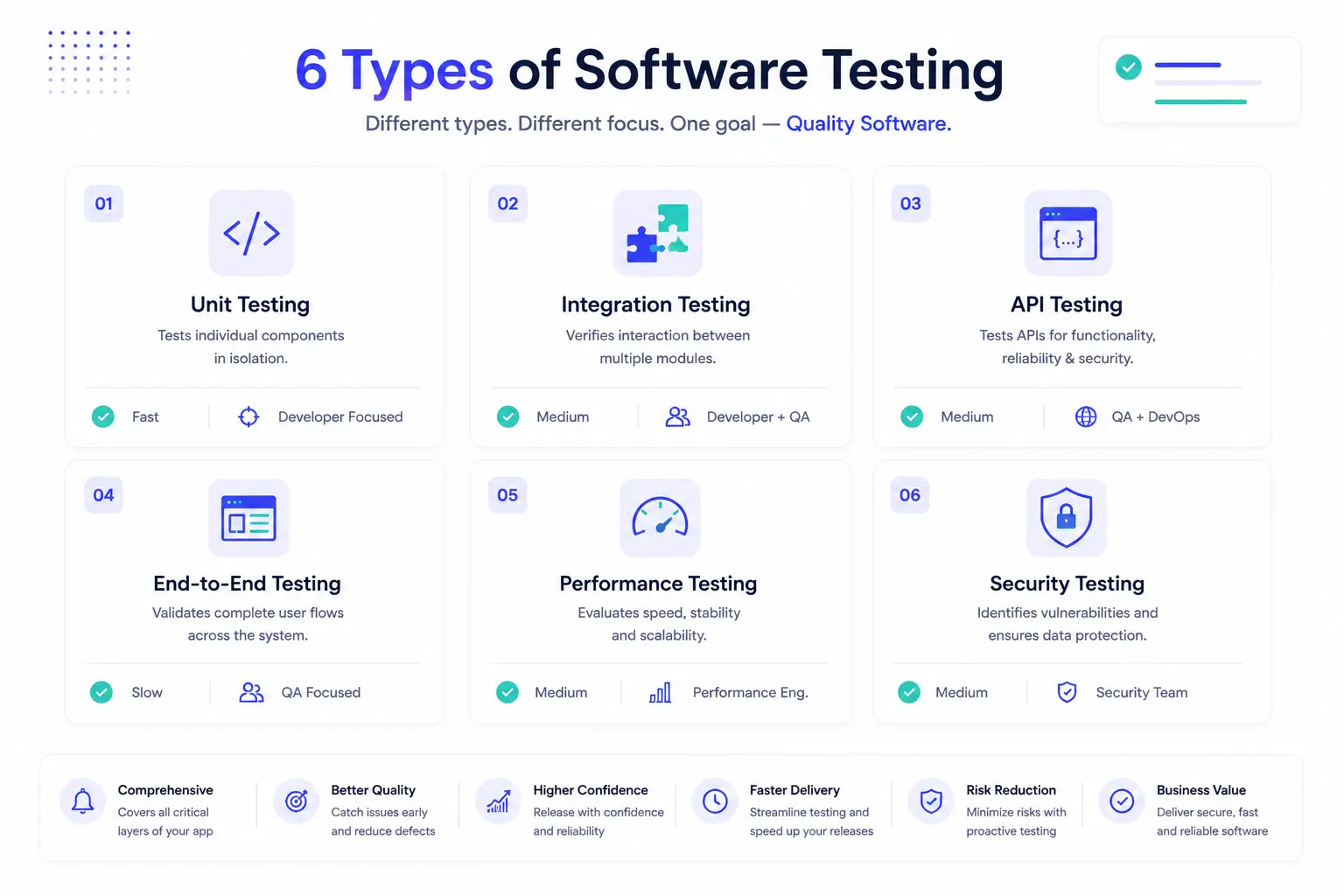
Not every test belongs in every pipeline, but a mature CI/CD testing strategy usually includes:
-
Unit tests — validate individual functions in isolation
-
Integration tests — check how components interact
-
API and contract tests — confirm request/response contracts between services stay intact
-
End-to-end (E2E) tests — simulate full user journeys
-
Performance tests — measure how the system behaves under load
-
Security tests (SAST/DAST) — catch vulnerabilities before release
Most teams get unit testing right. Where it falls apart is the layer in between — API and service-level testing — which brings us to the real bottleneck.
The Bottleneck Nobody Talks About: API Testing in CI/CD
Here’s the problem I keep running into when teams try to scale their CI/CD testing: UI-level end-to-end tests are too slow and too flaky to run on every commit, but hand-writing API tests and mocks for every microservice doesn’t scale either.
Someone has to write the test cases, keep the mocks updated every time an API contract changes, and maintain all of it as the service grows. That maintenance tax is exactly why integration and contract testing quietly become the most neglected layer in most pipelines.
This is where record-and-replay based testing changes the equation. Instead of manually writing API tests and mocks, tools can capture real application traffic (using techniques like eBPF-based traffic capture) and auto-generate test cases and mocks directly from it — no manual scripting required.
Keploy works this way. It sits inside your CI/CD pipeline, captures real API calls from your application, and turns them into test cases and mocks automatically, so your integration and API test suite grows alongside your codebase instead of falling behind it. Because it’s open source and plugs into existing pipelines (GitHub Actions, Jenkins, GitLab CI) without rewriting your test suite, it fits into the "post-build" stage from the table above without adding a new manual-testing burden on your team.
If you’re specifically comparing API contract validation tools, our guide on contract testing tools breaks down the options in more depth.
CI/CD Testing Tools Compared
There are two categories of tools here, and conflating them is where a lot of teams go wrong.
Orchestration tools run your pipeline: Jenkins, GitHub Actions, GitLab CI, CircleCI. They decide when tests run.
Test automation tools decide what gets tested: Selenium and Playwright for UI, Postman for manual API checks, and Keploy for auto-generated API and integration tests.
| Tool | Category | Best For | Limitation |
|---|---|---|---|
| Jenkins | Orchestration | Highly customizable, plugin-heavy pipelines | Steep setup and maintenance overhead |
| GitHub Actions | Orchestration | Teams already on GitHub | Tightly coupled to GitHub |
| GitLab CI | Orchestration | All-in-one DevSecOps platforms | Best when you standardize on GitLab |
| Selenium | Test automation | Cross-browser UI testing | Slow, brittle for API-level checks |
| Postman | Test automation | Manual and scripted API testing | Manual test writing doesn’t scale |
| Keploy | Test automation | Auto-generated API/integration tests + mocks | Best suited for API-heavy, microservice architectures |
Best Practices for CI/CD Testing
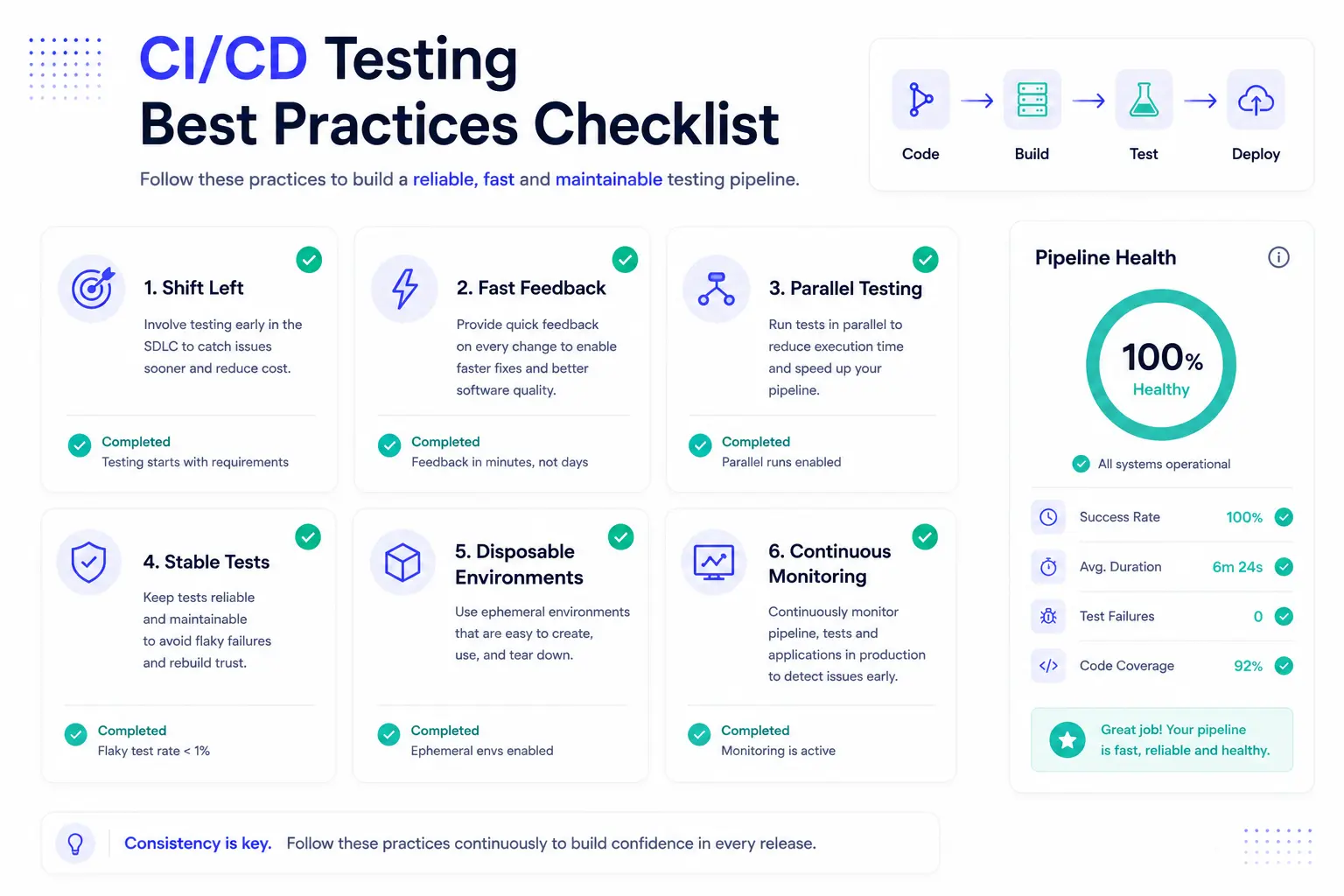
A few habits separate teams with reliable pipelines from teams that dread every deploy:
-
Shift left — write and run tests as early as possible, not just before release.
-
Gate by speed — run fast tests (unit) first, slower tests (E2E, performance) later or in parallel.
-
Isolate flaky tests — a flaky test that gets ignored defeats the entire purpose of the gate.
-
Use disposable environments — spin up containers fresh for every run to avoid state leaking between tests.
-
Automate mock and test data creation — manual upkeep is the single biggest reason integration test suites rot.
-
Monitor pipeline health — track build times, failure rates, and flaky test counts, and set goals to reduce them.
Common CI/CD Testing Challenges and How to Fix Them
Flaky tests. Tests that pass and fail without any code change erode trust fast. Isolate them, quarantine them, and fix the root cause (usually timing issues or shared state) instead of just re-running them.
Slow pipelines. If your whole suite runs on every commit, you’re doing it wrong. Parallelize test execution and gate slower tests behind faster ones.
Test data management. Use ephemeral databases (like SQLite or an in-memory instance) for unit and integration tests, and service virtualization for external dependencies you don’t control.
Mock maintenance overhead. This is the one most teams underestimate. Manually updating mocks every time an API changes is unsustainable — this is exactly the gap that record-replay tools like Keploy are built to close.
A Sample CI/CD Testing Workflow
Here’s a simplified GitHub Actions workflow showing how test stages map to pipeline steps:
name: CI Pipeline
on: [push, pull_request]

jobs:
  test:
    runs-on: ubuntu-latest
    steps:
      - uses: actions/checkout@v4

      - name: Run unit tests
        run: npm test

      - name: Run API tests with Keploy
        run: keploy test -c "npm start"

      - name: Run integration tests
        run: npm run test:integration

      - name: Deploy to staging
        if: success()
        run: ./deploy.sh staging
Notice how the API test step sits right after unit tests and before integration and deployment — that’s the post-build gate doing its job.
FAQs on CI/CD Testing
What is the difference between CI testing and CD testing?
CI testing runs when code is merged, focusing on unit and fast integration checks. CD testing runs before and after deployment, focusing on end-to-end validation and post-release monitoring.
Is CI/CD testing the same as test automation?
Not exactly. Test automation is the practice of writing automated tests. CI/CD testing is where those automated tests get triggered and gated within your delivery pipeline.
What tools are used for CI/CD testing?
Orchestration tools like Jenkins, GitHub Actions, and GitLab CI run the pipeline, while test automation tools like Selenium, Postman, and Keploy handle the actual test execution.
How do you handle flaky tests in CI/CD?
Quarantine flaky tests so they don’t block the pipeline, then fix the underlying timing or state issue rather than ignoring the failure.
Can API testing be automated in CI/CD?
Yes. Instead of manually writing API tests, tools like Keploy capture real traffic and auto-generate test cases and mocks, keeping your API test suite in sync with your codebase without manual effort.
Wrapping Up
CI/CD testing works when every stage of your pipeline has a clear job: unit tests catch broken logic, integration and API tests catch broken contracts, end-to-end tests catch broken user flows, and monitoring catches what slips through. The API and integration layer is where most teams lose time to manual test and mock maintenance — closing that gap is usually the fastest way to make your whole pipeline faster and more reliable.
If you want to see how auto-generated API tests and mocks fit into your existing pipeline, Keploy is open source and worth trying on your next build.

Leave a Reply