Ask five engineers whether a test is "functional" or "integration" and you will probably get three answers. That is not because people are confused. It is because the same test can honestly be both.
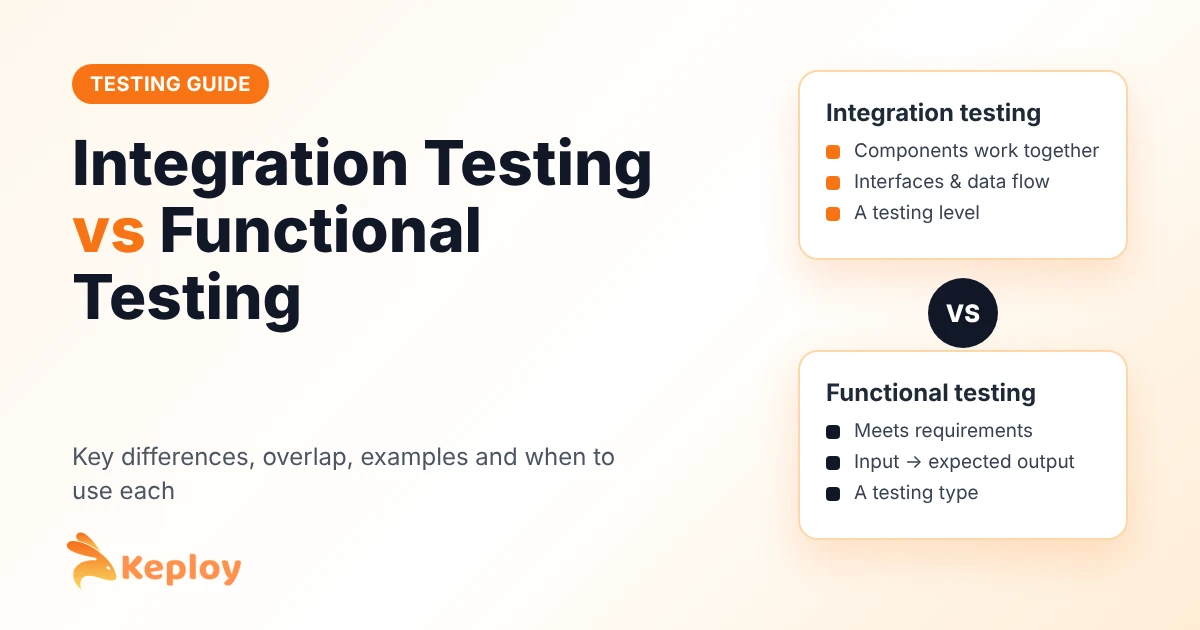
Here is the short version. Integration testing checks that components work together. Functional testing checks that the software does what the requirements say. One is about how the pieces connect. The other is about what the user gets.
Below we break down the difference, show where the two overlap, and walk through a real example using one of Keploy’s sample apps, so you can see a single test that is both functional and integration at the same time.
Quick answer: integration testing vs functional testing
Integration testing verifies that separate modules, services and databases work correctly together, focusing on interfaces and data flow. Functional testing verifies that the software behaves according to its requirements, focusing on inputs and expected outputs from the user’s point of view. Integration testing is a testing level; functional testing is a testing type. That is why a single test can be a functional integration test.
What is integration testing?
Integration testing checks that two or more components of a system work correctly when combined, such as an API with its database or one service calling another. It focuses on interfaces, contracts and data flow between components, and it usually runs after unit testing.
A typical integration test starts a real API, sends a request, and checks that the API wrote the right row to the database or called the right downstream service. It catches issues such as mismatched field names, wrong data types, broken API contracts and timeouts between services. For a complete walkthrough of types, examples and tools, see our integration testing guide.
What is functional testing?
Functional testing checks whether the software does what its requirements say. Testers give the system an input and compare the output with the expected result, without needing to know how the code works inside. It is a form of black box testing.
A functional test for a login feature, for example, checks that valid credentials open the dashboard and invalid ones show an error. It does not care which services, queues or databases sit behind the login form. Read more in our guide on what functional testing is and how it relates to black box and white box testing.
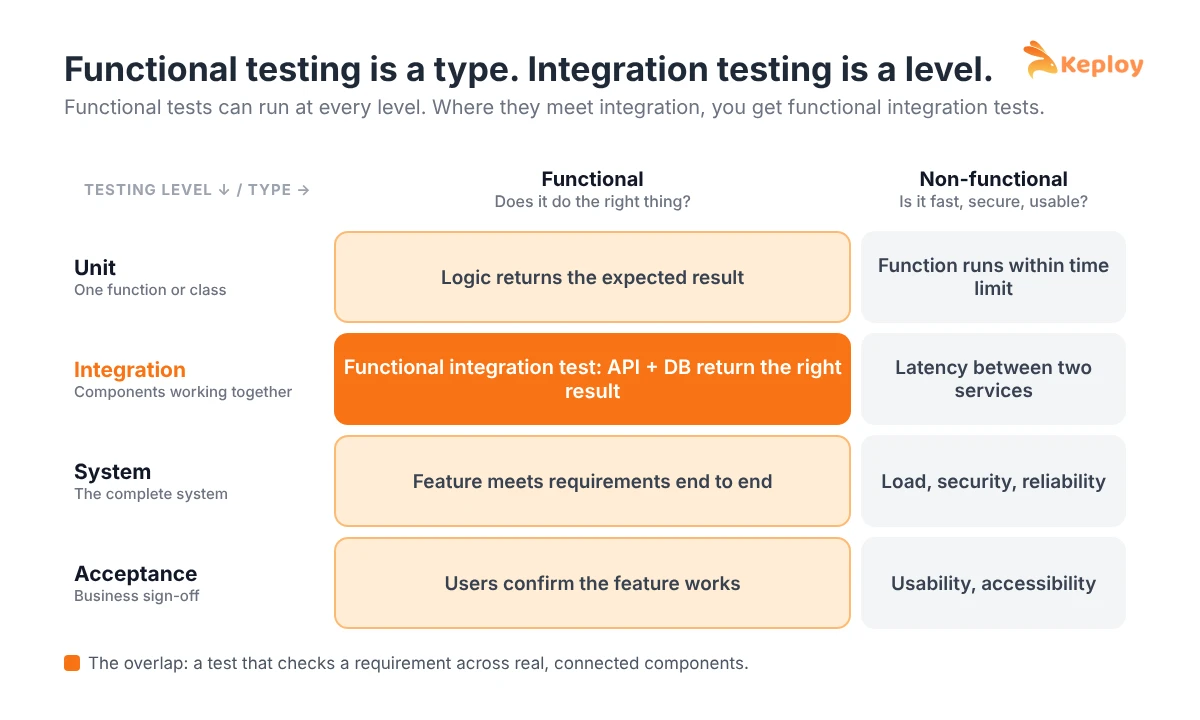
Functional testing is a type, integration testing is a level
If you only remember one thing from this post, make it this. Testing is usually described on two separate axes:
- Testing levels describe how much of the system is under test: unit, integration, system and acceptance. See the full breakdown in our guide to the levels of software testing.
- Testing types describe what quality you are checking: functional (does it do the right thing?) or non-functional (is it fast, secure, usable?).
Functional testing can happen at any level. A functional test at the integration level checks that a feature built from several components returns the right result. So "functional vs integration" is not really a choice between two boxes. It is a question of which angle you are looking from.
This is also where most arguments about naming come from. A QA engineer calls a test "functional" because it checks a requirement. A backend developer calls the same test "integration" because it hits a real database. They are both right.
Integration testing vs functional testing: key differences
| Integration testing | Functional testing | |
|---|---|---|
| Main question | Do these components work together? | Does the feature meet the requirements? |
| Category | Testing level | Testing type |
| Focus | Interfaces, contracts and data flow between components | Inputs, outputs and business rules |
| Point of view | Developer, system internals | User, business requirements |
| Knowledge of internals | Usually grey box: you know the components and their interfaces | Black box: you only know the expected behaviour |
| Based on | Architecture, API contracts and interface specs | Functional requirements and user stories |
| Typical defects found | Wrong field mapping, broken contracts, timeouts, bad data between services | Missing features, wrong calculations, broken user flows |
| Who writes them | Mostly developers | QA engineers and developers |
| When | After unit testing, before system testing | At every level, often heavily at system and acceptance level |
| Speed | Medium: real dependencies or mocks | Varies: fast at API level, slow through the UI |
How one feature is tested both ways
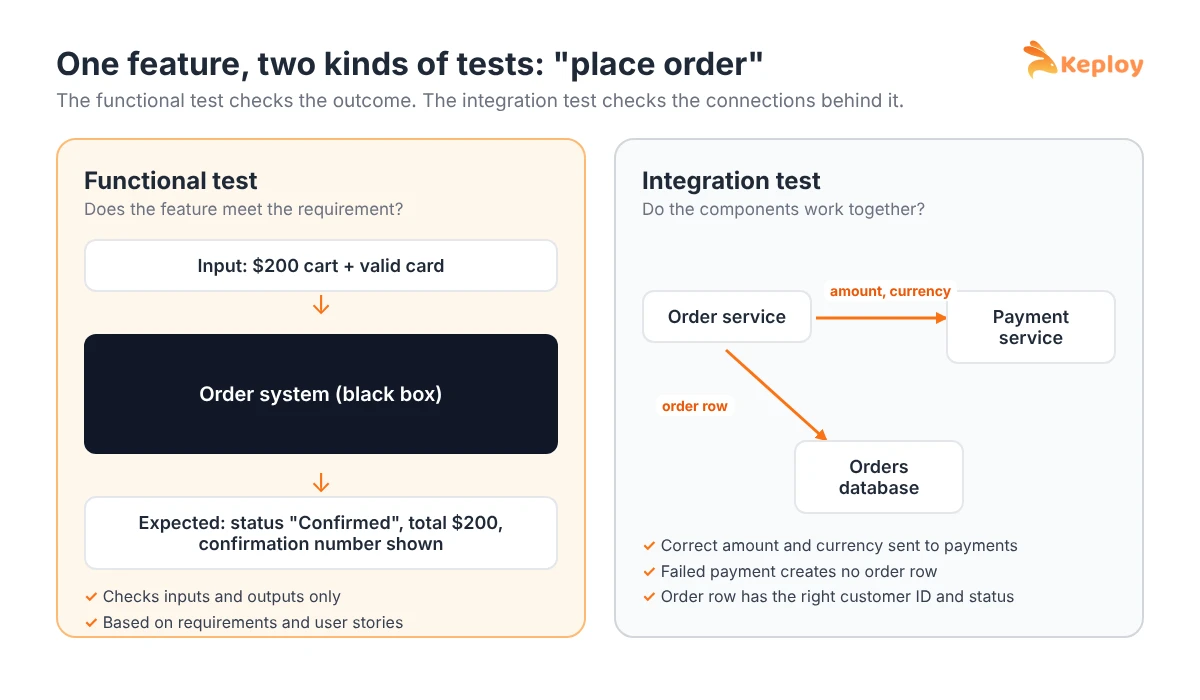
Take a "place order" feature in an online store. The order service calls a payment service and writes the order to a database.
Functional test (black box): a customer with $200 in their cart and a valid card places an order. Expected result: the order status is "Confirmed", the total is $200 and a confirmation number is shown. The test does not care how many services were involved.
Integration test (component interactions): call the order API and check that it sends the correct amount and currency to the payment service, that a failed payment does not create an order row, and that the order row has the right customer ID and status.
Both tests touch the same feature. The functional test protects the user’s outcome. The integration test protects the connections that make that outcome possible.
When to use integration testing
Use integration testing whenever two components exchange data or depend on each other: API and database, service and message queue, your code and a third-party API. Run it on every pull request so contract and data-flow issues are caught before they reach a shared environment.
Integration tests are especially important in microservices, where most production bugs come from the boundaries between services rather than from logic inside one service. When external dependencies are slow or unavailable, mock testing lets you keep these tests fast and reliable.
When to use functional testing
Use functional testing to confirm that each feature meets its requirements before release: new features, critical user flows like login, checkout and payments, and any requirement that can be expressed as "given this input, expect this output".
At the API level, API functional testing is usually the fastest way to cover business rules. Through the UI, functional tests overlap with end-to-end testing and are slower, so keep them for the most important journeys.
Where they overlap: functional integration tests
A functional integration test checks a business requirement across several real components at once, for example "a refund updates the order status and the customer’s wallet balance". It is functional because it checks a requirement and integration because it crosses component boundaries.
Most API tests that run against a real database or real downstream services fall into this overlap. They are often the best value tests in a suite: closer to real user behaviour than unit tests, and faster and more stable than full UI tests.
A real example with Keploy: one test, both kinds
Theory is easier to follow with a real app. Keploy’s Express and MongoDB sample is a small student registration API. Here is how one recorded request turns into a test that is both functional and integration.
1. Record real traffic. Start the app through Keploy so it can capture API calls and the database calls they trigger:
git clone https://github.com/keploy/samples-typescript && cd samples-typescript/express-mongoose
npm install
keploy record -c "docker compose up" --container-name "nodeMongoApp" --build-delay 50
2. Use the app like a normal client. Send a request to register a student:
curl --request POST \
  --url http://localhost:8000/students \
  --header 'content-type: application/json' \
  --data '{"name":"John Do","email":"john@xyiz.com","phone":"0123456799"}'
The API replies with Student registration successful!. Keploy saves two things: the HTTP request and expected response as a test case, and the MongoDB query and result as a mock.
3. Replay it as a test.
keploy test -c "docker compose up" --container-name "nodeMongoApp" --build-delay 50 --delay 10Now look at what that one test actually checks:
- The functional part: given this input (a new student), the API must return this output (status 200 and the success message). That is a requirement, checked from the outside.
- The integration part: the API has to talk to MongoDB correctly to produce that response. During replay, Keploy serves the recorded database response, so the test also confirms the API sends the query it is expected to send and handles the result properly.
You did not have to choose between a functional test and an integration test. You got one test that covers both, built from real traffic instead of hand-written fixtures. Step-by-step setup for other stacks is in the Keploy docs.
Unit, integration and functional testing compared
Many teams ask how all three fit together:
| Unit testing | Integration testing | Functional testing | |
|---|---|---|---|
| Scope | One function or class | Two or more connected components | One feature or user flow |
| Checks | Code logic | Interfaces and data flow | Requirements and expected results |
| Dependencies | Mocked | Real or partly mocked | Real system or a realistic environment |
| Speed | Fastest | Medium | Medium to slow |
For the closer comparisons, see unit testing vs integration testing and unit testing vs functional testing.
Pros and cons
Integration testing
- Pros: catches interface and contract bugs early, gives confidence that services work together, runs faster than end-to-end tests.
- Cons: needs test environments or mocks, failures can be harder to trace, flaky if real dependencies are unstable.
Functional testing
- Pros: tests what users and the business actually care about, easy to map to requirements, can be written without knowing the code.
- Cons: does not show why a feature failed, UI-level functional tests are slow and brittle, can miss bugs in paths the requirements do not describe.
Best practices for using both
- Write integration tests for every important interface. Every API, queue and database your service talks to should have at least one happy-path and one failure-path test.
- Map functional tests to requirements. Each user story or acceptance criterion should have a functional test that proves it works.
- Push functional tests down to the API level. API-level functional tests are faster and more stable than UI tests for the same rule.
- Use realistic test data. Both kinds of tests miss bugs when the data is too simple.
- Run both in CI/CD. Run integration tests on every pull request and the functional suite before every release. Use regression testing to rerun both after changes.
Tools for integration and functional testing
- Keploy: records real API traffic and turns it into test cases and dependency mocks, giving you functional integration tests without writing them by hand.
- Postman: API requests and scripted assertions for functional API checks.
- Selenium and Playwright: UI-level functional tests.
- JUnit, pytest and Jest: test runners that can host both integration and functional tests.
- Testcontainers: spins up real databases and services in containers for integration tests.
See more options in our list of integration testing tools.
How Keploy helps
Writing functional integration tests by hand is slow. You need realistic requests, expected responses and a mock for every dependency, and all of it goes stale the moment an API changes. As the example above shows, Keploy records real API calls along with the database and downstream responses behind them, then turns them into test cases and mocks. You get tests that check business behaviour (functional) across real component interactions (integration), and you can replay them in CI on every change.
Try Keploy for API testing and turn real traffic into functional integration tests.
Conclusion
Integration testing and functional testing answer different questions. Integration testing asks whether components work together; functional testing asks whether the feature does what it should. Because one is a level and the other is a type, they overlap, and the most valuable tests often sit in that overlap. Use integration tests to protect your interfaces, functional tests to protect your requirements, and run both in CI/CD.
FAQs
What is the difference between functional testing and integration testing?
Integration testing checks that separate components work correctly together, focusing on interfaces and data flow. Functional testing checks that the software meets its requirements, focusing on inputs and expected outputs. Integration testing is a level of testing; functional testing is a type of testing that can run at any level.
Is integration testing a type of functional testing?
Not exactly. Integration testing is a testing level, while functional testing is a testing type. Many integration tests are functional because they check expected results, but integration tests can also be non-functional, for example checking performance between two services.
Can a test be both functional and integration?
Yes. A functional integration test checks a business requirement across several real components, such as an API, its database and a payment service. Most API tests that run against real dependencies are functional integration tests.
Which comes first, integration testing or functional testing?
Integration testing usually runs earlier, right after unit testing, because it checks that components connect correctly. Functional testing runs at every level but is done most heavily at the system and acceptance levels, before release.
What is the difference between functional tests and integration tests in microservices?
In microservices, integration tests check the calls between services: contracts, payloads, retries and timeouts. Functional tests check that a business flow, such as placing an order, produces the right result across all services involved.
Is functional testing black box testing?
Yes. Functional testing is a form of black box testing: testers check outputs against expected results without needing to know how the code works inside.
What is the difference between unit, functional and integration testing?
Unit testing checks one function or class in isolation. Integration testing checks that connected components work together. Functional testing checks that a feature meets its requirements from the user’s point of view.
How is functional testing different from system testing?
System testing is a testing level that checks the complete system against all requirements, both functional and non-functional. Functional testing is a testing type that checks behaviour against requirements and can be done at the system level or any other level.

Leave a Reply