Picture a familiar Monday. The checkout screens are built, the loading states look right, and every call to the payments API still comes back as a 502 because the backend is two sprints behind. You can wait, or you can give your app something to talk to in the meantime.
That something is a mock server.
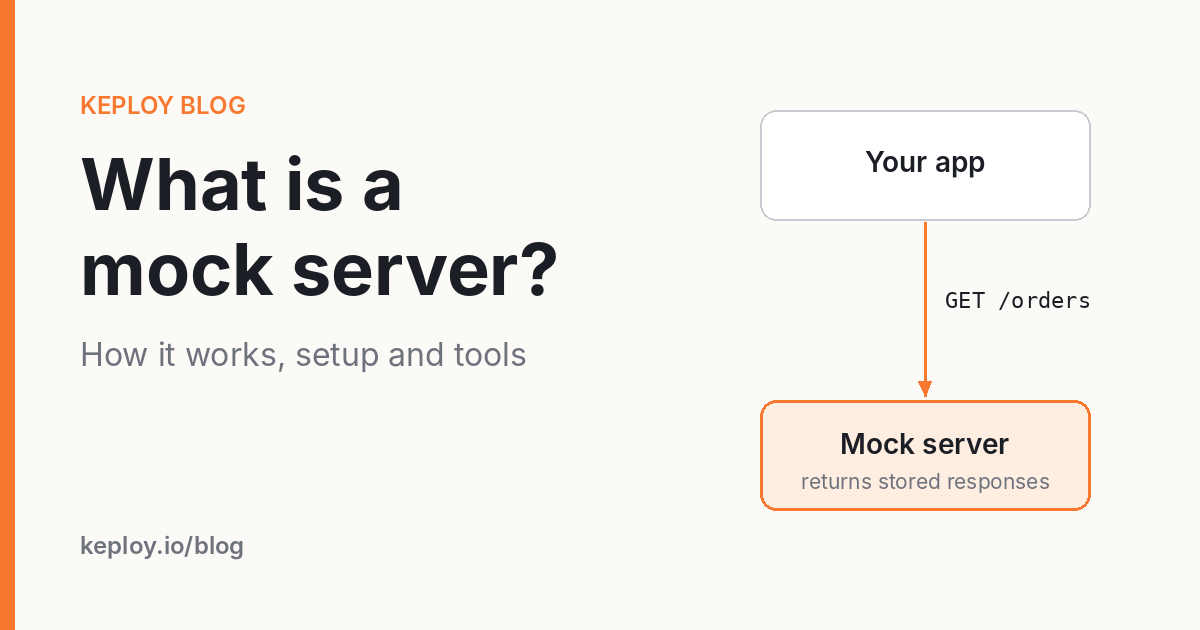
A mock server is a lightweight server that pretends to be a real API. It listens for HTTP requests, matches each one against rules you define, and sends back a prepared response with the status code, headers and body you chose. Your app can’t tell the difference, so you keep building and testing without the real backend.
In this guide we’ll look at how a mock server works, how it differs from stubs and service virtualization, when it’s worth using, and how to set one up. We’ll also cover the tools teams actually reach for, including mock servers in Postman.
How a mock server works
Under the hood, a mock server does three simple things.
- It receives the request. Your app sends the same call it always would. The only change is the base URL, which now points at the mock (say
http://localhost:3001) instead of the real service. - It matches the request against its rules. Most tools compare the method and path first, then query parameters, headers and sometimes the request body.
- It returns the stored response. If a rule matches, the mock sends back the response attached to it. If nothing matches, you get a 404 or a default reply, depending on the tool.
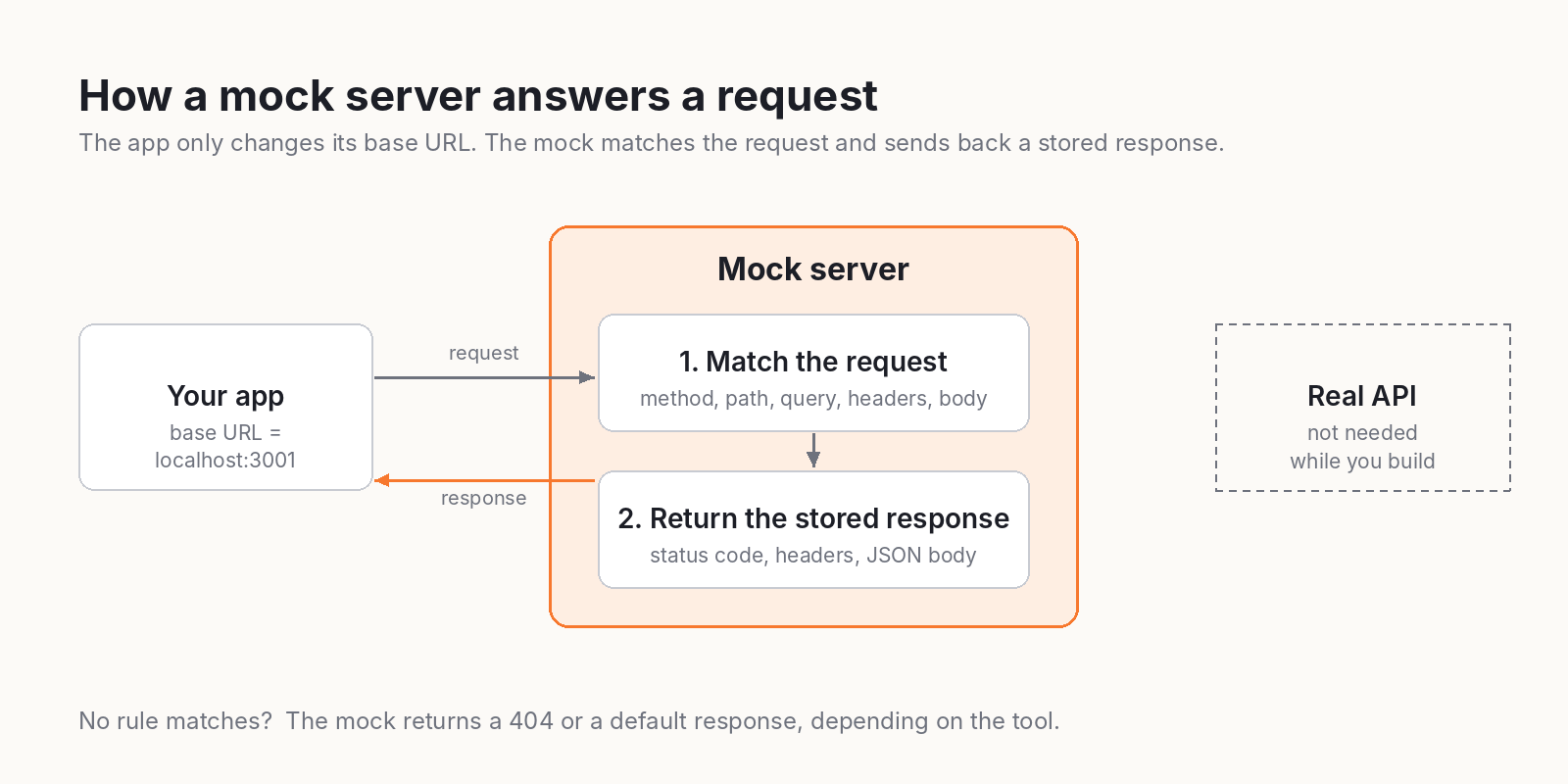
That’s the basic loop. Many tools go further. Some can sit in front of the real API as a proxy, record what comes back, and replay it later, which saves you from typing JSON by hand. Others support templating, so a request for /orders/42 returns an order whose id is actually 42.
Mock server vs mock API vs stub vs service virtualization
These terms get mixed up all the time, and honestly the lines are blurry. Here’s how most teams use them.
| Term | What it is | Where it lives | Typical use |
|---|---|---|---|
| Mock API | The fake endpoints and responses themselves | A config file, a spec or a collection | Agreeing on what an API will return |
| Mock server | The process that hosts the mock API and answers requests | A separate process, container or hosted URL | Frontend work, integration tests, demos |
| Stub | A code-level replacement for one function or class | Inside your test code | Unit tests |
| Service virtualization | A simulation of whole dependent systems, often with state and non-HTTP protocols | Dedicated tooling or shared environments | Large integration and performance testing |
You’ll also hear "mock service". In practice it means the same thing as a mock server: a fake version of a service your app depends on.
If you want the deeper theory, Martin Fowler’s note on test doubles is still the clearest explanation around. We’ve also written about the difference between mocks, stubs and fakes, API mocking in general and service virtualization.
When should you use a mock server?
A mock server pays for itself in a few situations.
- The backend isn’t ready yet. Agree on the contract, ideally as an OpenAPI file, and the frontend team can build against a mock while the backend catches up. Nobody sits idle.
- A third-party API is expensive or flaky. Payment gateways, SMS providers and shipping APIs often charge per call, rate-limit you, or run sandboxes that go down at the worst moment.
- You need to test failure paths. Real APIs rarely fail when you ask them to. A mock will happily return a 500, a 429 or a response that takes eight seconds, so you can see how your app copes.
- Your CI pipeline keeps breaking for reasons outside your code. Tests shouldn’t fail because a partner’s staging server fell over at 2 a.m.
- You’re running a demo or onboarding someone. A mock gives you predictable data every single time.
There’s one place a mock server can’t help you. It only proves that your app handles the responses you expected. It doesn’t prove the real API still sends them. That’s why mocks work best next to contract testing and a solid round of integration testing against the real thing.
Types of mock servers
Not every mock server works the same way. Picking the right type up front saves a lot of rework later.
Static mock servers
Each route returns the same fixed response. They’re quick to set up and perfect for prototypes. json-server is the classic example: point it at a JSON file and you get a working REST API in seconds.
Dynamic mock servers
These let you write rules. You can match on headers or body content, return different responses based on the request, add delays and inject faults. WireMock and MockServer fall into this group.
Spec-driven mock servers
You hand over an OpenAPI document and the tool builds the mock for you. Prism by Stoplight is a popular open source choice. This approach keeps the mock in line with the spec, as long as the spec stays current.
Record and replay mock servers
Instead of writing responses, you capture real traffic once and replay it later. The mocks reflect what the API actually returned, not what someone remembered it returns. Keploy works this way, and WireMock has a record mode too.
Hosted mock servers
These give you a public URL with nothing to install. They’re handy when a frontend team, a mobile app or a partner needs to hit the mock from anywhere. Beeceptor and Postman mock servers are the common picks.
How to set up a mock server in 5 steps
The exact commands depend on the tool, but the process looks the same almost everywhere. We’ll use json-server for the example because it’s the fastest way to see results.
1. Write down the contract
List the endpoints your app calls, a sample response for each, and the errors you care about. If you already have an OpenAPI file, you’re halfway there.
2. Choose static or dynamic
If you only need realistic data to build screens, a static mock is enough. If you need to test retries, timeouts or auth failures, go for a dynamic tool from the start.
3. Create the responses
For json-server, that’s a single file called db.json:
{
  "orders": [
    { "id": 1, "status": "paid", "total": 49.99 },
    { "id": 2, "status": "pending", "total": 18.5 }
  ]
}
Then start the server:
npx json-server db.json --port 3001Now GET http://localhost:3001/orders returns both orders, and GET http://localhost:3001/orders/1 returns the first one.
4. Point your app at the mock
Don’t hard-code the mock URL. Read the base URL from an environment variable so you can switch between the mock and the real API without touching code:
API_BASE_URL=http://localhost:3001 npm run dev5. Add the unhappy paths
This is the step most teams skip. Add an empty list, a 500 error, a slow response and a malformed body. Your users will hit all of these eventually, so your app should meet them in testing first.
One last habit worth building: keep your mock files in the same repo as the code and review them whenever the real API changes. A mock that drifts away from reality is worse than no mock at all, because it tells you everything is fine when it isn’t.
Generating mocks from real traffic with Keploy
Hand-written mocks have a weak spot. Somebody has to keep them accurate, and that somebody is usually busy. Keploy takes a different route: it records the calls your service makes to its dependencies while your tests run, then replays those exact responses later.
The workflow is two commands:
# Record: the real dependency is running
keploy mock record -c "python3 -m pytest -q"

# Replay: the dependency can be switched off
keploy mock replay -c "python3 -m pytest -q"
During recording, Keploy captures every outgoing call and its response into a mock file. During replay, it serves those responses back, so your tests pass even with the dependency offline. If a test makes a new call that has no recorded mock yet, Keploy can record it on the spot and add it to the set.
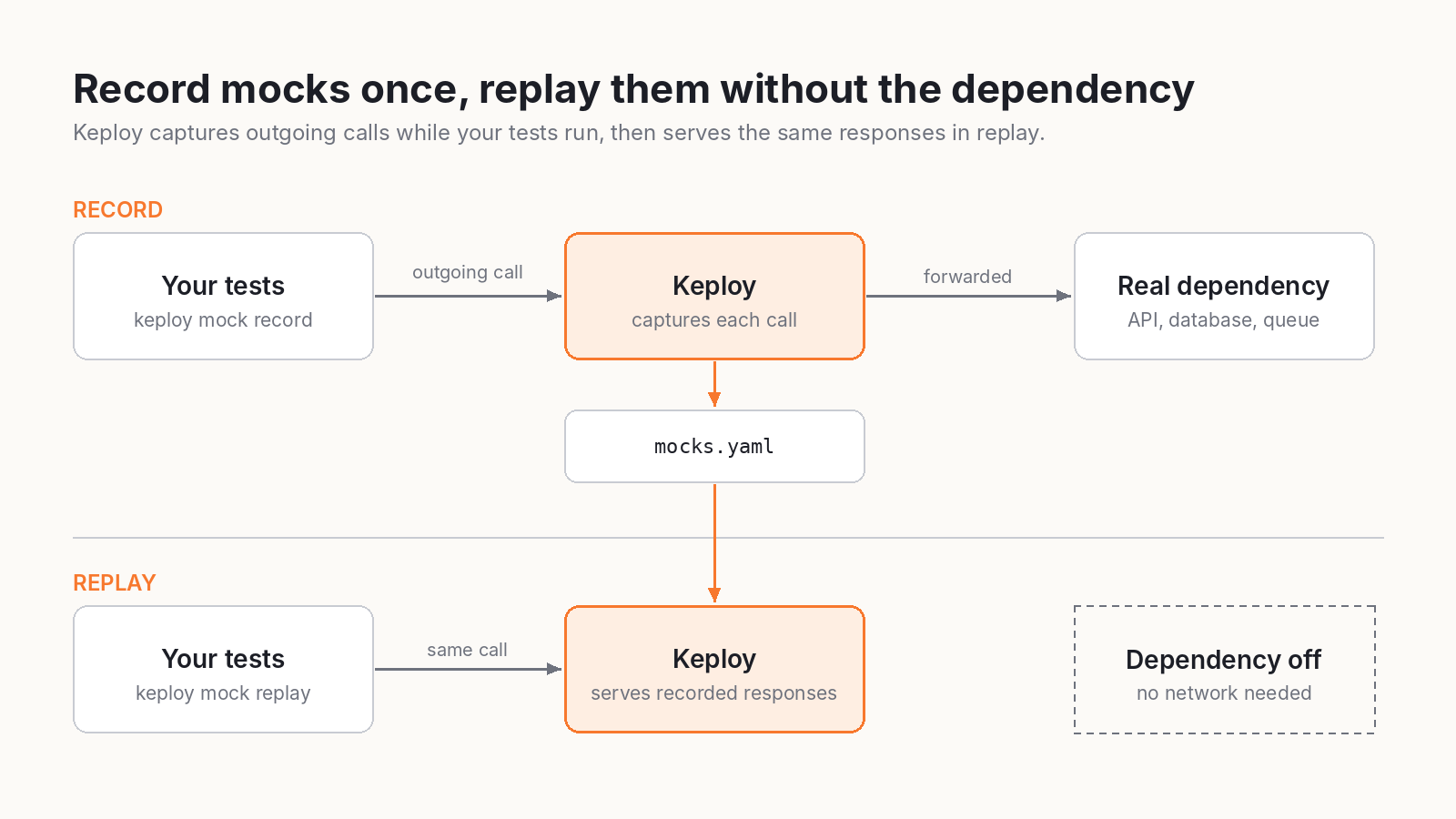
Because Keploy works at the network layer using eBPF, you don’t add an SDK or change your code. It also goes beyond HTTP, capturing calls to databases like PostgreSQL, MySQL and MongoDB, and to queues like Kafka. The mock quickstart walks through the full flow in about two minutes, and you can add custom mocks by hand when you need a case that never showed up in real traffic.
To be clear about the fit: Keploy is built for testing your own service. If you need a public mock URL that a frontend team or a partner can call from a browser, a hosted mock server is the better match. Plenty of teams run both.
Popular mock server tools
Here’s a quick look at the tools that come up most often. For a longer breakdown, see our list of API mocking tools.
| Tool | Type | Best for |
|---|---|---|
| WireMock | Dynamic, open source | Detailed stub mappings and fault injection |
| MockServer | Dynamic, open source | Expectations, proxying and request verification |
| Mockoon | Desktop app and CLI | Local mocks built through a GUI, no code |
| Beeceptor | Hosted | An instant public endpoint with nothing to install |
| Prism | Spec-driven, open source | Mocking straight from an OpenAPI file |
| json-server | Static, open source | A full fake REST API from one JSON file |
| Postman mock servers | Hosted | Teams that already keep their APIs in collections |
| Keploy | Record and replay, open source | Dependency mocks generated from real traffic |
How to create a Postman mock server
Searches for this setup have climbed fast this year, so it deserves its own section. If your team already lives in Postman, the setup is short.
- Save example responses. Open a request in your collection, send it, and save the response as an example. Do this for every response you want the mock to return, errors included.
- Create the mock from the collection. Use the collection’s menu to mock it. You’ll get a mock server URL back.
- Swap the base URL. Put the mock URL in an environment variable such as
{{baseUrl}}so you can flip between the mock and the real API. - Pick a specific example when you need one. Send the
x-mock-response-nameorx-mock-response-codeheader to tell the mock which saved example to return.
A few limits to keep in mind. The mock is only as good as the examples you saved, and it doesn’t keep state between calls. Private mocks need an API key in every request, and plans cap how many mock calls you get each month, so check yours before you wire it into CI. If you’re weighing other options, our guide to Postman alternatives is a good next read.
Common mistakes with mock servers
- Only mocking the happy path. If every mocked response is a 200, your tests are checking the one case that almost never breaks.
- Letting mocks go stale. The real API changes, the mock doesn’t, and your tests keep passing on old data. Regenerate mocks from the spec or from real traffic on a regular schedule.
- Treating mocked tests as proof of integration. Green tests against a mock mean your code handles the expected responses. They say nothing about the real service.
- Hard-coding the mock URL. Sooner or later someone ships it to production. Use environment variables.
- Building too much logic into the mock. Once your mock has its own business rules, you’re maintaining a second backend. Keep it simple.
Where to start
If you just need data on the screen today, spin up json-server or Mockoon and you’ll be working in minutes. If you need to test failures properly, go with a dynamic tool like WireMock or MockServer. And if keeping hand-written mocks accurate is the real headache, record them from real traffic instead.
Want to see that last option in action? Try Keploy for API testing and generate tests and mocks from the traffic your app already handles.
FAQs
What is a mock server used for?
A mock server stands in for a real API while you build or test. Frontend teams use it before the backend is ready, QA teams use it to trigger error cases on demand, and CI pipelines use it so tests don’t depend on third-party services being up.
Is a mock server the same as a stub?
Not quite. A stub usually lives inside your test code and replaces one function or class. A mock server is a separate process that speaks HTTP, so any client can call it over the network without code changes.
What is the difference between a mock server and a mock API?
A mock API is the fake set of endpoints and responses. The mock server is the thing that hosts them and answers requests. In everyday conversation, people use the two terms for the same idea.
Can I run a mock server in CI/CD?
Yes. Most mock servers run as a CLI or a Docker container, so you can start one as a step in your pipeline, point your tests at it, and shut it down when the job ends.
Does Postman have a mock server?
Yes. Postman can create a mock server from a collection. It returns the saved examples in that collection when a matching request comes in.
Is a mock server the same as service virtualization?
They overlap. A mock server usually fakes a single HTTP API. Service virtualization goes wider and simulates whole dependent systems, often with state, other protocols and realistic performance.

Leave a Reply