Blue-green deployment is a release strategy where you run two identical production environments. Blue serves live traffic while green gets the new version. Once green passes its checks, the router sends all traffic to green in one step. If anything goes wrong, you switch back to blue in seconds.
The idea is old. Martin Fowler wrote about it back in 2010, and teams were doing it with two racks of servers and a DNS change long before Kubernetes existed. It has stuck around because it solves a problem every team has: how do you ship without a maintenance window, and how do you undo a bad release fast?
This guide covers how a blue-green deployment works step by step, how to set it up in Kubernetes, the database problem nobody warns you about, how it compares to canary and rolling, and how to test the green environment properly before you flip the switch. If you want the bigger picture first, start with our overview of deployment strategies.
What is blue-green deployment?
Blue-green deployment keeps two production environments that are identical in everything except the application version. Only one of them takes user traffic at a time. You deploy and test the new version on the idle one, then switch traffic over all at once.
The colors don’t mean anything on their own. Blue is just whichever environment is live right now. After the next release, green is live and blue becomes the idle one waiting for the release after that. Some teams call them “live” and “staging”, or “A” and “B”. Same pattern.
What makes it different from a normal staging environment is that green is real production. Same instance types, same config, same network, same secrets, same connection to the production database. When you test green, you are testing the thing users will actually hit, not an approximation of it.
Pros and cons of blue-green deployment
The good:
- No downtime. Users never hit an empty server. The switch is one routing change.
- Instant rollback. If green misbehaves, you point traffic back to blue, which is still running the old version untouched.
- Real production testing. You can run checks against green on real infrastructure before any user reaches it.
- Simple mental model. At any moment, every user is on exactly one version. No mixed fleet to reason about.
The not so good:
- Cost. You pay for two full environments, at least during the switch window.
- All users switch at once. If a bug only shows up under real load, everyone sees it at the same moment.
- Shared state. Databases, caches and queues are usually shared between blue and green, which limits what changes you can make safely.
- Long-lived connections. WebSockets and long polling don’t move over cleanly when you switch.
How traffic switches from blue to green
Traffic moves from blue to green when you change a single routing point: a load balancer target group, a Kubernetes Service selector, a DNS record, or a weight in a service mesh. Load balancer and Service switches take effect in seconds. DNS switches are slower because clients cache old records.
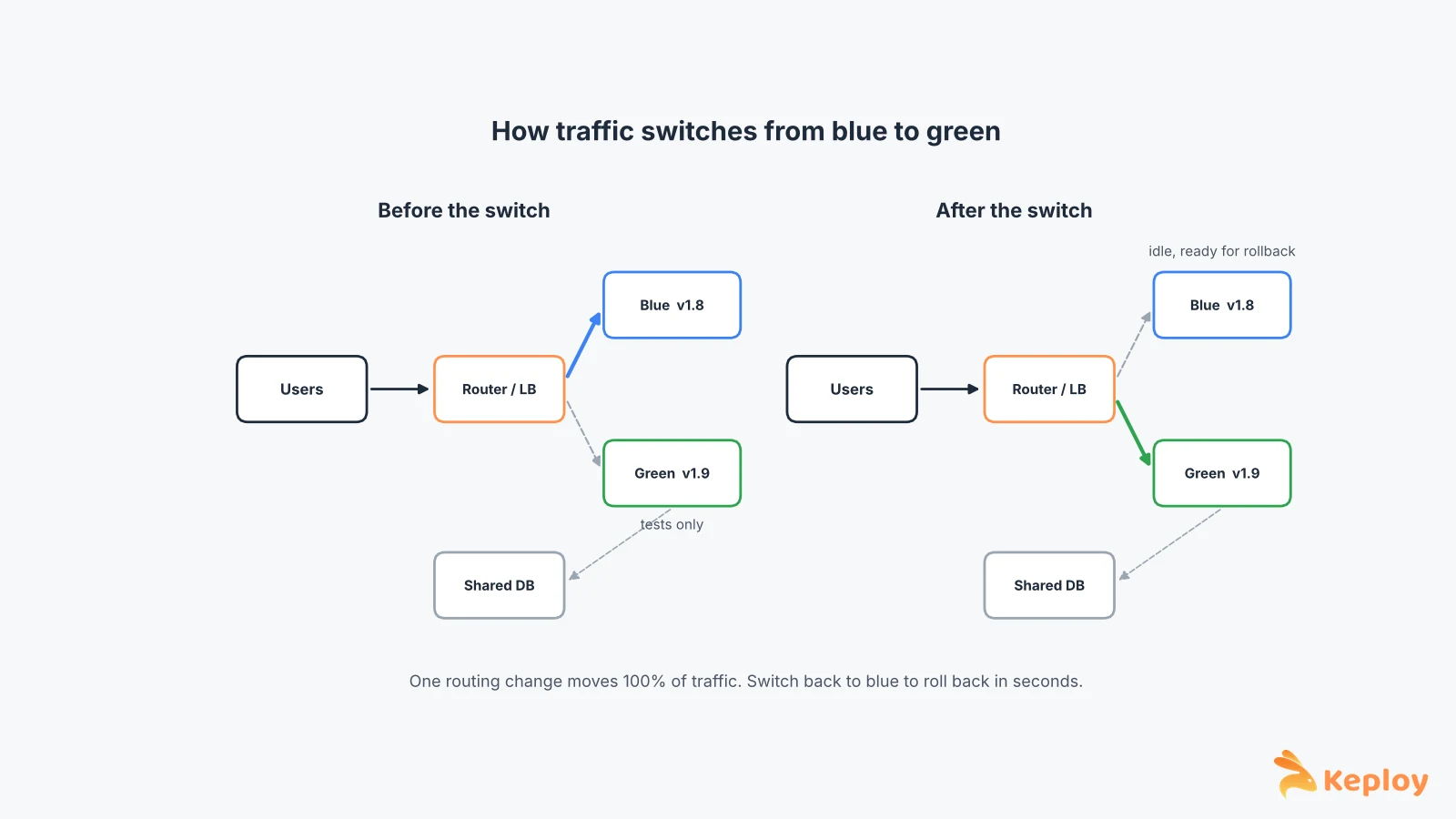
A typical release looks like this:
- Blue runs version 1.8 and takes 100% of traffic.
- You deploy version 1.9 to green. Green gets no user traffic yet.
- You run smoke tests, integration tests and replayed traffic against green directly, using an internal URL or a test header.
- You warm green up (caches, connection pools, JIT) so the first real users don’t get slow responses.
- You switch the router. All new requests now go to green.
- You watch error rates and latency for a set window, often 15 to 60 minutes.
- If anything looks wrong, you switch back to blue. If it holds, blue becomes the idle environment for the next release.
One thing worth knowing: DNS-based switching is the least reliable option. Some clients and resolvers ignore TTLs and keep sending traffic to blue for hours. If you can switch at the load balancer or inside the cluster, do that instead.
Blue-green deployment in Kubernetes
In Kubernetes, the simplest blue-green setup is two Deployments with different version labels and one Service. The Service selector points at blue. To switch, you change the selector to green. For automated checks and promotion, Argo Rollouts has a built-in blueGreen strategy.
The manual version takes three objects:
# Service that users hit. Change "version" to switch.
apiVersion: v1
kind: Service
metadata:
  name: checkout
spec:
  selector:
    app: checkout
    version: blue
  ports:
    - port: 80
      targetPort: 8080
---
# Green deployment running the new image
apiVersion: apps/v1
kind: Deployment
metadata:
  name: checkout-green
spec:
  replicas: 6
  selector:
    matchLabels:
      app: checkout
      version: green
  template:
    metadata:
      labels:
        app: checkout
        version: green
    spec:
      containers:
        - name: checkout
          image: registry.example.com/checkout:1.9.0
The blue Deployment looks the same with version: blue and the old image. When green is ready, you switch with one command:
kubectl patch service checkout -p '{"spec":{"selector":{"app":"checkout","version":"green"}}}'Rolling back is the same command with blue. It is worth adding a second Service, something like checkout-preview, that always points at green. That gives your tests a stable address for the idle environment.
If you want this automated, Argo Rollouts handles it with an activeService and a previewService, optional analysis runs before promotion, and a scaleDownDelaySeconds setting that keeps blue alive for a while after the switch in case you need to go back.
Database changes and rollback
In most blue-green setups, blue and green share one database, so any schema change must work with both versions at once. Use expand and contract migrations: add new columns or tables first, deploy code that uses them, and only drop old structures in a later release once rollback is no longer needed.
This is where blue-green stops being simple. The switch is instant for code. It is not instant for data.
Say version 1.9 renames customer_name to full_name. You run the migration, switch to green, and everything works. Twenty minutes later you spot a bug and switch back to blue. Blue still expects customer_name, which no longer exists. Your instant rollback just became an outage.
The fix is to never make a change the old version can’t handle:
- Expand: add
full_namealongsidecustomer_name. Both versions keep working. - Migrate: deploy code that writes to both columns and reads from the new one. Backfill old rows.
- Contract: a release or two later, once you are sure you won’t roll back, drop
customer_name.
A few other shared-state traps worth checking before every switch:
- Queues and topics. Messages produced by green in a new format will still be sitting there if you roll back to blue.
- Caches. If green writes cache entries in a new shape, blue may choke on them.
- Background jobs. Make sure cron jobs and workers aren’t running in both environments at once, or you’ll process the same job twice.
- Sessions. Store them somewhere shared (Redis, a database) so users don’t get logged out at the switch.
Blue-green vs canary vs rolling deployment
Blue-green moves all traffic at once and rolls back instantly. Canary moves a small share first and grows it slowly. Rolling replaces instances one batch at a time with no extra environment. Choose blue-green when rollback speed matters most, canary when you want to limit how many users a bad release can reach, and rolling when cost matters most.
| Blue-green | Canary | Rolling | |
|---|---|---|---|
| Traffic shift | 0% to 100% in one step | 1% to 100% in steps | Batch by batch |
| Rollback | Seconds (switch back) | Fast (set weight to 0) | Slow (another rollout) |
| Extra infrastructure | Full second environment | A few extra instances | None |
| Users exposed to a bad release | Everyone, until rollback | Only the canary slice | Grows during rollout |
| Mixed versions live at once | No | Yes | Yes |
The two are not either-or, by the way. A lot of teams test green, then shift traffic to it gradually instead of all at once. That is effectively a canary on top of a blue-green setup, and it is a solid default for high-traffic services. More on that in our guide to canary deployment.
Testing the green environment before the switch
Green should pass three kinds of checks before it gets user traffic: health and smoke tests on the critical endpoints, regression tests that compare its responses to blue’s for the same requests, and a short load warm-up. Replaying recorded production traffic against green is the most reliable way to catch regressions before the switch.
This is the step most teams rush. Green is up, the health check is green (no pun intended), someone clicks around for two minutes, and the router flips. Then a client nobody tested against sends a request with a field green no longer accepts.
The problem is that hand-written tests only cover what the developer expected. Production traffic includes the weird stuff: old mobile app versions, partner integrations sending extra fields, edge-case query params.
Keploy closes that gap. It records real API traffic hitting blue, including the calls blue makes to its database and other services, and saves them as test cases with mocks. Before the switch, you replay those recorded requests against green. Keploy compares each response to what blue returned and shows you any difference, field by field. Because dependencies are mocked from the recording, the replay doesn’t write to your production database or call external services.
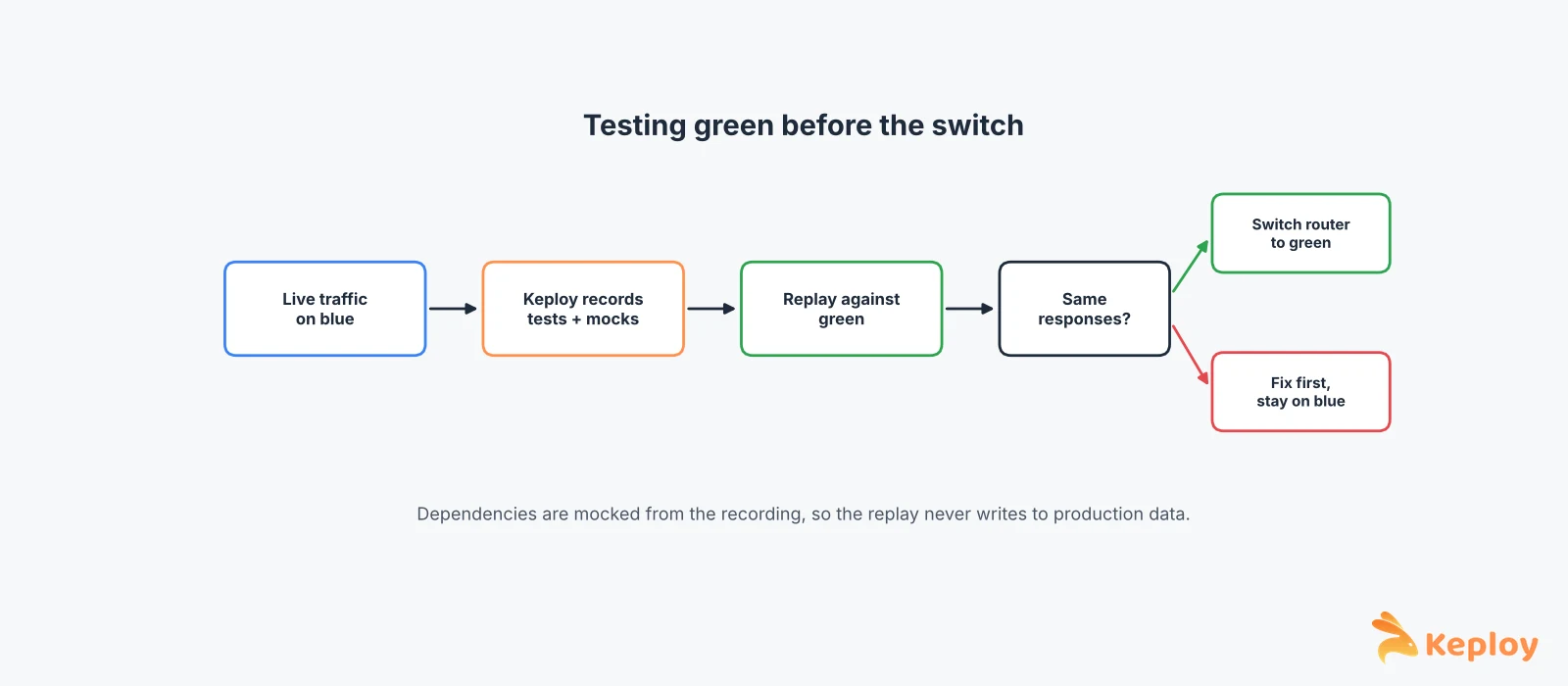
A practical pre-switch checklist:
- Health and readiness endpoints return 200 on every green pod.
- Smoke tests pass on login, checkout, and whatever else makes money.
- Recorded traffic replay shows no unexpected response differences.
- Database migrations for this release are backward compatible with blue.
- Green is warmed up (caches, connection pools).
- The rollback command has been written down and someone owns it.
If you also want to watch the new version under live load without exposing users, a shadow deployment mirrors real traffic to green before the switch. You can see how recorded traffic replay works on Keploy’s API testing page.
FAQs
Is blue-green deployment zero downtime?
Yes, when the switch happens at a load balancer, Kubernetes Service or service mesh. Green is fully running before it takes traffic, so there is no gap where users hit nothing. The two things that can still cause brief errors are DNS-based switching, because clients cache old records, and long-lived connections like WebSockets, which drop when the old environment is retired.
How is blue-green different from canary deployment?
Blue-green sends all users to the new version in one step and keeps the old environment ready for instant rollback. Canary sends a small percentage of users first and increases the share as metrics stay healthy. Blue-green rolls back faster but exposes everyone at once. Canary limits exposure but takes longer to complete.
What happens to the database in a blue-green deployment?
Usually blue and green share the same database, so it is not duplicated or switched. That means every schema change must work with both the old and new code at the same time. Teams handle this with expand and contract migrations: add new columns first, deploy code that uses them, and remove old columns only in a later release.

Leave a Reply