I’ve seen teams burn weeks untangling API messes that could have been avoided with a couple of days of upfront thinking. Endpoints named inconsistently, versioning added as an afterthought, error responses that just say "something failed" all of it traceable back to the same root cause. Nobody sat down and actually designed the API before building it.
That distinction between building an API and designing one is what this guide is about.
What Is API Design?
API design is the process of planning how an API will expose data and functionality, defining endpoints, methods, error behavior, authentication, and versioning before any code is written.
Before a single endpoint gets written, someone needs to answer a bunch of uncomfortable questions. Who’s actually going to use this? What do they need back? What happens when they send garbage data? What changes a year from now without breaking every integration that’s already live?
API design is that conversation — the one that happens before development starts, not after it’s already in production and something’s broken.
Most teams skip it. They crack open their IDE, start writing controllers, and assume the shape of the API will become clear as they go. Sometimes it works out. Usually, six months later, there are endpoints that contradict each other, field names that don’t match anywhere else, and a versioning plan that amounts to "we’ll deal with it when we have to."
What you’re settling in the design phase: the endpoint structure, what each resource exposes and what it doesn’t, how HTTP methods get used, what error responses look like, how auth flows, and how you’ll handle the inevitable breaking change. All of it, before coding. The developer integrating against your API is your real end user. Most API problems come from treating them as an afterthought.
API-First vs. Code-First
API-first design means writing the API contract before any implementation begins. Teams agree on what endpoints exist, what they return, and how they fail — then build against that spec.
Most development teams, historically, wrote code first. The API documentation came afterward — sometimes weeks later, sometimes never. The API-first approach inverts this completely, and the reasoning is pretty simple.
Writing the contract first — what endpoints exist, what they return, how they fail — means every stakeholder can review it before anyone’s committed hours of development to a direction that turns out to be wrong. Frontend and backend teams can work in parallel. QA has something concrete to test against. And when someone spots a design problem, fixing it costs almost nothing.
Catching that same problem after three teams have already built against your API? That’s a different conversation entirely.
Tools like OpenAPI, Stoplight, and SwaggerHub have made this genuinely practical now. The spec-first workflow used to feel like overhead. In 2026, it’s just how teams that move fast without breaking things tend to operate.
Core API Design Principles
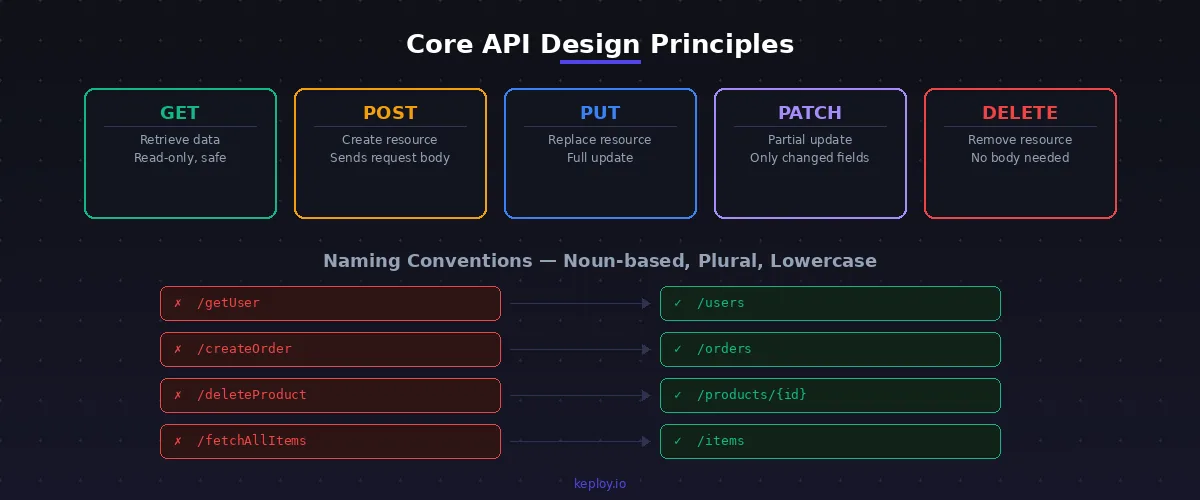
Core API design principles include statelessness, consistent naming conventions, correct HTTP method usage, meaningful status codes, and resource-oriented structure. These apply across REST, GraphQL, and gRPC alike.
None of these are REST-specific. Whether you’re working with GraphQL, gRPC, or plain HTTP — the underlying thinking is the same. These are the things that separate APIs developers trust from ones they dread touching.
1. Statelessness
Each request should carry everything the server needs to process it — full stop. No stored sessions, no "what did we talk about last time," no server-side context between calls.
The reason this matters at scale: stateless services don’t care which server handles a request. Load balancers can distribute freely, failed instances get replaced cleanly, and debugging doesn’t require reconstructing some session state that existed three calls ago. It’s also just a simpler mental model. One request, all the context, one response. If you’re still weighing whether stateless is the right call for your situation, the stateful vs. stateless breakdown covers the tradeoffs honestly.
2. Consistent Naming Conventions
Honestly, the rule is just: pick one style and never deviate.
Nouns, not verbs. Plural. Lowercase. That’s it.
| ❌ What teams actually ship | ✅ What they should ship |
|---|---|
/getUser |
/users |
/createOrder |
/orders |
/deleteProduct/1 |
/products/1 |
The HTTP method tells you the action — GET, POST, DELETE. Your URL describes the thing being acted on, not the action itself. /createOrder is redundant. POST /orders already says everything.
3. Use HTTP Methods for What They Were Built For
- GET retrieves data — it never, ever modifies anything
- POST creates a new resource
- PUT replaces a resource entirely
- PATCH updates part of it
- DELETE removes it
This sounds obvious, but misuse is rampant. GET endpoints that trigger side effects, POST endpoints used for lookups — every one of these breaks the assumptions developers bring to your API without reading the documentation. And those broken assumptions don’t always surface in dev. They tend to appear in production, late at night, when nobody’s expecting them.
4. HTTP Status Codes Are Part of Your Contract
Returning 200 OK for error responses is a surprisingly common habit. It seems harmless until someone’s integration is silently failing because they’re checking the status code and your API told them everything was fine.
Use the codes correctly:
200— success201— something was created400— the client sent bad data401— needs authentication403— authenticated, but not permitted404— doesn’t exist422— the request made sense but validation failed500— your server broke
5. Keep Resource Structure Shallow and Honest
/users, /orders, /products. Resources should map to real things your system works with — not to internal service names or database table structures.
Nesting more than one level deep usually means you’re modeling the wrong thing or need to rethink the relationship. /users/{id}/orders is fine. Going three or four levels deep is a smell worth investigating.
API Design Best Practices (2026)
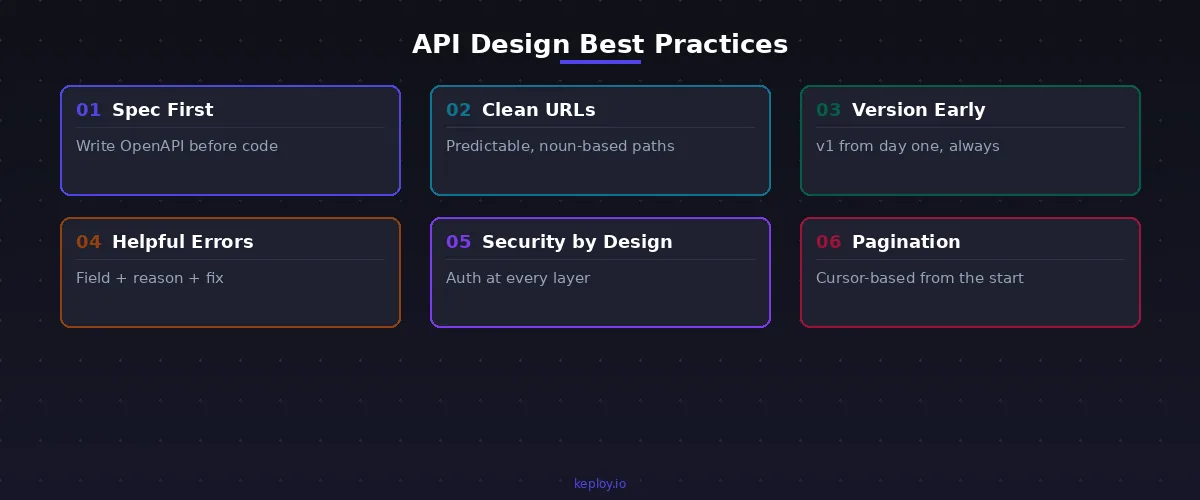
API design best practices start with writing the spec before code, versioning from day one, returning helpful errors, securing every endpoint, and treating documentation as a product feature — not an afterthought.
1. Write the Spec Before Anyone Writes Code
OpenAPI exists precisely for this. Define every endpoint, method, request shape, and response — including error responses — before implementation starts.
The practical benefit isn’t just documentation. It’s that frontend teams can build against mock responses while backend is still being written. QA has a spec to test against before there’s a server. Product and design can review the actual API behavior, not a verbal description of it. And when someone wants to change something, the conversation happens in a document rather than in a post-incident retrospective.
2. URLs Should Be Guessable
If a developer has to check your documentation to figure out how to list users or create an order, something’s off. The goal is an API where the pattern is obvious after seeing two or three endpoints.
GET    /users           → list all users
GET    /users/{id}      → a specific user
POST   /users           → create one
PUT    /users/{id}      → replace it
DELETE /users/{id}      → remove it
One level of nesting when the relationship genuinely calls for it:
GET /users/{id}/orders    ✅
GET /users/{id}/orders/{orderId}/items/{itemId}/details    ❌
Deep nesting creates fragility. When the underlying structure changes, those URLs break.
3. Version Before You Need To
Teams that skip versioning usually do it because they don’t think the API will change. It always changes.
URI versioning is the most straightforward approach:
https://api.yourproduct.com/v1/users
https://api.yourproduct.com/v2/users
When v2 introduces something breaking, v1 keeps running. Give consumers real notice before you deprecate — 12 months is a reasonable minimum. And understand what API contract testing can do here — it’s one of the best ways to catch version drift before it becomes a production incident.
4. Error Responses That Tell You Something Useful
There’s a version of error handling that tells developers something went wrong. Then there’s a version that tells them what went wrong and gives them a shot at fixing it.
{
  "status": 422,
  "error": "Validation Failed",
  "message": "The 'email' field must be a valid email address.",
  "field": "email",
  "timestamp": "2026-03-15T10:45:00Z"
}
When your error structure is consistent across every endpoint, developers write generic error handling once. When it’s inconsistent, they end up with a different workaround for each endpoint. That compounds fast.
5. Security Gets Designed In, Not Added Later
An API’s security model should be settled at design time, not retrofitted after launch.
OAuth 2.0 handles cases where users delegate access to third parties. JWT tokens give you stateless authentication that scales. API keys are appropriate for server-to-server communication. HTTPS is non-negotiable — no exceptions, no "we’ll add it later." And every input coming into your API gets validated and sanitized before anything touches it.
If you want to understand what you’re actually protecting against, the API security testing guide maps out the main attack surfaces clearly.
6. Pagination Isn’t a Nice-to-Have
An endpoint that returns all records works perfectly in a test environment with 50 rows. Under real load, it’s a disaster. Design pagination and filtering in from the start cursor-based pagination is generally more robust than offset for large datasets:
GET /orders?status=pending&sort=created_at&order=desc&limit=20&cursor=abc123Adding pagination to an existing endpoint without breaking consumers who already integrated against it is genuinely painful. It’s one of those tasks that always ends up being three times more work than expected.
7. Documentation Is Part of the Product
If developers can’t figure out how to use your API quickly, they’ll find one they can figure out. That’s not a judgment on your API quality — it’s just reality.
Good documentation has real code examples in the languages your consumers actually use, request and response samples with realistic data, a clear walkthrough of authentication, and a changelog that’s actually maintained. Your OpenAPI spec generates the skeleton. The quality of what you put on top of it determines whether developers trust the API or not.
How to Design an API — Step by Step
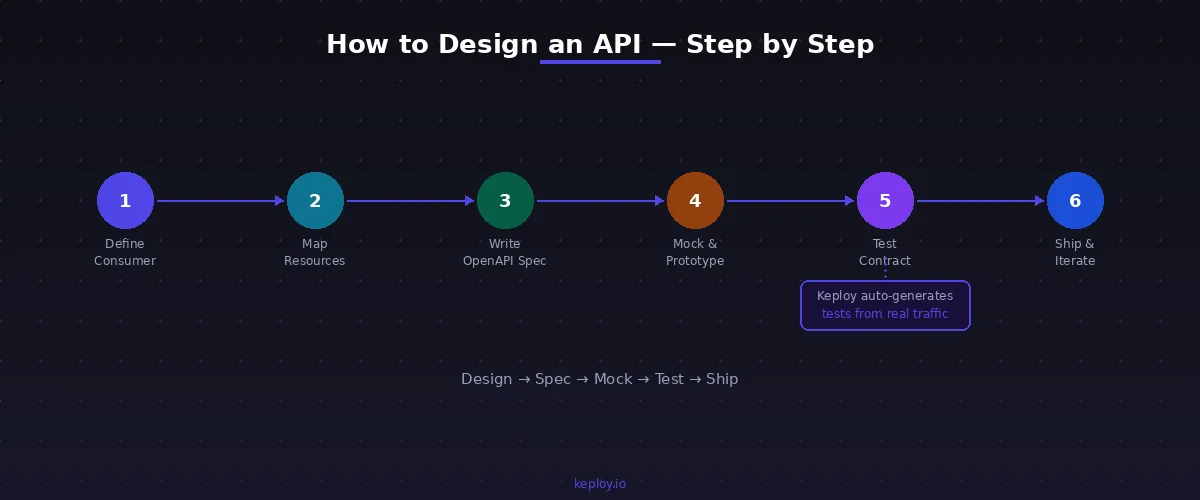
To design an API: define the consumer and purpose, map resources, write the OpenAPI spec, mock and share early, test the contract, then ship and iterate.
Step 1: Get Clear on Who’s Using It
An internal team building a dashboard has completely different needs than a third-party developer integrating against a public API. Mobile clients want smaller payloads. Enterprise customers need stronger backward compatibility guarantees. None of this is complicated, but it shapes every tradeoff you make afterward — so get specific before designing anything.
Step 2: Map the Resources
Write down the real-world entities your API needs to expose. Figure out how they relate. Then make two decisions for each one: what data it should return, and what it absolutely should not.
The second question matters as much as the first. Leaking your database schema into API responses — returning every column because it’s easier than thinking about it — is one of the most common ways teams create problems for themselves later. Return what consumers need. Nothing extra.
Step 3: Spec First, Then Code
Write every endpoint, method, request body, response shape, and error case in OpenAPI before anyone starts implementing. Treat this spec with the same gravity you’d treat a database schema change — it’s a contract, and contracts aren’t changed casually.
Step 4: Mock It, Then Share It
Generate mock responses from the spec and get them in front of the people who’ll actually consume the API. Early. Before implementation has started.
Feedback at this stage is essentially free to act on. Feedback after three weeks of development is not.
Step 5: Test the Contract Early
This step gets skipped more often than any other, and it’s the one where the cost of skipping is most visible later. Before coding starts, validate that what you’ve specced actually solves what the consumer needs. Map out your API testing strategy against the contract, not against the implementation.
Keploy auto-generates API tests from real traffic — useful for keeping test coverage in sync with an evolving API without manually writing every case.
Step 6: Launch, Then Watch
After shipping, watch actual usage. Which endpoints carry the most traffic? Where do errors concentrate? API observability surfaces patterns that logs alone won’t reveal. That data is what tells you which design decisions to carry forward and which to revisit in v2.
Common API Design Mistakes to Avoid
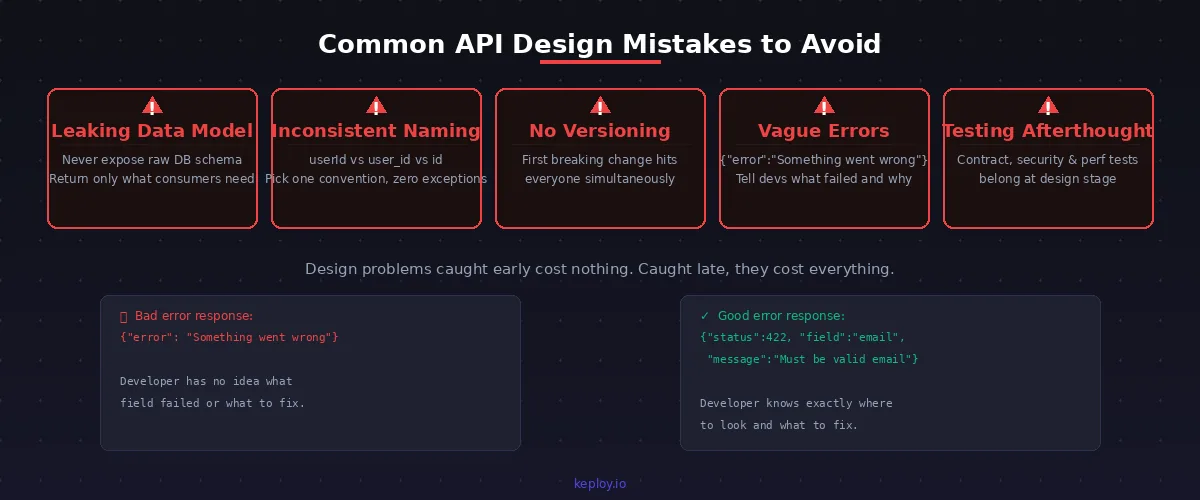
Most API problems trace back to design, not implementation. Here’s what usually goes wrong.
Leaking the data model. Your database table having 40 columns doesn’t mean the API response should have 40 fields. Consumers don’t need your implementation details — they need the data relevant to their use case. These aren’t the same thing, and conflating them creates tight coupling that’s painful to undo.
Naming that shifts. userId here, user_id there, just id somewhere else. Every inconsistency is a small tax on every developer who integrates against your API. It accumulates. Pick one convention before the first endpoint goes out, and don’t drift from it.
Versioning added after the first breaking change. By that point, every consumer takes the hit at once. The fix — version from release one, even when you’re certain nothing will change. Something always does.
Errors that explain nothing. {"error": "Something went wrong"} is technically an error response. It’s not actually useful. Developers need to know which field failed, what rule it violated, and what to do about it. That structure should be designed in, not added as a patch.
Treating testing as post-development cleanup. API testing — functional, contract, security, performance — belongs in the design conversation, not the QA handoff. The REST API testing guide covers what a real test plan looks like if you want a reference.
API Design Tools Worth Knowing in 2026
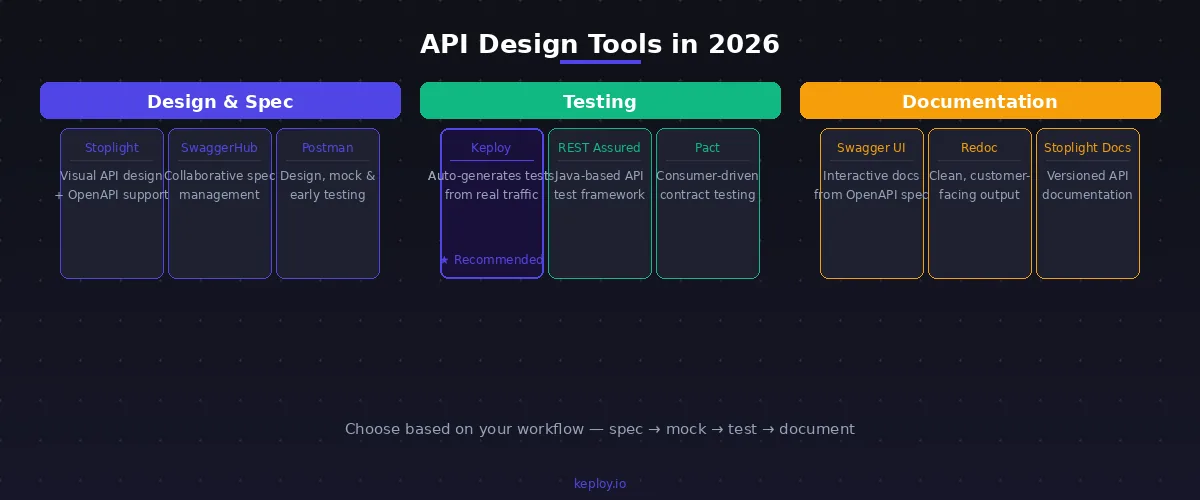
Stoplight is where most teams doing serious spec-first design end up — visual API design with solid OpenAPI support. SwaggerHub is a better fit if you have multiple teams collaborating on a shared spec. Postman does design, mocking, and early-stage testing in one place, which is convenient when you’re moving quickly and want fewer context switches.
For testing, Keploy is worth understanding separately. It generates API tests from actual traffic rather than requiring you to write them by hand — which matters a lot for teams trying to keep test coverage current as the API evolves. It solves a genuinely different problem than Postman does, which is why it’s worth looking at as a Postman alternative for teams whose main pain point is test maintenance.
For documentation output, Swagger UI renders interactive docs from your spec automatically. Redoc produces cleaner output from the same spec — worth it when the docs are customer-facing and presentation quality matters.
Frequently Asked Questions About API Design
What is API design in simple terms?
API design is the planning work done before building. You decide what endpoints exist, what they accept and return, how errors work, how auth works, and how the API evolves without breaking existing consumers.
It’s the planning you do before building. You decide what endpoints exist, what they accept, what they return, how errors work, how auth works, and how the API will evolve without breaking the people using it. The output is a spec — usually OpenAPI — that serves as the contract everything else is built against.
What’s the difference between API design and API development?
Design is figuring out what the API will do and how it will behave. Development is writing the code that makes it do that. They’re sequential for a reason: design decisions made after development has started are more expensive to act on, and design decisions made after consumers have integrated are the most expensive of all.
What does "API-first" actually mean?
It means the spec gets written and agreed on before anyone starts implementing. Teams have a shared contract to build against, which means frontend and backend can develop in parallel, and design problems surface in a document rather than a production incident. In 2026, API-first isn’t a methodology choice for forward-thinking teams — it’s just standard practice for teams that don’t want integration headaches.
What makes an API design good?
A good API design is consistent, predictable, and consumer-first. Developers can guess how it works after seeing two or three endpoints, errors explain what went wrong, versioning protects consumers from surprises, and security is baked in from the start.
Mostly: predictability. A developer should be able to look at a handful of your endpoints and correctly anticipate how the rest of them work, without reading documentation. Good design also means errors that actually explain what went wrong, versioning that protects consumers from surprises, security baked in from the start, and documentation that gets maintained rather than abandoned.
How do you actually design a REST API from scratch?
To design a REST API from scratch: identify consumers, map resources, write the OpenAPI spec, mock responses, collect feedback, test the contract, implement, then version from release one.
Start by understanding who’s consuming it and what they need. Map the resources, write the OpenAPI spec (every endpoint, method, response, error), mock it, show it to consumers before coding starts, then build tests against the contract before building the implementation. Version from day one. The spec is a living document — update it carefully and communicate changes clearly.
What’s the difference between REST and RESTful?
REST is an architectural style Roy Fielding described in his 2000 dissertation. It defines constraints: stateless communication, resource-based URLs, standard HTTP methods, a uniform interface. A RESTful API is one that actually follows those constraints. Most APIs in production are "REST-like" — they use HTTP and JSON, they have resource URLs, but they don’t strictly honor every Fielding constraint. Whether that matters depends on your use case. The gRPC vs REST comparison is useful if you’re choosing between approaches.
Why does testing belong in API design, not after development?
Because the spec only has value if the implementation actually matches it. Testing is how you verify that — and how you catch future changes that silently break existing consumers. If you wait until after development to think about contract testing, functional coverage, and security testing, you’re planning for a cleanup rather than building quality in. The cleanup always costs more.
Conclusion
API design isn’t the part before the real work starts. It is real work — and what you put into it shows up directly in how the API holds up six months later, when requirements shift and teams change and consumers have already built against your endpoints.
Write the spec first. Version from release one. Build error responses that developers can actually act on. Put security in the design, not the backlog. Test the contract before you ship it.
If you’re building APIs and want test coverage that keeps pace with an evolving codebase without someone manually maintaining hundreds of test cases, Keploy generates tests from real traffic — so the tests evolve with the API rather than lagging behind it.
Related reading:
- API Testing Strategies
- What Is API Contract Testing
- API Security Testing 101
- API Observability Guide

Leave a Reply