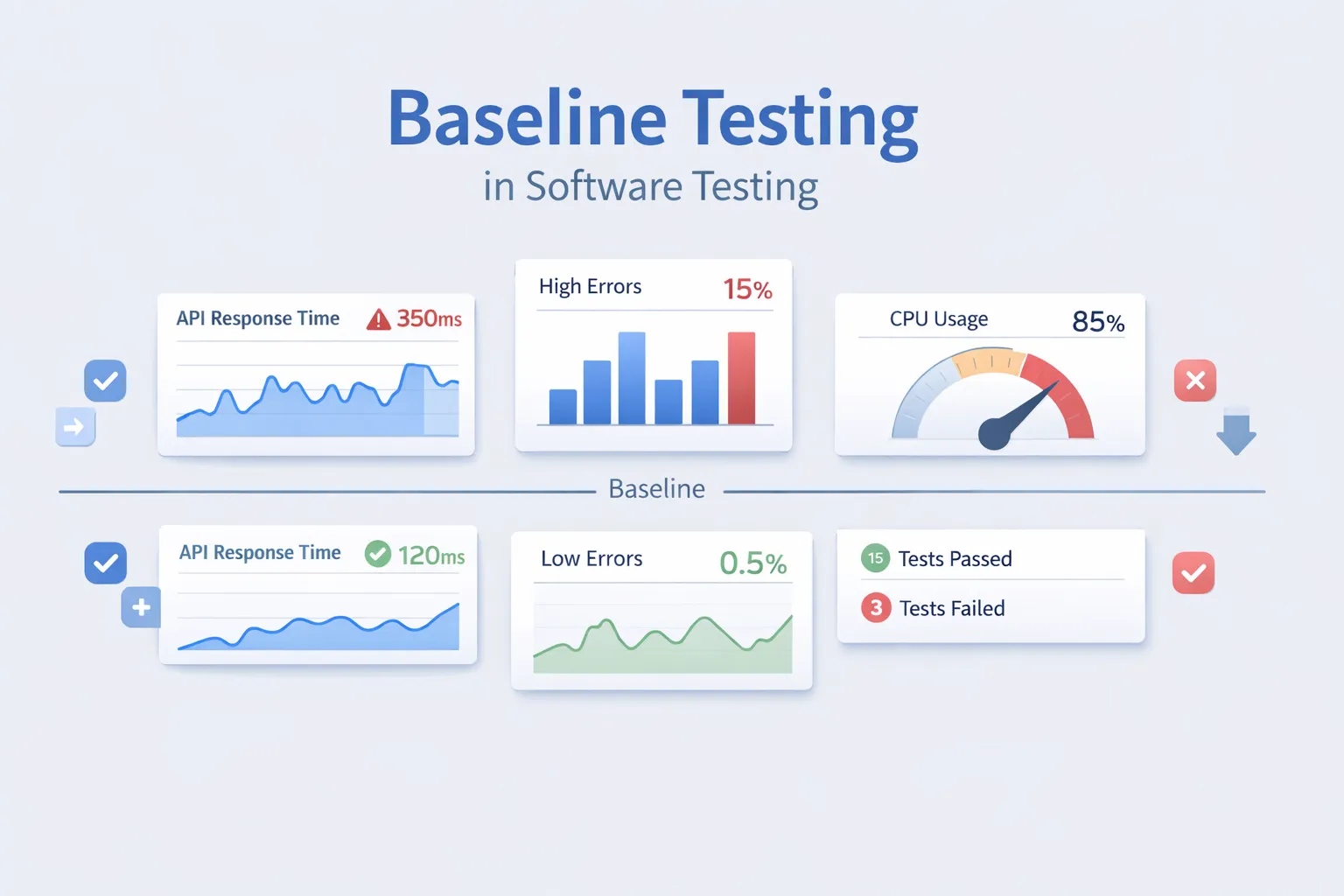
Every software change answers one simple question: Did something break? Baseline testing exists to answer it with confidence. Teams often ship regressions simply because they lack a reliable reference to compare against. In modern software testing, a baseline provides that reference point and helps teams understand change without slowing down delivery.
What Is Baseline Testing in Software Testing?
Baseline testing compares current test results against an approved baseline from a previously validated version of the system. The approved baseline is known as ‘a reference version’, which defines what a good working version of your system is. Any deviation from the previously approved/accepted baseline indicates that changes have occurred to the product over time, some of which may be unacceptable (i.e., regressions), while others may be acceptable (e.g., improvements).
When using a baseline approach to software testing, the focus is not on finding bugs in isolation, but on detecting differences between versions to determine whether there was regression in the product since you obtained your previous version of the product.
Key points:
• All baseline tests derive from an approved reference.
• Subsequent executions of the baseline test will always be compared to that reference.
• While it is important to compare differences to your approved baseline, you must understand the significance of the differences.
• Baselines can be defined as functional, performance, or visual baselines.
The baseline testing method is useful in environments where regressions are heavy.
Why Is Baseline Testing Important?
A baseline test helps teams recognize and manage change more effectively.
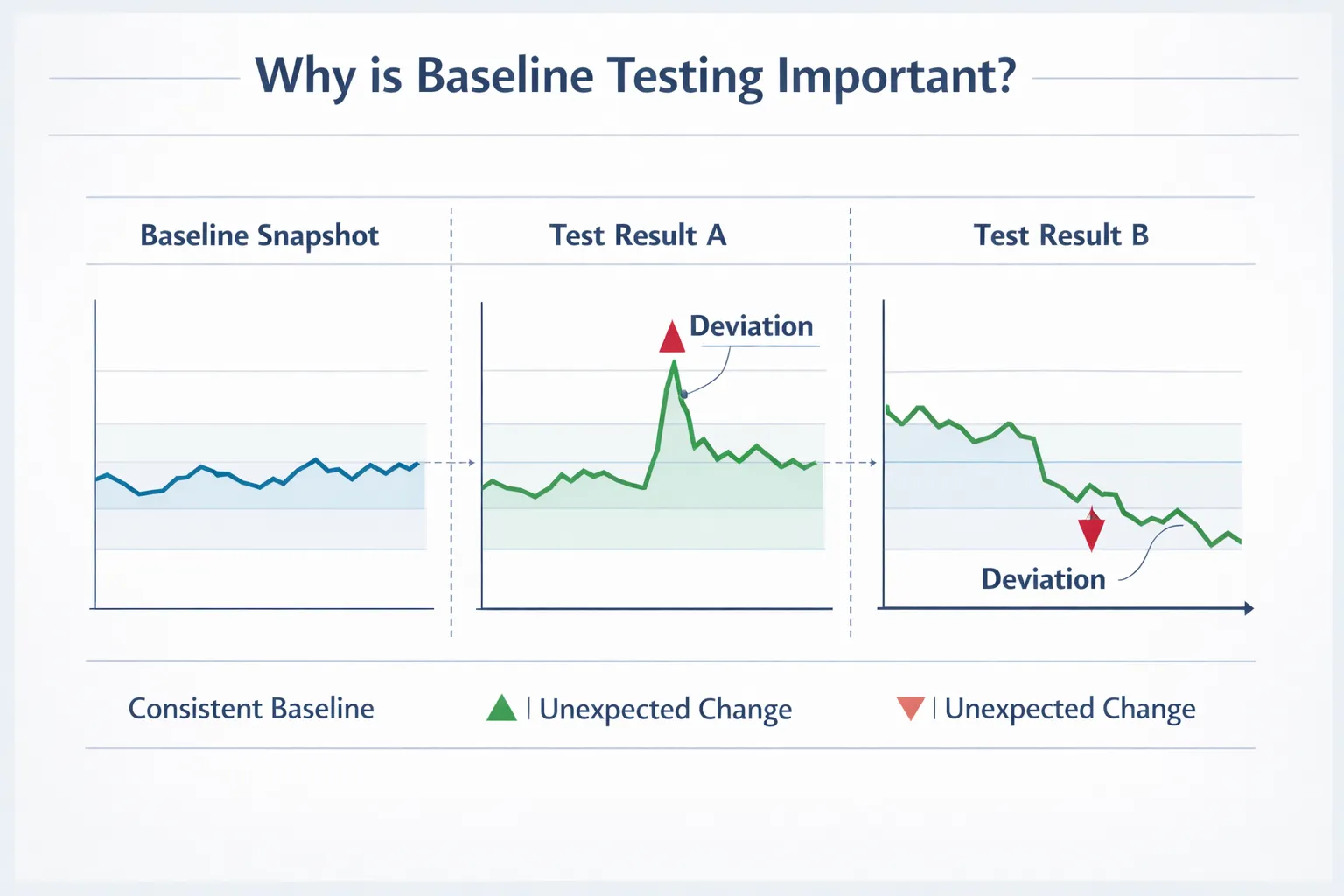
Without baseline tests:
-
Teams depend on memory and speculation.
-
Regressions slip into live systems.
-
Performance issues often go unnoticed..
-
Your test results have no value.
With Baseline Tests:
-
You get objective comparative data
-
Unintentional changes are detected at the earliest point possible
-
You provide support for the continued advancement of performance
-
Reduction of debugging time for an application after its release.
As part of CI/CD Pipeline, baseline tests have been put in place as an added level of safety between your application code and your production release.
Types of Baseline Testing
Baseline testing is not a single testing approach but a technique applied across different testing types. As a system changes, there are different types of baseline tests established to measure the application’s stability from many different aspects such as application behavior, user interface and performance.
Functional baseline testing
Functional baseline testing compares the currently exhibited behavior of an application to the behavior of a previously accepted application version. This is typically used to determine whether API responses or business logic continue to produce the same output for a feature.
Example: If the expected response for an endpoint on the API was a certain structure then that endpoint response needed to be the reference baseline. Any difference from any subsequent application releases (e.g. within the first x number of releases) will indicate there is a potential regression, modification to or intent for changes to that endpoint.
Baseline testing in Performance Testing
For performance testing, the culmination of the historical record of a system’s behaviour under actual expected load conditions (for example, average response time) will serve as the basis for comparison in future releases.
Example: if an average response time of 200 ms is expected for a typical system under maximum load, and a subsequent release provides an average response time greater than that, then the subsequent release has reduced the performance level of the system.
Visual Baseline Testing
The visual baseline is defined as a set of images or screenshots that represent a stable, baseline build that will subsequently be used as a reference point to identify any changes made to the design/layout of the application as it is updated and developed over time.
Example: A common scenario when doing visual testing is identifying layout or alignment issues caused by an update to an existing application (i.e., when elements within the UI move unexpectedly). By capturing the visual UI as a baseline, and then comparing visual photos taken during the time of an update with the visual photos taken before, we can easily identify if any changes have occurred as a result of the update.
Regression Baseline Testing
Regression baseline testing uses the results obtained during the previous run(s) of the automated tests as a comparison reference point to validate whether or not the ongoing functionality of the application(s) continues to work properly (as it was previously verified at the time of the original baseline).
Example: When adding new features to an application, the regression baseline tests will verify that the earlier features continue to function the same way they did at the time of the original baseline build.
Each type of baseline testing has a distinct form of validation. However, when combined, it allows teams to have confidence as the software products and services are updated through the course of development.
Key Features of Baseline Testing
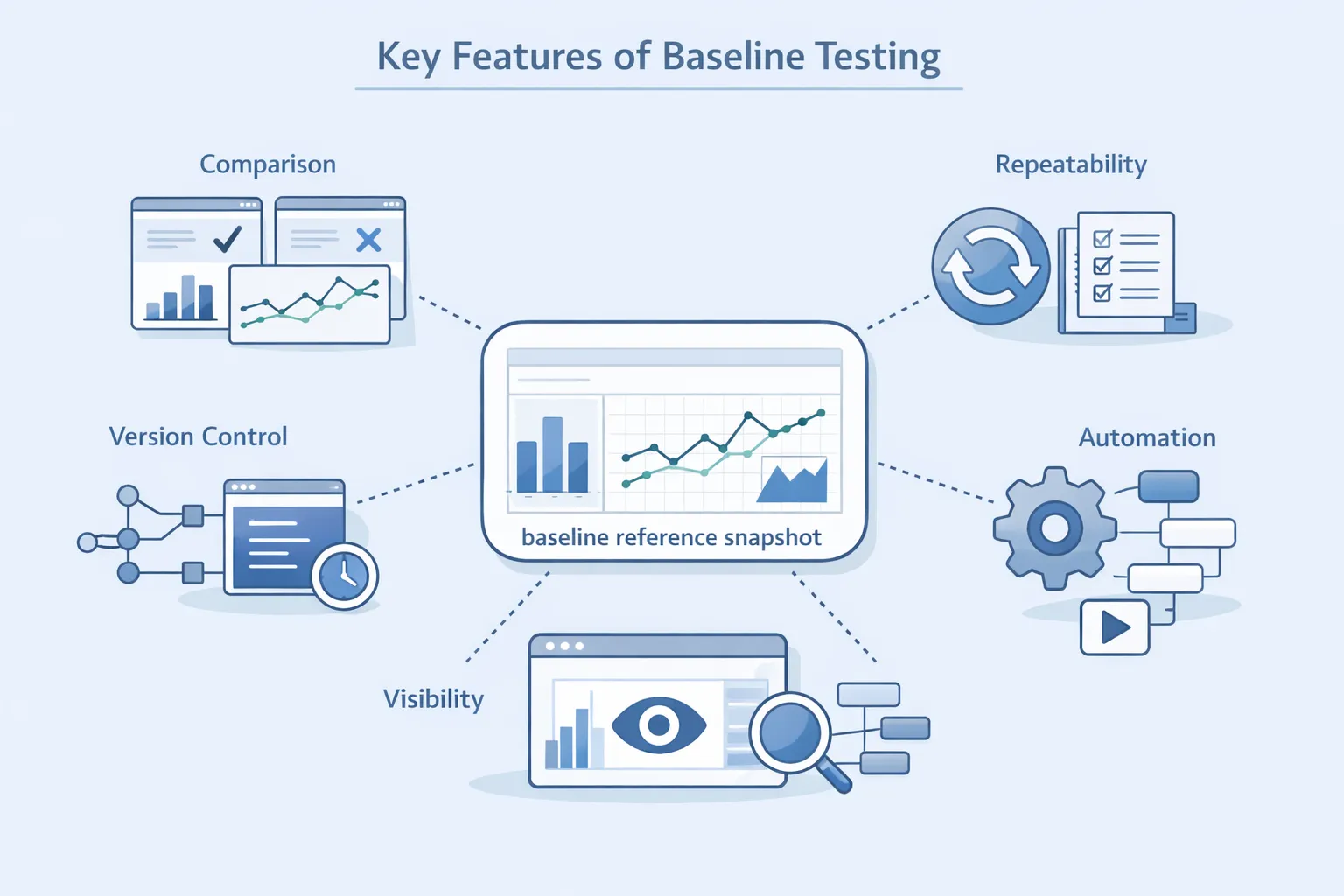
Baseline Tests have numerous advantages due to their key characteristics:
-
Comparison against an approved baseline.
-
Reusability & Consistency with consistent execution.
-
Control over Baselines by Versioning.
-
Transparent Change Tracking through Baselines.
-
Support for Data Automation Workflows.
These characteristics allow baseline testing to scale effectively as systems and automation workflows grow.
How to Conduct Software Baseline Testing?
As development cycles accelerate due to AI assistance and higher throughput, software teams face increased testing demands. Automated software baseline testing helps to establish a means for teams to efficiently track their regression efforts while continuing to move quickly and deliver new features at a high velocity.
Step 1: Define the Baseline Scope
To begin with, determine what to document for the software development team’s baseline. This definition will serve as the basis for expectations for the application’s behaviour prior to any new changes being implemented.
To achieve this goal, teams use real-time data to define their software baseline’s expectations, rather than manually entering expectations into the testing system. This scope typically includes:
-
API behaviour and responses
-
Performance characteristics during regular loading and usage
-
Security and contract issues
-
User Interface and layout characteristics
-
Databases’ outputs or other potential side effects.
Commonly used tools at this stage include:
| Purpose | Suitable Tools |
|---|---|
| API behavior recording | Postman, SoapUI, Insomnia, Keploy |
| Performance behavior capture | JMeter, k6, Gatling |
| Contract & schema validation | Swagger, Pact |
| UI layout capture | Playwright, Cypress, Percy |
Step 2: Capture the Baseline
By clearly defining the scope of the application, we can now capture the actual operation of the current version of the application and compare it to what was previously defined by the developer. This data will include how APIs operate, how the applications perform, how the contracts are used and what they look like on the screen.
Historically, developers relied heavily on certain scripted ways to capture these functional expectations; however, in today’s versions of software development, it is now much easier to automatically capture all of the system operations using the record and replay capabilities of the Record & Replay Platforms like those currently available.
When capturing the baseline of an application, there are four main categories of information that will typically be captured:
-
Functional response and data structure
-
Performance characteristics under "live" traffic
-
Expected contract and schema characteristics
-
Rendering characteristics of all UI Elements
Tools commonly used for baseline capture include:
| Purpose | Suitable Tools |
|---|---|
| API record & replay | Keploy, Postman |
| Performance baselines | BlazeMeter, LoadView, k6 |
| UI snapshots | Selenium, Cypress, Playwright |
| Contract recording | Pact, Swagger |
Step 3: Store and Version the Baseline
Baselines should be stored and managed in the same way as source code. As a result, as functionality is added to the system, the baseline for the system will also need to be updated.
Versioned baselines allow us to do the following:
-
Reference older behaviour if required
-
Establish traceability for all changes across each release of a baseline.
-
Make updates intentional and able to be reviewed.
Typical tools used for storing and versioning baselines include:
| Purpose | Suitable Tools |
|---|---|
| Baseline storage | Git, GitHub, GitLab |
| Version tracking | Git tags, release branches |
| Artifact management | CI pipelines, Keploy |
Step 4: Replay Against New Versions
Once you have created a baseline, you can use this as a basis to compare the baseline against later versions of your software application. Doing this allows you to run a comparison in lower level environments and/or within Continuous Integration/Continuous Deployment (CI/CD) pipelines to find any change in the way the application behaves (and therefore identify and fix bugs) much earlier in the software application delivery life cycle.
Below is a list of areas that can be identified using the replay:
-
Changes in API Response(s)
-
Contract and/or Schema Drift
-
Performance Regressions
-
Changes in UI Layout
Tools commonly used during replay and comparison include:
| Purpose | Suitable Tools |
|---|---|
| API replay & diffing | Keploy, Postman |
| Performance comparison | JMeter, k6, Gatling |
| UI visual diffing | Percy, Applitools, Cypress |
Step 5: Review and Update the Baseline
It is common practice for development teams to go through the following steps to ensure that all intentional changes have been captured in your baseline and therefore are kept up to date:
-
Review Differences Before Approving
-
Update Your Baseline When You Have Finalized The New Feature(s)
-
Keep Baseline Updates Explicit and Trackable
Tools supporting baseline review and updates include:
| Purpose | Suitable Tools |
|---|---|
| Review workflows | Git workflows, pull requests |
| CI validation | CI/CD pipelines |
| Controlled baseline updates | Keploy, test management tools |
Baseline Testing in Software Development Life Cycle (SDLC)
Multiple stages of the Software Development Lifecycle (SDLC) have baseline tests to ensure controlled evolution of software builds and artifacts.
-
Requirement Phase: Approved specs establish baselines for requirements to avoid gaps in tracking or changes to the scope without control.
-
Design & Development Phase: Once sufficient stability of a build is achieved, the development team will determine which config and functional baselines would best be referenced when supporting future development iterations.
-
Testing Phase: Performance, regression, and system behaviour are tested against a defined baseline, enabling identification of deviating behaviour, including degradation and/or defects.
-
Release & Maintenance Phase: Each production release creates a new baseline for the development team to perform impact analysis and develop a structured process for applying future changes.
By using these baseline checkpoints at each point throughout the SDLC, teams can ensure version control, change governance, and measurable quality continuities throughout the product lifecycle.
Example of Baseline Testing
Let us consider an example of an API that provides users with their profile information.

-
Version 1 of the API gives a user their name, email address, and role.
-
The baseline test for version 1 of the API
-
The next version of the API has a new extra field or has changed its output from that of the previous version.
-
Using the baseline information would show an immediate discrepancy between what was returned in version 1 vs a new release.
The development team can evaluate:
-
Is this change expected?
-
Should the baseline be updated?
-
Or is this a regression?
This simple comparison avoids silent breaking changes.
Metrics and Assertions Collected in Baseline Testing
Baseline testing is only as effective as the metrics you track. These metrics define what “normal” looks like for your system and act as the reference point for every future comparison. The goal is not to collect everything, but to capture signals that clearly indicate behavioral or performance change across versions.
Functional Metrics
These metrics validate that the system functions identically to the approved baseline. While many tools support functional assertions, most either check only high-level fields or require developers to manually script assertions for each response. Because of this effort, teams often skip deep validation of nested fields and payload structures.
Tools that support functional baseline assertions include:
-
Keploy, which captures and validates complete API responses (including nested fields and schemas) without manual assertion scripting
-
Traditional API testing tools like Postman or SoapUI, which typically rely on manually written assertions
Common examples of functional metrics to assert include:
-
The payload returned from the API (including nested fields)
-
Return status codes
-
HTTP status codes returned by the application.
Performance Metrics
Most performance testing uses performance metrics for baseline tests to determine whether performance has declined over time. Many of the performance testing tools you may be using rely solely on aggregate performance metrics and require custom scripts to reflect your team’s performance expectations, which often places limitations on in-depth validation of your APIs.
Some tools for baseline performance validation include:
-
Keploy (API performance metrics and functional API validation)
-
Traditional Performance Testing tools (JMeter, k6, LoadView, etc.)
The most commonly asserted performance metrics include:
-
API response times and latencies
-
Normal and expected load throughputs
-
CPU and Memory usage for each request
-
Resource consumption over time for multiple API versions
Visual Metrics
Visual metrics are metrics that compare the user interface output against an authority-approved baseline to help ensure all user-facing modifications are intentional and done in a controlled manner. These checks are commonly implemented using visual testing tools such as Percy, Applitools, or Playwright-based snapshot comparisons. Visual metrics that can be asserted include the following:
-
Graphic or Visual Difference
-
Changes in layout alignment
-
Variations in colour and spacing between elements
Contract Metrics
Contract metrics are used to measure the stability of API interfaces and to identify changes that might cause problems for consumers in the future. Contract assertions are typically validated using schema and contract testing tools like Pact, Swagger, or through recorded API behavior in record–replay workflows. Contract metrics that can be asserted include:
-
APIs that do not meet the defined contracts or schema.
-
Any changes to the type of field used.
-
Any fields that were removed or renamed.
-
Backward Compatibility for Multiple Versions.
Security Metrics
Security metrics ensure that access control and protection mechanisms behave consistently across releases. These validations are usually derived from recorded request–response behavior, role-based access tests, and API security testing tools integrated into CI pipelines. Some examples of security metrics are:
-
Authentication / Authorization Results
-
Consistent Role & Permissions
-
Rate-Limiting & Throttling
-
Consistency and Presence of Security Headers.
By tracking the right combination of metrics, teams ensure that baseline tests remain reliable, meaningful, and easy to review.
Challenges & Best Practices of Baseline Testing
The effectiveness of baseline testing depends on maintaining baseline data throughout the test cycle. Once baseline testing becomes part of the normal development workflow, the level of confidence in baseline testing results diminishes as a result of how well baselines are maintained.
Common Challenges
-
Dynamic data (timestamps, request IDs) will cause flaky baselines. These dynamic data elements can cause flaky tests, which result in false positives and/or negatives when testing with evolving data.
-
Updating baselines without review can result in incorrect or unvalidated baseline changes.
-
Under pressure to deliver code quickly, personnel will approve changes to baselines due to a lack of time to validate that the baseline obtained from recorded data accurately represents how the application should behave.
-
Tight baseline comparison requirements will cause baselines to break continuous integration processes.
-
Flaky scripted tests caused by virtualized infrastructure.
If left unchecked, the combination of these issues will ultimately erode a team’s confidence in the validity of its baseline testing results.
Best Practices
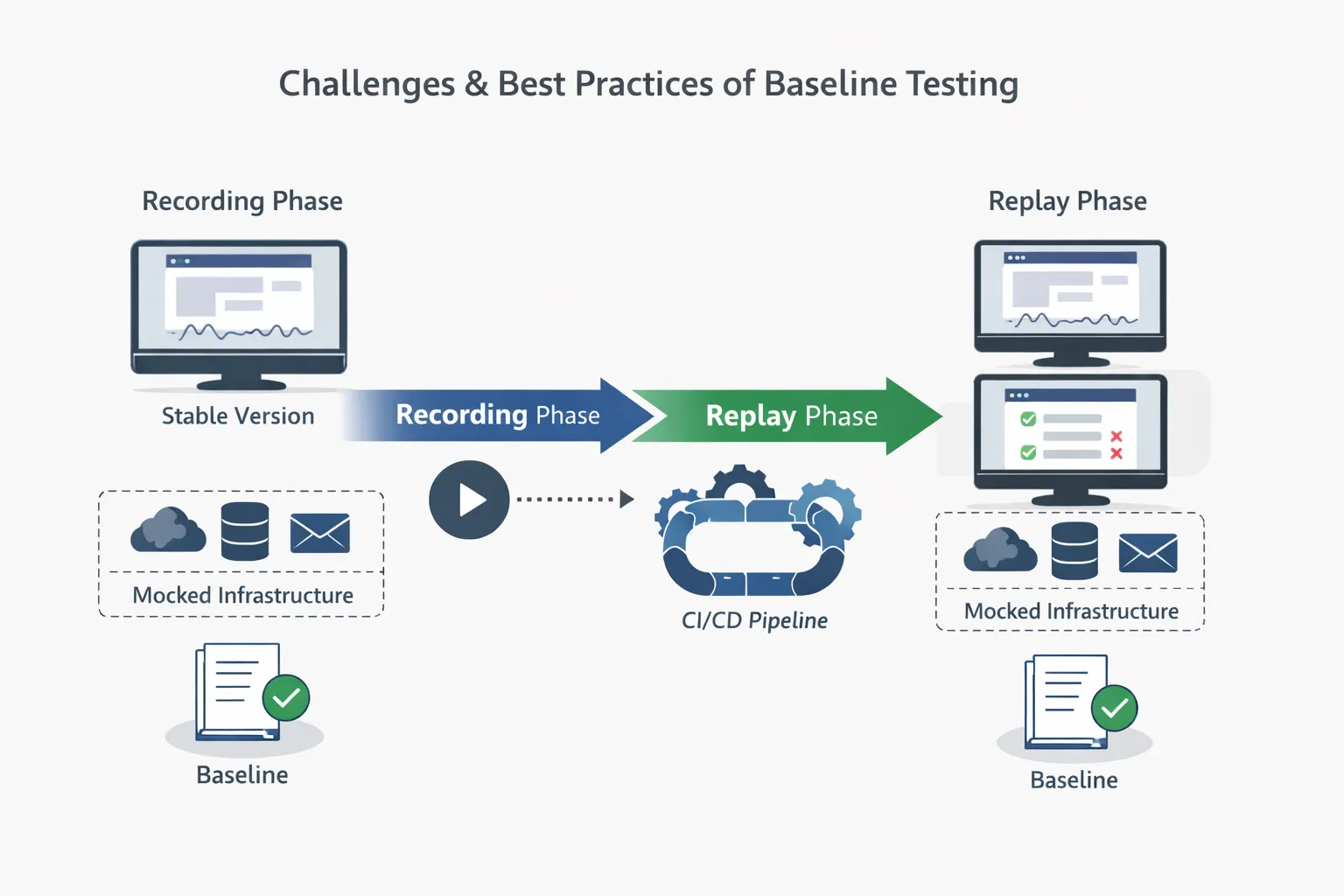
To make baseline testing effective at scale, teams should adopt practices that favor record-replay workflows:
-
Record real application behavior from a known working version
-
Replay interactions against newer versions in CI/CD pipelines
-
Mock dependent infrastructure for deterministic comparisons
-
Review diffs deliberately before updating baselines
-
Version and evolve baselines alongside code
Using record–replay tools, such as Keploy, and the associated practices of evolving baselines will allow teams to implement these best practices before the decay of the baseline test results causes incompatibility with other evolving versions.
How Is AI and Machine Learning Transforming Baseline Testing?
As Application Complexity and Release Frequency Increase, Manual Baseline Maintenance Will Become Increasingly Difficult to Scale. With the Advancement of AI and Machine Learning Technologies, Teams Can:
-
Automatically identify significant changes to baselines
-
Eliminate noise from dynamic responses, and conduct context-aware diffing.
-
Get baseline updates processed much more quickly while having human approval for All processed responses.
With these capabilities, teams can increase responsiveness to changes to improve baseline-based validation without increasing the amount of time and effort spent on maintenance.
Conclusion
By establishing baseline tests, organizations can reliably compare the impact of changes across versions. Instead of continuing to guess if something has failed, companies can make informed comparisons based on their established baseline. When baseline tests are created correctly in an organisation, they enhance and strengthen regression testing, increase confidence in the software’s release, and therefore fit well in the Continuous Integration and Continuous Deployment process.
Establishing a standard practice for defining, creating, and sustaining the Baseline Test over the life of a project is important as the products become more diverse, and the software development cycle becomes faster.
FAQs
What is the difference between baseline and benchmark testing?
The baseline test establishes a reference point from which the test results can be measured, while the benchmark testing establishes performance as measured against defined industry or target goals.
Is baseline testing the same as regression testing?
No, the baseline testing provides the standard for regression testing to assist in identifying regression errors.
How often should a baseline test be updated?
Only if there is an intentional, approved change.
Can baseline tests be automated?
Many of today’s professional teams have automated in the procedure of capturing, replaying, and comparing the baseline test results in the CI/CD pipeline.
Is baseline test useful for APIs?
Certainly. Baseline tests are particularly advantageous in situations where API response consistency and contract stability is critical to achieving accurate, reliable results.
What is a baseline document?
It is an officially approved version of a project artifact (such as requirements, design, test plans) that serves as a reference point for future changes.

Leave a Reply