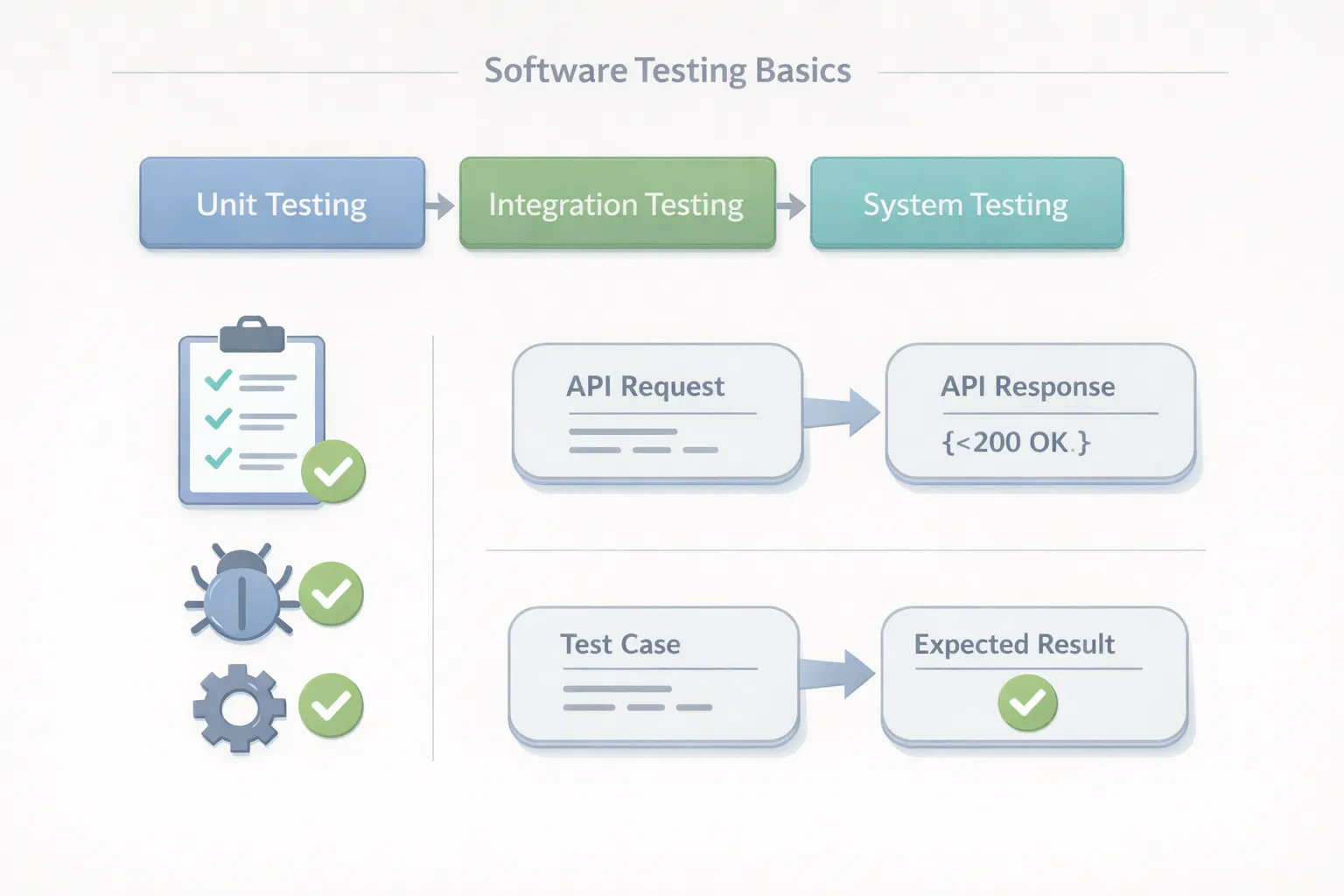
Release day gets tense when a test suite can’t answer one simple question: are we safe to ship? In the conversations I have with engineering and QA teams, the same pattern shows up again and again – confusion in the basics creates chaos later. That’s why software testing basics matter: they turn testing from “random checks” into something teams can trust.
Once the fundamentals click, choosing test types, tools, and automation becomes a lot easier. Let’s get into the parts that actually show up in real work.
What is Software Testing in Simple Terms?
Software testing is how teams check that software behaves the way it should, and that it stays reliable as it changes.
In a real software testing process, we’re usually answering two questions: does the feature work as expected, and does it keep working after the next change?
These terms show up everywhere, so it helps to keep them crisp:
-
Defect In Software Testing: the underlying issue in the product that breaks an expectation or requirement.
-
Bug: the everyday word teams use for a defect.
-
Failure: what users experience when the defect shows up.
-
Verification Vs Validation: verification checks “built correctly,” validation checks “built the right thing.”
-
Test Case / Test Suite: one check vs a collection of checks.
-
Test Execution: running tests and recording outcomes.
When teams use the same vocabulary, the testing process becomes easier to run, and easier to trust.
The Impact of Defects: Why Testing Fundamentals Are Critical?
Software defects can be both costly and difficult to rectify, as they can result in a wide variety of issues. The results of poor testing practices are clear from examining real-world statistics, which illustrate the importance of understanding the basics of software testing. Take a look at these numbers:
-
60% of software defects that are not found before production will be present in live applications and lead to failures.
-
A global developer survey found that 26% of developers spend up to half of their time fixing software bugs, highlighting how defects can significantly slow development and reduce productivity.
-
Only 16 % of organisations believe their testing processes are effective; thus, there appears to be a widespread need to improve upon basic testing principles and processes.
There is no doubt that having a strong foundation (performing testing early, writing good test cases, and reporting defects correctly) is critical to producing high-quality software and providing a positive customer experience.
What Are The Objectives Of Software Testing?
The objectives of software testing are not about proving perfection. They’re about reducing risk with evidence.
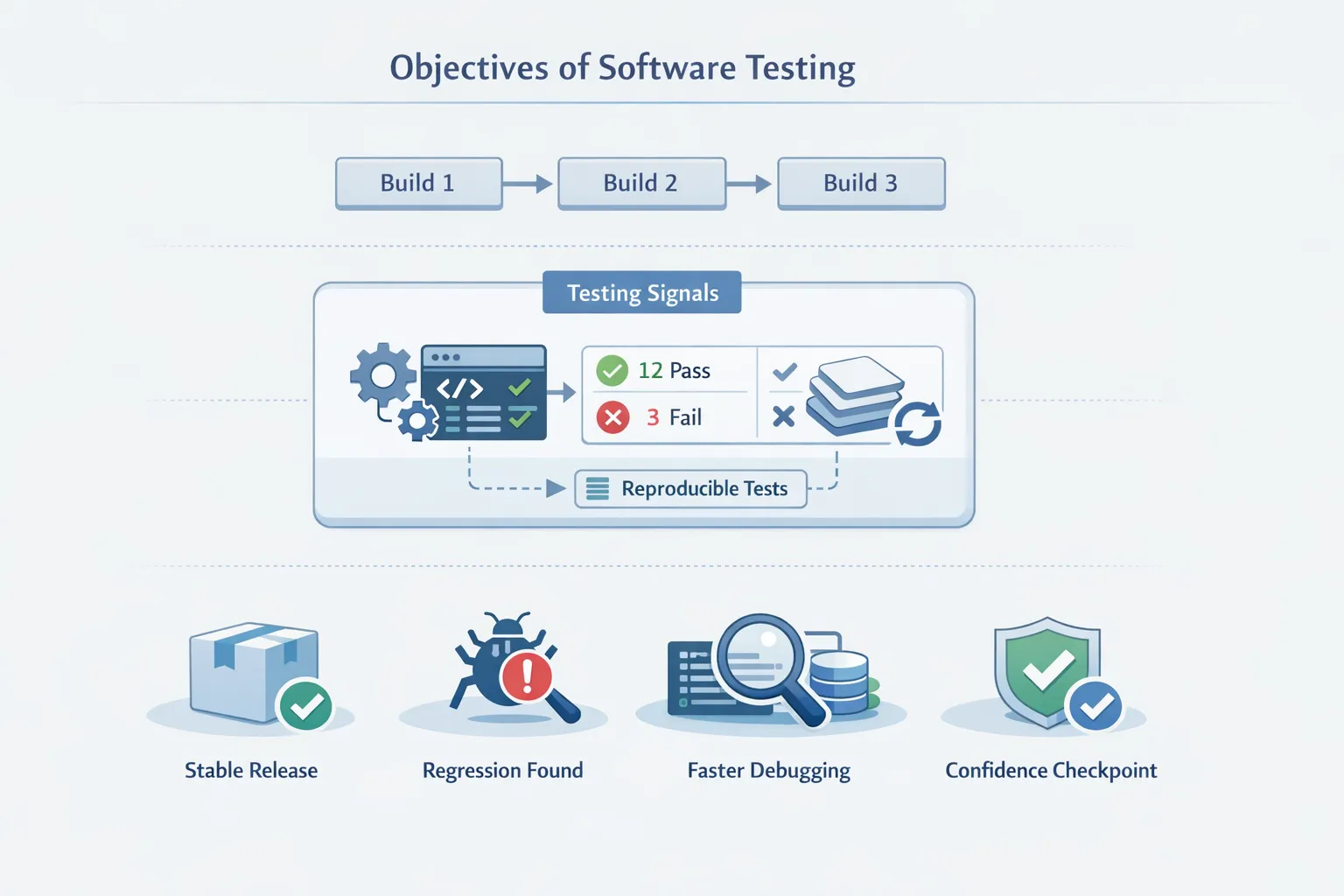
Most teams aim for outcomes like these:
-
Protect product quality while shipping frequently
-
Catch regressions before users find them
-
Make debugging faster by reproducing failures reliably
-
Build confidence in changes under time pressure
-
Keep releases predictable as the product grows
This is where software testing basics start paying off: it turns “we ran some tests” into “we have a reliable signal.”
What Core Concepts Do You Need Before You Start?
A lot of beginner confusion isn’t about tools. It’s about mismatched expectations and unclear fundamentals. These software testing fundamentals keep teams aligned.
Defects Vs Failures
A defect is the root issue in the system. A failure is what the user actually sees. If a team wants fewer incidents, the goal is fewer failures. If a team wants a more stable product, the goal is fewer defects.
Verification Vs Validation
Verification is correctness to spec. Validation is useful to users. In real teams, both matter, and they show up in different test types and stages.
Test Cases, Suites, And Scripts
A test case is a specific scenario with steps, inputs, and expected results. A suite is a set of test cases run together.
When a case becomes automated, it often becomes a test script in software testing. That’s why writing clear cases upfront saves time later.
What Are The Principles Of Software Testing?
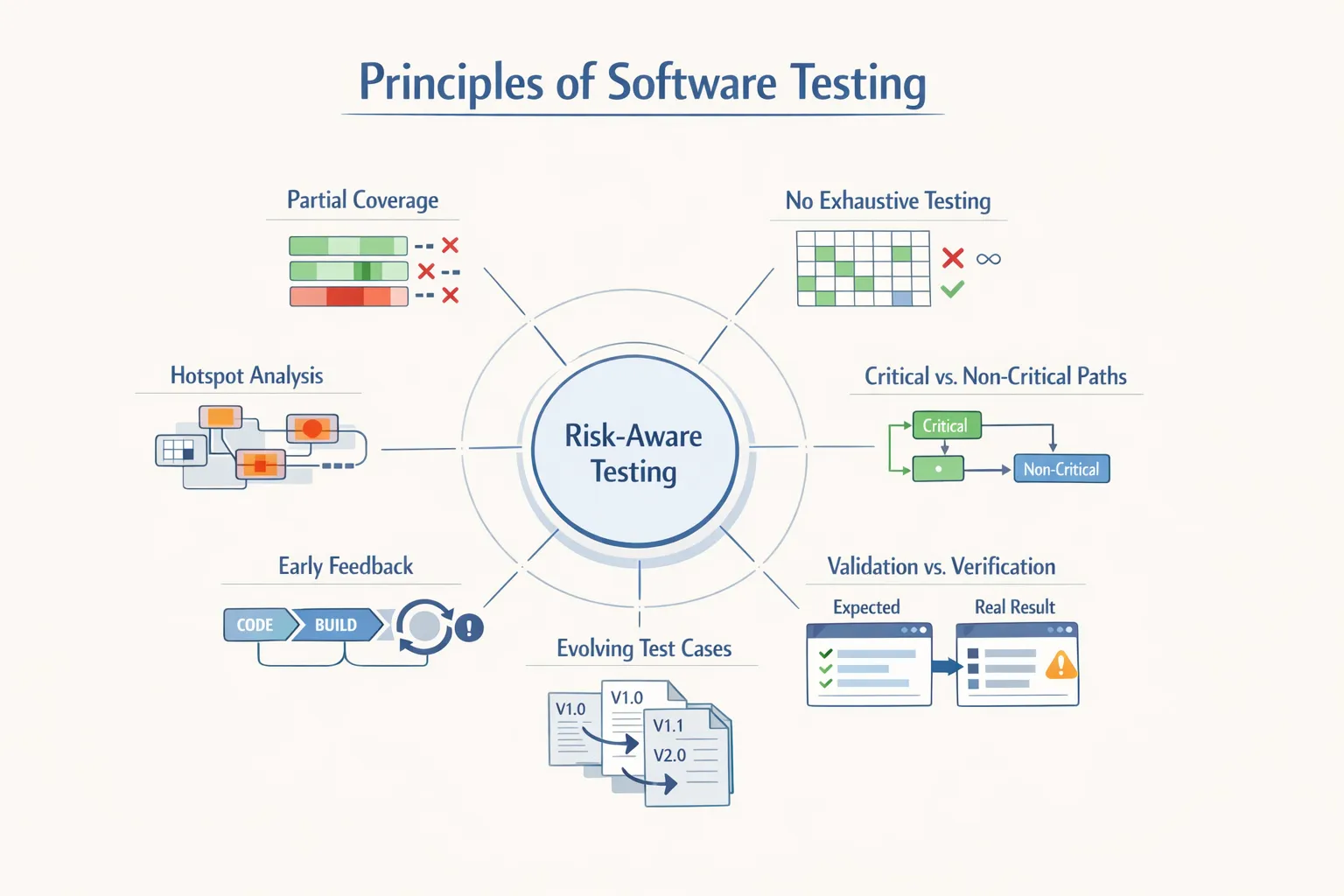
The principles of software testing keep teams realistic and focused. They’re simple, but they prevent wasted effort.
-
Testing Shows The Presence Of Defects, Not Their Absence: Green tests prove what you tested passed. They don’t prove that nothing can fail.
-
Exhaustive Testing Is Impossible: You can’t test every input and every system state. Prioritize by risk.
-
Test Early: Early feedback usually means safer fixes and fewer surprises.
-
Defects Cluster: A few areas tend to break repeatedly. Raise coverage there.
-
Repeating the Same Tests Stops Catching New Issues: As the product changes, tests must evolve too.
-
Testing Depends On Context: A payments workflow and a social app don’t need the same depth of checks.
-
A Bug-Free Feature Can Still Fail If It Solves The Wrong Problem: Validation matters as much as verification.
If you read engineering writing from companies like Google, Microsoft, Shopify, or Atlassian, you’ll see these themes repeated: fast feedback, stable tests, and risk-based decisions.
What Are The Levels Of Testing?
Levels of software testing tell you where to test in the stack. Getting this right is one of the most useful software testing basics, because it prevents slow and fragile suites.
Unit Testing
Unit testing checks small pieces of logic in isolation.
Best for:
-
validation rules
-
business logic
-
edge cases in pure functions
Unit tests are usually cheap to run and maintain, so they’re ideal for pull request checks.
Integration Testing
Integration testing checks how components work together (API + database, service + cache, worker + queue).
Best for:
-
database interactions
-
data mapping and serialization
-
dependency handling and retries
Integration tests catch a lot of real failures without requiring a full UI flow.
System Testing And Acceptance Testing
System testing validates the product as a whole. Acceptance testing (often UAT) confirms it meets stakeholder needs.
This is where tests become slower and costlier to maintain, so the goal is not “more,” it’s “focused.”
When teams balance these levels well, software testing basics become the foundation for practical software testing strategies instead of just a checklist.
What Types Of Software Testing Should Beginners Focus On?
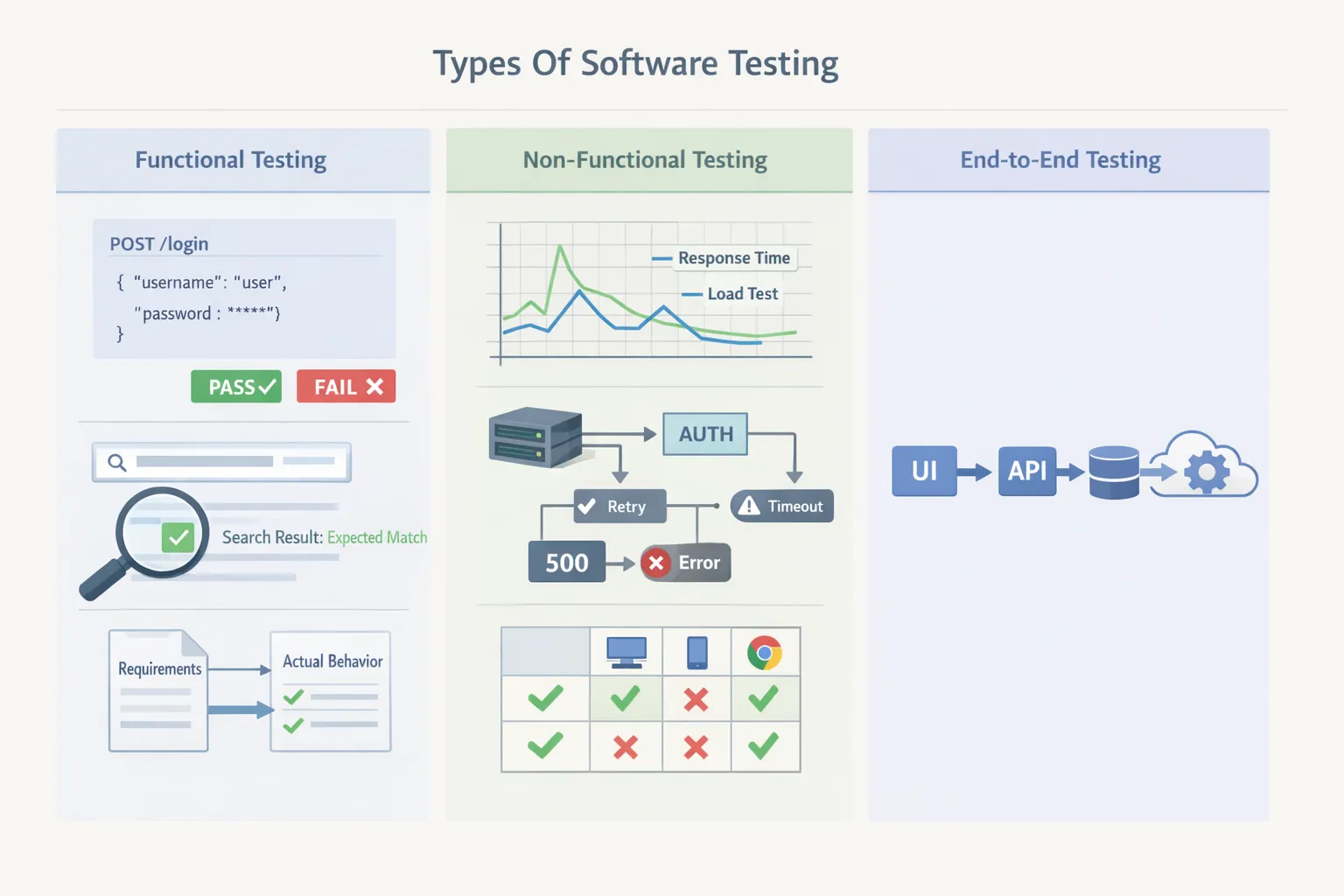
Types of software testing tell you what you’re trying to prove.
Functional Testing
Functional testing checks whether features behave correctly against requirements.
Examples:
-
login works with valid credentials
-
search returns correct results
-
checkout completes with valid payment details
Non-Functional Testing
Non-functional testing checks quality attributes users care about even when the feature “works.”
Common areas:
-
performance testing (latency, load, throughput)
-
reliability (timeouts, retries, graceful failure)
-
security basics (auth, access control, input validation)
-
compatibility (browser/device where relevant)
End-To-End Testing In Software Testing
End-to-end testing in software testing checks a complete user journey across layers (UI → API → DB → third parties). It’s valuable, but it’s also the easiest place to create flaky, slow pipelines if it grows without control.
A practical approach that works in most teams: keep end-to-end tests for the few flows that must never break, and let unit + integration carry most coverage.
What Is The Software Testing Life Cycle?
The software testing life cycle (STLC) is the repeatable way teams plan, run, and close testing work so releases don’t turn chaotic.
Planning
Start with scope and risk:
-
what are we testing?
-
what can break?
-
what does “ready to ship” mean?
Test Design And Preparation
Turn requirements into checks:
-
scenarios and test cases
-
test data needs
-
what stays manual testing vs what becomes automation testing
Setup
Make tests runnable:
-
environments, configuration, and access
-
stable test data strategy
-
dependency strategy (real, mocked, replayed, or sandboxed)
Execution And Reporting
Run tests and capture outcomes:
-
manual testing for exploration and new behavior
-
automated testing for repeatable regression
-
defect reports with clear evidence and repro steps
Closure
Lock in learning:
-
what broke and why?
-
what coverage is missing?
-
what should be updated or removed next sprint?
This is where the software testing process becomes predictable, and that predictability is what keeps teams shipping.
How Do You Write Test Cases That Actually Catch Bugs?
You don’t need hundreds of cases to start. You need clear cases tied to real risk. That’s the difference between “we wrote tests” and “we built confidence.”
A solid starter set of types of test cases in software testing includes:
-
Positive Cases: valid inputs → expected success
-
Negative Cases: invalid inputs → correct error behavior
-
Boundary Cases: min/max values and edge conditions
-
Data Variation Cases: empty fields, special characters, large payloads
-
State-Based Cases: multi-step flows that depend on previous actions
-
Regression Cases: checks that prevent past issues from returning
A format teams actually maintain:
-
Title
-
Preconditions
-
Steps
-
Expected Result
-
Notes (only when needed)
This is also where testing basics becomes practical: a good case should make it obvious what failed and why, without needing a meeting to interpret it.
What Should A Defect Report Include?
A well-written defect report speeds up fixes and reduces churn. A vague report creates back-and-forth.
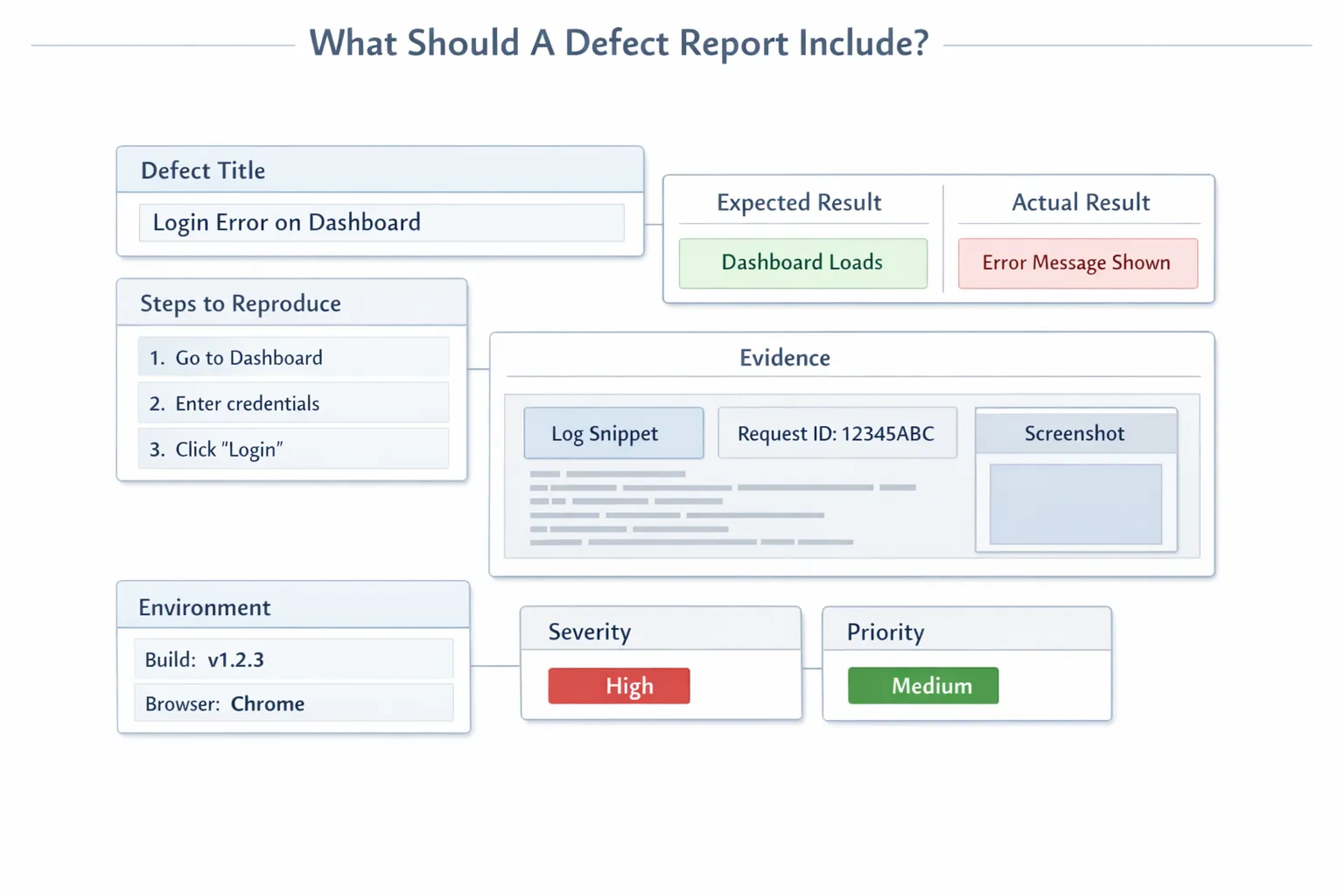
A good defect in software testing report usually includes:
-
specific title (what broke + where)
-
minimal steps to reproduce
-
expected vs actual result
-
evidence (log snippet, screenshot, request ID)
-
environment (build version, browser/device if relevant)
-
severity and priority (kept simple)
This habit scales across teams. It also improves collaboration between QA, developers, and product.
Which Software Testing Tools Should You Use?
A good stack isn’t “lots of tools.” It’s the smallest set that creates fast, stable feedback. Below are common software testing tools grouped by what teams use them for, with examples.
Test Management And Tracking
Useful when you need structure around test planning and releases:
-
Jira, Azure DevOps (workflow + defects)
-
TestRail, Zephyr, Xray (test case management)
Unit Testing And Assertions
Common picks by ecosystem:
-
Java: JUnit, TestNG
-
JavaScript/TypeScript: Jest, Vitest
-
Python: pytest
-
Go: go test
API Testing And Regression Automation
Useful for stable checks at the service layer:
-
Keploy (generate tests from real API traffic and replay them for repeatable regression runs)
-
Postman, Insomnia
-
Rest Assured, Karate
This category is where many teams start automation because it’s usually more stable than UI-heavy tests.
UI Testing
Best kept small and focused on critical journeys:
- Playwright, Cypress, Selenium
Dependency Control And Mocking
This is where teams reduce flakiness and keep CI runs reliable:
-
WireMock, MockServer (service mocking)
-
Keploy (record and replay real dependency behavior so tests can run without live services)
-
Testcontainers (ephemeral dependencies)
-
Pact (contract testing)
Performance Testing Tools
For baseline checks and catching regressions:
- k6, JMeter, Gatling, Locust
Reporting And Analytics
To debug faster and spot trends:
-
Keploy (test analytics across runs, useful for understanding coverage signals and failures over time)
-
Allure, ReportPortal
-
CI reports + logs + dashboards
Tool selection becomes much easier once you know what you’re trying to improve: speed, stability, coverage, or debugging time. That’s the practical lens behind testing tools choices and automated software testing tools comparisons.
How Do You Keep Tests Reliable In CI/CD?
CI failures hurt twice: they waste time and they reduce trust. This is where software testing basics becomes very real.
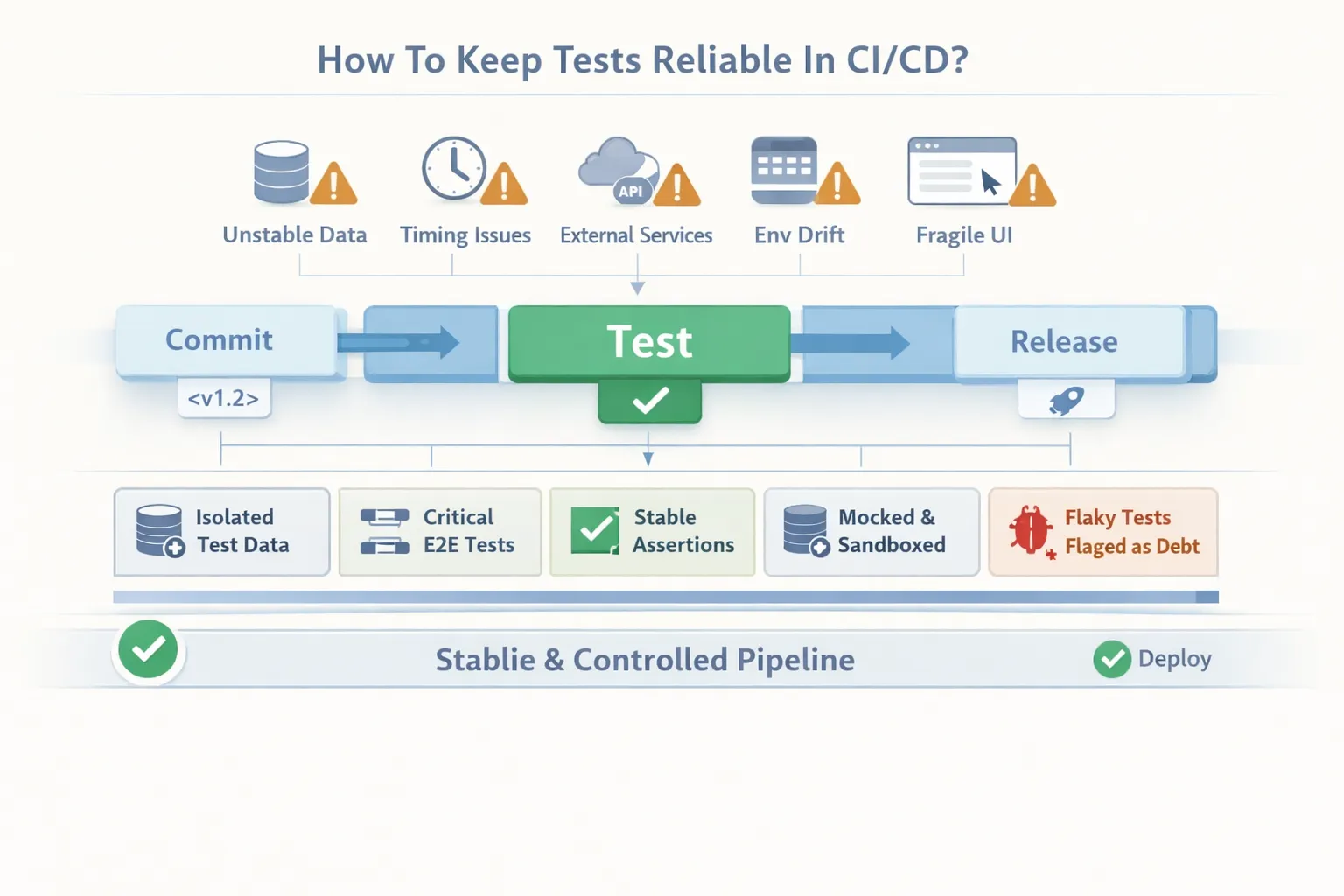
Common causes:
-
unstable test data
-
timing issues (async jobs, race conditions)
-
live third-party dependencies
-
environment drift (local vs CI)
-
fragile UI selectors
Fixes teams consistently apply:
-
isolate data per test run (or reset state reliably)
-
keep E2E minimal and high-value
-
prefer stable assertions over timing-based checks
-
control dependencies (mock, replay, or sandbox)
-
treat flaky tests as urgent tech debt, not “random CI noise”
In teams I’ve worked with, this is often the turning point: once CI is trusted, the whole dev loop speeds up.
How Do You Build Your First Test Suite?
A first suite should be small, trustworthy, and runnable every week. That’s where software testing basics turns into action.
Step 1: Pick One High-Impact Flow
Examples:
-
signup and onboarding
-
login and password reset
-
checkout and payment confirmation
Step 2: Write 8–12 Test Cases
A healthy mix:
-
3–4 positive
-
3–4 negative
-
2–3 boundary/data variation
Step 3: Run It Manually First
Manual runs catch unclear requirements and messy edge behavior early.
Step 4: Automate What Pays Back Weekly
Start with:
-
unit testing for validation and business logic
-
integration testing for API + database behavior
-
1–2 end-to-end checks for “must never break” flows
This is where test automation stops being a buzzword and starts saving time.
Step 5: Make It CI-Ready
Stabilize data, dependencies, and assertions before expanding. If dependency instability is your biggest blocker, record-and-replay approaches (including tools like Keploy) can help keep suites runnable without waiting on live systems.
What Should You Measure As The Suite Grows?
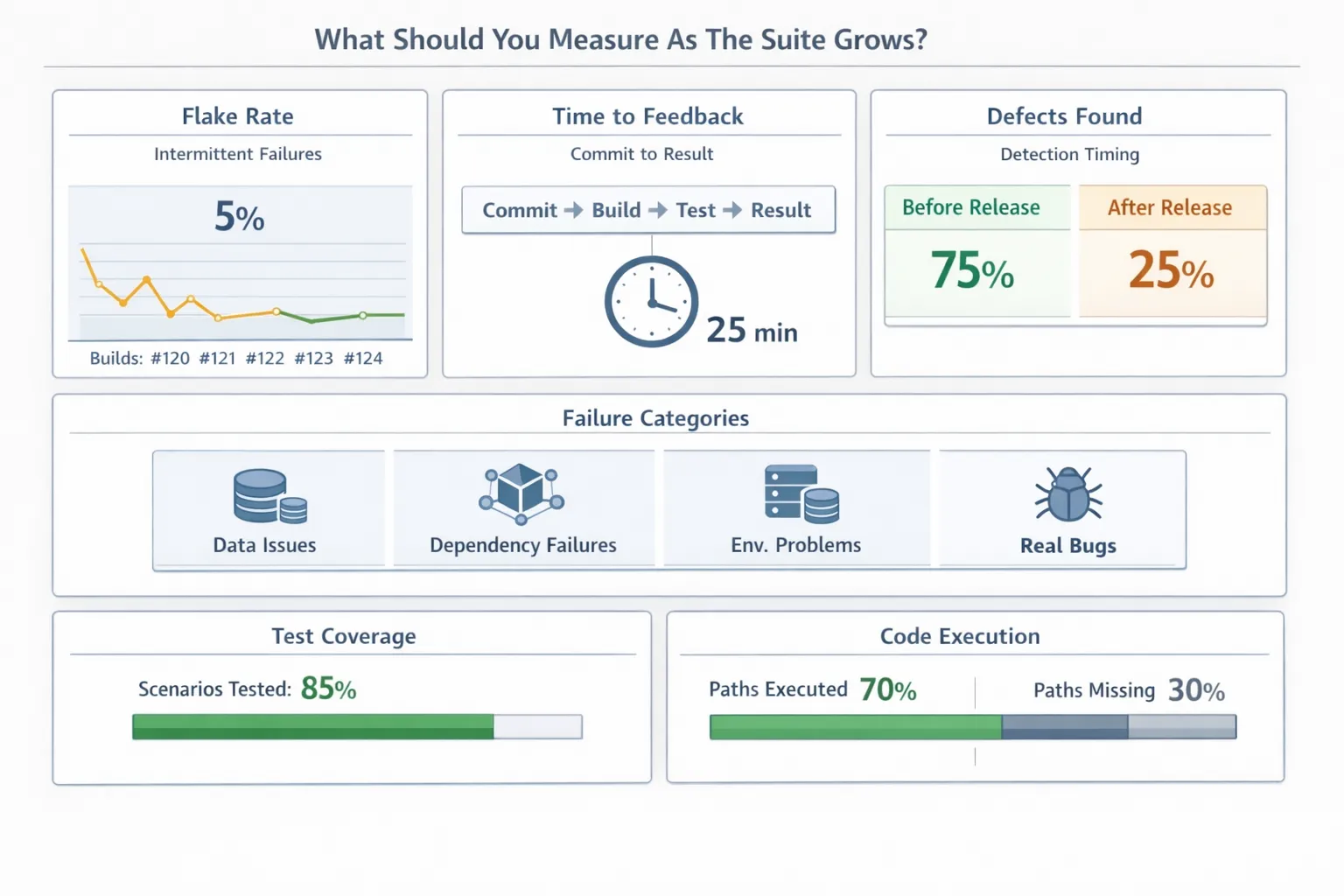
Better testing isn’t just “more tests.” It’s better signals.
A simple set of software testing metrics teams actually use:
-
flake rate (tests failing without meaningful code changes)
-
time to feedback in CI
-
defects found before release vs after release
-
failure categories (data, dependency, environment, real bug)
Coverage can help, but it’s not the goal:
-
test coverage in software testing helps you understand scenario coverage.
-
code coverage in software testing helps you spot unexecuted code paths.
If you want a practical baseline habit, doing benchmark software testing over time (build time, flake rate, key performance checks) makes quality trends visible instead of guesswork.
Software Testing Best Practices for Beginners
Starting with software testing may feel difficult. However, if you can incorporate a few fundamental best practices into your workflow, then your testing becomes more efficient over time. Here are five important best practices for a beginner:
1. Understand the Requirements: Make sure that you fully understand the requirements of a feature before writing any test cases. Ask developers or product managers to clarify any ambiguous requirements to avoid wasting time on irrelevant test cases.
2. Start Small & Focus on High-Risk Areas: Begin with a few critical flows rather than trying to test everything at once. Focus on areas where failures would have the biggest impact, such as login, payment, or data handling.
3. Write Clear and Maintainable Test Cases: Create test cases that are easy to read and may be referenced by others, including steps, expected output, preconditions, etc. This way, anyone can reproduce an error without confusion.
4. Document Defects Properly- When you document a defect (use precise steps, evidence, and context), you save developers time and allow them to better coordinate with you.
5. Apply Feedback Quickly- Review results from each test cycle and adapt your approach. Use feedback to refine test cases, improve coverage, and prioritize high-risk areas for future tests.
Following these best practices strengthens your foundation in software testing and makes your test efforts more reliable over time.
Future of Software Testing: The Emerging Trends
The basics of software testing will always matter, but the field is changing fast. Teams that keep up with the emerging trends and approaches can work smarter and deliver more reliable software. Here are a few trends shaping the future of software testing and QA:
-
AI and Machine Learning in Testing- AI tools are helping build "smart" test cases, identify tests that could potentially cause issues, and flag potentially high-risk areas within an application. This makes testing faster, more accurate, and focused.
-
Shift-Left and Continuous Testing- Testing is happening earlier in the development process and integrated into CI/CD pipelines. Continuous testing gives faster feedback, finds defects sooner, and helps teams release software confidently, even at high speed.
-
Cloud-Based and Codeless Testing Platforms- Cloud and codeless solutions reduce setup time and make it easier to scale testing across distributed teams. Testers can spend more time on strategy and coverage rather than on configuring tools or infrastructure.
Using these trends alongside the core software testing basics helps teams work smarter and keep up with the fast pace of software development.
Conclusion
Good testing isn’t about being perfect. It’s about being predictable. When teams align on fundamentals, choose the right levels, and control dependencies, they ship with confidence instead of hope. Manual testing stays valuable for exploration. Automated testing protects releases. And tool choices become easier because they support a workflow you already trust.
If you want one next step that works across almost any product: pick one high-impact flow, build a small suite around it, and make it run consistently in CI. Once that loop is stable, scaling coverage becomes a steady process instead of a constant reset.
FAQs
How Do I Choose Between Manual Testing And Automated Testing?
Use manual testing for exploration and new behavior. Use automated testing when the check must run repeatedly (PRs, nightly builds, releases).
Do Software Testers Need Programming Knowledge?
Not necessarily. For manual testing, programming knowledge is not mandatory, but knowing basic coding helps when working with automated tests or CI/CD pipelines.
What Should I Learn to Start with Software Testing?
Focus on the very basics: test cases, defect reporting, test levels, testing types, etc. Automation tools and CI/CD skills can come later.
Do I Need End-To-End Tests For Everything?
No. Keep end-to-end tests small and focused on critical journeys. Use more unit and integration coverage for fast, stable feedback.
Why Do Tests Pass Locally But Fail In CI?
Usually because of environment drift, unstable data, timing issues, or live dependencies. Fix the root cause first, then expand the suite.
How Many Test Cases Are Enough?
Enough to cover high-risk flows, common failure modes, and the regressions you’ve actually seen. Expand based on real defects and real user impact.

Leave a Reply