System testing is the stage where you test the complete, integrated application as a whole, against its requirements, in an environment that looks as much like production as possible. Every component is in place, and the question is no longer "does this piece work?" but "does the whole product work?"
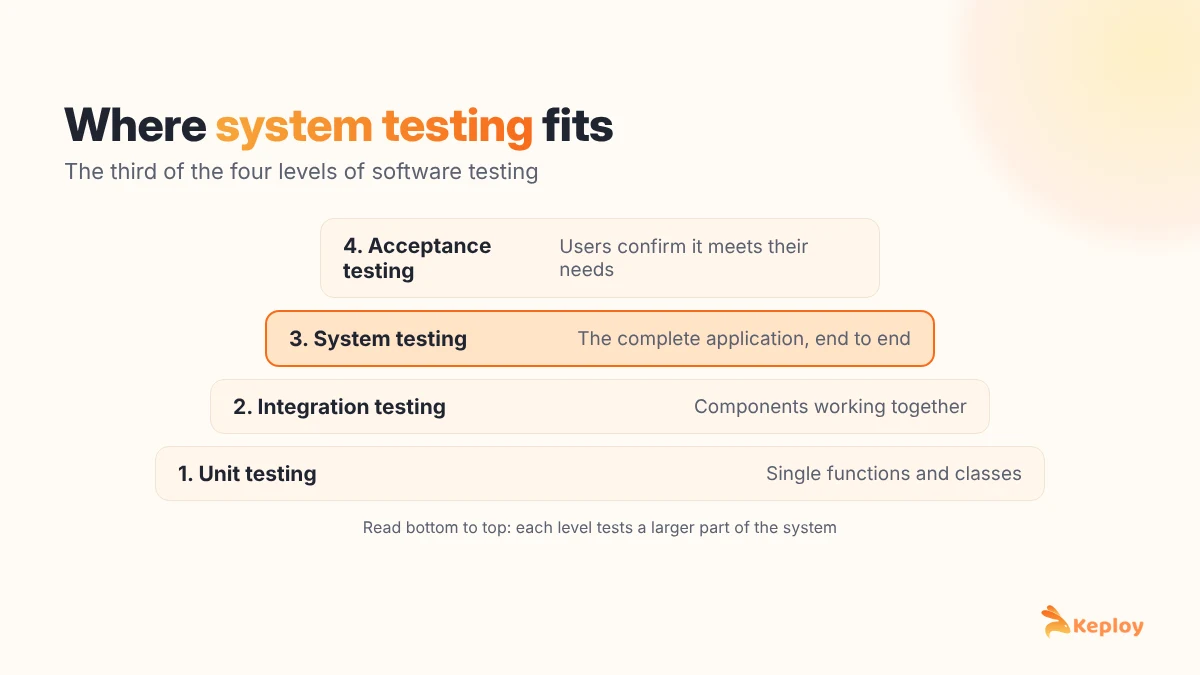
It sits third in the four levels of software testing: after unit and integration testing, and before acceptance testing. It’s usually the last stage owned by the engineering and QA team before real users or the client get involved.
This guide covers what system testing checks, its main types, how to run it step by step, a worked example and how it differs from integration, functional and acceptance testing.
What is system testing in software testing?
System testing evaluates the fully assembled software system to confirm it meets its functional and non-functional requirements. Testers treat the system as a black box: they use it the way a user or an external system would, without relying on knowledge of the internal code.
By this point, individual functions have passed unit tests and the connections between components have passed integration tests. System testing catches what those earlier stages can’t see: problems that only appear when everything runs together, with real configuration, real data volumes and the full set of dependencies.
Typical examples of what turns up only at this stage:
- A feature works in every service on its own, but a timeout setting in the production-like config makes the full flow fail.
- Two services each pass their tests but disagree on a date format, so reports show the wrong numbers.
- The app works for one user but locks up when a scheduled batch job runs at the same time.
What does system testing check?
System testing covers both what the system does and how well it does it:
- End-to-end business flows: a customer signs up, places an order, pays, gets a confirmation and can see the order in their history.
- Functional requirements: every feature in the specification behaves correctly.
- Non-functional requirements: performance, security, reliability, usability and compatibility targets are met. See functional vs non-functional testing for how the two differ.
- Interfaces with external systems: payment gateways, email providers, identity providers and partner APIs.
- Data handling: data is stored, migrated, reported and deleted correctly across the whole system.
- Configuration and deployment: the system installs, starts and runs correctly with production-like settings.
Types of system testing
System testing is an umbrella for several kinds of checks on the complete system:
- Functional system testing: verifies every feature and business flow against the requirements.
- End-to-end testing: follows complete user journeys through every layer. See our end-to-end testing guide.
- Regression testing: confirms existing features still work after changes.
- Performance and load testing: checks response times and behavior at expected and peak traffic.
- Security testing: looks for vulnerabilities, access control gaps and data exposure.
- Usability testing: checks that people can complete tasks without confusion.
- Recovery testing: confirms the system recovers cleanly from crashes, network failures and restarts.
- Compatibility testing: checks behavior across browsers, devices, operating systems and versions.
- Installation and migration testing: verifies installs, upgrades and data migrations.
How to perform system testing
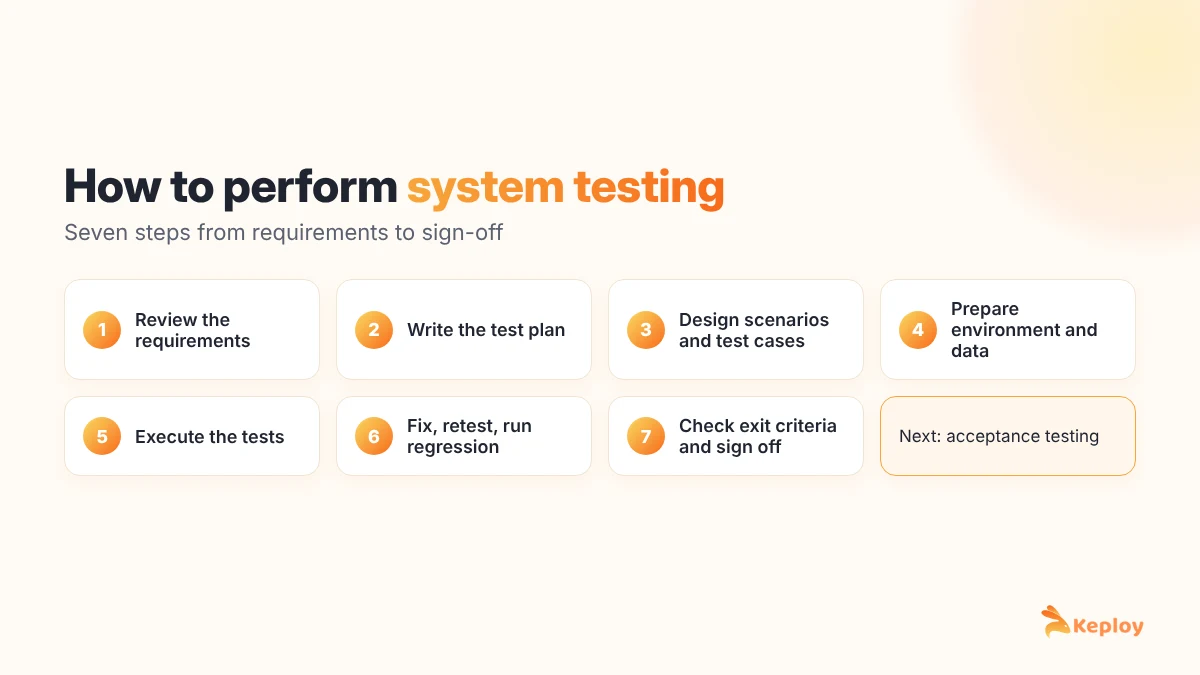
1. Review the requirements
Start from the full requirements specification, including non-functional targets. Each requirement should map to at least one system test. Gaps in the requirements show up quickly at this stage, so flag them early.
2. Write a system test plan
Agree on scope, approach, environments, tools, schedule, roles, and entry and exit criteria. Decide what is out of scope, too. Leaving something out by decision is better than leaving it out by accident.
3. Design test scenarios and test cases
Turn requirements into end-to-end scenarios ("a returning customer reorders a previous purchase with a saved card") and then into detailed test cases with steps, data and expected results. Our test case template is a good starting point.
4. Prepare the environment and test data
Build an environment as close to production as you can: same configuration, similar infrastructure, realistic data volumes. Many system test failures are really environment differences, so this step deserves time.
5. Execute the tests
Run the functional scenarios first, then the non-functional ones. Log every defect with steps to reproduce, the environment and the expected and actual results.
6. Fix, retest and run regression
After fixes, retest the failed cases and run the regression suite to make sure the fixes didn’t break anything else.
7. Check exit criteria and sign off
Typical exit criteria: all critical and high-severity defects fixed, a planned percentage of test cases passed and performance targets met. Once they’re met, the build moves on to acceptance testing.
Entry and exit criteria for system testing
| Entry criteria | Exit criteria |
|---|---|
| Unit and integration testing completed | All planned system test cases executed |
| The full build is deployed to the system test environment | No open critical or high-severity defects |
| Test plan, test cases and test data are ready | Agreed pass rate reached |
| Environment and dependencies are available and stable | Performance and security targets met |
| Known integration defects are fixed | Test summary report reviewed and signed off |
A system testing example
Take an online food delivery app. System tests on the complete app might include:
- A new user signs up, adds an address, orders from a restaurant, pays by card and receives order confirmation by email and push notification.
- The restaurant receives the order on its dashboard, marks it ready and the delivery partner’s app updates the customer’s tracking screen.
- A payment fails midway and the customer is not charged and sees a clear retry option.
- 2,000 users order at the same time during a dinner rush and checkout still responds within 2 seconds.
- The app recovers without losing orders when the notifications service restarts.
- The ordering flow works on both Android and iOS, and on a slow 3G connection.
Each of these involves several services working together, real configuration and realistic load, which is exactly what earlier test levels don’t cover.
System testing vs integration testing
Integration testing checks that specific components work together correctly, for example that the orders service writes the right records to the database and calls the payment service with the right data. System testing checks the entire application as one product against its requirements.
Integration testing comes first and is often done by developers. It focuses on interfaces. System testing comes after and is usually led by QA. It focuses on the complete behavior a user experiences. We cover this in more depth in system testing vs integration testing.
System testing vs functional testing
The two overlap but aren’t the same thing. Functional testing is a type of testing: it checks features against requirements, and it happens at every level, from a unit test on a single function to a full user journey. System testing is a level of testing: it covers the complete application and includes both functional and non-functional checks.
| System testing | Functional testing | |
|---|---|---|
| What it is | A level of testing | A type of testing |
| Scope | The whole integrated system | Any feature, at any level |
| Covers | Functional and non-functional requirements | Functional requirements only |
| When | After integration testing, before acceptance testing | Throughout development |
| Example | Full order flow plus load, security and recovery tests | "Coupon SAVE10 reduces the total by 10%" |
In short: functional testing at the system level is one part of system testing, but system testing also includes performance, security, usability and recovery checks that functional testing doesn’t cover.
System testing vs acceptance testing
System testing asks whether the software meets the specified requirements, and it’s run by the QA and engineering team. Acceptance testing asks whether the software meets the business’s and users’ needs, and it’s run by the client, product owners or real users. A system can pass system testing and still fail acceptance if the requirements themselves missed what users actually needed.
System testing tools
- Functional and end-to-end flows: Playwright, Cypress and Selenium for web UIs, Appium for mobile apps.
- APIs and backend services: Keploy for API tests and mocks generated from real traffic, and Postman for scripted API checks.
- Performance and load: JMeter, k6 and Gatling.
- Security: OWASP ZAP and Burp Suite.
- Test management: tools like TestRail or Zephyr to track test cases, runs and defects.
Where Keploy helps in system testing
In a system test environment, most of the behavior a user sees depends on APIs talking to each other. Keploy records real API traffic in that environment and turns it into test cases, along with mocks for databases and third-party services. You can replay those tests on every new build to confirm the backend still behaves the same way, which turns a slow manual system test cycle into a fast automated regression check for the API layer.
Try Keploy API testing to generate API tests from real traffic.
FAQs
What is system testing in simple words?
System testing means testing the complete software as a whole, with all its parts connected, to check that it meets its requirements before it goes to users for acceptance testing.
Is system testing black-box or white-box testing?
System testing is black-box testing. Testers check the system through its interfaces and behavior without relying on knowledge of the internal code.
Who performs system testing?
System testing is usually performed by a QA or testing team that is independent of the developers who built the features, often with help from performance and security specialists.
What is the difference between system testing and functional testing?
System testing is a level of testing that covers the whole integrated application, including functional and non-functional requirements. Functional testing is a type of testing that checks features against requirements at any level, from single units to the full system.
What comes after system testing?
Acceptance testing comes after system testing. The client, product owners or real users confirm that the software meets business needs and is ready for release.
Can system testing be automated?
Large parts of it can. Functional flows, API checks, regression suites and performance tests are commonly automated, while usability and exploratory testing still rely on people.

Leave a Reply