The 10 main types of API testing are functional, performance and load, security, integration, regression, validation, fuzz, contract, end-to-end, and UI-driven testing, each checking a different dimension of how an API behaves. Covering them by hand is slow, which is why teams lean on automation to keep up. Keploy generates tests and mocks across these scenarios straight from real API traffic.
APIs (Application Programming Interfaces) are the backbone of modern software; they let applications talk to each other, share data, and trigger actions across systems. Before any API goes live, it needs to be thoroughly tested to ensure it works correctly, handles edge cases, performs well under load, and stays secure.
This guide covers all major types of API testing with real-world examples and tool recommendations.
What is API testing?
API testing is a method of validating an API’s behavior directly without going through a user interface. Instead of clicking buttons in an app, you send requests to the API and verify that the responses are correct.
A simple analogy: Think of an API like a waiter at a restaurant. You (the client) place an order (a request). The waiter takes it to the kitchen (the server) and brings back your food (the response). API testing checks that the waiter takes the right order, delivers it to the right table, and brings back exactly what was asked for every time.
Types of API testing
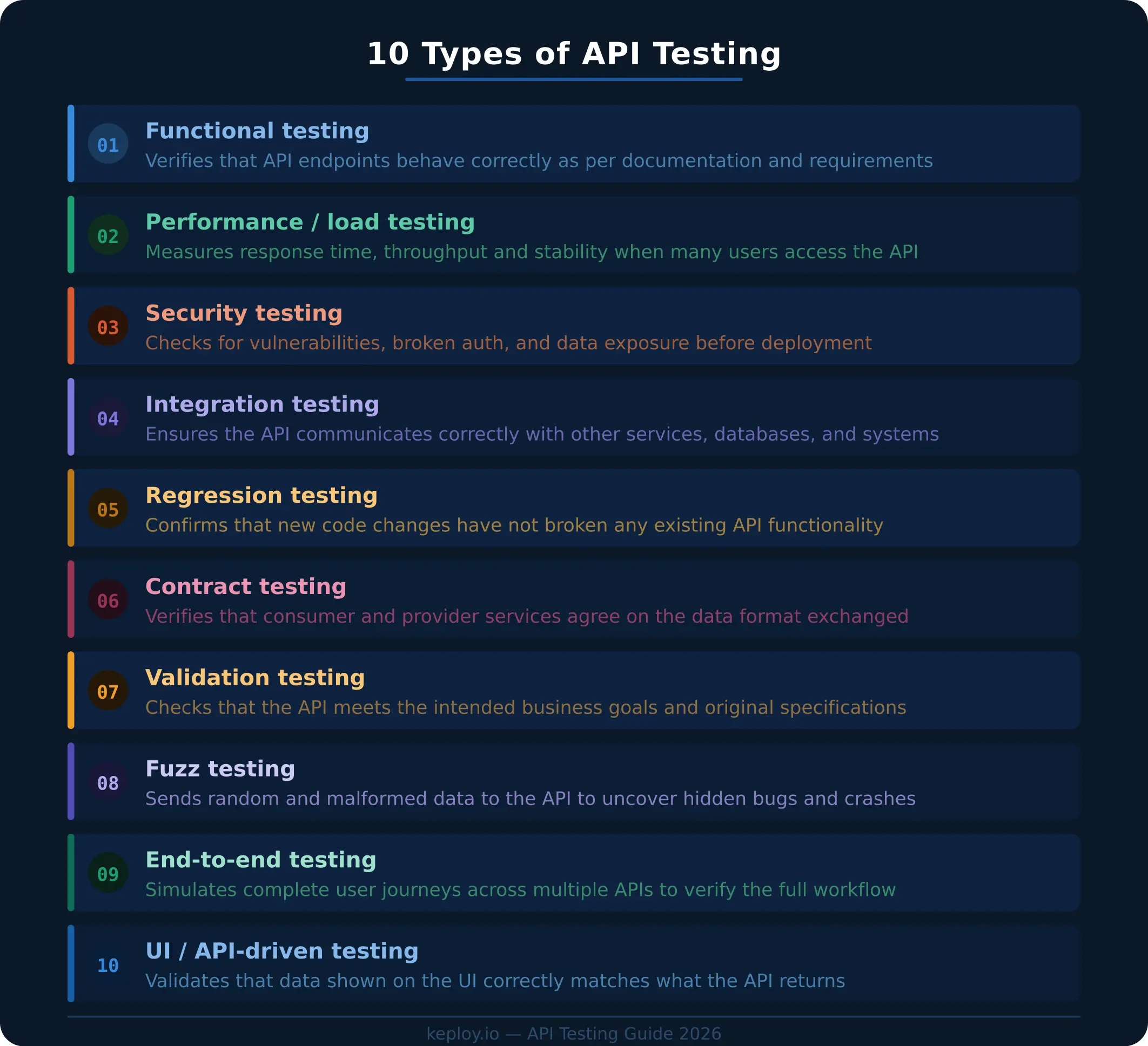
1. Functional testing
Functional testing checks whether an API does what it is supposed to do. It tests individual endpoints against expected inputs and outputs, using the API’s documentation or requirements as a reference.
Real-world example: Testing a login endpoint, sending valid credentials and confirming a success token is returned, then sending invalid credentials and confirming the correct error message appears.
Common tools: Postman, REST Assured, Keploy
2. Performance and load testing
Performance testing evaluates how an API behaves under heavy traffic. Key metrics include response time (how fast a single request is processed), throughput (how many requests per second the API handles), and error rate under stress.
Load testing measures behavior under expected traffic. Stress testing pushes beyond normal limits to find where the system breaks.
Real-world example: Simulating 10,000 users hitting an e-commerce API at the same time during a flash sale. The test reveals whether the system slows to a crawl, throws errors, or holds steady.
Common tools: Apache JMeter, k6, Locust
3. Security testing
Security testing identifies vulnerabilities in an API, things like unauthorized access, data leaks, injection attacks, broken authentication, and improper permission controls. This type is especially critical for APIs that handle personal or financial data.
Real-world example: Attempting to access User A’s private data using User B’s authentication token. A properly secured API should block this with a 403 Forbidden response, not return the data.
Other checks include: SQL injection through query parameters, sending API requests without any authentication header, and verifying sensitive fields are not exposed in responses.
Common tools: OWASP ZAP, Burp Suite, 42Crunch
4. Integration testing
Integration testing verifies that an API works correctly when it communicates with other services, databases, or third-party systems. It is not enough for an endpoint to work in isolation, it also needs to work as part of a larger system.
Real-world example: Testing a payment API integrated with a banking service. After a successful charge, the test confirms that the user’s account balance is updated, the transaction is recorded, and a confirmation email is triggered, all as expected.
Common tools: Postman, Keploy (supports dependency mocking), REST Assured
5. Regression testing
Regression testing confirms that new code changes have not broken anything that previously worked. It is typically run automatically after every deployment as part of a CI/CD pipeline.
CI/CD pipeline = a system that automatically builds, tests, and deploys code whenever a developer pushes a change.
Real-world example: A developer adds a new filter feature to a search API. Regression tests run automatically and catch that the new code accidentally changed the sort order of existing search results, something that would have gone unnoticed without automated checks.
Common tools: Keploy, Postman (with Newman for CI), REST Assured
6. Validation testing
Validation testing checks that an API meets the intended business requirements, not just technical ones. It answers the question: does this API actually deliver what the business asked for?
Real-world example: A weather API is built to serve a mobile app that shows temperatures in Celsius. Validation testing confirms the API returns Celsius values, uses the agreed date format, and includes all required fields, not just that the endpoint responds with a 200 OK.
Common tools: Postman, SoapUI
7. Fuzz testing
Fuzz testing deliberately sends unexpected, malformed, or random data to an API to uncover hidden bugs or security gaps that standard test cases miss. The goal is to find crashes, data leaks, or unexpected behavior before attackers do.
Real-world example: Sending a registration API an email field containing 10,000 characters, null values, or script tags. A robust API should reject these gracefully; a poorly written one might crash or expose internal error messages.
Common tools: Atheris, Jazzer, Postman (manual fuzzing with variables)
8. Contract testing
In a microservices architecture, many services depend on each other. Contract testing ensures that two services, a provider (the one serving data) and a consumer (the one requesting it), agree on the format and structure of the data they exchange.
Schema = the agreed structure of a response, including field names, types, and required fields.
Real-world example: A mobile app expects the user profile API to return a JSON object with { "id": number, "name": string, "email": string }. Contract testing catches it immediately if a backend team renames email to emailAddress before the mobile app breaks in production.
Common tools: Pact, Spring Cloud Contract
9. End-to-end testing
End-to-end (E2E) testing simulates a complete user workflow across multiple services to verify the entire flow works from start to finish, not just individual pieces.
Real-world example: Testing an online order flow: product search → add to cart → apply discount code → checkout → payment → order confirmation email. Each step calls different APIs. E2E testing confirms the entire chain completes without errors and that data passes correctly from one service to the next.
Common tools: Keploy, Cypress (for API + UI combined), Playwright
10. UI-driven API testing
UI-driven API testing validates that the data displayed to users in the front end matches what the underlying API actually returns. It catches mismatches between what the server sends and what the interface shows.
Real-world example: A user updates their profile name via the settings page. The test verifies that the profile API returns the new name and that the UI correctly displays it, not a cached or stale version.
Common tools: Postman, Cypress, Selenium with API assertions
Comparison table: all types at a glance
| Type | What It Tests | Difficulty | Priority |
|---|---|---|---|
| Functional | Correct behavior of endpoints | Low | Essential |
| Performance / Load | Speed and stability under traffic | Medium | High |
| Security | Protection against threats | High | Critical |
| Integration | Communication between services | Medium | High |
| Regression | No breakage after updates | Low | Essential |
| Validation | Alignment with business goals | Low | Medium |
| Fuzz | Robustness with unexpected input | High | Medium |
| Contract | Data format agreements | Medium | High |
| End-to-End | Complete user workflows | High | High |
| UI (API-Driven) | Front-end / back-end consistency | Low | Medium |
Recommended tools for API testing
| Tool | Best For | Notes |
|---|---|---|
| Postman | Functional, Validation | The most widely used tool for manual and automated API testing. Beginner-friendly with a visual interface. |
| Apache JMeter | Performance, Load | Open-source. Excellent for simulating high-traffic scenarios at scale. |
| OWASP ZAP | Security | Free, open-source scanner for identifying common API vulnerabilities. |
| REST Assured | Functional, Regression | Java-based, ideal for CI/CD pipelines. |
| Pact | Contract | Industry standard for contract testing in microservices. |
| Keploy | Functional, Regression, E2E | Open-source. Records real API traffic and auto-generates test cases. Useful for teams that want to reduce manual test writing. |
| k6 | Performance, Load | Developer-friendly load testing tool with scriptable tests in JavaScript. |
Best practices for API testing
A few habits separate a reliable API test suite from a flaky one, regardless of which types you run.
- Test both positive and negative paths. Confirm the happy path works, then deliberately send missing fields, wrong data types, invalid tokens, and malformed payloads. Most real bugs hide in how an API handles bad input.
- Validate the full response, not just the status code. A 200 OK is not enough. Assert on the response body, schema, required fields, headers, and response time so a broken payload cannot slip through.
- Automate and run in CI/CD. Wire functional and regression tests into your pipeline so they run on every commit and pull request. Continuous checks catch regressions before they reach production.
- Mock external dependencies. Payment gateways, third-party APIs, and databases make tests slow and unreliable. Mocking keeps runs fast, deterministic, and repeatable. Keploy generates these mocks automatically from real traffic.
- Use realistic test data. Production-like payloads surface issues that dummy placeholders miss. Avoid hardcoded values that break the moment the data changes.
- Prioritize by risk. Cover the highest-impact endpoints first, such as authentication, payments, and core data flows, then expand coverage outward.
- Keep tests independent and maintainable. Each test should run on its own without depending on the order or output of another, and should be version-controlled alongside your code so it evolves with the API.
Conclusion
Solid API testing is what stands between working software and production incidents. The ten types covered here are not all equally urgent, start with functional and regression testing to build a reliable baseline. Add integration and security testing as your system grows. Performance, contract, and end-to-end testing become increasingly important as your architecture scales.
The right tools depend on your team, stack, and workflow. Postman is the best starting point for most developers. Dedicated tools like JMeter, OWASP ZAP, and Pact each solve specific problems well. Choose based on what you actually need to test and build your coverage gradually rather than all at once.
Frequently asked questions
1. What type of API testing should beginners learn first?
Start with functional testing. It is the most straightforward — you define an input, call the API, and check that you get the expected output back. Tools like Postman make this accessible without any coding experience.
2. Is API testing different from unit testing?
Yes. Unit testing validates individual functions or methods within the code itself. API testing validates complete endpoints including request handling, response formatting, data processing, and integration with external systems. The two complement each other rather than replace each other.
3. Do I need to know how to code to do API testing?
Not necessarily. Tools like Postman allow you to send requests and check responses visually without writing code. As you advance, tools like Rest Assured or k6 let you write automated tests in code for deeper coverage.
4. How often should API tests be run?
Functional and regression tests should run automatically after every code change, integrated into your CI/CD pipeline. Performance and security tests are typically run on a schedule or before major releases.
5. What is the difference between load testing and stress testing?
Load testing measures how the API performs under expected, normal traffic levels. Stress testing deliberately exceeds those limits to find the breaking point and understand how the system behaves when it fails.
Read next:

Leave a Reply