QA testing tools have never been more varied, and more confusing to choose between. In 2026, the category spans unit testing frameworks, API automation platforms, AI-powered self-healing test suites, and everything in between. Most teams don’t need one tool. They need a stack of three to five that cover different parts of the delivery cycle.
The challenge isn’t finding tools. It’s knowing which category to fill first and which specific tool fits your team’s technical maturity and release cadence.
What are QA testing tools?
QA testing tools are software applications that help engineering teams verify software quality by automating test execution, managing test cases, tracking defects, and measuring coverage across the delivery lifecycle. They range from unit testing frameworks that run in seconds on a developer’s machine to cloud-based platforms that simulate thousands of concurrent users. The right combination depends on what you’re testing, how often you’re deploying, and how much maintenance overhead your team can absorb.
QA Tool Categories at a Glance
Quality assurance tools sit at different stages of the software delivery lifecycle. Some run before code is committed. Others run during deployment. A few observe behaviour in production.
The broadest split is between automated QA testing tools and manual testing support tools. Automated tools execute test cases without human intervention. They’re what most teams mean when they say "QA automation." Manual testing support tools (like test management platforms) help teams organise, track, and report on both manual and automated test runs.
A quick reference for the categories covered in this guide:
|
Category |
What it tests |
Manual or automated |
Typical tools |
|
Unit testing |
Individual functions and methods |
Automated |
pytest, JUnit, Jest |
|
API testing |
Request and response behaviour, contracts |
Automated |
Keploy, Postman, SoapUI |
|
End-to-end / UI |
Full user flows in the browser |
Automated |
Selenium, Cypress, Playwright |
|
Mobile |
Native and hybrid app behaviour |
Automated |
Appium, Detox |
|
Performance |
System behaviour under load |
Automated |
JMeter, k6, Gatling |
|
Test management |
Test case organisation, tracking |
Both |
TestRail, Zephyr Scale |
|
AI-powered |
Self-healing, AI test generation |
Automated |
Mabl, testRigor, KaneAI |
Most teams run tools from three or four of these categories simultaneously. A unit testing framework catches logic errors in development, an API tool validates service contracts, and an E2E tool confirms user flows. Test management handles the tracking.
Types of QA Testing Tools: In-Depth Breakdown
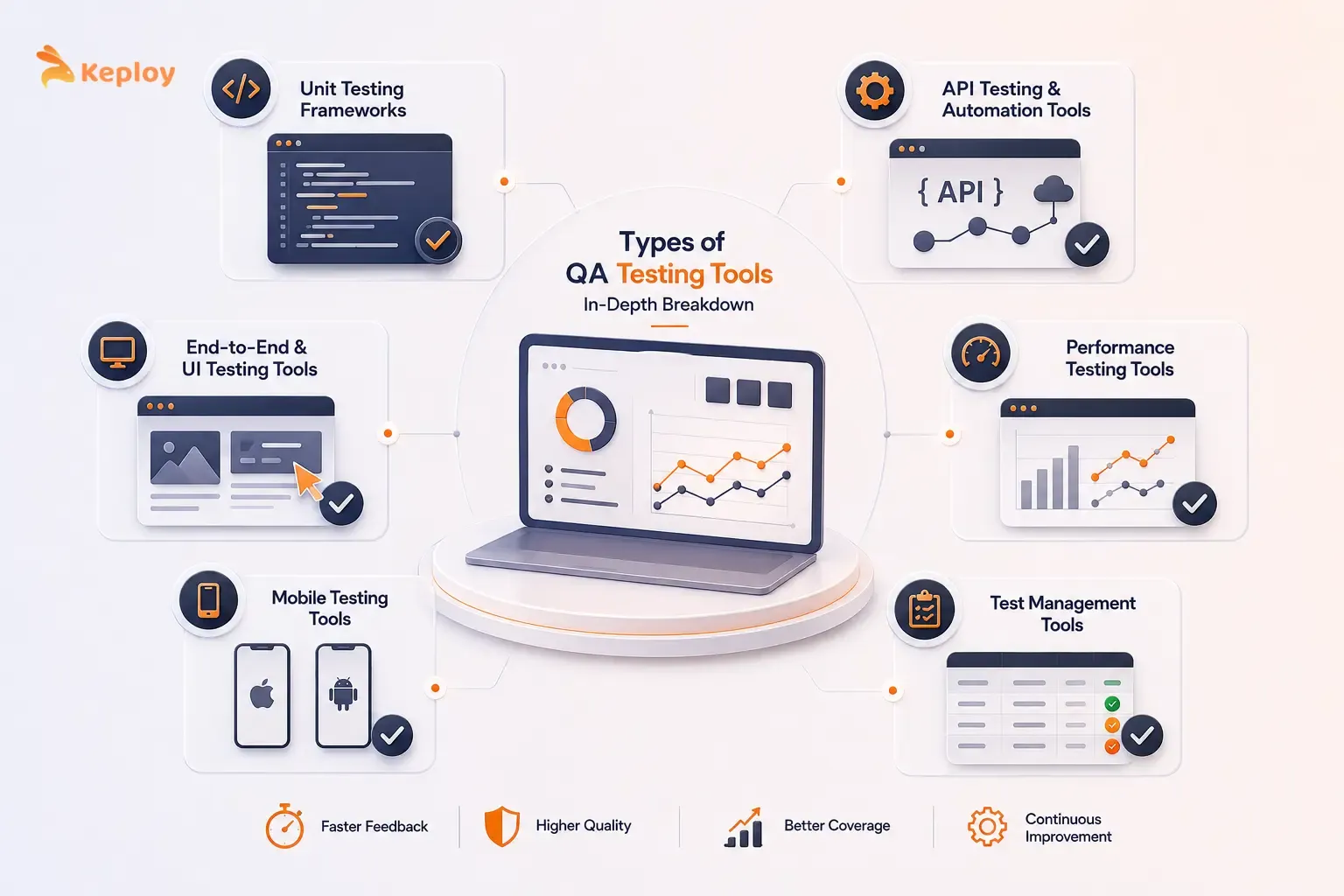
1. Unit Testing Frameworks
Unit testing tools run the fastest and give feedback the earliest. A failing unit test surfaces in seconds after a commit. That speed is what makes unit testing the foundation of any QA automation approach.
-
For Python teams, pytest is the default. Clean syntax, powerful fixtures, parameterised testing for covering edge cases with minimal code, and a plugin ecosystem that handles everything from coverage reporting to test ordering. It integrates with every major CI platform out of the box.
-
JUnit 5 is the Java equivalent. Nested test classes, parameterised tests, and native integration with Maven and Gradle make it the default for Java and Kotlin projects. JaCoCo runs alongside it to generate branch and line coverage reports.
-
Meta created Jest, and it has become the dominant choice for JavaScript and TypeScript projects. Built-in coverage, snapshot testing, and mocking in a single package mean teams don’t need to assemble separate libraries. Microsoft uses Jest internally for TypeScript validation.
All three are open-source. For most teams, unit testing frameworks are the first tool to adopt. The learning curve is low and the feedback speed advantage is immediate.
2. API Testing and Automation Tools
APIs break in ways that unit tests don’t catch. A function can pass all its unit tests while the API endpoint it powers returns the wrong status code, a missing field, or a response that doesn’t match what downstream services expect.
Most teams consistently underinvest in this category. They either rely on manual Postman runs or write fragile automation scripts that need constant updating as APIs evolve. Neither approach scales.
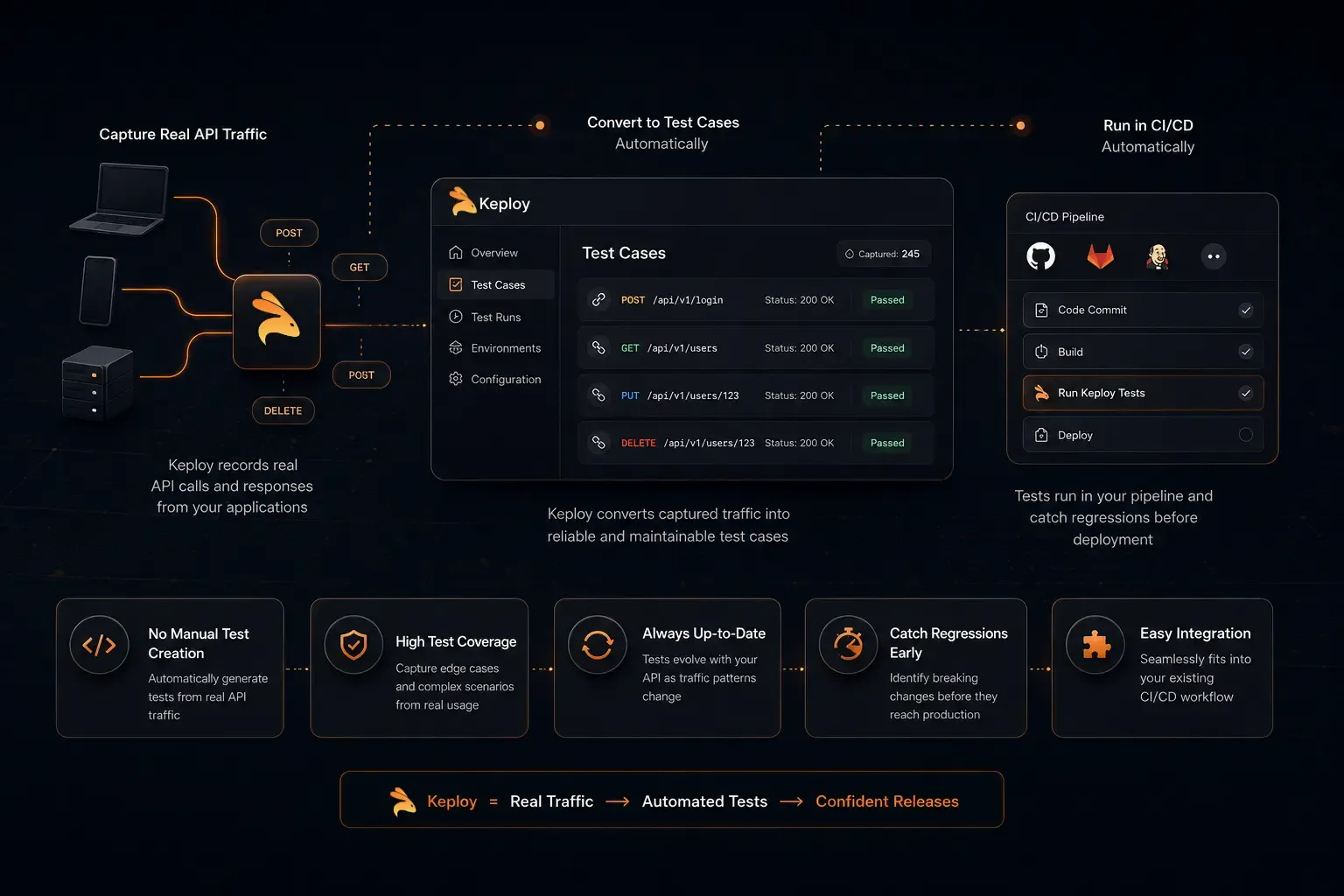
- Keploy takes a different approach to API testing. Instead of writing test cases manually, it captures real API traffic from production or staging environments and converts those request-response pairs into regression tests that run in CI automatically. When an API changes and a previously captured interaction fails, the failure surfaces before deployment rather than after.
Teams using Keploy stop asking "did we write a test for this endpoint?" The test suite grows with real usage patterns rather than anticipated scenarios. Engineers at API-heavy companies find it particularly useful for catching regressions in integration layers where manually authored tests go stale fast. Keploy is open-source and integrates with standard CI pipelines through GitHub Actions and similar platforms.
-
Postman is where most teams start. API collections, request/response documentation, basic test scripts, and a GUI that non-developers can use. It’s excellent for exploratory API testing and sharing API specifications across teams. The automation capabilities (Newman for CLI runs, collection runners) work but require significant manual maintenance as APIs change.
-
SoapUI targets enterprise environments with complex API testing requirements: SOAP services, multi-step test scenarios, data-driven testing, and API simulation for teams that need to test against services not yet in production. It’s more powerful than Postman for load and security testing of APIs specifically, and widely used in regulated industries where audit trails and test reporting matter.
Who needs what:
-
Keploy for teams that want automated regression coverage without maintaining manually authored test suites.
-
Postman for teams new to API testing or needing shared API documentation.
-
SoapUI for enterprise environments with complex scenarios and compliance requirements.
|
Tool |
Open-source |
Best for |
Maintenance overhead |
CI integration |
|
Keploy |
Yes |
Automated regression from real traffic, no manual test authoring |
Low: tests update as traffic patterns change |
GitHub Actions, GitLab CI, Jenkins |
|
Postman |
Freemium |
Manual exploration, API documentation, team collaboration |
Medium: collections need updating as APIs change |
Via Newman CLI |
|
SoapUI |
Freemium |
Enterprise SOAP/REST, compliance scenarios, API simulation |
High: complex scripting required |
Jenkins, CI plugins |
3. End-to-End and UI Testing Tools
End-to-end testing tools simulate real users moving through an application: clicking buttons, filling forms, navigating between pages. The tool verifies that the full flow produces the expected outcome. They’re the most expensive tests to write and maintain, which is why most teams treat them as a small layer on top of a larger base of unit and API tests.
-
Selenium is the original open-source browser automation framework. ThoughtWorks created it in 2004. It supports more languages and browsers than any other tool (Java, Python, JavaScript, C#, Ruby across Chrome, Firefox, Safari, Edge) and has the largest community. The tradeoff is setup complexity. Selenium doesn’t include a test runner, assertion library, or parallel execution. Teams assemble those separately.
-
Cypress took a different approach. Tests run directly in the browser, giving real-time visual feedback during development. Automatic waiting eliminates the explicit wait commands that make Selenium tests brittle. The limitation is JavaScript/TypeScript only, and cross-browser support has historically been more limited than Selenium’s.
-
Microsoft created Playwright, and it has become the modern default for teams starting fresh. It supports Chromium, Firefox, and WebKit in a single API, with auto-waits, network interception, and solid parallel execution built in. The same test code runs across all three browsers without modification. Netflix and GitHub use Playwright for their end-to-end testing.
For most teams starting a new E2E stack in 2026, Playwright is the strongest choice. For teams with existing Selenium infrastructure, migrating isn’t always worth the effort. Selenium still works and its community support is unmatched.
|
Tool |
Open-source |
Best for |
Maintenance overhead |
CI integration |
|
Playwright |
Yes |
Modern multi-browser coverage, new stacks |
Low: stable locators, built-in auto-waits |
GitHub Actions, all major CI platforms |
|
Cypress |
Open-source core |
JavaScript/TypeScript frontends, developer-friendly workflows |
Medium: JS-only, some cross-browser limits |
Built-in Dashboard, GitHub Actions |
|
Selenium |
Yes |
Maximum language and browser flexibility, existing enterprise stacks |
High: manual waits, separate driver management required |
All major CI platforms via plugins |
4. Mobile Testing Tools
Mobile apps are fundamentally different to test than web apps. The test environment needs to handle native UI components, device permissions, app state, and a matrix of OS versions and screen sizes.
-
Appium is what most mobile teams reach for first. It works with native, hybrid, and mobile web apps on both iOS and Android using the same WebDriver protocol Selenium uses for web. Teams with Selenium experience find the transition relatively smooth. The tradeoff is speed. Appium tests are slower than native testing approaches.
-
React Native teams have a better option than Appium. Detox runs tests synchronised with the app’s JavaScript thread, which eliminates the timing issues that make Appium tests flaky on React Native. For pure React Native teams, Detox is significantly faster and more reliable than Appium. For teams with native iOS or Android code, Appium remains the better fit.
5. Performance Testing Tools
A feature that works correctly under normal load can fail completely under real traffic. Performance testing tools simulate concurrent users, measure response times under load, and identify the bottlenecks that only appear at scale.
-
Apache JMeter has been the load testing default for over two decades. Protocol-level simulation (HTTP, JDBC, FTP, WebSocket, and more), distributed test execution across multiple nodes, and a large plugin ecosystem make it the most flexible tool in this category. The GUI is dated but functional, and the CLI mode integrates cleanly with CI pipelines.
-
k6 is the developer-friendly alternative, created by Grafana Labs. Tests are written as JavaScript scripts rather than configured through a GUI. The output is clean, the integration with Grafana dashboards is excellent, and the scripting model makes test scenarios easier to version-control and review than JMeter’s XML-based test plans.
The case for Gatling is throughput. Written in Scala with a DSL that’s readable even for non-Scala developers, it handles thousands of concurrent users more efficiently than JMeter at equivalent hardware. Used heavily in fintech and e-commerce environments where peak load scenarios are critical to validate.
6. Test Management Tools
Test management tools don’t execute tests. They organise, track, and report on both manual and automated runs. For teams running large test suites across multiple sprints, a test management platform gives visibility into coverage, pass/fail trends, and what’s been tested against each requirement.
-
Most teams that outgrow test case spreadsheets end up at TestRail. Comprehensive test case organisation, run tracking, milestone management, and integrations with Jira, GitHub, and most CI platforms. It supports both manual test case management and importing automated test results via its CLI.
-
If your team already lives in Jira, Zephyr Scale Zephyr Scale keeps test cases, test runs, and defects in the same tool as the sprint board. The integration is tight enough that test results link directly to user stories and bugs without any manual mapping.
-
BDD teams tend to prefer Xray for Jira over Zephyr. Cucumber feature files can be linked directly to Xray test cases, so the behaviour specifications that developers write become the test management records automatically.
AI Tools for QA Testing in 2026
AI has changed what’s possible in QA over the last 18 months. The two main problems it’s solving are test creation (writing tests is slow) and test maintenance (keeping tests up to date as the UI changes is expensive).
These are different problems requiring different tools.
-
For test maintenance: Self-healing test platforms like Mabl use AI to update selectors and test steps automatically when the UI changes. Instead of a developer manually fixing broken locators after a redesign, Mabl detects the change and adjusts. For teams with large Selenium or Playwright suites that break constantly due to UI changes, self-healing tools reduce maintenance significantly.
-
For test creation: Tools like testRigor let testers write test cases in plain English ("click the Login button, enter ‘user@example.com’ in the email field, verify the dashboard loads") and convert them into executable automation. This lowers the barrier to automation for teams without strong scripting skills. KaneAI from LambdaTest does similar work with an LLM-powered interface.
The honest limitation: AI-generated tests are only as good as the scenarios they’re given. Neither testRigor nor KaneAI can predict which user flows are most likely to break. That’s still a human judgment call. The AI just removes the scripting burden once the scenario is defined.
- A third approach worth knowing: Keploy doesn’t generate tests from natural language or UI recordings. It generates them from real production traffic. When users interact with your API, Keploy captures those request-response pairs and converts them into regression tests that run in CI.
The tests reflect what real users actually do rather than what engineers predicted they’d do. For API-heavy backends where test creation speed and coverage accuracy both matter, this approach closes gaps that natural language generation alone leaves open.
The distinction matters: If test maintenance is your problem, reach for a self-healing tool. If test creation speed is the bottleneck, reach for an AI generation tool. Buying the wrong one for your actual problem is a common and expensive mistake
The 7 Principles of QA Testing
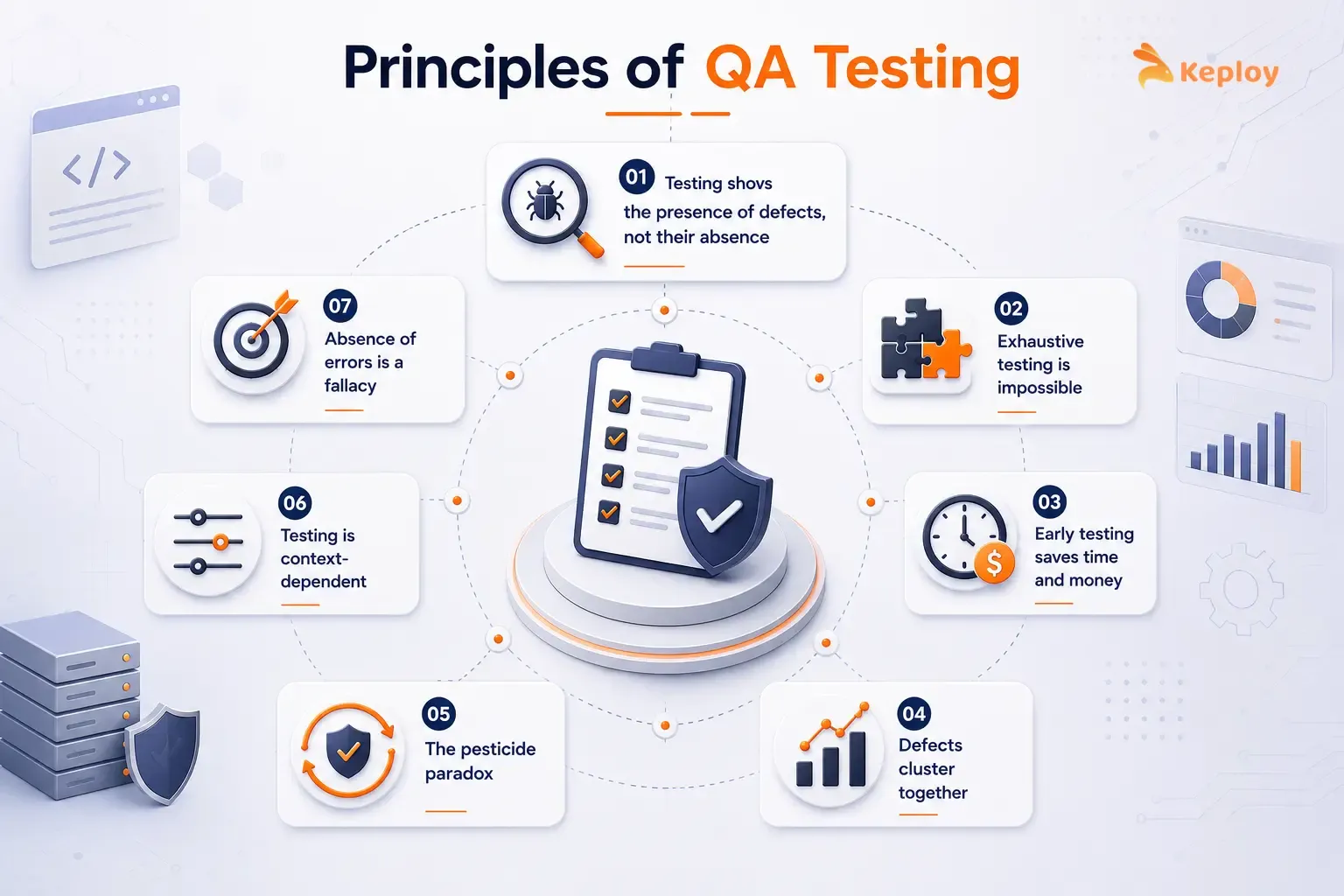
The ISTQB (International Software Testing Qualifications Board) established the 7 principles of software testing, and they represent the most widely adopted framework for understanding how QA actually works. They’re not theory. They’re practical truths that shape how experienced teams approach every project.
-
Testing shows the presence of defects, not their absence. It can identify bugs that exist but cannot confirm that none remain. No matter how comprehensive the test suite, it doesn’t guarantee the software is bug-free. The goal is risk reduction, not elimination.
-
Exhaustive testing is impossible. Nobody tests every possible input, path, or condition. Prioritise by risk. Test what’s most likely to fail and most costly when it does.
-
Early testing saves time and money. A bug during requirements review takes 30 minutes to resolve. In production, the same defect means downtime, a hotfix deployment, an incident postmortem, and sometimes a customer communication. The cost difference is significant. This is why shift-left testing exists.
-
Defects cluster together. In most codebases, roughly 80% of bugs live in about 20% of the code. It’s not evenly distributed. Track where defects have historically concentrated and weight test coverage accordingly.
-
The pesticide paradox. Run the same tests long enough and they stop finding bugs. The suite needs to grow as the codebase grows. A regression suite that hasn’t changed in six months probably isn’t catching problems from the last six months.
-
Testing is context-dependent. A payments API and a marketing landing page don’t need the same testing approach. The risk profiles are different. So are the regulatory requirements, the failure consequences, and what "good enough" looks like.
-
Absence of errors is a fallacy. Software can pass every test and still be a failed product. If the requirements were wrong, a 100% pass rate just means you built the wrong thing reliably. QA can validate correctness. It can’t substitute for understanding what users actually need.
How to Build Your QA Stack
Most teams don’t need every tool in this guide. What matters is covering the right categories for your team’s current stage.
Starter Stack
For lean teams deploying weekly or less, without dedicated QA headcount:
-
Unit testing framework (pytest, JUnit, or Jest depending on language): catches logic errors in development
-
API testing tool (Keploy for automated regression, Postman for manual): validates service behaviour on every deploy
-
CI integration (GitHub Actions or GitLab CI): runs everything automatically on every commit.
This covers Prevention and Detection at the API and unit level. It’s the minimum viable QA automation setup and most teams that don’t have this yet will see immediate improvement in change failure rate by adding it.
Intermediate Stack
For teams with a dedicated QA function, deploying multiple times per week. Add to the starter stack:
-
E2E testing tool (Playwright for new stacks, Selenium for existing): validates critical user flows
-
Test management platform (TestRail or Zephyr Scale): tracks coverage and links test results to requirements
-
Performance testing (k6 for developer-friendly scripting): validates behaviour under realistic load
This adds Control and covers the most critical failure modes across unit, API, E2E, and performance.
Full Stack
For platform engineering teams deploying multiple times per day with a dedicated QA function. Add to the intermediate stack:
-
AI-powered self-healing (Mabl): reduces maintenance overhead on the E2E suite as the UI evolves
-
Mobile testing (Appium for cross-platform), if the product has a mobile surface
-
Observability integration (Datadog, New Relic): feeds production signals back into the testing function
At this tier, the QA stack covers all four pillars and the feedback loop is closed. Production incidents generate new test cases. Pre-deployment coverage grows with real usage patterns.
How to Choose a QA Testing Tool
By What you’re Testing
-
Web UI: Cypress for JavaScript-heavy frontends, Playwright for multi-browser coverage, Selenium for maximum language flexibility
-
API: Keploy for automated regression from real traffic, Postman for manual exploration, SoapUI for enterprise compliance scenarios
-
Mobile: Appium for cross-platform, Detox for React Native
-
Performance: k6 for developer-friendly scripting, JMeter for maximum protocol flexibility
By Team Size and Technical Maturity
Small teams without QA engineers should start with a software testing framework their developers already know and add one API testing tool. Don’t add E2E automation until unit and API coverage is solid. Brittle E2E tests on top of weak foundational coverage creates more noise than signal.
Larger teams with QA engineers can operate a full stack but should still resist the urge to buy everything at once. Add tools in the order of the pillars: Prevention first, Detection second, Control third, Feedback last.
By Budget
Open-source QA testing tools that require no licensing costs: pytest, JUnit, Jest, Keploy, Selenium, Playwright, Appium, JMeter, k6.
Commercial tools with free tiers worth evaluating: Postman (free tier), Cypress (open-source core), TestRail (trial available), Mabl (trial available).
The open-source tools in this list cover Prevention and Detection completely. Teams early in their QA automation journey rarely need commercial tools to get started.
Conclusion
The right QA testing tools depend on which category you’re missing, not which tools are trending. Unit testing frameworks prevent logic errors in development. API testing tools catch the regressions unit tests miss. E2E tools confirm user flows still work. Performance tests expose what only becomes visible at scale. And test management keeps the evidence that everything was checked.
Most teams have one or two of these categories covered and gaps in the others. Start by identifying which category causes the most production incidents and fill that gap first. Build the stack incrementally. Tools that sit unused because the team isn’t ready for them cost budget and add complexity without adding coverage.
Frequently Asked Questions
What are QA testing tools?
QA testing tools are software applications that help teams verify software quality through automated test execution, test case management, defect tracking, and coverage measurement. They range from unit testing frameworks that run in milliseconds during development to cloud platforms that simulate thousands of concurrent users against a live service.
What is the difference between QA tools and test automation tools?
Test automation tools execute tests automatically without human intervention. pytest, Cypress, and JMeter are examples. QA tools is a broader term that includes both automated testing tools and manual testing support tools like test management platforms (TestRail, Zephyr Scale) that organise test cases and track results without executing them automatically.
Which QA tool is best for API testing?
It depends on what problem you’re solving. Keploy is best for teams that want automated API regression coverage without writing test cases manually. It generates tests from real production traffic, so coverage grows with actual usage rather than predicted scenarios. Postman is best for exploratory API testing and sharing API documentation. SoapUI suits enterprise environments with SOAP services and compliance requirements.
What are the best open-source QA testing tools?
Pytest, JUnit 5, Jest, Keploy, Selenium, Playwright, Appium, JMeter, and k6 are all open-source. Between them they cover unit testing, API regression, web automation, mobile testing, and load testing. Most teams can build a solid foundational stack without spending anything on licensing.
How do QA testing tools integrate with CI/CD?
Most modern QA tools integrate with CI/CD through CLI commands, Docker images, or native plugins for GitHub Actions, GitLab CI, Jenkins, and CircleCI. Unit testing frameworks output JUnit-format XML results that every CI platform can read. API testing tools like Keploy run as part of the pipeline and fail the build if captured tests don’t pass. E2E tools like Playwright have first-class GitHub Actions integrations.
What AI tools are used in QA testing? The main categories are self-healing test tools (Mabl, Testim) that automatically update test selectors when the UI changes, and AI test generation tools (testRigor, KaneAI from LambdaTest) that convert natural language descriptions or user recordings into executable tests. Most teams find self-healing tools solve a more immediate and expensive problem than test generation.
How do I build a QA testing stack?
Don’t start with more than two tools. A unit testing framework and a CI pipeline to run it automatically is enough for week one. Add API testing next: Keploy for automated regression coverage or Postman for manual runs. Add E2E testing only after unit and API coverage is solid. Don’t buy everything at once.
What are the pillars of QA?
Prevention (catching defects before they’re introduced through static analysis, TDD, and code review), Detection (finding defects automatically through automated testing), Control (managing and measuring test coverage through test management tools), and Feedback (closing the loop between production incidents and pre-deployment test coverage). A mature QA function addresses all four.

Leave a Reply