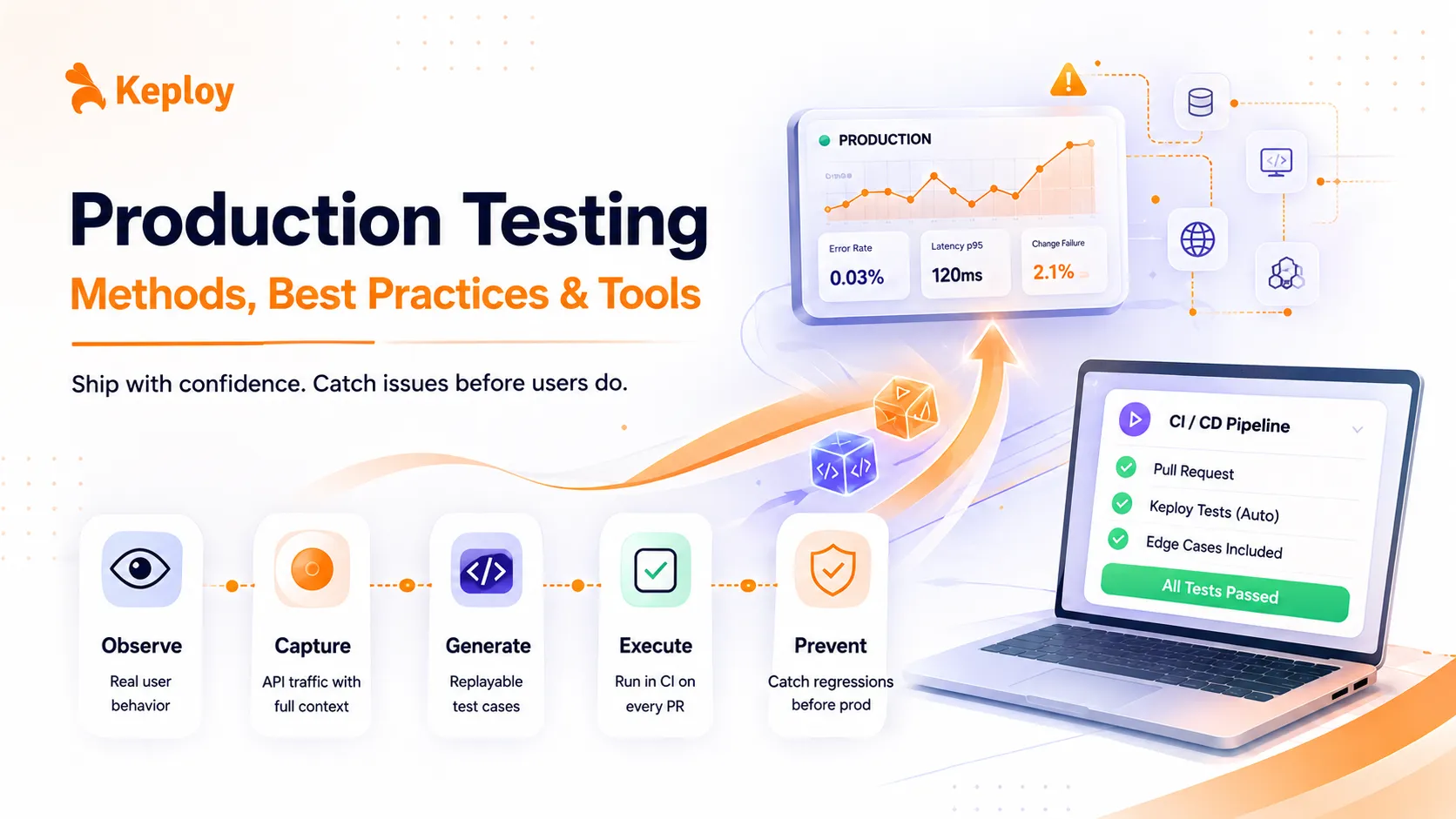
Production testing is the practice of validating software in the live environment using real user traffic – not as a replacement for staging, but as an additional layer that catches what no controlled environment can replicate. Done with guardrails like canary releases, feature flags, and rollback plans, it’s standard practice at Netflix, Google, and Meta. Keploy extends this by capturing real production traffic and turning it into CI regression tests, so failures get prevented rather than just flagged.
Production testing is what happens when you stop trusting staging. Your CI pipeline was green. Your staging environment passed. And then a user filed a bug that broke checkout for 12% of your traffic – a bug that only appeared under real database load with real session data. That scenario is not rare. Testing in production means validating your software directly in the live environment, using real users, real traffic, and real data – under conditions no staging setup can fully replicate.
What Is Production Testing?
Production testing (also called testing in production, or TiP) is the practice of running tests against your live production environment after deployment. It’s not about skipping QA or shipping untested code – it’s an additional validation layer that catches what pre-production environments miss.
The term "testing on prod" carries a stigma. People hear it and assume it means deploying half-baked features and hoping for the best. That misconception is exactly what this guide addresses.
Done correctly, production testing is a controlled, engineering-backed practice. Netflix runs Chaos Monkey in production. Google uses canary releases to validate every major rollout. Meta has been testing in production for over a decade. These aren’t reckless teams – they’re among the most reliable engineering organizations in the world.
According to the 2025 DORA State of AI-Assisted Software Development report by Google Cloud – surveying nearly 5,000 tech professionals – only 16.2% of organizations achieve on-demand deployment frequency, and just 8.5% hit elite-level change failure rates of 0-2%, while 39.5% of teams still see failure rates above 16%.
That gap doesn’t close with better staging. It closes with shift-right testing – validating in production with guardrails in place.
Production Testing vs. Pre-Production Testing
Before getting into methods, it helps to know where production testing actually fits in your pipeline. A lot of teams treat it as a replacement for staging. It isn’t.
| Aspect | Pre-production Testing | Production Testing |
|---|---|---|
| Environment | Dev, staging, QA | Live production |
| Data | Mocked or anonymized | Real user data |
| Traffic | Simulated load | Actual user traffic |
| Edge cases | Anticipated scenarios | Unanticipated real-world behavior |
| Speed of feedback | Slower (setup required) | Faster (real-time) |
| Risk level | Low | Medium (manageable with guardrails) |
| Best for | Logic bugs, unit failures | Performance, UX, integration behavior |
Your staging vs production environments serve different purposes, and the best teams use both. One catches bugs early; the other catches what slips through anyway.
Why Staging Environments Aren’t Enough
Staging is built to mirror production. In practice, it never quite does.
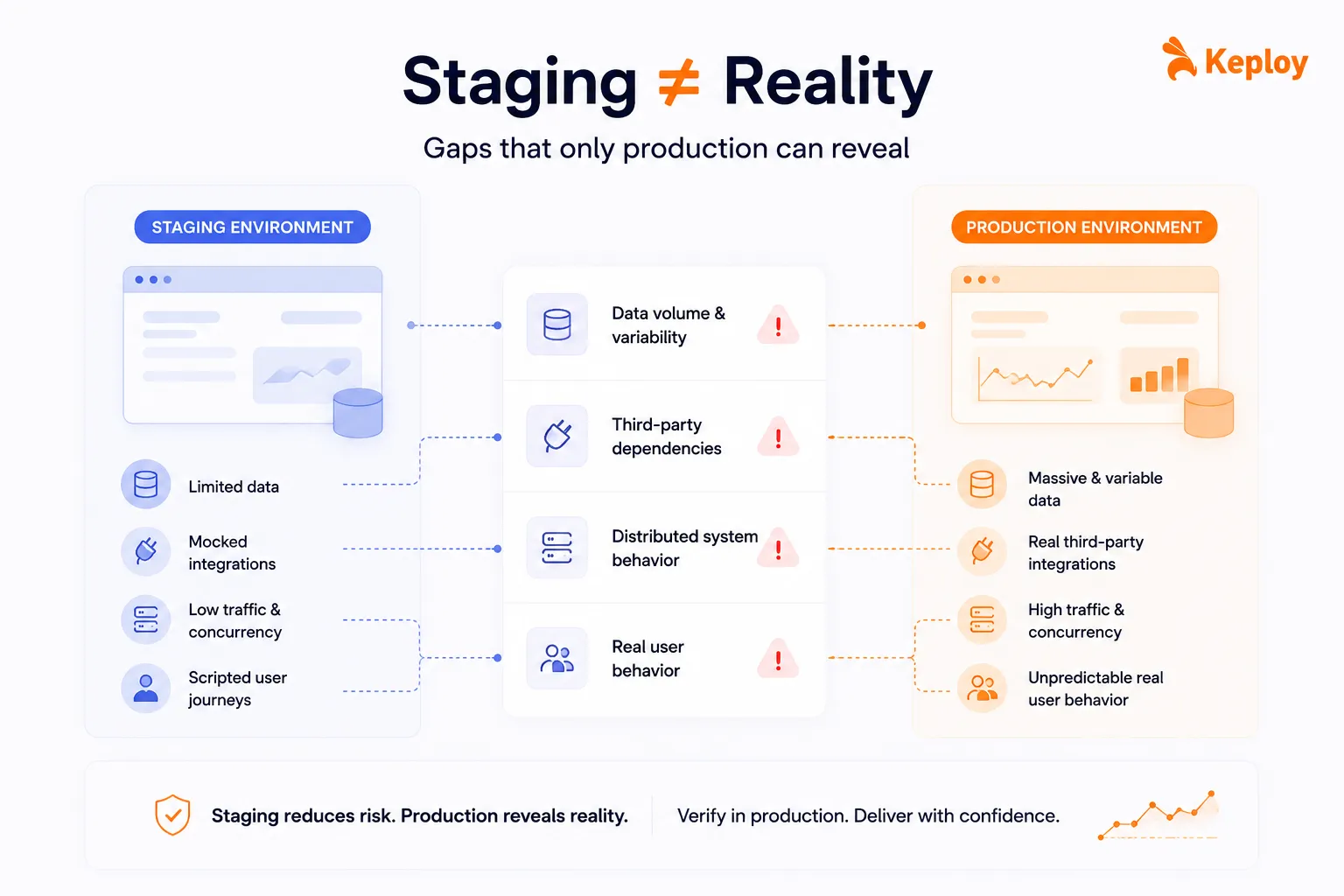
Data volume and variability.
Staging runs on a subset of data. Real edge cases live in production – unusual account states, legacy data formats, unpredictable user behavior patterns that no test script anticipated.
Third-party dependencies.
External APIs, payment gateways, and downstream microservices behave differently under real traffic. Rate limits hit differently. Latency behaves differently. You won’t see any of that in staging.
Distributed system behavior.
Race conditions, network timeouts, concurrency bugs – these rarely surface in staging but show up fast in production, especially once you scale.
Real user behavior.
Users do unexpected things. They use outdated browsers, spotty mobile connections, and unusual device configurations. No QA team scripts for all of it.
"Works on my machine, breaks in prod" isn’t just a meme. It’s a structural problem that gets worse as your system grows more complex. Staging environments drift from production over time, and that drift is hard to detect until something breaks for a real user.
Production verification testing became standard at high-growth engineering teams for exactly this reason.
Types of Production Testing
1. Canary Releases
A canary release routes a small percentage of traffic – typically 1-5% – to a new version of your service. If key metrics stay stable, you gradually expand. If something breaks, you roll back before the majority of users are ever affected.
Production testing example: An e-commerce platform deploys a new checkout service to 2% of users, monitors error rates and conversion metrics for 30 minutes, then expands to 25%, then 100%.
The appeal here is simple: you get real production signal with a controlled blast radius.
2. A/B Testing
A/B testing runs two versions of a feature simultaneously across different user segments to figure out which performs better. Conversion rates, session depth, click-through behavior – none of this can be replicated in staging with any statistical validity. You need real users.
Airbnb and Booking.com run hundreds of concurrent A/B tests. Their entire product iteration loop depends on production data, not staging approximations.
3. Feature Flags
Feature flags let you ship code that’s switched off. You activate it for specific users, segments, or traffic percentages without touching your deployment.
This one architectural decision – separating deployment from release – removes a surprising amount of production risk. If something goes wrong, you flip the flag. No emergency hotfix, no late-night rollback.
LaunchDarkly and Unleash are the go-to tools here, though lighter open-source options like Flagsmith work well for smaller teams.
4. Shadow Testing (Traffic Mirroring)
Shadow testing duplicates your live production traffic and routes a copy to a new service version running in parallel. That shadow service processes requests and generates outputs, but users never see any of it.
This approach works well for validating ML model updates or API refactors where behavioral accuracy matters but you can’t afford any user impact during testing.
5. Chaos Engineering
Chaos engineering deliberately breaks things in production – shutting down service instances, injecting network latency, corrupting dependency responses – to verify that your resilience mechanisms actually hold up under failure.
Netflix’s Chaos Monkey is the most well-known implementation. Amazon runs "GameDay" exercises with a similar intent. The logic is straightforward: find your weaknesses before real failures find them for you.
6. Smoke Testing in Production
After every deployment, smoke tests run a handful of lightweight automated checks to confirm that core functionality is still intact. Does the app load? Can users log in? Does the primary user flow complete without errors?
It’s a fast, inexpensive way to catch a bad deployment before it turns into an incident. Most teams set these up to run automatically post-deploy.
7. Synthetic Monitoring
Synthetic monitoring continuously runs scripted interactions against your production environment – simulating flows like login, search, or checkout at regular intervals.
Unlike real user monitoring (RUM), synthetic monitoring is proactive. It catches issues even during low-traffic windows, not just when real users happen to hit a broken path.
Best Practices for Safe Production Testing
Most horror stories about testing in production share a common pattern: teams skipped the guardrails.
1. Start small, scale gradually.
Canary at 1-5% first. Watch your error rates and latency before expanding. The blast radius stays small, and you have time to react if something goes sideways.
2. Use feature flags from day one.
Toggling should be built into your deployment workflow, not bolted on later. The ability to kill a feature instantly – without a redeployment – is genuinely the most useful safety mechanism you can have in production testing.
3. Set up observability before you test anything.
Logging, distributed tracing, alerting – these need to be in place before you run a single production test, not after something breaks. Datadog, Grafana, and OpenTelemetry are common choices here.
4. Keep deployment and release separate.
Ship the code. Don’t turn it on yet. This is one of those practices that sounds overly cautious until the first time it saves you from a production incident at 2am.
5. Document your rollback plan before you deploy.
Define the exact conditions that trigger a rollback and how long it should take. For canary and blue-green deployments, under five minutes is a reasonable target.
6. Don’t treat production as a substitute for pre-production testing.
Production testing catches what pre-production misses. It doesn’t replace unit tests, integration tests, or testing in production with Keploy workflows that replay captured traffic in CI. Both layers are necessary.
7. Be deliberate about user data.
Real data means real privacy obligations. Anonymize where you can, restrict test traffic to opted-in beta users where feasible, and stay compliant with GDPR and CCPA. This isn’t optional – it’s a risk management requirement.
Key Metrics to Track in Production Testing
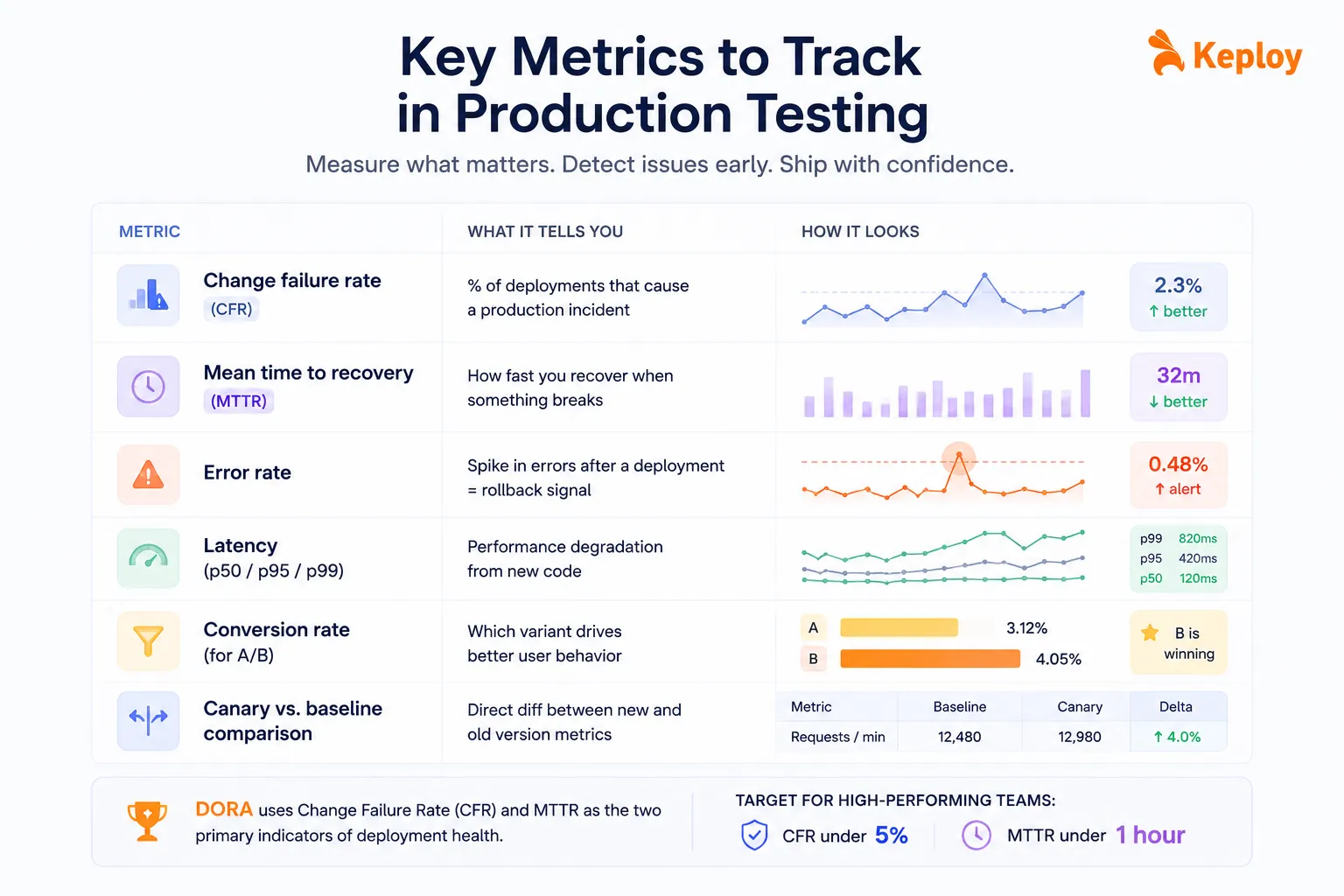
Without the right metrics, you’re flying blind. These are the ones that actually tell you whether your production tests are working.
| Metric | What it tells you |
|---|---|
| Change failure rate | % of deployments that cause a production incident |
| Mean time to recovery (MTTR) | How fast you recover when something breaks |
| Error rate | Spike in errors after a deployment = rollback signal |
| Latency (p50/p95/p99) | Performance degradation from new code |
| Conversion rate (for A/B) | Which variant drives better user behavior |
| Canary vs. baseline comparison | Direct diff between new and old version metrics |
DORA uses change failure rate and MTTR as the two primary indicators of deployment health. The target for high-performing teams: CFR under 5% and MTTR under one hour.
Tools for Production Testing
| Use case | Tools |
|---|---|
| Feature flags | LaunchDarkly, Unleash, Flagsmith |
| Canary/progressive delivery | Argo Rollouts, Flagger, Spinnaker |
| Chaos engineering | Gremlin, Chaos Monkey, LitmusChaos |
| Synthetic monitoring | Datadog Synthetics, New Relic, Checkly |
| Real user monitoring | Sentry, Datadog RUM, Dynatrace |
| Traffic replay / test generation | Keploy, GoReplay, Shadowtraffic |
| A/B testing / experimentation | Optimizely, Eppo, GrowthBook |
No single tool covers everything. Most mature engineering teams run two to three of these in combination depending on what they’re deploying and how much risk a given change carries.
How Keploy Bridges Shift-Right and Shift-Left
Most production testing tools are observability-first. They help you see what’s happening in production, but the insight stops there.
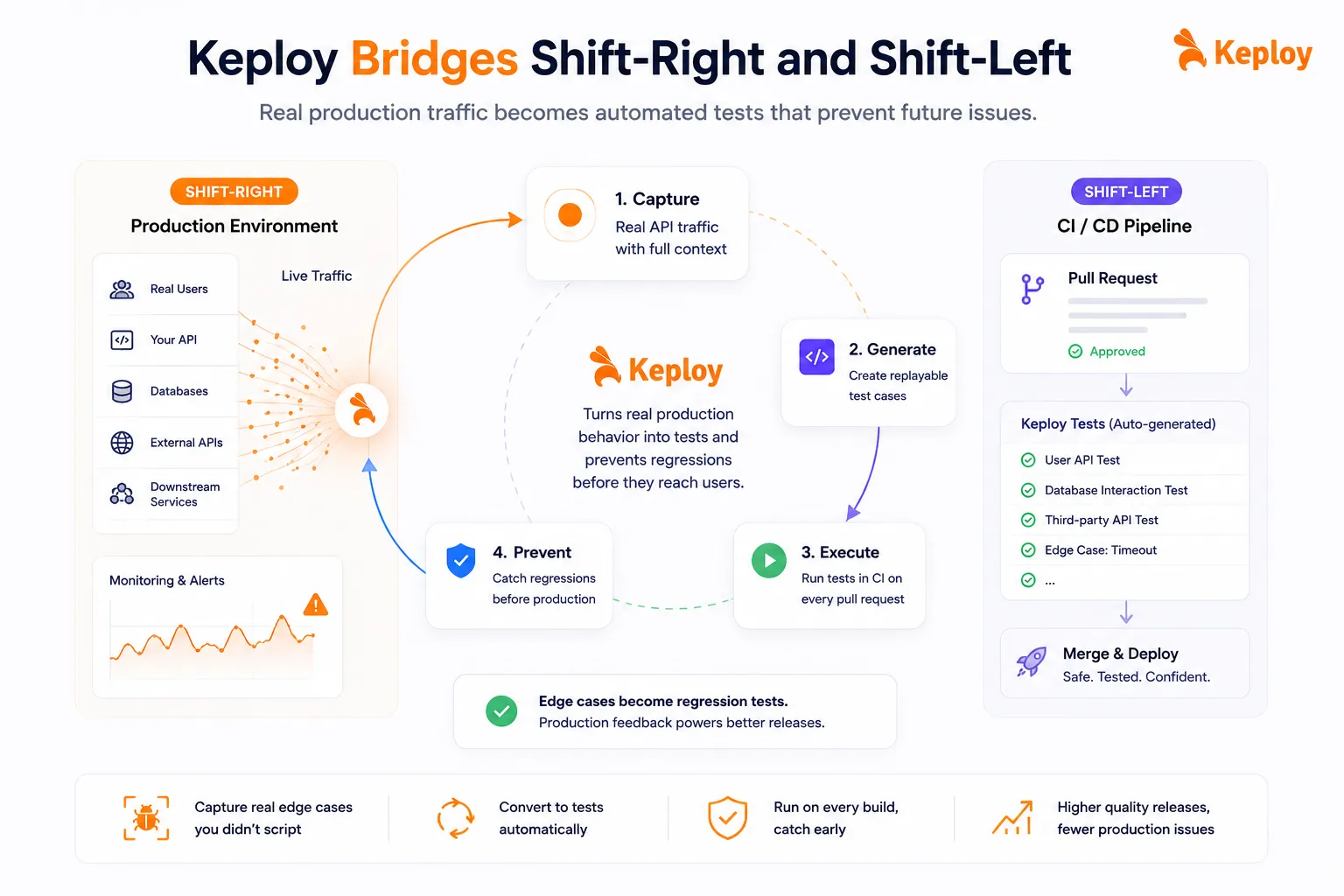
Keploy does something different. It captures real API traffic from your production environment – including all dependency calls to databases, external APIs, and downstream services – and converts that traffic into replayable test cases. Those tests run automatically in CI on every pull request, with no manual authoring involved.
The practical outcome: edge cases that only emerge in production no longer just trigger an alert and get forgotten. They get turned into regression tests that run on every build going forward.
This is what shift-right feeding back into shift-left actually looks like in practice. You catch real behavior in production, capture it, and prevent regressions before they reach users again. The "works on my machine, breaks in prod" problem gets addressed at the architecture level, not just flagged at the monitoring level.
Conclusion
Production testing isn’t the opposite of careful engineering. It’s what careful engineering actually looks like at scale. The most reliable software teams in the world don’t avoid production – they’ve learned how to use it as a testing environment with discipline. The methods aren’t new: canary releases, feature flags, A/B testing, shadow traffic, and chaos engineering.
The guardrails aren’t complicated: observability, rollback plans, gradual rollouts, and data privacy. And the tooling – from LaunchDarkly to Keploy – has matured to the point where there’s no excuse not to have them in place. The only real risk is skipping all of it and assuming staging is enough.
Frequently Asked Questions
What is production testing in software testing?
Production testing is the practice of validating software in the live environment after deployment, using real user traffic and data to surface issues that controlled pre-production environments can’t replicate.
Is testing in production a bad practice?
No, not when it’s done with the right guardrails. Feature flags, canary releases, monitoring, and rollback plans turn it into a controlled, reliable practice. Netflix, Google, and Meta have been doing it at scale for years.
What is the difference between production testing and staging testing?
Staging uses a controlled replica of production with limited, often anonymized data. Production testing uses the live environment with real users and real traffic. Both serve different purposes – staging catches logic bugs early; production validates real-world behavior.
What is a production testing example?
A payment service deploys a new transaction processor to 3% of users via canary release. Engineers watch error rates and transaction success rates for 20 minutes, then expand to full rollout after confirming nothing broke.
What is production verification testing (PVT)?
PVT is a focused subset of production testing. Its job is to verify that a new deployment hasn’t broken existing functionality in the live environment. Smoke tests and synthetic monitoring are the most common methods used here.
What is shadow testing in production?
Shadow testing duplicates live traffic to a parallel version of a service. The shadow processes requests but never returns responses to users, giving you a way to validate new behavior against real traffic without any user-facing risk.
What is the safest way to test on prod?
Start with feature flags and canary releases. Keep initial rollouts to 1-5%, monitor error rates and latency in real time, and have a documented rollback plan ready before you begin.
How does pre-production testing differ from production testing?
Pre-production testing validates functionality in controlled environments before release. Production testing validates behavior in real conditions after release. Neither replaces the other – they cover different failure modes.

Leave a Reply